
소개
Thank you for choosing the zelotes T80 Ergonomic Gaming Mouse. This wired optical mouse is designed for both gaming and office use, offering adjustable DPI, customizable LED lighting, and a comfortable ergonomic design for extended use. Please read this manual carefully to ensure proper setup and operation of your new mouse.
제품 특징
- 7 Buttons & Quick Fire Button: Includes forward, backward, and a rapid fire (double click) button for enhanced control in gaming and productivity.
- 5단계 DPI 조절 가능: Easily switch between 1000/1600/2400/3200/7200 DPI to match your speed and precision needs.
- 7 LED Backlit Modes: Personalize your setup with various lighting effects.
- 인체공학적 디자인: Crafted for comfort with skin-friendly material, sweat-resistant, and anti-slip features to prevent fatigue during long sessions.
- 폭넓은 호환성: Compatible with Windows 11/10/8/7 and Mac OS, suitable for various applications including MMD, FPS games, and office tasks.
패키지 내용
- 1 x zelotes T80 Wired Gaming Mouse
- 1 x 사용 설명서
설정
- 풀다: Carefully remove the mouse and its accessories from the packaging.
- 보호 필름 제거: Before use, please remove the protective film from the mouse's foot pads.
- 연결하다: Plug the USB cable of the zelotes T80 Gaming Mouse into an available USB port on your computer (PC or Laptop).
- 드라이버 설치: The mouse is plug-and-play. Your operating system will automatically detect and install the necessary drivers. No additional software installation is typically required for basic functionality.
작동 지침
버튼 설명
The zelotes T80 mouse features 7 buttons for versatile control:
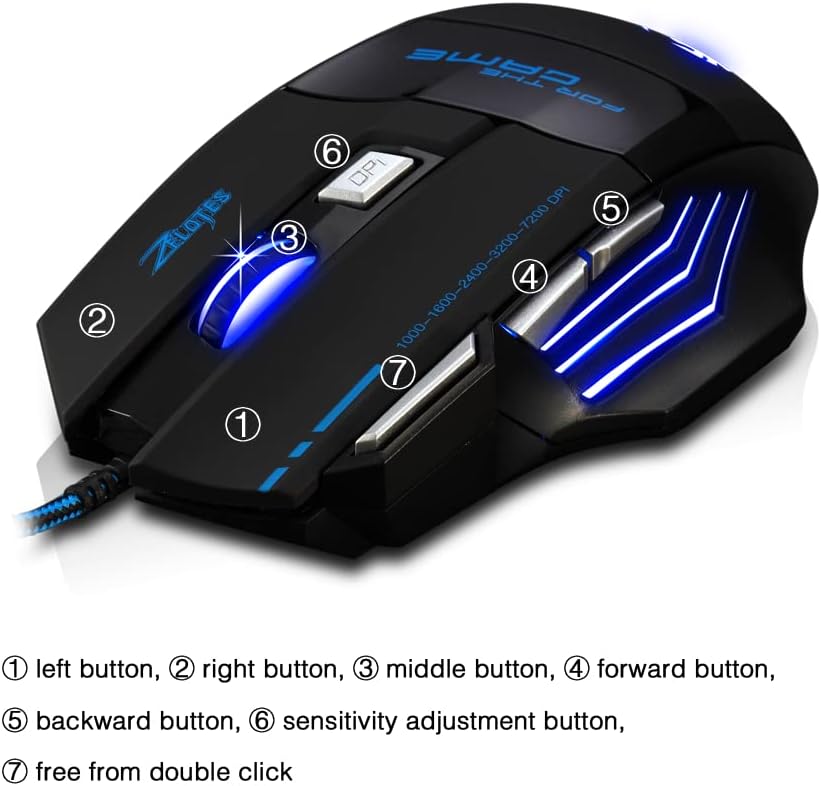
- 왼쪽 버튼(1): 표준 왼쪽 클릭 기능.
- 오른쪽 버튼(2): 표준 마우스 오른쪽 클릭 기능.
- Middle Button / Scroll Wheel (3): Scrolls up/down. Pressing it acts as a middle-click.
- 앞으로 가기 버튼(4): 앞으로 이동합니다 web 브라우저 또는 file 탐험가.
- 뒤로 가기 버튼(5): 뒤로 탐색합니다 web 브라우저 또는 file 탐험가.
- DPI 버튼(6): Adjusts mouse sensitivity (DPI) and changes LED colors.
- Rapid Fire Button (7): Functions as a double-click of the left button, useful for continuous firing in games.
DPI 조정
The mouse offers 5 adjustable DPI levels to suit different tasks and preferences:
- 1000DPI
- 1600DPI
- 2400DPI
- 3200DPI
- 7200DPI
를 누르세요 DPI 버튼(6) to cycle through these sensitivity levels. Each change will be indicated by a corresponding LED color change.
LED 조명 제어
The mouse features 7 LED lighting modes. To change the LED color, long press the DPI button (6). The LED will flash rapidly 7 times and then remain constant on the selected color.

유지
- 청소: 부드럽고 마른 천을 사용하여 마우스 표면을 닦으세요. 잘 지워지지 않는 오염의 경우, 약간amp 천을 사용하여 액체가 마우스 내부로 들어가지 않도록 할 수 있습니다.
- 케이블 관리: 손상을 방지하려면 USB 케이블을 급격하게 구부리거나 과도하게 당기지 마세요.
- 저장: 마우스를 직사광선과 극한 온도 변화를 피해 건조하고 서늘한 곳에 보관하십시오.
문제 해결
마우스가 응답하지 않음
- USB 케이블이 작동하는 USB 포트에 제대로 꽂혀 있는지 확인하십시오.
- 마우스를 컴퓨터의 다른 USB 포트에 꽂아보세요.
- 다른 컴퓨터에서 마우스를 테스트하여 문제가 마우스에 있는지 컴퓨터에 있는지 확인하세요.
LED Lights Not Working/Changing
- 마우스가 컴퓨터에 제대로 연결되어 있는지 확인하십시오.
- Ensure you are long-pressing the DPI button to cycle through colors. A short press changes DPI.
DPI가 변경되지 않음
- Ensure you are short-pressing the DPI button to cycle through DPI levels.
- 문제가 지속되면 마우스를 다시 연결해 보세요.
명세서
| 특징 | 세부 사항 |
|---|---|
| 모델 번호 | T80 |
| 버튼 | 7 (with scroll wheel) |
| 조정 가능한 DPI | 1000/1600/2400/3200/7200 DPI |
| LED 조명 | 7가지 조명 모드 |
| 연결성 | USB 유선 |
| 추적 시스템 | 광학 |
| 인체공학적 디자인 | 예 |
| 스위치 라이프 | 5 백만주기 |
| 치수 | 130x105x45mm |
| 무게 | 160±5g |
| USB 케이블 길이 | 1.5m |
| 호환성 | 윈도우 11, 윈도우 10, 윈도우 8, 윈도우 7, 맥 OS |
보증 및 지원
For warranty information and technical support, please refer to the product packaging or contact zelotes customer service through the retailer where the product was purchased. Keep your purchase receipt for warranty claims.