
1. 제품 오버view
The zelotes C-12 Professional Wired Gaming Mouse is designed for high-performance gaming and office use. It features an ergonomic design, 12 programmable buttons, adjustable DPI settings, multi-modes RGB backlighting, and a customizable weight system.

Image 1.1: The zelotes C-12 Professional Wired Gaming Mouse, showcasing its ergonomic shape and customizable RGB lighting.
패키지 내용:
- 1 x zelotes C-12 Gaming Mouse
- 1 x 사용 설명서
- 1 x 소프트웨어 CD
- 1 x Foot Pad Set
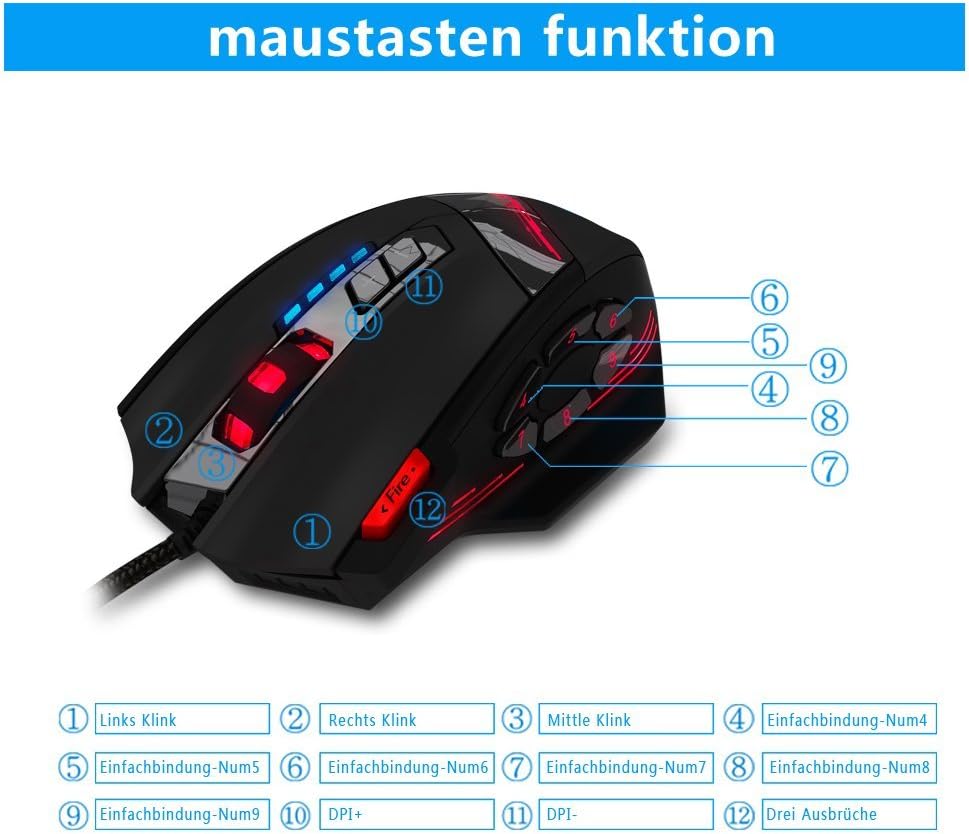
Image 1.2: The complete package contents of the zelotes C-12 Gaming Mouse.
2. 설정
2.1 마우스 연결
Connect the USB cable of the zelotes C-12 Gaming Mouse to an available USB port on your computer. The mouse is plug-and-play for basic functionality.
2.2 소프트웨어 설치(선택 사항)
For full customization of buttons, DPI, and lighting, install the provided software from the included CD. Insert the CD into your computer's optical drive and follow the on-screen instructions. If your computer does not have an optical drive, please visit the official zelotes website to download the latest software driver.
Note: The programming software is not fully compatible with Mac operating systems.
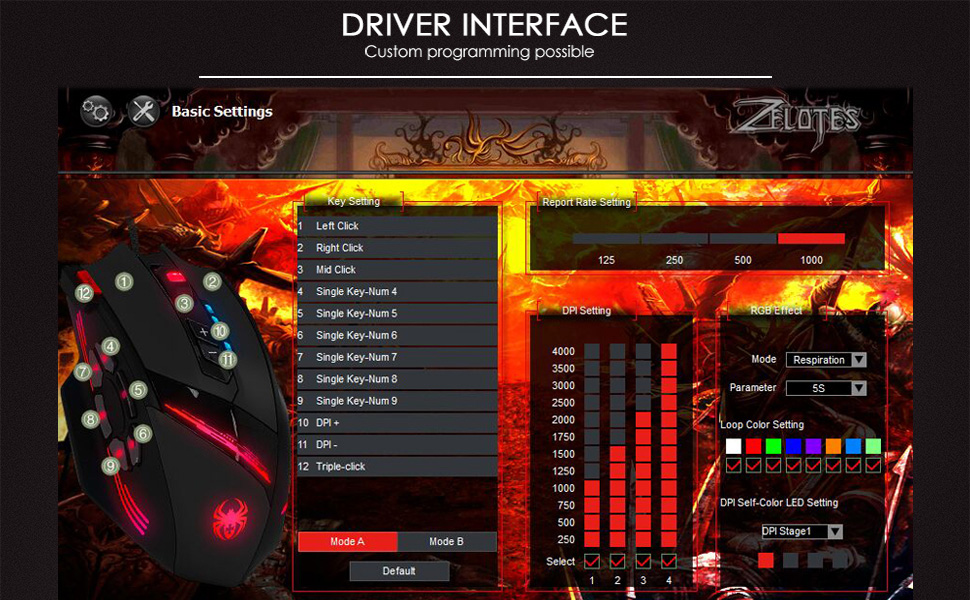
Image 2.1: The software interface for customizing the zelotes C-12 Gaming Mouse.
2.3 무게 조정
The mouse includes 8 removable weight blocks, each weighing 2.5 grams, located in a compartment on the underside of the mouse. To adjust the mouse's weight:
- Gently twist and remove the circular cover on the bottom of the mouse.
- Add or remove the 2.5g weight blocks as desired to achieve your preferred mouse feel.
- Replace the circular cover by twisting it back into place.
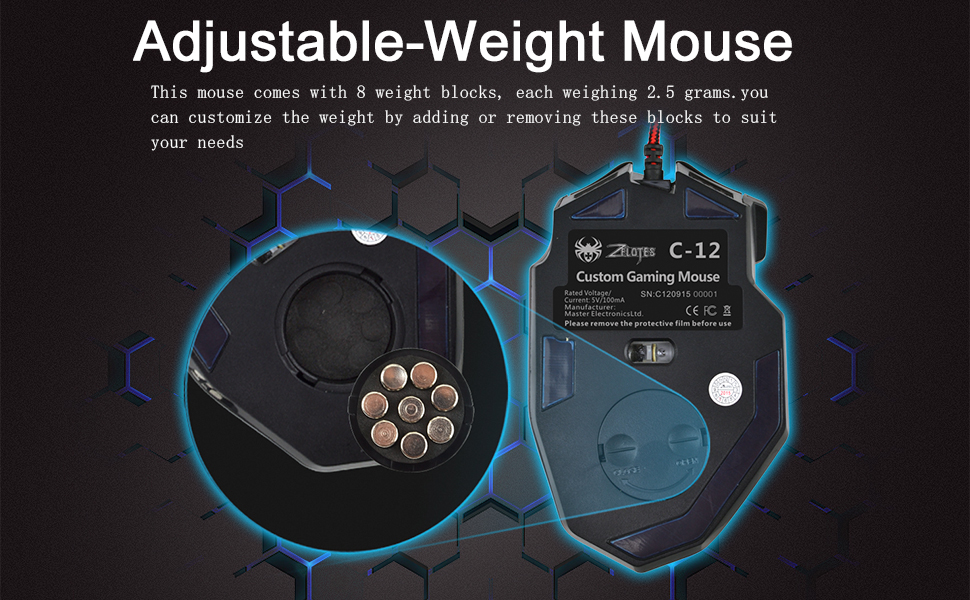
Image 2.2: Adjusting the weight of the zelotes C-12 mouse by adding or removing the 2.5g blocks.
Video 2.1: A demonstration of the weight tuning feature and programmable buttons on the zelotes C-12 Gaming Mouse.
3. 사용 설명서
3.1 버튼 기능
The zelotes C-12 mouse features 12 programmable buttons. The default functions are:
- 왼쪽 클릭 (버튼 1)
- 마우스 오른쪽 클릭 (버튼 2)
- 가운데 클릭/스크롤 휠 (버튼 3)
- 사이드 버튼 (Buttons 4-9): Default to various functions, customizable via software.
- DPI+ (Button 10): Increases DPI sensitivity.
- DPI- (Button 11): Decreases DPI sensitivity.
- 화재 버튼 (Button 12): Default to triple-click, customizable via software.

Image 3.1: Labeled diagram of the zelotes C-12 mouse buttons.
3.2 DPI 조정
The mouse offers 4 default DPI levels: 1000/1500/2000/4000 DPI. You can cycle through these levels using the dedicated DPI+ and DPI- buttons. For finer control and to reach up to 8000 DPI, use the included software.
3.3 RGB 조명
The mouse features multi-modes RGB backlighting, including 7-color cycle breathing and monochromatic constant bright modes. Lighting effects can be customized through the software to match your preferences.
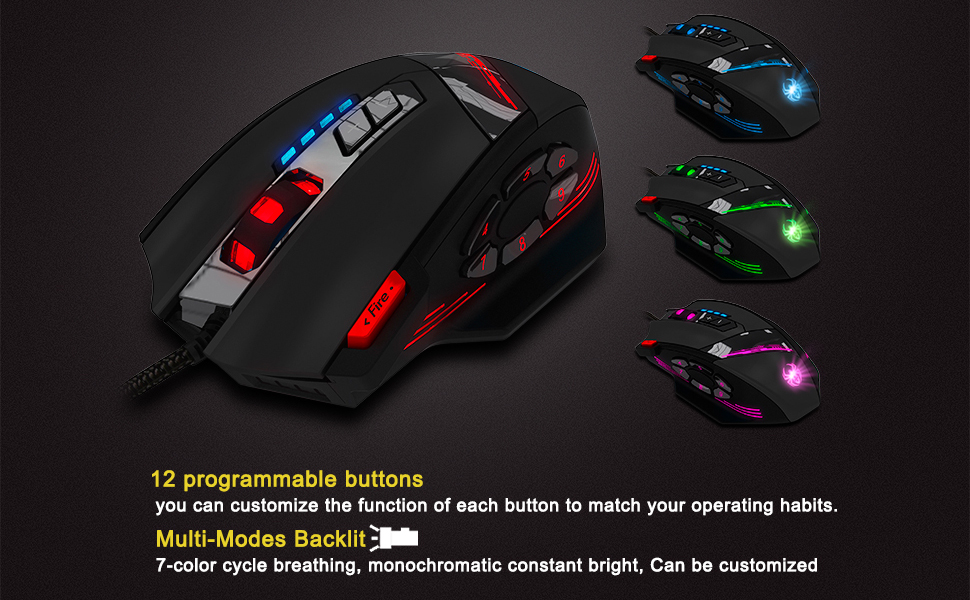
Image 3.2: The zelotes C-12 mouse showcasing its multi-color RGB lighting options.
3.4 인체공학적 디자인
The mouse is designed for comfort during extended use, featuring a sweat-resistant and anti-slip rubber surface. Its ergonomic shape helps prevent wrist fatigue.

Image 3.3: The ergonomic design of the zelotes C-12 mouse provides a comfortable grip.
4. 유지관리
To ensure the longevity and optimal performance of your zelotes C-12 Gaming Mouse, follow these maintenance guidelines:
- 청소: 부드럽고 마른 천을 사용하여 마우스 표면을 닦으세요. 잘 지워지지 않는 오염의 경우, 살짝 damp천에 물이나 순한 세척액을 묻혀 닦아주세요. 강한 화학 물질이나 연마재는 사용하지 마세요.
- 센서 관리: 마우스 밑면의 광학 센서를 깨끗하고 먼지나 이물질이 없도록 유지하세요. 필요한 경우 면봉이나 압축 공기를 사용하세요.
- 케이블 관리 : 손상을 방지하려면 USB 케이블을 급격하게 구부리거나 과도하게 당기지 마세요.
- 저장: 사용하지 않을 때는 마우스를 극한의 온도를 피해 깨끗하고 건조한 곳에 보관하세요.
5. 문제 해결
5.1 마우스가 응답하지 않음
- USB 케이블이 컴퓨터에 제대로 연결되어 있는지 확인하세요.
- 마우스를 다른 USB 포트에 연결해 보세요.
- 다른 컴퓨터에서 마우스를 테스트하여 컴퓨터 특정 문제인지 확인하세요.
- 컴퓨터를 다시 시작하세요.
5.2 DPI or Button Settings Not Changing
- Ensure the zelotes C-12 software is correctly installed and running.
- Check if the settings are saved within the software after making changes.
- For Mac users, note that the programming software has limited compatibility. Basic DPI changes via mouse buttons should still function.
5.3 RGB 조명이 작동하지 않거나 올바르지 않음
- Verify lighting settings within the zelotes C-12 software.
- 마우스가 제대로 연결되어 있고 전원이 공급되고 있는지 확인하십시오.
5.4 Mouse Movement Is Erratic
- 마우스 바닥의 광학 센서를 청소하세요.
- 마우스를 적절한 표면(예: 마우스 패드)에서 사용하고 있는지 확인하세요. 반사율이 높거나 투명한 표면은 피하세요.
6. 사양
| 특징 | 설명 |
|---|---|
| 상표 | 젤로테스 |
| 모델명 | C-12 |
| 연결 기술 | USB 유선 |
| 움직임 감지 기술 | Optical (A3050 Gaming Chip) |
| DPI 설정 | 1000/1500/2000/4000 (Adjustable up to 8000 DPI via software) |
| 버튼 수량 | 12개의 프로그래밍 가능한 버튼 |
| 가중치 조정 | 8 x 2.5g removable weights |
| 손의 방향 | 오른손잡이 |
| 운영 체제 호환성 | Win11, Win10, Win8, Win7, Mac OS (limited software compatibility for Mac) |
| 치수(길이 x 너비 x 높이) | 130mm x 81.5mm x 39.8mm |
| 폴링 속도 | 125~1000Hz |
| 케이블 길이 | 1.8m |
| 재료 | 플라스틱(무광 마감) |

Image 6.1: Detailed technical specifications and dimensions of the zelotes C-12 Gaming Mouse.
7. 보증 정보
The zelotes C-12 Professional Wired Gaming Mouse comes with a 1년 제조사 보증 구매일로부터 유효합니다. 본 보증은 정상적인 사용 조건에서 발생하는 재료 및 제조상의 결함에 적용됩니다. 단, 오용, 사고, 무단 개조 또는 외부 요인으로 인한 손상은 보증 대상에서 제외됩니다.
보증 청구를 위해 구매 증명서를 보관하십시오.
8. 지원
For further assistance, technical support, or warranty inquiries, please refer to the contact information provided with your product packaging or visit the official zelotes web대지.