
소개
Thank you for choosing the Casio MWA-300H Series watch. This manual provides essential information regarding the setup, operation, and maintenance of your new timepiece. Please read this manual carefully to ensure proper use and to fully understand the features of your watch.
The Casio MWA-300H is an analog watch featuring a chronograph, 100-meter water resistance, and luminous hands for enhanced readability. It is designed for versatile wear, suitable for both daily use and recreational water activities.
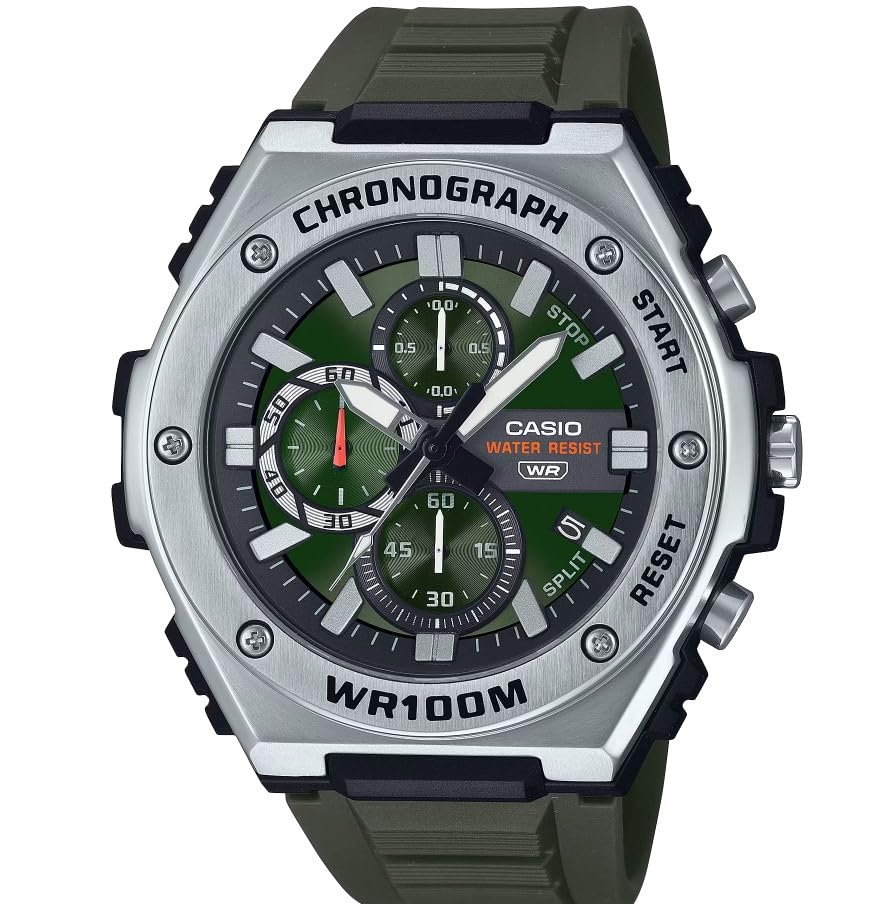
이미지: 앞면 view of the Casio MWA-300H Series watch, highlighting its green dial, chronograph sub-dials, and black resin band.
Setup: Initial Settings
시간 설정
- Pull the crown out to the second click (time setting position). The second hand will stop.
- Rotate the crown to set the hour and minute hands. Ensure the AM/PM setting is correct if your watch has a 24-hour indicator or date changes at midnight.
- 용두를 원래 위치로 다시 밀어 넣으십시오. 그러면 초침이 다시 움직이기 시작합니다.
날짜 설정
- 용두를 첫 번째 딸깍 소리가 날 때까지 (날짜 설정 위치까지) 당겨 빼냅니다.
- 용두를 돌려 날짜를 설정하세요. 오후 9시부터 오전 1시 사이에는 날짜를 설정하지 마세요. 자동 날짜 변경 기능에 문제가 발생할 수 있습니다.
- 용두를 다시 정상 위치로 밉니다.
배터리 정보
Your Casio MWA-300H watch is powered by 1 LR44 battery, which is included. The battery life is approximately 3 years. When the battery runs low, the watch may exhibit irregular movement or stop. It is recommended to have the battery replaced by a qualified watch technician to maintain water resistance.
Operating: Watch Functions
크로노그래프(스톱워치) 사용하기
The chronograph function allows for precise timing of events. Your watch features a 1/10-second stopwatch that captures elapsed, split, and 1st/2nd place times across three dedicated sub-dials.
- Starting the Stopwatch: Press button A (typically the upper right button) to start the stopwatch.
- Stopping the Stopwatch: Press button A again to stop the stopwatch.
- Resetting the Stopwatch: After stopping, press button B (typically the lower right button) to reset the stopwatch hands to zero.
- 분할 시간 측정: While the stopwatch is running, press button B to measure split times. The stopwatch hands will momentarily stop to indicate the split time, then resume timing. Press button B again to release the split time and display the current elapsed time.
Note: Refer to the specific button layout on your watch for exact button assignments.
Water Resistance (100 Meters)
Your Casio MWA-300H watch is water resistant up to 100 meters (330 feet). This rating means the watch is suitable for swimming, showering, and recreational water activities. It is not suitable for diving or snorkeling where significant water pressure changes occur.
- 시계가 젖었거나 물에 잠겨 있는 동안에는 용두나 버튼을 조작하지 마십시오.
- 바닷물에 노출된 후에는 시계를 깨끗한 물로 헹구고 물기를 닦아 말리십시오.
빛나는 바늘과 마커
The watch features luminous hands and markers that absorb light and glow in the dark, providing readability in low-light conditions. The intensity and duration of the glow depend on the amount and type of light exposure.
유지
일반 관리
- 시계의 먼지와 습기를 제거하기 위해 부드럽고 마른 천으로 정기적으로 닦아주세요.
- 시계를 극한 온도, 장시간 직사광선 또는 강한 자기장에 노출시키지 마십시오.
- Keep the watch away from solvents, detergents, perfumes, and cosmetics, as these can damage the resin materials.
배터리 교체
When the battery needs replacement, it is highly recommended to take your watch to an authorized Casio service center or a reputable watch repair shop. This ensures that the watch is properly sealed and its water resistance is maintained after battery replacement.
Water Resistance Checks
To maintain the water resistance of your watch, it is advisable to have it inspected periodically (e.g., every 2-3 years) by an authorized service center, especially if it is frequently exposed to water.
문제 해결
| 문제 | 가능한 원인 | 해결책 |
|---|---|---|
| Watch hands do not move or move irregularly. | 배터리가 부족합니다. | 배터리를 교체하십시오. 전문 시계 수리 기사에게 문의하십시오. |
| 시간이 정확하지 않습니다. | Time not set correctly; watch has stopped and restarted. | Reset the time according to the "Setting the Time" instructions. |
| 날짜는 자정이 아닌 정오에 변경됩니다. | AM/PM 설정이 올바르지 않습니다. | 시간을 12시간 앞당깁니다. |
| 크로노그래프 바늘은 0으로 재설정되지 않습니다. | Chronograph hands misalignment. | Consult the full Casio module manual for chronograph hand adjustment procedures, or contact customer support. |
| 시계 내부에 습기가 차 있습니다. | Crown or buttons operated underwater; seals compromised. | 더 이상의 손상을 방지하기 위해 즉시 공인 서비스 센터에 시계를 가져가 점검 및 수리를 받으십시오. |
명세서
| 모델명 | MWA-300H |
| 디스플레이 유형 | 비슷한 물건 |
| 이동 유형 | 석영 |
| 방수 깊이 | 100미터(330피트) |
| 추가 기능 | 크로노그래프, 날짜 표시, 야광 바늘 |
| 전원 | 배터리 작동식 (LR44 배터리 1개 포함) |
| 케이스 소재 | 수지 |
| 밴드 소재 | 수지 |
| 크리스탈 소재 | 수지 |
| 케이스 직경 | 50.9 밀리미터 |
| 케이스 두께 | 14.3 밀리미터 |
| 대역폭 | 22 밀리미터 |
| 걸쇠 유형 | 버클 |
보증 및 지원
한정 보증
Your Casio MWA-300H watch comes with a limited warranty. Please refer to the warranty card included with your purchase for specific terms, conditions, and duration of coverage. The warranty typically covers manufacturing defects under normal use.
고객 지원
For further assistance, technical support, or warranty claims, please contact Casio customer service. You can find contact information on the official Casio web해당 웹사이트 또는 시계와 함께 제공된 설명서를 참조하십시오.
For more detailed information, including specific module operations or advanced settings, please visit the official Casio support website or refer to the full module manual for your watch.