
1. 서론
This instruction manual provides essential information for the proper installation, operation, and maintenance of your Masterpart genuine replacement vacuum cleaner hose. This hose is specifically designed to be compatible with Dyson DC23 and DC32 vacuum cleaner models, ensuring optimal performance and fit.
2. 제품 오버view
The Masterpart vacuum cleaner hose is a high-quality, authentic replacement part manufactured to meet the specifications of Dyson DC23 and DC32 vacuum cleaners. It features a durable plastic construction in a grey color, designed for longevity and efficient airflow.
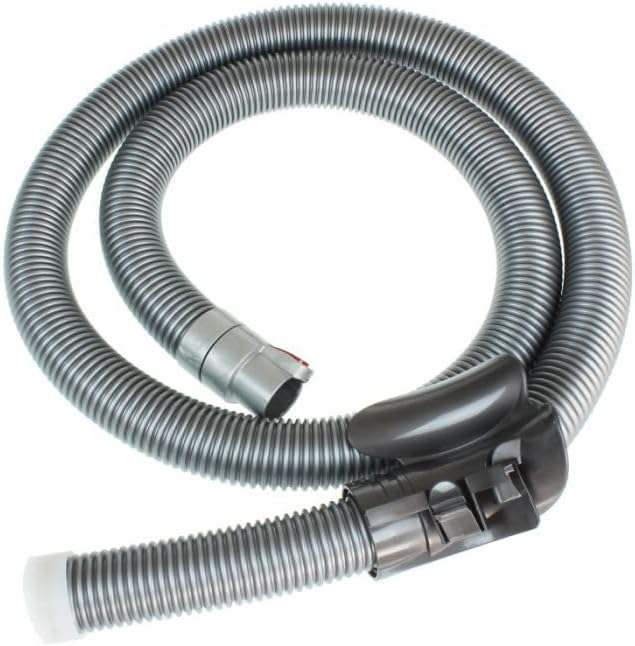
Figure 2.1: The Masterpart replacement vacuum cleaner hose, shown coiled. This image displays the grey corrugated hose with its attachment ends, including the handle and the connection point for the vacuum cleaner.

그림 2.2: 더 자세히 view of the Masterpart vacuum cleaner hose, highlighting the connection mechanism with a visible red release button. This image provides a detailed look at the hose's texture and the design of its attachment points.
2.1가지 주요 기능:
- Genuine replacement part (Manufacturer Part Number: 914851-01)
- 내구성 있는 플라스틱 구조
- 회색
- Designed for optimal airflow and suction
3. 호환성
This Masterpart vacuum cleaner hose is compatible with the following Dyson vacuum cleaner models:
- 다이슨 DC23
- 다이슨 DC32
설치를 시도하기 전에 진공 청소기 모델이 나열된 호환 모델 중 하나와 일치하는지 확인하세요.
4. 설정 및 설치
Follow these steps to properly install the replacement vacuum cleaner hose:
- 전원 끄기 : Before beginning, ensure your Dyson vacuum cleaner is unplugged from the power outlet to prevent accidental activation.
- (해당되는 경우) 기존 호스를 제거하십시오. Locate the connection point of the existing hose to the vacuum cleaner body. Depending on your specific Dyson model (DC23 or DC32), there may be a release button or latch. Press the release button or disengage the latch and gently pull the old hose away from the vacuum cleaner.
- 연결 지점을 검사하십시오: Examine the vacuum cleaner's hose inlet for any debris or obstructions. Clean if necessary.
- 새 호스를 연결하세요: Align the connection end of the Masterpart replacement hose with the inlet on your Dyson vacuum cleaner. Push the hose firmly into the inlet until it clicks securely into place. You should hear or feel a positive engagement.
- 연결 확인: Gently tug on the hose to ensure it is securely attached and will not detach during use.
- Attach Handle/Wand: If the hose comes separate from the handle or wand, attach your existing handle/wand to the other end of the new hose. This connection typically involves aligning and pushing until it locks.
Note: Refer to your original Dyson vacuum cleaner manual for specific instructions on hose removal and attachment if you encounter difficulties.
5. 사용 설명서
Once the Masterpart replacement hose is securely installed, operate your Dyson vacuum cleaner as you normally would. The hose functions identically to the original part, providing the necessary conduit for airflow and debris collection.
- 청소기를 작동하기 전에 모든 연결부가 단단히 고정되었는지 확인하십시오.
- Avoid kinking or sharply bending the hose during operation, as this can restrict airflow and reduce suction efficiency.
- Do not pull the vacuum cleaner by the hose; always move the unit by its main body or designated handle.
6. 유지관리 및 관리
Proper care will extend the life of your Masterpart vacuum cleaner hose:
- 정기 검사: Periodically inspect the hose for any signs of damage, such as cracks, tears, or blockages.
- 청소: If the exterior of the hose becomes dirty, wipe it down with a damp 천으로 감싸십시오. 호스를 물에 담그지 마십시오.
- 장애물 제거: If suction is reduced, check the hose for blockages. Carefully remove any large debris that may be obstructing the airflow. Do not use sharp objects that could puncture the hose.
- 저장: Store the hose in a clean, dry place, away from direct sunlight and extreme temperatures. Avoid storing it in a tightly coiled or kinked position for extended periods.
7. 문제 해결
If you experience issues with your vacuum cleaner after installing the new hose, consider the following:
| 문제 | 가능한 원인 | 해결책 |
|---|---|---|
| 흡입 감소 | Hose blockage; Loose connection; Full dustbin/filter. | Check hose for obstructions and clear them. Ensure hose is securely connected to vacuum. Empty dustbin and clean/replace filters. |
| Hose Detaches During Use | Improper installation; Damaged locking mechanism. | Re-attach hose, ensuring it clicks firmly into place. If problem persists, inspect the locking mechanism on both the hose and vacuum for damage. |
| Unusual Noise from Hose | Small tear or hole; Debris trapped inside. | Inspect hose for visible damage. Check for and remove any trapped debris. |
If troubleshooting steps do not resolve the issue, contact Masterpart customer support or a qualified service technician.
8. 사양
| 기인하다 | 세부 사항 |
|---|---|
| 제조업체 | Masterpart |
| 제조업체 부품 번호 | 914851-01 |
| 제품 크기(L x W x H) | 37 x 33 x 0.1cm (대략) |
| 품목 무게 | 970그램 |
| 색상 | 회색 |
| 재료 | 플라스틱 |
| 포함된 구성 요소 | 진공 호스 어셈블리 |
| 호환 모델 | Dyson DC23, Dyson DC32 |
9. 보증 및 지원
Specific warranty information for this Masterpart replacement hose is not provided in the product details. For warranty inquiries or technical support, please contact Masterpart directly through their official web사이트 또는 고객 서비스 채널.
지원팀에 문의할 때는 다음 정보를 준비해 주세요.
- Product Name: Masterpart Vacuum Cleaner Hose
- 모델 번호: 914851-01
- 구매일자
- 문제에 대한 설명

