
소개
This manual provides detailed instructions for the setup, operation, maintenance, and troubleshooting of your XIWBSY T08-FR Projector. Please read this manual thoroughly before using the projector to ensure proper function and to maximize your viewing 경험. 나중에 참조할 수 있도록 이 설명서를 보관하십시오.

Image: The XIWBSY T08-FR Projector displaying a high-definition image, highlighting its 4K support, 180° rotation, 30000 Lumen brightness, and Android 12 operating system.
제품 끝view
주요 특징
- 180° 회전 스탠드: Features an innovative, detachable stand allowing projection from various angles (wall, table, ceiling, outdoor).
- 안드로이드 12 OS: Integrated operating system providing access to over 8,000 applications, including Netflix, YouTube, Prime Video, and Hulu.
- WiFi Mirroring: Supports screen mirroring for iOS and Android devices.
- 고화질 디스플레이: Native 1080P resolution, 4K supported, 30000 Lumen brightness, 20000:1 contrast ratio, and HDR10+ for enhanced image quality.
- 대형 투사 크기: Up to 300 inches with 50% to 100% zoom function.
- 몰입형 오디오: Equipped with dual 15W stereo speakers for 360° 3D stereo Hi-Fi audio. Can connect to external Bluetooth speakers.
- 고급 연결성 : Dual-band 5G+2.4G WiFi and Bluetooth 5.2 for stable and fast connections.
- Office Suite: Integrated software for viewing PPT, Excel, and Word documents.
- 다양한 장착: Supports 360° image flip for front, rear, and ceiling projection.

Image: This visual highlights the projector's advanced 8-layer lens system, 30000 Lumen brightness, 50000-hour lamp life, and superior contrast, contributing to its high-definition image quality.
구성 요소 및 포트
Familiarize yourself with the projector's components and connection ports.
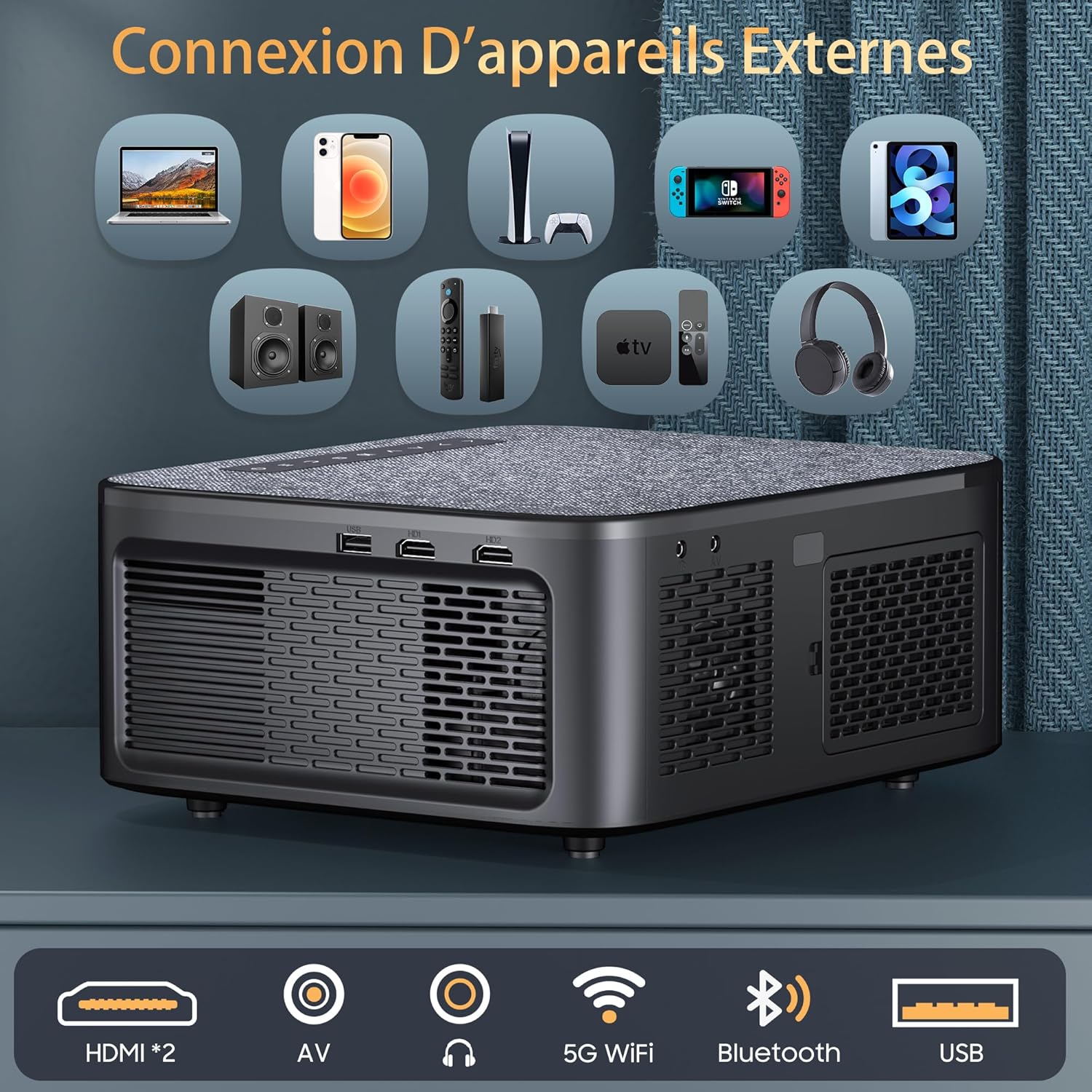
Image: Rear panel of the projector, illustrating the available connectivity options including two HDMI ports, AV input, audio output, 5G WiFi, Bluetooth, and USB port.
- HDMI 포트(x2): For connecting devices such as laptops, game consoles, and streaming sticks.
- USB 포트: 미디어를 재생하기 위해 USB 드라이브를 연결하려면 files.
- AV 입력: For connecting older devices with composite video and stereo audio output.
- 오디오 출력: 외부 오디오 시스템 또는 헤드폰 연결용입니다.
- 전원 입력: 전원 어댑터를 연결합니다.
- 초점 링: 이미지 선명도를 위한 수동 조정.
- 키스톤 보정: Manual or automatic adjustment for image shape.
설정
1. 물리적 배치
Place the projector on a stable, flat surface or mount it using a compatible ceiling mount. Ensure adequate ventilation around the projector.

Image: The projector positioned on a bedside table, utilizing its 180-degree rotatable stand to project an image onto the ceiling, demonstrating flexible view각도를 나타냅니다.
- The 180° rotatable and detachable stand allows for flexible projection angles, including walls, tables, and ceilings.
- For ceiling mounting, the projector supports 360° image flip.
2. 전원 연결
- 전원 어댑터를 프로젝터의 전원 입력 포트에 연결합니다.
- 전원 어댑터를 벽면 콘센트에 꽂으세요.
- 프로젝터나 리모컨의 전원 버튼을 눌러 전원을 켜세요.
3. 초기 구성
- 처음 전원을 켤 때 화면 안내에 따라 원하는 언어를 선택하십시오.
- Connect to a Wi-Fi network: Navigate to Settings > Network > Wi-Fi and select your network. Enter the password if required.
작동 지침
1. 기본 동작
- 전원 켜기/끄기: 프로젝터나 리모컨의 전원 버튼을 누르세요.
- 초점 조정: 프로젝터 렌즈의 초점 링을 돌려 이미지가 선명해질 때까지 조정하십시오.
- 키스톤 보정: Use the remote control or on-screen menu to adjust the image shape (4D/4P keystone correction, auto-vertical correction up to ±50°).

Image: Visual representation of the projector's keystone correction capabilities, including 4D/4P correction, auto-vertical adjustment, and zoom function, showing how the image can be adjusted for various screen sizes and angles.
2. 입력 소스
- HDMI : Connect your device (laptop, game console, etc.) to an HDMI port. Select the corresponding HDMI input from the projector's source menu.
- USB: Insert a USB drive into the USB port. The projector will typically prompt you to open the media player.
- 유명인 : Connect devices using an AV cable. Select AV input from the source menu.
3. 무선 연결
- 와이파이(5G+2.4G): For internet access and streaming. Configure in Settings > Network > Wi-Fi.
- 블루투스 5.2 : For connecting external audio devices (headphones, speakers). Go to 설정 > 블루투스, enable Bluetooth, and pair with your device. Note: Bluetooth only supports audio transmission, not video.

이미지: 프로젝터 쇼케이스asing its Bluetooth 5.2 bidirectional connectivity for external audio devices and its internal dual Hi-Fi speakers, emphasizing sound quality.
4. Smart Features (Android 12 & Apps)
The projector runs on Android 12, providing access to a variety of applications.

Image: A projected display showing the Android 12 interface with various streaming and utility applications such as YouTube, Netflix, Hulu, and Aptoide, indicating the projector's smart capabilities.
- 앱 액세스: From the home screen, navigate to the desired application (e.g., Netflix, YouTube).
- 화면 미러링: To mirror your smartphone screen, activate the WiFi mirroring function on the projector and connect your iOS/Android device. Note: Due to HDCP copyright protection, some protected content may not have sound or image during screen mirroring.
- Office Suite: Use the integrated office suite to open and view PPT, Excel, and Word documents directly.

Image: The projector wirelessly mirroring content from a smartphone, illustrating its 5G+2.4G dual-band WiFi capability for stable and fast screen sharing across Android, iOS, and Windows devices.
5. 투사 설정
- 줌: Adjust the projection size from 50% to 100% via the menu settings.
- 종횡비: Supports 4:3 and 16:9 aspect ratios. Adjust in the display settings.
- 이미지 뒤집기 : For different mounting orientations (front, rear, ceiling), adjust the image flip setting in the menu.
유지
1. 청소
- 렌즈: 부드럽고 보풀이 없는 광학 렌즈용 천을 사용하세요. 연마성 세척제는 사용하지 마세요.
- 외부: 프로젝터 외부를 부드럽고 마른 천으로 닦으십시오. 액체 세척제를 기기에 직접 사용하지 마십시오.
- 통풍: 과열을 방지하기 위해 통풍구에 먼지나 방해물이 없는지 확인하세요.
2. 보관
사용하지 않을 때는 프로젝터를 직사광선과 극한 온도 변화를 피해 서늘하고 건조한 곳에 보관하십시오. 렌즈 캡을 사용하여 렌즈에 먼지와 흠집이 생기지 않도록 보호하십시오.
문제 해결
- 전원 없음:
- 프로젝터와 전원 콘센트에 전원 케이블이 제대로 연결되어 있는지 확인하십시오.
- 전원 콘센트가 작동하는지 확인하세요.
- 이미지 없음:
- Verify that the correct input source (HDMI, USB, AV) is selected.
- Check the connection cables between the projector and the source device.
- 소스 장치의 전원이 켜져 있고 신호를 출력하고 있는지 확인하세요.
- 흐릿한 이미지:
- 프로젝터 렌즈의 초점 링을 조정합니다.
- Ensure the projection surface is flat and the projector is at an optimal distance.
- Adjust keystone correction if the image is distorted.
- 소리 없음:
- 프로젝터와 소스 장치의 볼륨을 높이세요.
- Check if external speakers are properly connected or paired via Bluetooth.
- Ensure the audio output setting is correct in the projector's menu.
- Note: Some copyrighted content mirrored from smartphones may not transmit audio due to HDCP.
- Wi-Fi 연결 문제:
- Wi-Fi 비밀번호가 올바르게 입력되었는지 확인하세요.
- 프로젝터와 Wi-Fi 라우터를 다시 시작하세요.
- Move the projector closer to the Wi-Fi router to improve signal strength.
명세서
| 상표 | XIWBSY |
| 모델 번호 | T08-FR |
| 디스플레이 기술 | 액정표시장치 |
| 네이티브 해상도 | 1920 x 1080 (1080P 풀 HD) |
| 최대 디스플레이 해상도 | 4096 x 2160 (4K 지원) |
| 명도 | 30000루멘 |
| 대비율 | 20000시 1분 |
| HDR 지원 | HDR10+ |
| 운영 체제 | 안드로이드 12 |
| 무선 연결 | 5G+2.4G Wi-Fi, Bluetooth 5.2 |
| 유선 연결 | 2x HDMI, 1x USB, AV, Audio Out |
| 내장 스피커 | 듀얼 15W 스테레오 스피커 |
| 투사 크기 | 최대 300인치 |
| 줌 기능 | 50% - 100% |
| 키스톤 보정 | 4D/4P, Auto-vertical (±50°) |
| 치수(길이 x 너비 x 높이) | 25.7cm x 22cm x 11.5cm |
| 호환 장치 | 게임 콘솔, 스피커, 노트북, 스마트폰, 태블릿 |
보증 및 지원
For any questions or assistance, our customer service team is available 24 hours a day, 7 days a week. Please do not hesitate to contact us at:
구체적인 보증 조건은 구매 서류를 참조하십시오.