소개
This manual provides essential information for setting up, operating, maintaining, and troubleshooting your HP Elite Mini 800 G9 Desktop Computer. This compact and powerful mini PC is designed for business environments, offering high performance in a small form factor.
The HP Elite Mini 800 G9 features an Intel Core i5-12500T processor, 16 GB DDR5 RAM, and a 256 GB SSD, running on Windows 11 Pro. Its small size allows for flexible deployment options, including mounting behind a monitor or discreet placement on a desk.
상자 안에 무엇이 들어있나요?
모든 품목이 포장에 들어 있는지 확인하세요.
- HP Elite Mini 800 G9 데스크탑 PC
- AC 어댑터
- 건반
- 생쥐
설정
HP Elite Mini 800 G9 데스크톱 컴퓨터를 설정하려면 다음 단계를 따르십시오.
1. 풀기 및 배치
Carefully remove the mini PC and all accessories from the packaging. Place the mini PC on a stable, flat surface with adequate ventilation. Ensure no vents are obstructed.
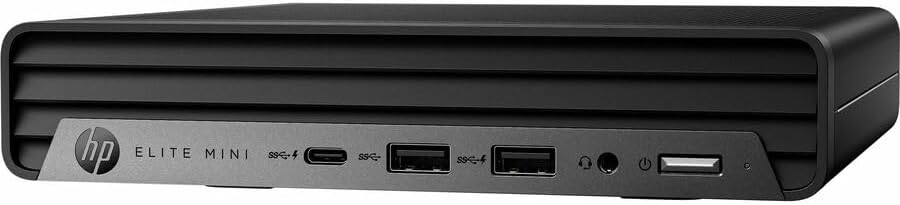
이미지: 앞면 view of the HP Elite Mini 800 G9 Desktop PC, highlighting the accessible front ports including USB-C, USB-A, and a headphone jack.
2. 주변기기 연결하기
- 모니터 연결: Connect your monitor to one of the available video output ports (e.g., DisplayPort, HDMI) on the rear of the mini PC.
- 키보드와 마우스 연결: Plug the included keyboard and mouse into the USB ports on the mini PC.
- 네트워크 연결(선택 사항): For a wired internet connection, connect an Ethernet cable from your router or network switch to the Ethernet port on the mini PC. Wireless connectivity (Wi-Fi 6) is also available.
- 전원 연결: Connect the AC adapter to the power input port on the mini PC, then plug the power cord into a wall outlet.
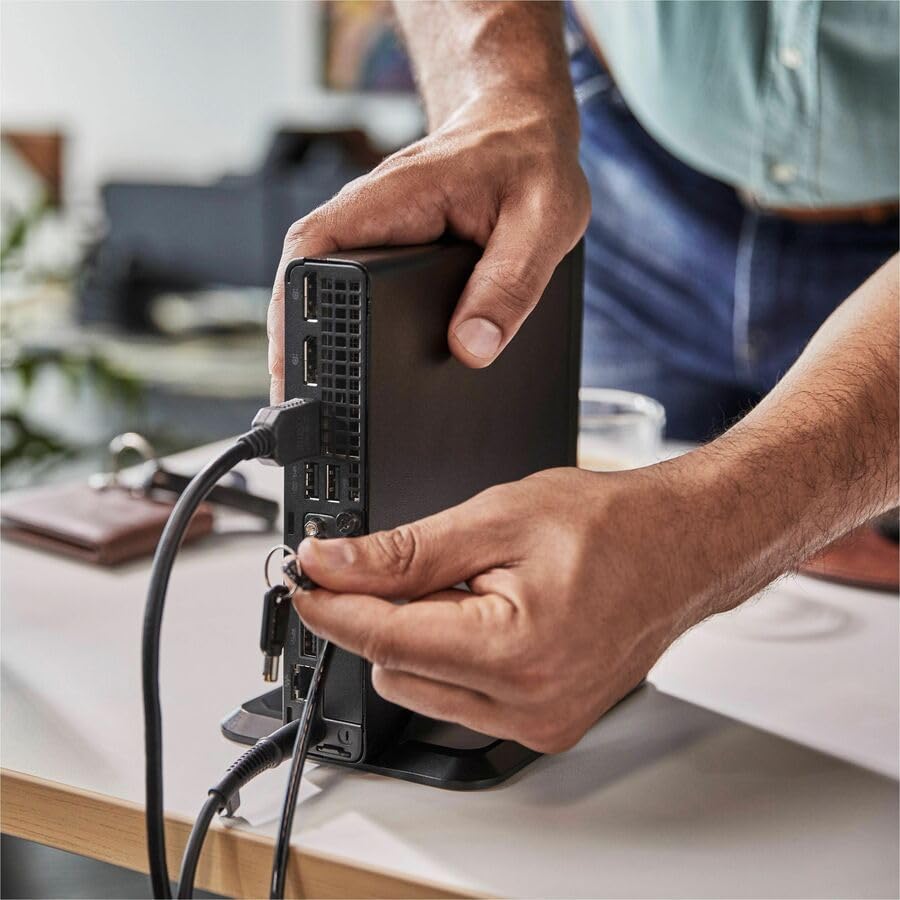
Image: A user connecting various cables, including power and display, to the rear ports of the HP Elite Mini 800 G9. This illustrates the typical connection process for peripherals.
작동 지침
Once your HP Elite Mini 800 G9 is set up, follow these steps for basic operation:
1. 전원 켜기
Press the power button located on the front of the mini PC. The power indicator light will illuminate, and the system will begin to boot up. The operating system (Windows 11 Pro) will load automatically.
2. 초기 설정(첫 사용)
Upon first boot, you will be guided through the Windows 11 Pro setup process. This includes selecting your region, language, accepting terms, and setting up a user account. Follow the on-screen prompts to complete this process.
3. 종료
To properly shut down the computer, click the 시작 Windows에서 버튼을 클릭한 다음 선택하세요 힘 > 종료하다. Avoid powering off the system by holding the power button, as this can lead to data loss or system corruption.

Image: A professional working at a desk, demonstrating the compact integration of the HP Elite Mini 800 G9, which is mounted discreetly behind a monitor.
유지
Regular maintenance helps ensure the longevity and optimal performance of your HP Elite Mini 800 G9 Desktop Computer.
1. 소프트웨어 업데이트
Keep your operating system and drivers updated. Windows Update automatically handles OS updates. For driver updates, visit the official HP support web귀하의 모델에 대한 사이트입니다.
2. 청소
- 외부: 부드럽고 털이 없는 천을 살짝 사용하세요.amp외부 표면을 청소하려면 물이나 순한 세척액으로 적셔주세요.
- 통풍구 : Periodically use compressed air to clear dust from the ventilation grilles to prevent overheating. Ensure the system is powered off before cleaning vents.
3. 데이터 백업
Regularly back up important data to an external drive or cloud storage to prevent data loss in case of hardware failure or other issues.
문제 해결
이 섹션에서는 HP Elite Mini 800 G9에서 발생할 수 있는 일반적인 문제에 대해 설명합니다.
전원이 없습니다
- Ensure the AC adapter is securely connected to both the mini PC and a working power outlet.
- 다른 장치를 연결하여 전원 콘센트가 작동하는지 확인하세요.
- 전원 버튼에 손상이나 막힘이 있는지 확인하십시오.
모니터에 디스플레이가 없습니다
- Confirm the monitor is powered on and correctly connected to the mini PC's video output port.
- 모니터에서 올바른 입력 소스가 선택되었는지 확인하세요.
- Try connecting the mini PC to a different monitor or using a different video cable if available.
느린 성능
- 백그라운드에서 실행 중인 불필요한 애플리케이션을 닫으세요.
- 보류 중인 Windows 업데이트 또는 드라이버 업데이트가 있는지 확인하고 설치하십시오.
- 디스크 정리 및 조각 모음을 실행하세요(HDD용이며, SSD에는 일반적으로 필요하지 않습니다).
- Scan for malware or viruses using reputable antivirus software.
명세서
Detailed technical specifications for the HP Elite Mini 800 G9 Desktop Computer:
| 특징 | 세부 사항 |
|---|---|
| 모델 번호 | AS1F8AT#ABA |
| 프로세서 | Intel Core i5-12500T (12th Gen, Hexa-core, 2 GHz) |
| 숫양 | 16GB DDR5램 |
| 저장 | 256GB SSD |
| 제도법 | Intel UHD Graphics 770(통합) |
| 운영 체제 | 윈도우 11 프로 |
| 무선 연결 | Wi-Fi 6(802.11ax), 블루투스 |
| 치수(길이x너비x높이) | 6.9 x 7 x 1.4 인치 |
| 무게 | 3.13파운드 |
| 포트(전면) | USB-C, USB-A, Headphone/Microphone Combo |
| 포트(후면) | Multiple USB-A, Video Outputs (e.g., DisplayPort, HDMI), Ethernet, Power Input |
보증 및 지원
Your HP Elite Mini 800 G9 Desktop Computer comes with a standard manufacturer's warranty. For specific warranty terms and conditions, please refer to the documentation included with your product or visit the official HP support web대지.
기술 지원, 드라이버 다운로드 또는 기타 지원이 필요하시면 HP 지원 페이지를 방문하십시오. web대지: