
1. 서론
This manual provides essential instructions for the safe and effective operation of your Fujifilm S4500 and S4530 Compact Digital Camera. Please read this manual thoroughly before using the camera and keep it in a safe place for future reference. The Fujifilm S4500/S4530 is equipped with a 14MP CCD sensor, a 30x optical zoom Fujinon lens, and is capable of recording 720p HD movies.
2. 제품 오버view
카메라의 주요 구성 요소를 숙지하세요.
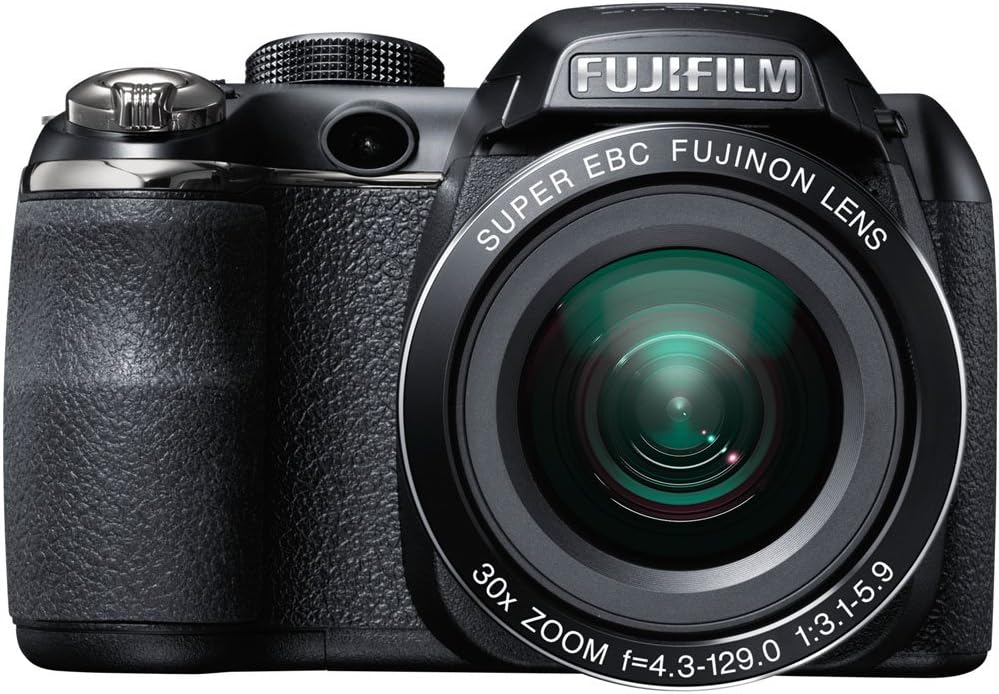
그림 2.1: 앞쪽 view of the Fujifilm S4500/S4530 camera with the built-in flash in the raised position, showcasing the Fujinon 30x optical zoom lens.

그림 2.2: 앞쪽 view of the Fujifilm S4500/S4530 camera with the built-in flash in the lowered position, highlighting the lens barrel and grip.

그림 2.3: 옆 view of the Fujifilm S4500/S4530 camera, showing the ergonomic grip and control layout.
주요 구성 요소:
- 렌즈: Fujinon 30x Optical Zoom Lens (24-720mm equivalent).
- 플래시: Built-in pop-up flash.
- LCD 디스플레이: 3-inch, 230,000-dot screen for viewing 및 메뉴 탐색.
- View파인더: 전자 View파인더(EVF).
- 컨트롤 다이얼 : For selecting shooting modes.
- 셔터 버튼: 사진을 찍기 위해.
- 줌 레버: 광학 줌과 디지털 줌을 제어합니다.
3. 설정
3.1. 배터리 삽입
- 카메라 하단에 있는 배터리 덮개를 엽니다.
- 배터리 칸 내부에 표시된 극성(+/-)을 확인하여 AA 알칼리 배터리 4개를 삽입하십시오.
- 배터리 덮개를 단단히 닫으세요.
3.2. 메모리 카드 삽입
- 일반적으로 카메라의 측면이나 바닥에 있는 메모리 카드 슬롯 덮개를 엽니다.
- Insert an SD, SDHC, or SDXC memory card with the label facing the correct direction until it clicks into place.
- 메모리 카드 슬롯 덮개를 단단히 닫으세요.
3.3. 최초 전원 켜기 및 날짜/시간 설정
- 를 누르세요 켜짐/꺼짐 버튼을 눌러 카메라 전원을 켭니다.
- The first time you power on, you will be prompted to set the date and time. Use the directional buttons to navigate and the 메뉴/확인 확인 버튼을 클릭하세요.
- 화면의 지시에 따라 초기 설정을 완료합니다.
4. 사용 설명서
4.1. 사진 찍기
- 카메라를 켭니다.
- Select a shooting mode using the mode dial (e.g., 자동차 자동 설정용).
- LCD 모니터나 전자 기기를 사용하여 구도를 잡으세요. view파인더.
- Use the zoom lever to adjust the focal length.
- 셔터 버튼을 반쯤 눌러 초점을 맞추세요. 초점이 맞춰지면 초점 프레임이 녹색으로 변합니다.
- 셔터 버튼을 완전히 눌러 사진을 찍으세요.
4.2. 비디오 녹화
- Turn the mode dial to the movie recording setting (often indicated by a film camera icon).
- 피사체를 구도에 맞춰 보세요.
- Press the dedicated movie record button (if available) or the shutter button to start recording.
- Press the button again to stop recording. The camera records in 720p HD resolution.
4.3. 재생
- 를 누르세요 놀다 버튼을 눌러 재생 모드로 들어갑니다.
- Use the directional buttons to scroll through your photos and videos.
- 누르다 메뉴/확인 에게 view 선택한 이미지/비디오에 대한 옵션입니다.
4.4. 플래시 모드
The camera offers various flash modes, including Auto and Red Eye Reduction. To change the flash mode, press the flash button (often indicated by a lightning bolt icon) and use the directional buttons to select your desired mode from the on-screen menu.
5. 유지관리
5.1. 카메라 청소
- 렌즈: 부드럽고 보풀이 없는 천이나 렌즈 브러시를 사용하여 먼지를 조심스럽게 제거하세요. 얼룩이 생긴 경우, 렌즈에 직접 닿지 않도록 천에 전용 렌즈 세척액을 묻혀 사용하세요.
- LCD 디스플레이: 부드럽고 마른 천으로 살살 닦아주세요. 너무 세게 누르지 마세요.
- 카메라 본체 : Use a soft, dry cloth to wipe away dust and fingerprints. Do not use organic solvents or strong cleaning agents.
5.2. 배터리 관리
- Remove batteries when the camera will not be used for an extended period to prevent leakage.
- 배터리를 서늘하고 건조한 곳에 보관하십시오.
- Replace all four AA batteries at the same time with new ones for optimal performance.
5.3. 보관
When storing the camera, ensure it is turned off, and the lens cap is attached. Store in a dry, well-ventilated area away from direct sunlight, high temperatures, and humidity.
6. 문제 해결
| 문제 | 해결책 |
|---|---|
| 카메라가 켜지지 않습니다. | Check if batteries are inserted correctly and are fully charged. Replace with new AA batteries if necessary. |
| 이미지가 흐릿합니다. | Ensure the lens is clean. Press the shutter button halfway to allow the camera to focus before taking the shot. Check if the camera is in a suitable shooting mode for the lighting conditions. |
| 플래시가 터지지 않습니다. | Check the flash mode settings. Ensure the flash is raised if it is a pop-up type. The flash may not fire if the battery level is low. |
| 메모리 카드 오류. | Ensure the memory card is inserted correctly. Try formatting the card (this will erase all data). If the problem persists, try a different memory card. |
| 동영상 녹화가 불가능합니다. | Ensure the camera is in video recording mode. Check if there is sufficient space on the memory card. |
7. 사양
| 특징 | 세부 사항 |
|---|---|
| 모델명 | Fujifilm S4500 / S4530 |
| 이미지 센서 | 14 메가픽셀 1/2.3인치 CCD |
| 렌즈 | Fujinon 30x Optical Zoom (24-720mm equivalent) |
| 디지털 줌 | 최대 6.7배 |
| 이미지 안정화 | 디지털 이미지 안정화 |
| LCD 디스플레이 | 3.0인치, 230,000만 화소 |
| 비디오 녹화 | 720p HD (MP4 형식) |
| 저장 매체 | SD / SDHC / SDXC memory cards |
| ISO 감도 | Auto, 100, 200, 400, 800, 1600, 3200, 6400 (expanded to 51200) |
| 셔터 속도 | 8초에서 1/2000초 |
| 전원 공급 장치 | AA 알카라인 배터리 4개 |
| 연결성 | HDMI, USB |
| 크기(대략) | 1.2파운드 (제품 무게) |
8. 보증 및 지원
This Fujifilm S4500/S4530 camera typically comes with a 90-day limited warranty. Please refer to your purchase documentation for specific warranty terms and conditions. For technical support or service inquiries, please contact Fujifilm customer service or the retailer from whom the product was purchased.