
1. 서론
The PREXISO 3 X 360° Green Laser Level is a versatile tool designed for various leveling and alignment tasks in construction, tile installation, home renovation, and other DIY projects. This manual provides essential information for safe and effective use of your laser level.
2. 안전 지침
경고: 레이저 방사선
- Do not stare into the laser beam. This is a Class II laser product with a maximum output of < 1mW.
- Do not remove or deface any product labels on the device.
- 레이저 빔이 눈에 직접 닿지 않도록 하세요.
- 어린이 주변에서 공구를 조작하거나 어린이가 공구를 조작하지 못하게 하십시오.
- 의도적이든 실수든 누군가가 레이저 빔을 쳐다볼 수 있는 위치에 공구를 배치하지 마십시오.
- Do not use on reflective surfaces such as shiny steel, glass, or polished metal, as the shiny surface could reflect the beam back at the operator.
- 사용하지 않을 때는 레이저 도구를 항상 끄세요.
- 레이저 장치의 성능을 어떤 식으로든 변경하려고 시도하지 마십시오. 이는 레이저 방사선에 위험하게 노출될 수 있습니다.
- Use only accessories that have been designed for use with other laser tools.
- Exercise caution when operating outdoors, as laser visibility may be reduced.
3. 패키지 내용
아래 나열된 모든 품목이 패키지에 포함되어 있는지 확인하세요.
- 1 x PREXISO 3 X 360° Green Laser Level
- 1 x 37-1/2 인치 삼각대
- 1 x Iron Plate (for wall mounting)
- 자석 회전 받침대 1개
- 1 x Type-C 충전 케이블
- 1 x 휴대용 가방
- 1 x Operator's Manual

Image: PREXISO 3 X 360° Green Laser Level and accessories.
4. 사양
| 요소 | 사양 |
|---|---|
| 원자 램프 | 510-530 nm, Class II laser, maximum laser output < 1mW |
| Operating Range (typically) | 82ft (25m) under 100LUX indoor environment |
| 정확도(일반적으로) | ±3/16" @32ft (±3mm @10m) |
| 셀프 레벨링 범위 | ± 4 ° (± 1.5 °) |
| 예상 배터리 수명 | >3.5h (Li-ion battery) |
| 최적의 작동 온도 | 화씨 14도 ~ 화씨 104도(섭씨 -10도 ~ 40도) |
| 보관 온도 | -4°F ~ 140°F(-20°C ~ 60°C) |
| 배터리 | 충전식 리튬이온 배터리 |
| 재료 | 알루미늄, 금속 |
| 품목 무게 | 4.75파운드(2.16킬로그램) |
5. 설정
5.1 배터리 설치 및 충전
- 레이저 레벨기의 배터리 칸을 찾으세요.
- 충전식 리튬 이온 배터리를 삽입할 때 극성을 확인하십시오.
- Connect the provided Type-C charging cable to the charging port on the laser level and to a suitable USB power source.
- The battery can be charged separately or while inside the laser tool.
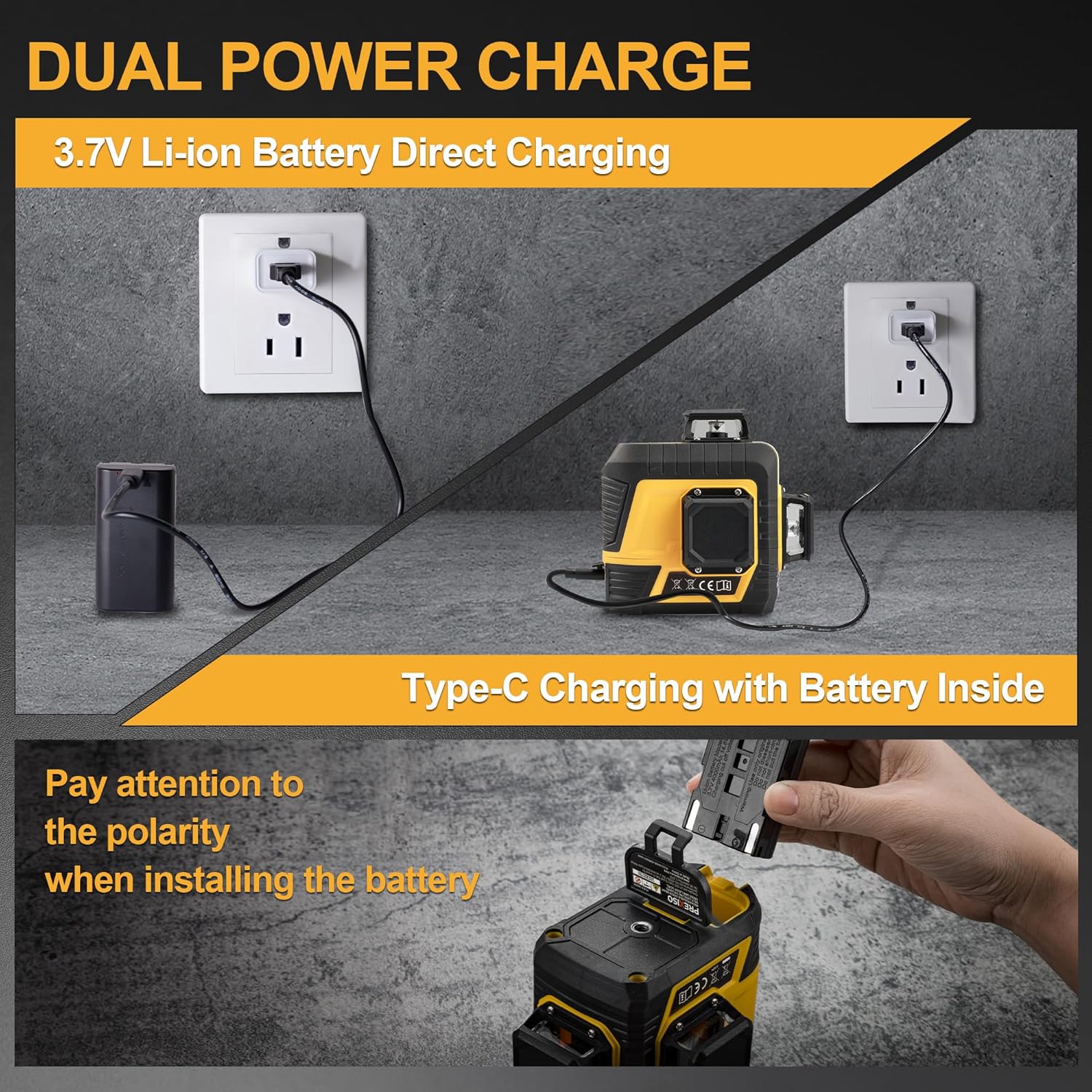
Image: Dual Power Charge methods for the PREXISO laser level.
5.2 장착 옵션
The PREXISO laser level offers multiple mounting solutions:
- 삼각대 장착: The laser level features a 1/4"-20 thread on its base, allowing it to be securely mounted onto the included tripod. The tripod can extend up to 37-1/2 inches and offers pan, tilt, and height adjustments.
- 자석 브라켓: The included magnetic pivoting base allows the laser level to be affixed to metal surfaces. This bracket also features 1/4"-20 mount threads for tripod compatibility.
- Iron Plate: For non-magnetic surfaces, the iron plate can be screwed to a wall, providing a metal surface for the magnetic bracket to attach to.

Image: Strong Magnetic Bracket and Wall Mount Plate.
6. 작동 모드
The laser level features a sliding switch on the side to power on/off and lock/unlock the pendulum, and a power button on top to cycle through laser modes.

Image: Bright Green Laser Diode with labeled components.
6.1 셀프 레벨링 모드
- Slide the side switch to the "ON" position to unlock the pendulum and activate self-leveling mode.
- The tool will automatically level itself if it is within ±4° of horizontal.
- If the surface tilt exceeds 4 degrees, the laser lines will blink as an alarm, indicating it is out of level.

Image: Self-Leveling Automatic Mode operation.
6.2 Manual/Lock Mode
- Slide the side switch to the "OFF" position to lock the pendulum.
- Press and hold the power button on top for 3 seconds to turn on the laser in manual mode.
- In this mode, the self-leveling feature is disabled, allowing you to project lines at any desired angle.
- Short press the power button to switch between horizontal, vertical, or cross modes.

Image: Self-Leveling Mode vs. Manual/Lock Mode.

Image: Manual Mode for angled lines.
6.3 레이저 라인 전환
The PREXISO laser level features 3 x 360° full green laser layouts (one horizontal and two vertical). In either self-leveling or manual mode, short press the power button to cycle through the available laser line combinations:
- 1 x 360° 수평선
- 2 x 360° Vertical lines
- All 3 x 360° lines (cross mode)

Image: 3-Plane High Visibility Cross Laser with 4 Laser Line Modes.

Image: 4 Mode Line Combination.
6.4 펄스 모드
The laser level features a pulse mode for use with an optional laser receiver (sold separately). In receiver mode, the laser lines flash at a very high frequency, making them detectable by the receiver, which is useful in bright conditions or over longer distances. When pulse mode is active, the laser lines may appear less visible to the human eye.
To activate/deactivate pulse mode, press the receiver mode button (G) on the keypad.
7. 응용 프로그램
The PREXISO 3 X 360° Green Laser Level is suitable for a wide range of indoor and outdoor applications, including but not limited to:
- 건설: Establishing level and plumb lines for framing, wall layouts, and foundation work.
- 타일 설치: Ensuring straight and even tile lines on floors and walls.
- Home Renovation: Installing cabinets, shelves, pictures, and decorative elements with precision.
- Electrical & Plumbing: Aligning electrical wiring, pipes, and conduits.
- Staircase & Railing Installation: Projecting angled lines for accurate stair stringer and railing placement in manual mode.

Image: Green beam 3 Plane Laser for high visibility and precise alignment.

Image: Multiple Ways of Using the laser level.
8. 유지관리
- Keep the laser level clean and free from dust and debris. Use a soft, dry cloth to clean the laser light aperture.
- Store the device in its portable bag in a cool, dry place when not in use.
- Regularly charge the lithium-ion battery to maintain its performance and lifespan.
- 장치를 물이나 다른 액체에 담그지 마십시오.
9. 문제 해결
- Laser lines blinking: If the laser lines are blinking rapidly in self-leveling mode, the device is tilted beyond its ±4° self-leveling range. Adjust the position of the laser level until the lines become solid.
- 레이저 라인 없음: Ensure the battery is charged and properly inserted. Check that the side switch is in the "ON" position for self-leveling mode or that the power button has been held for 3 seconds for manual mode.
- 가시성 감소: In bright ambient light or outdoors, the visibility of the green laser lines may be reduced. Consider using pulse mode with an optional laser receiver for improved detection.
10. 보증 및 지원
For warranty information or technical support, please refer to the official PREXISO web해당 사이트를 방문하거나 고객 서비스에 문의하세요. 구매 증빙 자료로 구매 영수증을 보관하세요.