
Laptomo Laptomo S6
Laptomo S6 Laptop Screen Extender User Manual
Enhance Your Productivity with a Multi-Display Setup
제품 끝view
The Laptomo S6 Laptop Screen Extender is a portable, 15.6-inch Full HD 1080P IPS multi-monitor solution designed to expand your laptop's display capabilities. It offers dual screens for a triple-display setup (including your laptop's screen), enhancing productivity for various tasks from office work to entertainment. Featuring a high-quality display with 300 nits brightness, 72% NTSC color gamut, and a 1000:1 contrast ratio, it provides vibrant visuals. The low blue light and anti-glare features ensure comfortable extended use. Its multi-functional design supports both extension and mirroring modes, with flexible rotation for optimal viewing angles. The magnetic adsorption function and included portable bag make it highly convenient for travel and mobile offices. It's a plug-and-play device, requiring no driver installation.

The Laptomo S6 Laptop Screen Extender in a triple-display setup.
상자 안에 무엇이 들어있나요?
Your Laptomo S6 package includes all necessary components for a seamless setup:
- S6 Laptop Screen Extender (1 unit)
- USB-C to USB-A Cables (2 units)
- USB-C to USB-C Cables (2 units)
- Type-C to HDMI Cables (2 units)
- Sleeve Stand (1 unit)
- Single Screen Stand (1 unit)
- 보관용 가방 (1개)
- 사용 설명서(1부)

All components included with the Laptomo S6 Laptop Screen Extender.
설정 및 설치
Setting up your Laptomo S6 is straightforward and driver-free. Follow these steps for a quick installation:
- Expand the stand and assemble the screen stand. Pay attention to the left and right screen labels for correct placement.
- Adjust the stand to the appropriate supporting angle for stability.
- Place the stand behind your computer screen.
- Complete the installation of the dual-screen support.

Standard Mode Installation Steps.
설치 비디오 가이드
Watch this video for a detailed guide on assembling your Laptomo S6 laptop screen extender.
작동 모드
The Laptomo S6 offers versatile operating modes to suit your needs, including extension and mirroring. The 235-degree horizontal rotation and 90-degree vertical rotation allow for multiple screen combinations and view각도를 나타냅니다.
Seamlessly Expand Your Workspace

Dual Screen Horizontal Setup for an expanded workspace.
최적화하다 Viewing with Vertical and Horizontal Modes

Dual Screen Front and Back Vertical Setup.
Maximize Productivity with Front and Back Display

Dual Screen Front and Back Horizontal Setup.
Operating Modes Video Guide
Learn about the effortless setup and multiple modes of the Laptomo S6 for various occasions.
연결 옵션
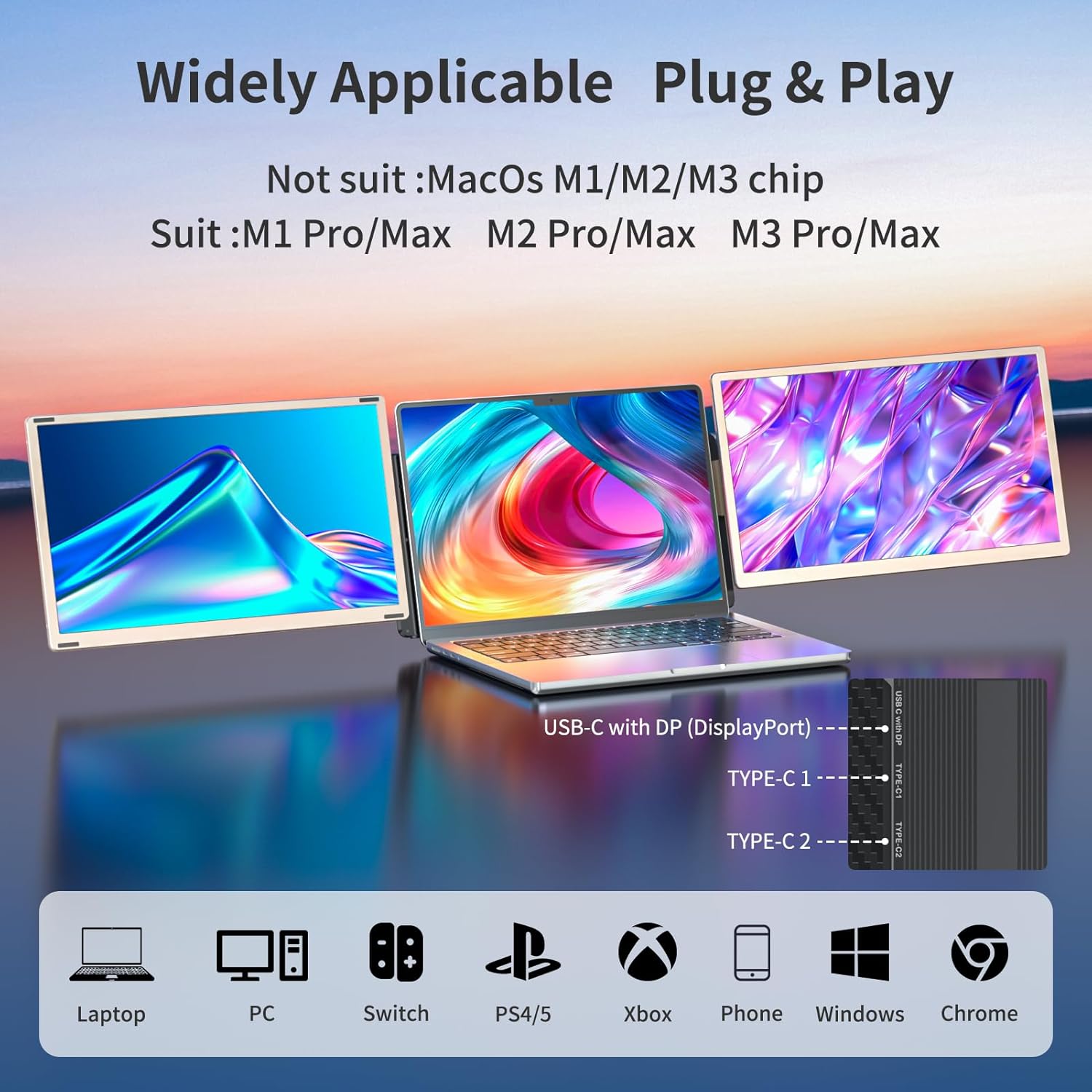
The Laptomo S6 provides multiple connectivity options to accommodate different device needs, including USB-C, USB-A, and HDMI. All necessary connection cables are included.

Detailed Interface Explanation of S6.
Dual Screen Type-C to Type-C Connections

For laptops with two USB 3.0 Type-C ports, connect each screen using a Type-C to Type-C cable.
Mixed Connections (Type-C to Type-C + Type-C to HDMI with Type-C to USB-A)

For laptops with one USB 3.0 Type-C port and one HDMI port, connect one screen using Type-C to Type-C and the other using Type-C to HDMI with USB-A.
Dual Screen Type-C to HDMI + Type-C to USB-A Connections

For laptops with two HDMI and two USB-A ports, connect each screen using Type-C to HDMI and Type-C to USB-A.
Type-C to Type-C + Type-C to HDMI with External Power

For laptops with one USB 3.0 Type-C port and external power needs, connect one screen using Type-C to Type-C and the other using Type-C to HDMI with Type-C to external power.
Dual Screen Setup for MacBook with MST Hub

For MacBooks with M1, M2, M3 chips, use an MST Hub to connect dual screens. (MST Hub not included).
명세서
| 특징 | 세부 사항 |
|---|---|
| 제품 치수 | 13.9 x 8.15 x 1.5 인치 |
| 품목 무게 | 9.11파운드 |
| 품목 모델 번호 | Laptomo S6 |
| 화면 크기 | 15.6 인치 |
| 해결 | FHD 1080p(1920 x 1080 픽셀) |
| 종횡비 | 16시 9분 |
| 이미지 밝기 | 300니트 |
| 화면 표면 설명 | 매트 |

Laptomo S6 Product Dimensions.
Laptomo S6 Display Features.
유지
To ensure the longevity and optimal performance of your Laptomo S6 Laptop Screen Extender, follow these maintenance guidelines:
- 청소: 부드럽고 보풀 없는 천으로 화면과 외부 표면을 살살 닦아주세요. 잘 지워지지 않는 얼룩은 살짝 두드려 닦아주세요.ampen the cloth with water or a screen-safe cleaning solution. Avoid using harsh chemicals, alcohol, or abrasive materials.
- 저장: When not in use, store the extender in its portable bag to protect it from dust, scratches, and impacts. Ensure the screens are properly folded and secured.
- 손질: Handle the device with care. Avoid dropping it or subjecting it to excessive force, especially on the screen panels and hinges.
- 온도: 장시간 극한의 온도나 직사광선에 기기를 노출시키지 마세요.
- 케이블 : Keep the connection cables organized and free from kinks or excessive bending to prevent damage.
문제 해결
If you encounter any issues with your Laptomo S6, please refer to the common troubleshooting tips below:
- 신호 없음/검은 화면:
- Ensure all cables (USB-C, HDMI) are securely connected to both the extender and your laptop.
- Verify that your laptop's ports support video output (e.g., USB-C with DisplayPort Alt Mode).
- Check your laptop's display settings to ensure the external monitors are detected and configured for extension or mirroring.
- 노트북을 다시 시작해 보세요.
- 깜박임/불안정한 디스플레이:
- Ensure sufficient power is supplied. If using a single USB-C cable for power and video, try connecting an additional power source if available.
- Check the cable for damage and try a different cable if possible.
- Adjust the display resolution or refresh rate in your laptop's settings.
- 화면 방향이 잘못되었습니다:
- Go to your laptop's display settings and adjust the orientation (Landscape, Portrait) for each external monitor.
- Compatibility Issues (Mac M1/M2/M3):
- As noted, MacBooks with M1, M2, or M3 chips require an MST Hub for dual-screen functionality. Ensure you are using a compatible MST Hub that supports macOS.
이러한 단계를 수행해도 문제가 해결되지 않으면 고객 지원팀에 문의하십시오.
보증 및 지원
Laptomo is committed to customer satisfaction. Your S6 Laptop Screen Extender comes with professional customer service to ensure a positive user experience. We respond swiftly to address compatibility and connection concerns promptly.
- 고객 지원: Enjoy peace of mind with round-the-clock customer support, ensuring timely resolution of any issues.
- 연락처 정보: For any inquiries or support needs, please refer to the contact details provided in your User Manual or visit the Laptomo official store on Amazon.
Ask a question about this manual
Ask about setup, troubleshooting, compatibility, parts, safety, or missing instructions. Manuals+ will review the question and use this page’s manual context to help answer it.