
1. 서론
The Fosi Audio HT4S is a versatile all-in-one amplifier designed to enhance your audio experience across various settings. This compact unit integrates a Digital-to-Analog Converter (DAC) and a powerful amplifier, supporting up to 5 channels of output. It offers flexible switching between 4.1 channel and 5.0 channel modes, making it suitable for diverse speaker configurations. With multiple input options including Bluetooth, AUX, and optical digital, along with Pre-Out and up to 5 speaker outputs, the HT4S provides comprehensive connectivity for your home audio, outdoor entertainment, or even immersive simulation setups.

이미지 1.1: 앞면 view of the Fosi Audio HT4S amp리퍼.
2. 제품 오버view
2.1 패키지 내용
설치하기 전에 패키지에 모든 구성품이 있는지 확인하십시오.
- Fosi Audio HT4S AmpLIFIER 단위
- AC 전원 케이블
- 블루투스 안테나
- 3.5mm 보조 케이블
- 원격 제어
- User Manual (Japanese version included)

Image 2.1: All components included in the Fosi Audio HT4S package.
2.2 전면 패널 컨트롤
- SUB VOL Knob: Adjusts the volume of the subwoofer output.
- 전원/볼륨 손잡이: Turns the unit on/off and controls the master volume.
- 베이스 노브: 저음 레벨을 조정합니다.
- 고음 노브: 고음 레벨을 조정합니다.
- Mode Light Bar: Indicates the current input mode (Bluetooth, AUX, Optical).

Image 2.2: Close-up of the front panel controls, including volume, bass, and treble knobs.
2.3 후면 패널 연결
- Bluetooth Antenna Terminal: 동봉된 블루투스 안테나를 여기에 연결하세요.
- 광 입력(OPT IN): 디지털 오디오 소스용.
- AUX 입력(AUX IN): For analog audio sources (e.g., CD player, TV).
- 프리아웃: 외부 전원에 연결하기 위해 ampliifier 또는 활성 서브우퍼.
- Speaker Outputs (FL, FR, SL, SR, SUBGEN): Connect your passive speakers and bass shakers here.
- AC 110-240V Power Input: AC 전원 케이블을 연결합니다.
- 5th Channel FLAT/SUB Mode Switch: Toggles the 5th channel output between full-range (FLAT) and subwoofer (SUB) modes.

이미지 2.3: 상세 view of the rear panel with all input and output terminals.
3. 설정 지침
3.1 Connecting Speakers and Audio Sources
- 스피커 연결: Connect your passive speakers to the FL, FR, SL, SR speaker outputs. Ensure correct polarity (+ to + and - to -).
- Connect Bass Shakers/Subwoofer: If using bass shakers or a passive subwoofer, connect them to the SUBGEN output. For active subwoofers or external amplifiers, use the Pre-Out connection.
- 블루투스 안테나 부착: Screw the included Bluetooth antenna onto the Bluetooth antenna terminal on the rear panel.
- 오디오 소스 연결: Choose your desired input:
- 블루투스: Pair your device wirelessly (see Operating Instructions).
- 보조: Connect an analog audio source (e.g., smartphone, tablet, PC, CD player) using the 3.5mm auxiliary cable to the AUX IN port.
- 광학: Connect a digital audio source (e.g., TV, projector) using an optical cable to the OPT IN port.
- 전원 연결: Plug the AC power cable into the amp앰프의 전원 입력 단자를 벽면 콘센트에 연결합니다.

Image 3.1: Diagram illustrating various connection options for the Fosi Audio HT4S.
3.2 초기 전원 켜기
After all connections are made, turn the Power/Volume knob clockwise to power on the unit. The LED mode light bar will illuminate, indicating the current input mode.
4. 사용 설명서
4.1 전원 켜기/끄기 및 볼륨 제어
- 힘: Rotate the master volume knob to turn the amplifier on or off. Alternatively, use the power button on the remote control.
- 용량: Adjust the master volume by rotating the Power/Volume knob on the front panel or using the volume buttons on the remote control.
- 서브우퍼 볼륨: Use the SUB VOL knob to adjust the output level of the subwoofer/bass shaker channel independently.
4.2 입력 모드 선택
The HT4S supports Bluetooth, AUX, and Optical inputs. You can switch between these modes using the remote control or the multi-function knob on the front panel. The LED mode light bar will change color to indicate the active input:
- 파란색: 블루투스 모드
- 녹색: AUX 모드
- 빨간색: 광학 모드
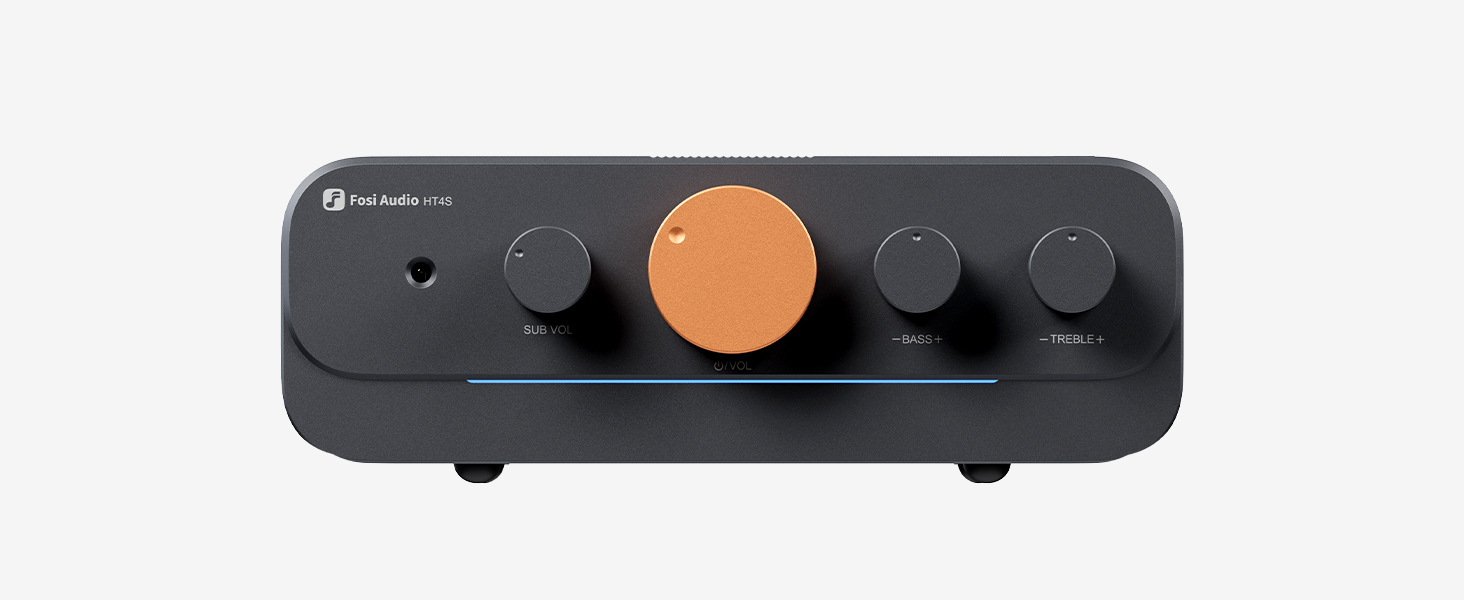
Image 4.1: The LED light bar indicates the current input mode.
4.3 블루투스 페어링
When in Bluetooth mode (blue LED), the amplifier가 자동으로 페어링 모드로 전환됩니다. 검색 "Fosi Audio HT4S" on your device's Bluetooth settings and connect. If already paired, it will attempt to reconnect to the last device.
4.4 톤 컨트롤
Use the Bass and Treble knobs on the front panel to adjust the low and high frequencies according to your preference. These adjustments allow you to fine-tune the sound output to match your speakers and listening environment.
4.5 5th Channel Mode Switch
The switch on the rear panel labeled "FLAT/SUB" allows you to configure the 5th channel output:
- 평평한: The 5th channel outputs a full-range signal, suitable for a standard speaker.
- 보결: The 5th channel outputs a low-frequency signal, ideal for a subwoofer or bass shaker.
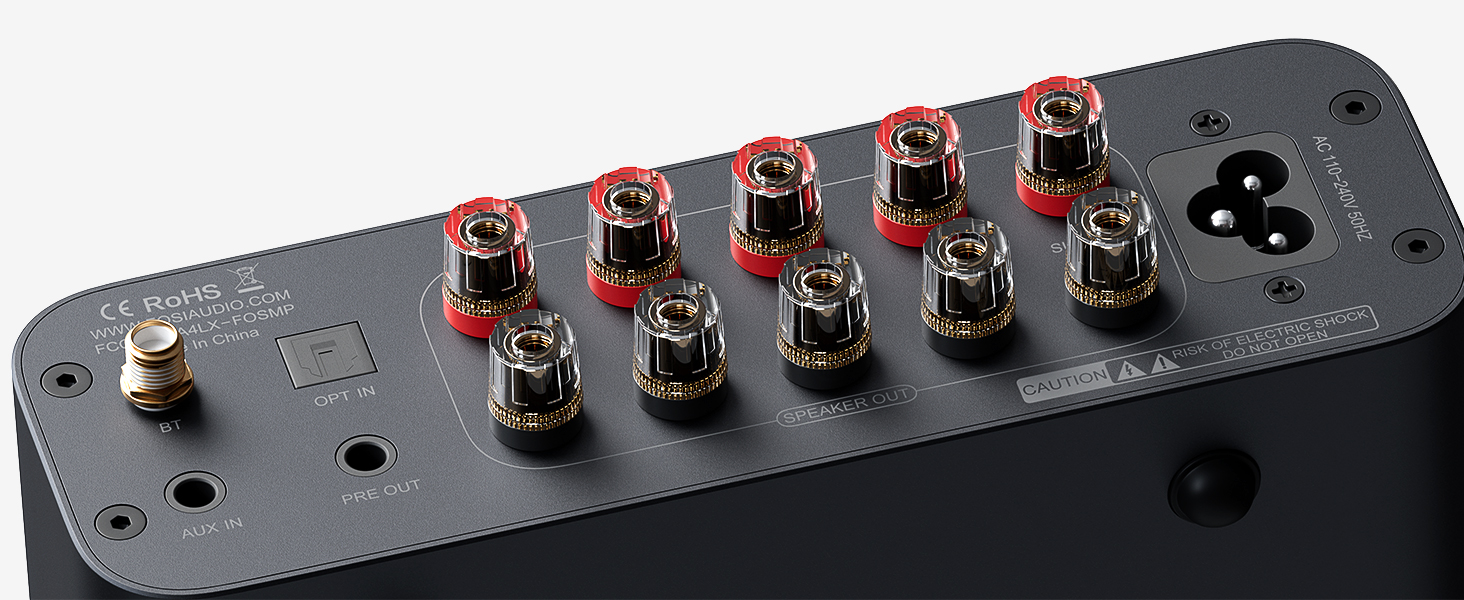
Image 4.2: The FLAT/SUB switch for the 5th channel output.
4.6 리모콘 기능
포함된 리모컨을 사용하면 다양한 기능에 편리하게 접근할 수 있습니다.
- 전원 켜기/끄기
- 볼륨 높이기/낮추기
- 무음
- Input Mode Selection (Bluetooth, AUX, Optical)
- LED Light Bar Control
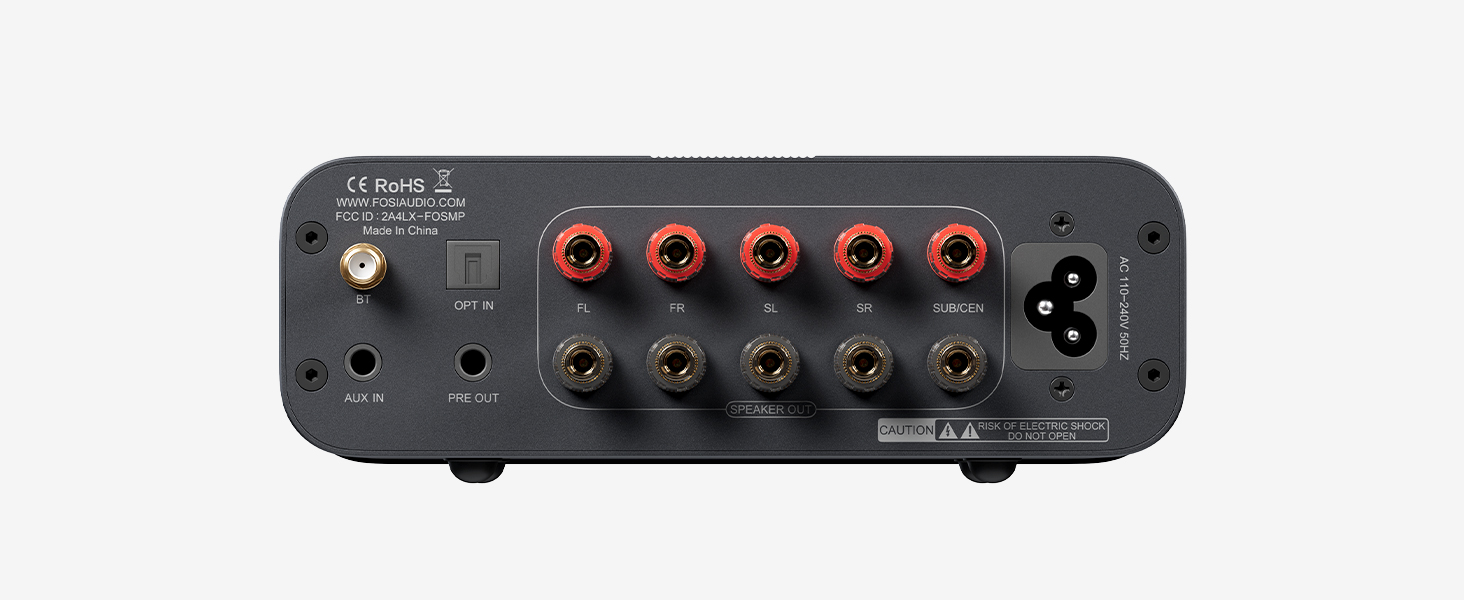
Image 4.3: The remote control for the Fosi Audio HT4S.
5. 유지관리
- 청소: 부드럽고 건조한 천을 사용하여 청소하십시오. amplifier's surface. Avoid using harsh chemicals or abrasive materials.
- 통풍: 확인하십시오 amp앰프는 과열을 방지하기 위해 통풍이 잘 되는 곳에 설치하십시오. 통풍구를 막지 마십시오.
- 열 발산: For optimal performance and longevity, especially during extended use or in warm environments, it is recommended to use Fosi Audio's cooling fan (sold separately) with the amp리퍼.
- 저장: 장기간 사용하지 않을 경우 보관하세요 amp증폭기는 직사광선과 습기를 피해 서늘하고 건조한 곳에 보관하십시오.
6. 문제 해결
| 문제 | 가능한 원인 | 해결책 |
|---|---|---|
| 사운드 출력이 없습니다 |
|
|
| 블루투스 연결 문제 |
|
|
| 왜곡된 소리 |
|
|
| 리모컨이 작동하지 않습니다 |
|
|
7. 사양
| 특징 | 세부 사항 |
|---|---|
| 상표 | Fosi 오디오 |
| 모델 번호 | HT4S |
| 채널 수 | 5 (switchable 4.1/5.0) |
| 재료 | 알루미늄 합금 |
| 포함된 구성 요소 | Cable, Japanese User Manual |
| 원산지 | 중국 |
| 고객 재views | 4.4점 만점에 5점 (9개 평가) |
8. 보증 및 지원
All Fosi Audio products, including the HT4S, come with a 24-month warranty, ensuring durability and peace of mind. For technical support, troubleshooting assistance, or warranty claims, please contact Fosi Audio customer service through their official web제품을 구매한 사이트 또는 소매업체.
9. 제품 비디오
9.1 Fosi Audio BT20APRO Power Amplifier Product Introduction
비디오 9.1: 소개 비디오 쇼asing the features and design of a Fosi Audio power amplifier, providing general insights into the brand's product line.
9.2 Fosi Audio BT20A MAX Product Display
Video 9.2: A brief product display video highlighting the design and key aspects of a Fosi Audio amplifier, offering a visual overview.