
소개
This manual provides essential information for the installation, operation, maintenance, and troubleshooting of the Cisco Catalyst C9300L-24P-4X-E Network Essentials Switch. This device is designed for enterprise-grade access, offering 24 Gigabit PoE+ ports and four 10 Gbps SFP+ uplinks for robust network connectivity.
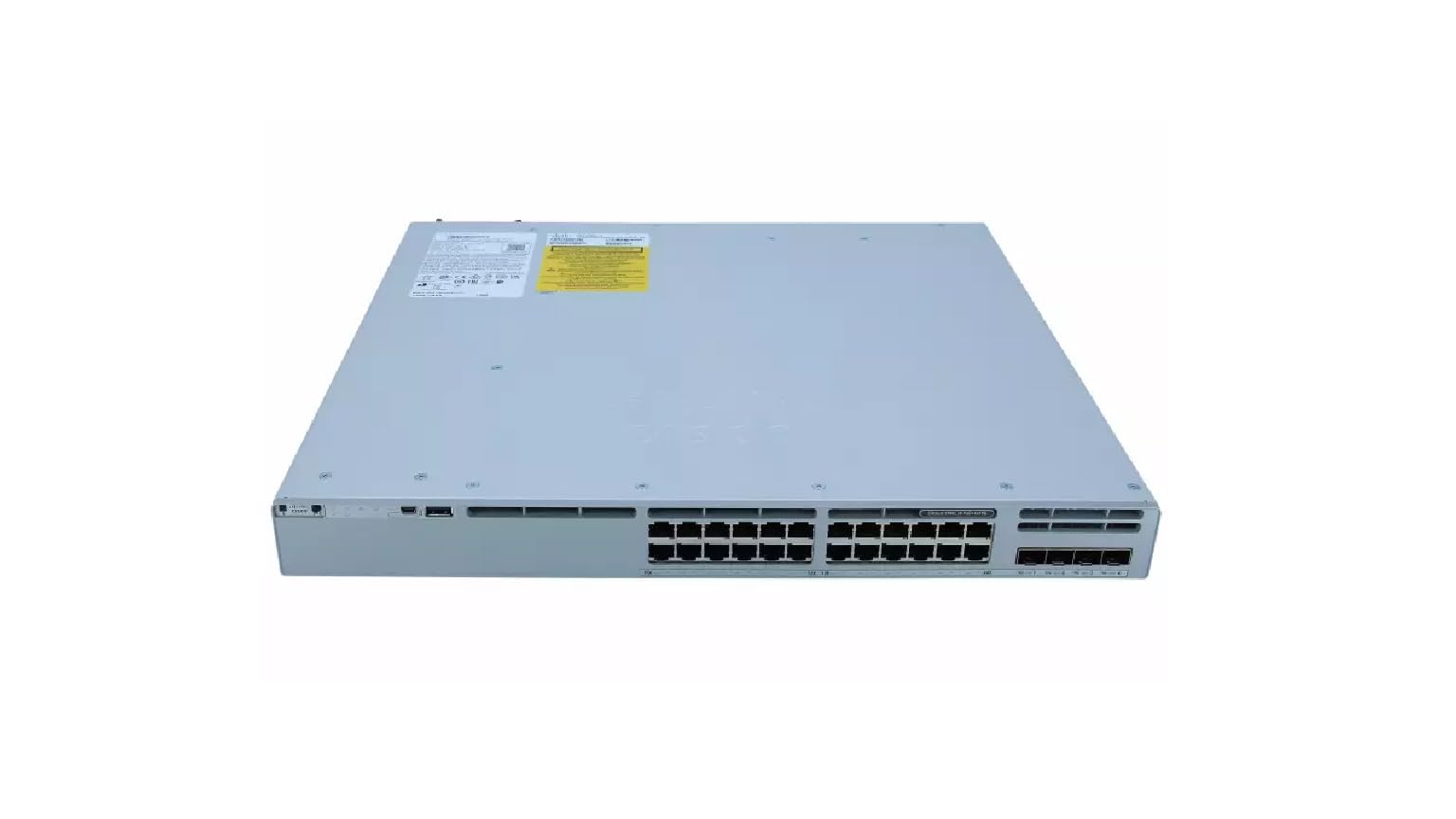
This image displays the rear panel of the Cisco Catalyst C9300L-24P-4X-E switch, highlighting the various ports, cooling fans, and the power supply unit.
안전 정보
부상 및 장비 손상을 방지하기 위해 다음 안전 수칙을 준수하십시오.
- 전원을 연결하기 전에 접지가 제대로 되었는지 확인하십시오.
- 습하거나 지나치게 습한 환경에서 스위치를 작동하지 마십시오.
- 승인된 전원 코드와 액세서리만 사용하세요.
- 과열을 방지하기 위해 적절한 환기를 보장하십시오.
- 유지관리나 설치 절차를 수행하기 전에 전원을 분리하세요.
패키지 내용
패키지에 다음 품목이 포함되어 있는지 확인하십시오.
- Cisco Catalyst C9300L-24P-4X-E Switch
- 전원 코드
- 랙 마운트 키트(해당되는 경우)
- 콘솔 케이블(RJ-45 - DB-9)
- 문서(빠른 시작 가이드, 안전 정보)
신체적 설명
The Cisco Catalyst C9300L-24P-4X-E switch features a robust design for network deployments. The rear panel includes:
- 24 Gigabit Ethernet PoE+ Ports: For connecting network devices and providing power over Ethernet.
- 4x 10Gbps SFP+ Uplink Ports: For high-speed connections to the distribution or core layer.
- 콘솔 포트: 명령줄 인터페이스 접속용입니다.
- USB 포트: 을 위한 file management and system configuration.
- Modular Power Supply Bay: For installing power supply units.
- 냉각 팬 : For thermal management.
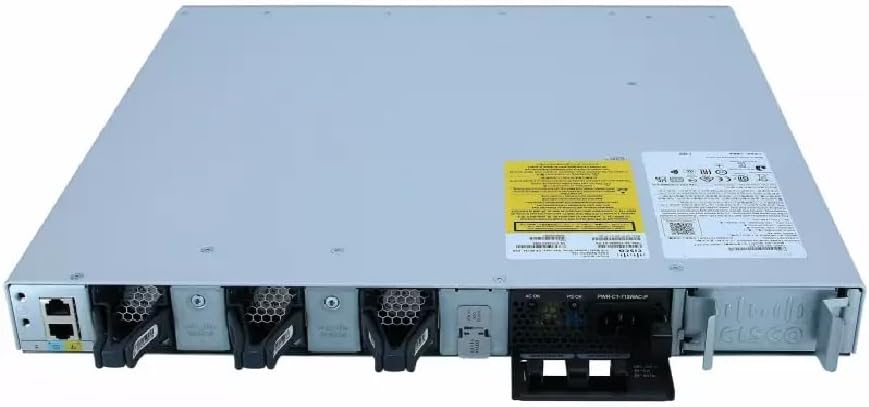
자세한 view of the rear panel of the Cisco Catalyst C9300L-24P-4X-E switch, illustrating the 24 Gigabit PoE+ ports, four 10Gbps SFP+ uplink ports, and the modular power supply bay.
설정
1. 개봉 및 검사
Carefully remove the switch from its packaging. Inspect the device for any signs of physical damage. If damage is found, contact your supplier immediately.
2. 스위치 장착
The switch can be mounted in a standard 19-inch equipment rack or placed on a desktop.
- 랙 마운트 설치: Attach the provided rack-mount brackets to the sides of the switch using the screws. Secure the switch into the rack using appropriate rack screws.
- 데스크탑 설치: Ensure the surface is flat, stable, and allows for adequate ventilation around the switch. Attach the rubber feet (if provided) to the bottom of the switch.
3. 전원 연결하기
Insert the power cord into the AC power connector on the rear of the switch. Connect the other end of the power cord to a grounded electrical outlet. Ensure the power supply is properly seated in its bay.
4. 네트워크 연결
- PoE+ 포트: Connect Ethernet cables from your network devices (e.g., IP phones, access points, surveillance cameras) to the 24 Gigabit PoE+ ports. These ports will provide both data connectivity and power.
- SFP+ 업링크 포트: Insert compatible SFP+ transceivers into the four 10Gbps SFP+ uplink ports. Connect fiber optic cables from these transceivers to your distribution or core network devices.
- 콘솔 포트: For initial configuration or troubleshooting, connect a console cable from your management workstation to the console port on the switch.
스위치 조작
1. 초기 전원 켜기
After connecting power, the switch will automatically power on. Observe the system LED indicators for boot status. The system LED should turn green once the boot process is complete.
2. 기본 구성
The Cisco Catalyst C9300L-24P-4X-E runs on Cisco IOS XE. Initial configuration can be performed via the console port using a command-line interface (CLI) or through a web-based graphical user interface (GUI) if enabled. Refer to Cisco's official documentation for detailed configuration guides.
3. LED 표시기
The switch features various LED indicators to provide status information:
- 시스템 LED: Indicates overall system status (e.g., green for normal operation, amber for warning).
- PoE LED: 포트의 PoE(Power over Ethernet) 상태를 나타냅니다.
- 포트 상태 LED: 각 네트워크 포트의 링크 상태 및 활동을 표시합니다.
유지
Regular maintenance ensures optimal performance and longevity of your switch:
- 청소: Periodically clean the exterior of the switch with a soft, dry cloth. Ensure ventilation openings are free from dust and debris. Do not use liquid cleaners directly on the device.
- 펌웨어 업데이트: Keep the switch firmware updated to the latest version provided by Cisco. This ensures access to new features, security patches, and performance improvements.
- 환경 제어: 하드웨어 고장을 방지하기 위해 작동 환경을 지정된 온도 및 습도 범위 내로 유지하십시오.
- 케이블 관리 : Ensure all cables are neatly organized and properly secured to prevent accidental disconnections or damage.
문제 해결
If you encounter issues with your switch, consider the following troubleshooting steps:
- 전원 없음: Verify the power cord is securely connected to both the switch and the power outlet. Check the power source and any circuit breakers. Ensure the power supply unit is correctly installed.
- 네트워크 연결 없음: Check the link status LEDs on the affected ports. Ensure Ethernet cables are properly connected and undamaged. Verify connected devices are powered on and functioning correctly.
- PoE 장치가 켜지지 않음: Confirm the PoE+ port is enabled and the device is PoE compatible. Check the PoE budget and ensure it's not exceeded.
- 느린 성능: Check for network congestion, duplex mismatches, or errors on ports. Ensure uplink bandwidth is sufficient.
- Accessing the Switch: If unable to access via network, try connecting directly to the console port for CLI access.
명세서
| 특징 | 세부 사항 |
|---|---|
| 상표 | 시스코 |
| 모델 번호 | C9300L-24P-4X-E |
| 포트 수 | 24 Gigabit PoE+ ports, 4x 10Gbps SFP+ uplinks |
| 인터페이스 | PoE, SFP+ |
| 데이터 전송 속도 | 1 Gigabits Per Second (Gigabit Ethernet), 10 Gigabits Per Second (Uplinks) |
| 권tage | 240볼트(AC) |
| 스위치 유형 | Managed, Fixed, PoE+, Layer 2 |
| 케이스 재질 종류 | 플라스틱 |
| 호환 장치 | Desktop, Laptop, Printer (and other network devices) |
보증 정보
이 제품에는 다음이 포함되어 있습니다. 90일 한정 보증. Please refer to the warranty documentation provided with your purchase for specific terms and conditions. For warranty claims, contact your reseller or the manufacturer's support channels.
기술 지원
For further assistance, technical support, or advanced configuration guidance, please refer to the official Cisco documentation available on their website. You may also contact your authorized Cisco reseller or support provider for specialized assistance.
시스코 지원 Web대지: https://www.cisco.com/c/en/us/support/index.html


