
1. 서론
This manual provides essential information for setting up, operating, maintaining, and troubleshooting your Xiaomi Redmi 13C smartphone. Please read this guide carefully to ensure proper use and optimal performance of your device.
The Xiaomi Redmi 13C is a new product featuring 128GB storage and 6GB RAM, with Dual SIM capability, in Midnight Black. This device is supplied by a specialized distributor.
2. 상자 안에 무엇이 들어있나요?
Xiaomi Redmi 13C의 포장을 풀 때 다음 품목이 모두 포함되어 있는지 확인하세요.
- Xiaomi Redmi 13C 스마트 폰
- USB 케이블
- 충전기
- SIM 트레이 꺼내기 도구
3. 디바이스 오버view
Familiarize yourself with the key components of your Redmi 13C.

그림 3.1: 이상view of Xiaomi Redmi 13C key features, including its 6.74-inch 90Hz display, 50MP AI triple camera, 5000mAh battery with 18W fast charging, and powerful octa-core processor.
The Redmi 13C features a large 6.74-inch display with a 90Hz refresh rate for smooth visuals. It is equipped with a 50MP AI triple camera system and a robust 5000mAh battery supporting 18W fast charging. The device is powered by an octa-core processor, ensuring efficient performance.
4. 설정
4.1. SIM 및 SD 카드 삽입
Your Redmi 13C supports Dual SIM cards and expandable storage via a microSD card (up to 128GB). Use the provided SIM tray ejector tool to open the SIM card slot.
- 휴대폰 측면에서 SIM 트레이를 찾으세요.
- SIM 꺼내기 도구를 트레이 옆에 있는 작은 구멍에 넣고 트레이가 튀어나올 때까지 단단히 누르세요.
- 나노 SIM 카드 및/또는 microSD 카드를 트레이의 지정된 슬롯에 넣으세요. 금색 접촉부가 아래로 향하도록 하세요.
- 트레이를 조심스럽게 전화기에 다시 삽입하세요.
4.2. 초기 전원 켜기 및 구성
- Xiaomi 로고가 나타날 때까지 전원 버튼을 길게 누르세요.
- 화면의 지시에 따라 언어와 지역을 선택하고, Wi-Fi에 연결하고, Google 계정을 설정하세요.
- You can also set up fingerprint recognition for enhanced security during this initial setup.
5. 장치 작동
5.1. 디스플레이 기능

Figure 5.1: The Redmi 13C features an immersive 6.74-inch display, providing a fluid visual experience.
The Redmi 13C boasts a 6.74-inch display with a 90Hz refresh rate, offering a smooth and immersive viewing experience for all your content. The maximum display resolution is 720x1600 pixels with a 16:9 aspect ratio.
5.2. 카메라 사용
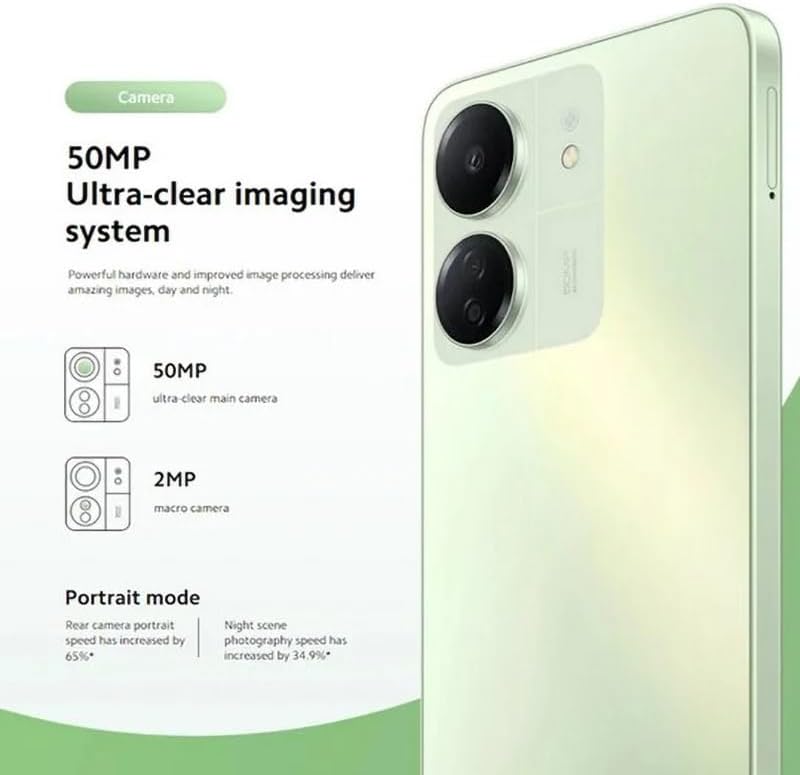
Figure 5.2: The Redmi 13C's 50MP Ultra-clear imaging system includes a 50MP main camera and a 2MP macro camera, supporting Portrait and Night modes.
The device is equipped with a 50MP Ultra-clear imaging system. The rear camera setup includes a 50MP main sensor and a 2MP macro camera. The front camera has an 8MP sensor. Utilize various shooting modes such as Portrait mode and Night mode to capture high-quality photos in different conditions.
5.3. 배터리 관리
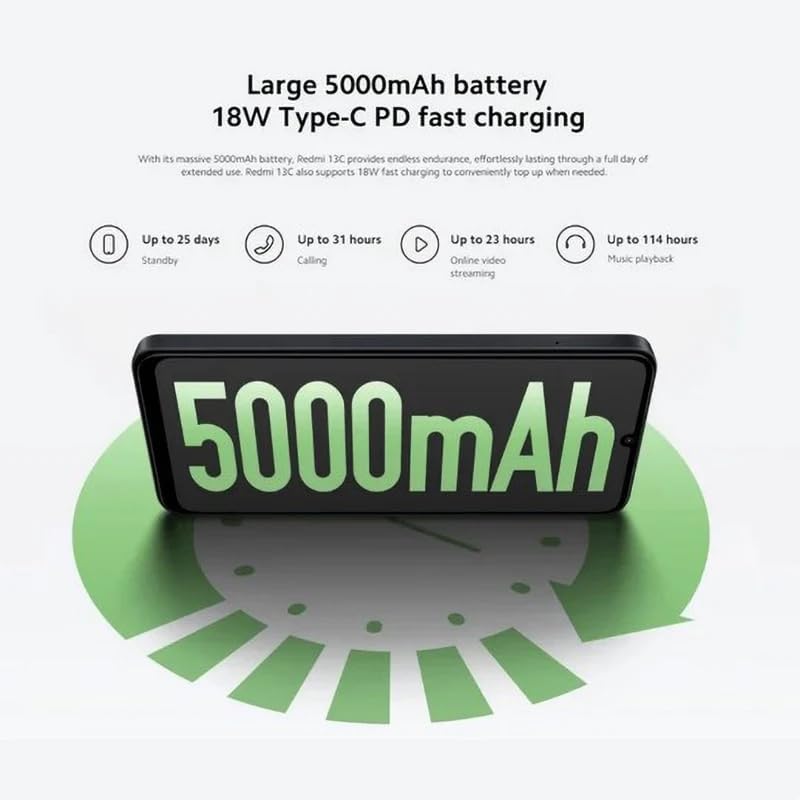
Figure 5.3: The Redmi 13C features a large 5000mAh battery with 18W Type-C PD fast charging, offering extended usage times.
Your Redmi 13C comes with a large 5000mAh Lithium-ion battery, providing extended usage. It supports 18W Type-C PD fast charging, allowing for quick power-ups. For optimal battery life, use the provided charger and avoid extreme temperatures.
- 최대 25일 대기
- Up to 31 hours calling
- Up to 23 hours online video streaming
- 최대 114시간 음악 재생
5.4. 성능

Figure 5.4: The Redmi 13C is powered by an Octa-core MediaTek Helio G85 processor, delivering smooth and stable performance.
The Redmi 13C is powered by a MediaTek Helio G85 octa-core processor, ensuring smooth and stable performance for daily tasks and applications. It comes with 6GB of RAM and 128GB of internal storage, expandable up to 1TB with a microSD card.
5.5. 연결성 및 보안
The device supports Wi-Fi, Bluetooth, and 4G cellular technology. It is an unlocked phone, allowing use with various wireless carriers. For security, the Redmi 13C includes a fingerprint recognition feature.
6. 유지관리
6.1. 기기 청소
To clean your Redmi 13C, use a soft, lint-free cloth. Avoid using harsh chemicals or abrasive materials, as these can damage the screen and finish. The device is not water-resistant, so avoid exposure to liquids.
6.2. 소프트웨어 업데이트
Regularly check for and install software updates to ensure your device has the latest features, security patches, and performance improvements. You can usually find this option in the phone's settings under "About phone" or "System updates."
6.3. 배터리 관리
To prolong battery life, avoid fully discharging the battery frequently. Charge your phone using the original charger and cable. Do not expose the device to extreme heat or cold.
7. 문제 해결
이 섹션에서는 Redmi 13C에서 발생할 수 있는 일반적인 문제에 대해 설명합니다.
- 장치가 켜지지 않음: 배터리가 충전되어 있는지 확인하세요. 휴대폰을 충전기에 연결하고 몇 분 정도 기다린 후 다시 전원을 켜보세요.
- 앱이 충돌하거나 정지됨: Close background apps. Clear the cache of the problematic app or reinstall it. If the issue persists, consider a factory reset (back up your data first).
- 배터리 수명이 짧음: Reduce screen brightness, disable unnecessary features like GPS or Bluetooth when not in use, and check for apps consuming excessive power in battery settings.
- 네트워크 연결 문제: Ensure your SIM card is properly inserted. Try restarting the device. Check your network settings and contact your carrier if problems persist.
- 지문 센서가 작동하지 않습니다. Ensure your finger is clean and dry. Re-register your fingerprints in the security settings.
8. 사양
| 특징 | 사양 |
|---|---|
| 상표 | 샤오미 |
| 모델명 | 레드미 13C |
| 운영 체제 | 기계적 인조 인간 |
| 설치된 RAM 크기 | 6GB (XNUMX기가바이트) |
| 메모리 저장 용량 | 128GB(최대 1TB까지 확장 가능) |
| CPU 모델 | MediaTek Helio G85(옥타코어) |
| CPU 속도 | 최대 2.0GHz |
| 디스플레이 유형 | 아몰레드 |
| 디스플레이 크기 | 6.74인치 |
| 최대 디스플레이 해상도 | 720x1600 |
| 새로 고침 빈도 | 90Hz |
| Rear Camera Sensor Resolution | 50 Megapixels (Main), 2 Megapixels (Macro) |
| Front Camera Sensor Resolution | 8메가픽셀 |
| 배터리 용량 | 5000mAh(리튬이온) |
| 충전 중 | 18W Type-C PD Fast Charging |
| 연결 기술 | 블루투스, Wi-Fi, 4G LTE |
| SIM 카드 슬롯 | Dual SIM (Nano) |
| 생체 인식 보안 | 지문 인식 |
| 헤드폰 잭 | USB 타입-C |
| 색상 | 미드나잇 블랙 |
| 품목 무게 | 410그램 |
| 방수 레벨 | 방수가 되지 않음 |
| 모델 연도 | 2023 |
9. 보증 및 지원
9.1. 보증 정보
The Xiaomi Redmi 13C comes with a standard manufacturer's warranty. Please refer to the warranty card included with your product for specific terms and conditions. Spare parts availability is stated as 2 years.
9.2. Official Documents and Support
For additional information and support, you can refer to the official user guide and data transparency statement:
For further assistance, please visit the official XIAOMI support web사이트를 방문하거나 고객 서비스에 문의하세요.