
1. 서론
Thank you for choosing the ORDRO Z88 4K Video Camera. This manual provides essential information for setting up, operating, and maintaining your device. Please read it thoroughly before use to ensure proper functionality and to maximize your camera's potential. Keep this manual for future reference.
2. 안전 정보
- Do not expose the camera to water or moisture. This device is not waterproof.
- 카메라를 떨어뜨리거나 강한 충격을 주지 마세요.
- 카메라를 강한 자기장에서 멀리 두세요.
- 카메라를 분해하거나 개조하지 마십시오. 수리는 반드시 공인 서비스 담당자만 수행해야 합니다.
- 지정된 전원 어댑터와 액세서리만 사용하세요.
- 사용하지 않을 때는 카메라를 서늘하고 건조한 곳에 보관하십시오.
3. 패키지 내용
아래 나열된 모든 품목이 패키지에 포함되어 있는지 확인하세요.
- ORDRO Z88 4K Video Camera
- USB-C 케이블
- 마이크로 HDMI-HDMI 케이블
- 전원 어댑터/충전기
- Lithium-ion Batteries (2 included)
- 원격 제어
- 32GB SD 카드
- SD 카드 어댑터
- Camera Bag/Pouch
- 손목 스트랩

Image: The ORDRO Z88 4K camera displayed with its full set of accessories, including cables, batteries, remote, and storage card.
4. 제품 오버view
The ORDRO Z88 is a compact 4K video camera designed for ease of use and high-quality recording. It features a 3.0-inch IPS touchscreen, 10x optical zoom, and various connectivity options.

이미지: 앞면 view of the ORDRO Z88 camera, highlighting its 4K resolution, 1/3" CMOS sensor, 28.0MP still image capability, 3.0" IPS touchscreen, and 10x optical zoom.
카메라 부품
- 렌즈: 10배 광학 줌 렌즈.
- LCD 화면: 3.0-inch IPS touchscreen, rotatable for various view각도를 나타냅니다.
- 마이크로폰: 오디오 녹음을 위한 내장 마이크.
- 스피커: 오디오 재생용.
- 제어 버튼: Power, Record, Zoom lever, Menu, Playback, etc.
- 포트: USB-C, Mini HDMI, External Microphone input.
- 삼각대 스레드: Standard 1/4 inch thread for mounting on tripods.

이미지: 상세 측면 view of the ORDRO Z88 camera, illustrating the external microphone input, Mini HDMI port, and USB-C output.
5. 설정
5.1 배터리 설치
- 카메라 하단의 배터리 덮개를 엽니다.
- Insert the Lithium-ion battery, ensuring the correct polarity.
- 배터리 덮개를 단단히 닫으세요.
5.2 메모리 카드 설치
The camera supports SDHC flash memory cards up to 256GB. A 32GB SD card is included.
- SD 카드 슬롯을 찾으세요. 일반적으로 카메라 측면이나 하단에 있습니다.
- SD 카드의 금속 접촉면이 올바른 방향을 향하도록 하여 딸깍 소리가 나면서 제자리에 고정될 때까지 삽입하십시오.
- 제거하려면 카드가 튀어나올 때까지 살짝 누르세요.
5.3 배터리 충전
Connect the camera to a power source using the provided USB-C cable and power adapter. The camera supports recording while charging.
5.4 초기 전원 켜기
Press and hold the Power button to turn on the camera. The LCD screen will illuminate. You may need to set the date and time upon first use.
6. 사용 설명서
6.1 Basic Video Recording and Photo Capture
- 전원 켜기: 카메라를 켭니다.
- 모드 선택: Use the mode dial or touchscreen menu to select video recording or photo capture mode.
- 집중하다: The camera features automatic focus. Ensure your subject is within the focus range.
- 녹화/캡처: Press the Record button to start/stop video recording. Press the Shutter button to take a photo.
6.2 줌 기능
The ORDRO Z88 features a 10x optical zoom and a 120x intelligent (digital) zoom.
- 광학 줌: Use the zoom lever to adjust the optical zoom. This maintains image quality.
- 디지털 줌: Beyond the 10x optical zoom, the camera can engage 120x digital zoom. Note that digital zoom may reduce image quality.

Image: A visual comparison demonstrating the clarity of 10x optical zoom versus the extended reach of 120x digital zoom, showing a distant tower.
6.3 Wi-Fi 연결
Connect your camera to a smartphone via Wi-Fi using the "D Video" application for remote control, preview, sharing, and downloading files. The effective range is up to 10 meters.
- Download and install the "D Video" app on your smartphone.
- 카메라 메뉴 설정에서 Wi-Fi를 활성화하세요.
- On your smartphone, connect to the camera's Wi-Fi network.
- Open the "D Video" app to establish the connection and control the camera.
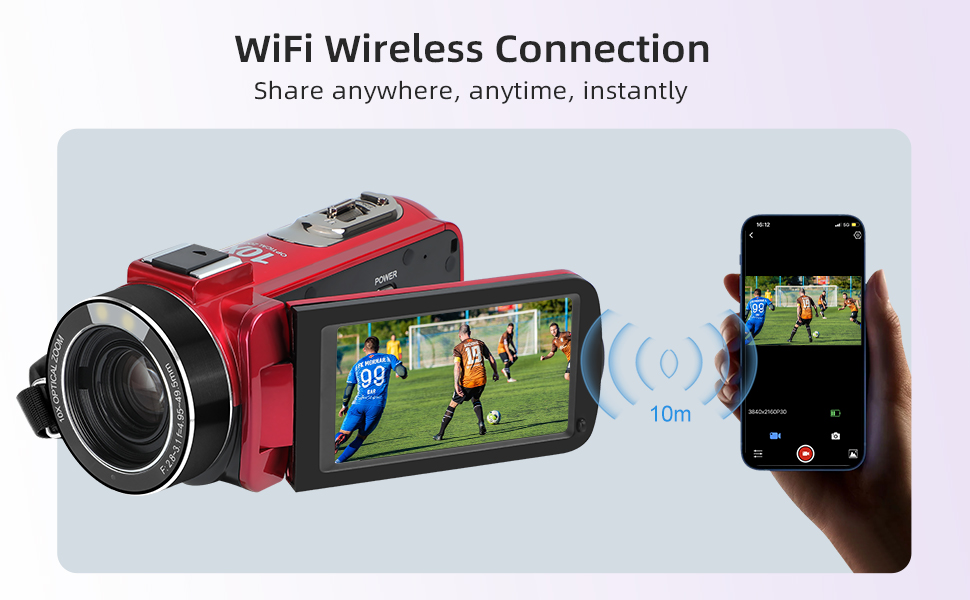
Image: The ORDRO Z88 camera wirelessly connected to a smartphone, demonstrating remote viewing and control capabilities via the "D Video" app.
6.4 Web캠 모드
The camera can function as a high-definition web라이브 스트리밍용 카메라.
- Connect the camera to your computer using the USB-C cable.
- On the camera's screen, select "PC Camera" mode when prompted.
- 컴퓨터는 카메라를 카메라로 인식해야 합니다. webcam, allowing you to use it with video conferencing or streaming software.

Image: The ORDRO Z88 camera mounted on a mini tripod, connected to a laptop via USB-C, demonstrating its functionality as a web화상 통화용 캠.
6.5 재생 및 TV 연결
Review your recorded videos and photos directly on the camera's LCD screen or connect to a larger display.
- 카메라에 포착된 사람: 재생 버튼을 눌러 view 당신의 미디어 files. Use the touchscreen or navigation buttons to browse.
- To TV: Connect the camera to a 4K compatible television using the Mini HDMI to HDMI cable. This allows for high-resolution playback of your 4K content on a larger screen.
6.6 특수 기능
The ORDRO Z88 offers several advanced shooting modes:
- 타임랩스: Capture a series of images over time and combine them into a video.
- 느린: 부드러운 슬로우 모션 재생을 위해 더 높은 프레임률로 동영상을 녹화하세요.
- 일시 정지 기능: 같은 영상 내에서 녹화를 일시 중지하고 다시 시작할 수 있습니다. file.
- 얼굴 인식: 프레임 내 얼굴을 자동으로 감지하고 초점을 맞춥니다.
- 시간 제한 촬영: 사진 촬영 타이머를 설정하세요.
- Quick 3 Burst Shot: 여러 장의 사진을 빠르게 연속해서 촬영하세요.

이미지: 콜라주 쇼asing the camera's diverse shooting capabilities, including time-lapse, slow motion, pause function, and various event recordings like weddings and graduations.
7. 유지관리
7.1 청소
- 부드럽고 마른 천을 사용하여 카메라 본체를 청소하세요.
- For the lens, use a specialized lens cleaning cloth and solution.
- 연마성 세척제나 용제를 사용하지 마십시오.
7.2 보관
- 장기간 사용하지 않을 때는 배터리를 분리하십시오.
- Store the camera in its protective bag in a cool, dry, dust-free environment.
8. 문제 해결
If you encounter issues with your ORDRO Z88 camera, refer to the following common solutions:
- 카메라 전원이 켜지지 않습니다: 배터리가 올바르게 설치되었고 완전히 충전되었는지 확인하세요.
- 녹음할 수 없습니다: Check if the SD card is inserted correctly and has sufficient free space. Ensure the camera is in the correct mode.
- 이미지 품질이 좋지 않음: 렌즈가 깨끗한지 확인하십시오. 조명 조건을 확인하십시오.
- Wi-Fi 연결 문제: Ensure the "D Video" app is installed and updated. Verify Wi-Fi is enabled on the camera and your smartphone.
- Webcam mode not recognized: Ensure the USB-C cable is securely connected and "PC Camera" mode is selected on the camera. Try a different USB port on your computer.
추가 지원이 필요하면 고객 지원팀에 문의하세요.
9. 사양
| 특징 | 사양 |
|---|---|
| 상표 | 오르드로 |
| 모델 번호 | HDR-Z88 |
| 포토 센서 기술 | CMOS |
| 비디오 녹화 해상도 | 1080p, 4K (2880x2160@24fps) |
| 정지 이미지 해상도 | 5MP (28.0MP로 보간) |
| 광학 줌 | 10배 |
| 디지털 줌 | 120배 |
| 화면 크기 | 3.0 Inches (IPS Touchscreen) |
| 플래시 메모리 유형 | SDHC (up to 256GB expansion) |
| 연결 기술 | HDMI, USB-C, Wi-Fi (802.11ac) |
| 이미지 안정화 | Optical (Note: Product specs state 'No' for 'Posiada stabilizację obrazu' but 'Optyczny' for 'Stabilizacja obrazu'. Assuming optical stabilization is present as per feature bullets.) |
| 방수 수준 | 방수가 아닙니다 |
| 품목 무게 | 300그램 |
| 배터리 포함 | 예 (리튬 이온 배터리 2개) |
| 추천 용도 | Vlogging, daily video recording, beginner use |
10. 보증 및 지원
The ORDRO Z88 4K Video Camera comes with a standard manufacturer's warranty. Please refer to the warranty card included in your package for specific terms and conditions. For technical support, troubleshooting, or warranty claims, please contact ORDRO customer service through the contact information provided with your purchase or on the official ORDRO web대지.