
1. 서론
Thank you for choosing the TROMAR 9-in-1 Air Quality Monitor. This portable device is designed to provide comprehensive real-time monitoring of various indoor air pollutants and environmental factors. It is an essential tool for maintaining a healthy living and working environment in homes, offices, schools, and other indoor spaces.
This monitor accurately detects Carbon Dioxide (CO2), Carbon Monoxide (CO), Formaldehyde (HCHO), Total Volatile Organic Compounds (TVOC), Particulate Matter (PM2.5 and PM10), Air Quality Index (AQI), as well as Temperature and Humidity.

그림 1: 전면 view of the TROMAR 9-in-1 Air Quality Monitor, showing its compact design and clear display.
2. 제품 특징
- 종합적인 탐지: Simultaneously monitors 9 key air quality parameters: Carbon Dioxide (CO2), Carbon Monoxide (CO), Formaldehyde (HCHO), Total Volatile Organic Compounds (TVOC), PM2.5, PM10, Air Quality Index (AQI), Temperature, and Humidity.
- 고정밀 센서: Equipped with advanced PM2.5 sensors, semiconductor sensors, electrochemical sensors, and temperature/humidity sensors for precise real-time data.
- 넓은 측정 범위:
- HCHO: 0-9.999 mg/m³
- TVOC: 0-9.999 mg/m³
- Temperature: 0-70 ℃
- 습도: 0-99% 상대습도
- CO2: 400-5000 PPM
- CO: 0-5000PPM
- PM2.5: 0-999 ug/m³
- PM10: 0-999 ug/m³
- AQI: 0-999
- 충전식 배터리: Features a built-in 1500mA battery with a Type-C interface for convenient and repeated charging.
- 휴대성 있는 디자인: Compact and lightweight, making it easy to carry and use in various locations.
3. 패키지 내용
개봉 시 패키지 내용물을 확인하여 모든 품목이 들어 있고 손상되지 않았는지 확인하세요.
- TROMAR 9-in-1 Air Quality Monitor (VT-9IN1)
- USB Type-C 충전 케이블
- 사용자 설명서
4. 설정
4.1 초기 충전
Before first use, fully charge the device. Connect the provided USB Type-C cable to the monitor's charging port and the other end to a standard USB power adapter (not included) or a computer USB port. The battery indicator on the display will show charging status. A full charge typically takes 2-3 hours.
4.2 전원 켜기/끄기
장치의 전원을 켜려면 버튼을 길게 누르세요. 전원 버튼 (usually marked with a circle and vertical line) located on the front panel until the display illuminates. To power off, press and hold the same button until the display turns off.
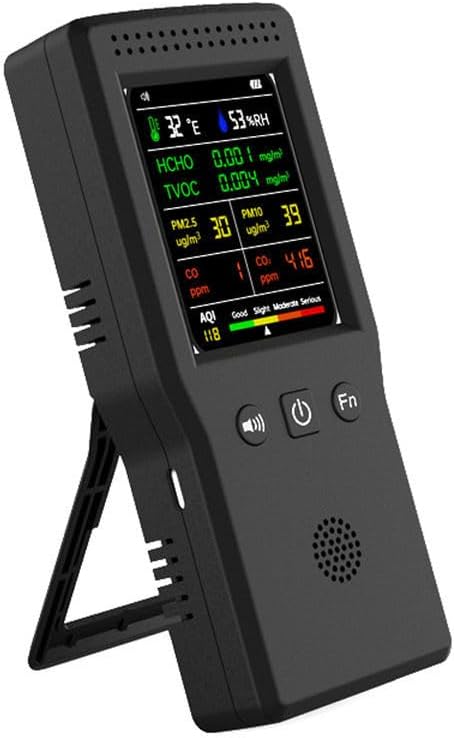
Figure 2: The TROMAR Air Quality Monitor shown with its integrated kickstand extended for convenient view주고받음.
5. 사용 설명서
5.1 디스플레이 이해
The monitor features a clear color display that presents all detected parameters simultaneously. Refer to the diagram below for an explanation of each indicator:
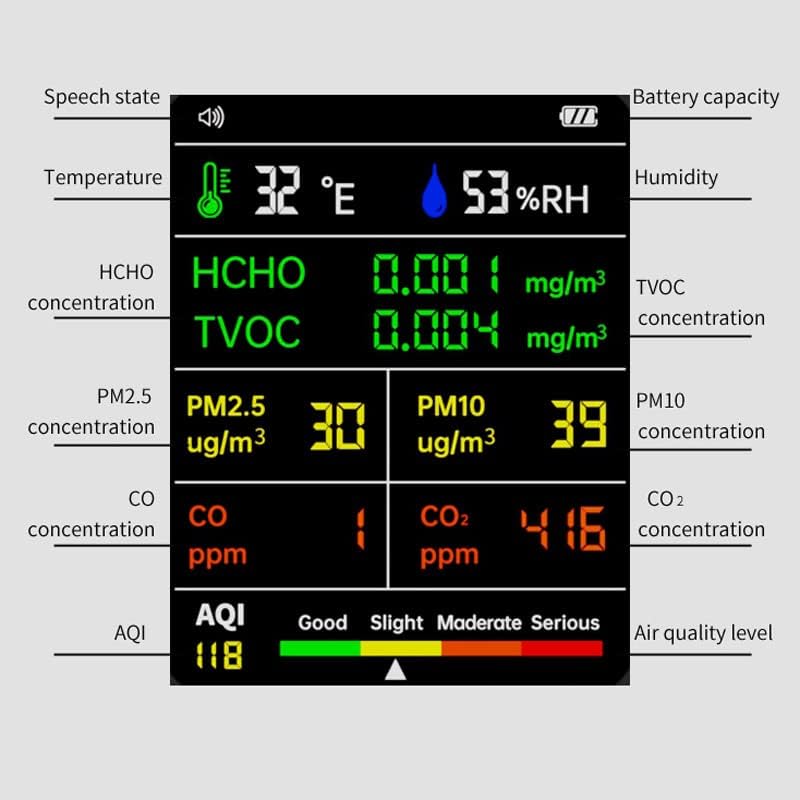
Figure 3: Detailed breakdown of the monitor's display, indicating the location and meaning of each measurement and status icon.
- Speech State Icon: Indicates if voice prompts are active.
- Battery Capacity Icon: 현재 배터리 수준을 보여줍니다.
- 온도: Displays ambient temperature in Celsius.
- 습기: Displays relative humidity in percentage.
- HCHO Concentration: Formaldehyde levels in mg/m³.
- TVOC Concentration: Total Volatile Organic Compounds levels in mg/m³.
- PM2.5 농도: Particulate Matter 2.5 levels in ug/m³.
- PM10 농도: Particulate Matter 10 levels in ug/m³.
- CO 농도: Carbon Monoxide levels in ppm.
- CO2 농도: Carbon Dioxide levels in ppm.
- AQI: Air Quality Index, providing an overall assessment of air quality.
- Air Quality Level Bar: A color-coded bar indicating the current AQI level (Good, Slight, Moderate, Serious).
5.2 버튼 기능
- 전원 버튼(⑂): Press and hold to power on/off. Short press may cycle through display modes or confirm selections (refer to specific model behavior).
- Speaker Button (🔊): Short press to toggle voice prompts on/off.
- Function Button (Fn): Used to access additional settings or switch between different display interfaces if available. Consult the on-screen prompts for specific functions.
5.3 읽기 해석
The monitor provides real-time readings for all parameters. The AQI (Air Quality Index) and its corresponding color bar offer a quick visual summary of overall air quality:
- 녹색: 좋은 공기질.
- 노란색 : Moderate air quality, sensitive individuals may experience minor effects.
- 주황색: Unhealthy for sensitive groups.
- 빨간색: Unhealthy for everyone.
- Purple/Maroon: Very unhealthy/Hazardous.
For specific pollutant levels, refer to local or international air quality guidelines to understand safe and unsafe thresholds.
6. 유지관리
6.1 청소
Wipe the device gently with a soft, dry cloth. Do not use abrasive cleaners, solvents, or immerse the device in water. Ensure the air inlets and outlets are free from dust and obstructions.
6.2 보관
When not in use for extended periods, store the monitor in a cool, dry place away from direct sunlight and extreme temperatures. It is recommended to charge the device every 3 months to maintain battery health.
7. 문제 해결
| 문제 | 가능한 원인 | 해결책 |
|---|---|---|
| 장치의 전원이 켜지지 않습니다. | 배터리가 부족합니다. 기기가 고장났습니다. | 기기를 최소 30분 동안 충전하십시오. 그래도 켜지지 않으면 고객 지원 센터에 문의하십시오. |
| Readings seem inaccurate or fluctuate wildly. | Device not calibrated; sensor obstruction; environmental interference. | Ensure the device is in a stable environment away from strong air currents or direct sources of pollution. Allow 5-10 minutes for readings to stabilize after power-on. If issues persist, contact support. |
| 화면이 어둡거나 반응이 없습니다. | 배터리 부족; 소프트웨어 오류. | Charge the device. Try restarting the device by holding the power button. |
8. 사양
| 매개변수 | 값 |
|---|---|
| 상표 | TROMAR |
| 모델 번호 | VT-9IN1 |
| 전원 | Battery Powered (1500mA built-in) |
| 충전 인터페이스 | USB 타입-C |
| 센서 유형 | Electrochemical, Semiconductor, PM2.5, Temperature/Humidity |
| 작동 습도 | 상대습도 0~99% |
| HCHO 범위 | 0-9.999 mg / m³ |
| TVOC 범위 | 0-9.999 mg / m³ |
| 온도 범위 | 0~70℃ |
| CO2 범위 | 400-5000 PPM |
| CO 범위 | 0-5000 PPM |
| PM2.5 범위 | 0-999ug/m³ |
| PM10 범위 | 0-999ug/m³ |
| AQI 범위 | 0-999 |
| 치수 | 약 157mm x 70mm x 30mm |
| 한국어: | 749757251012 |

Figure 4: Diagram illustrating the approximate dimensions of the TROMAR 9-in-1 Air Quality Monitor.
9. 보증 및 지원
The TROMAR 9-in-1 Air Quality Monitor comes with a standard manufacturer's warranty. Please refer to the warranty card included in your package or visit the official TROMAR web자세한 보증 약관은 해당 사이트에서 확인하세요.
For technical support, troubleshooting assistance, or warranty claims, please contact TROMAR customer service. Contact information can typically be found on the product packaging or the official brand web대지.