
TROMAR VT-9IN1
TROMAR 9-in-1 Air Quality Monitor User Manual
Model: VT-9IN1
소개
Thank you for choosing the TROMAR 9-in-1 Air Quality Monitor. This device is designed to provide real-time detection of various air pollutants and environmental factors, ensuring you have a clear understanding of your indoor air quality. Please read this manual carefully before use to ensure proper operation and maintenance.
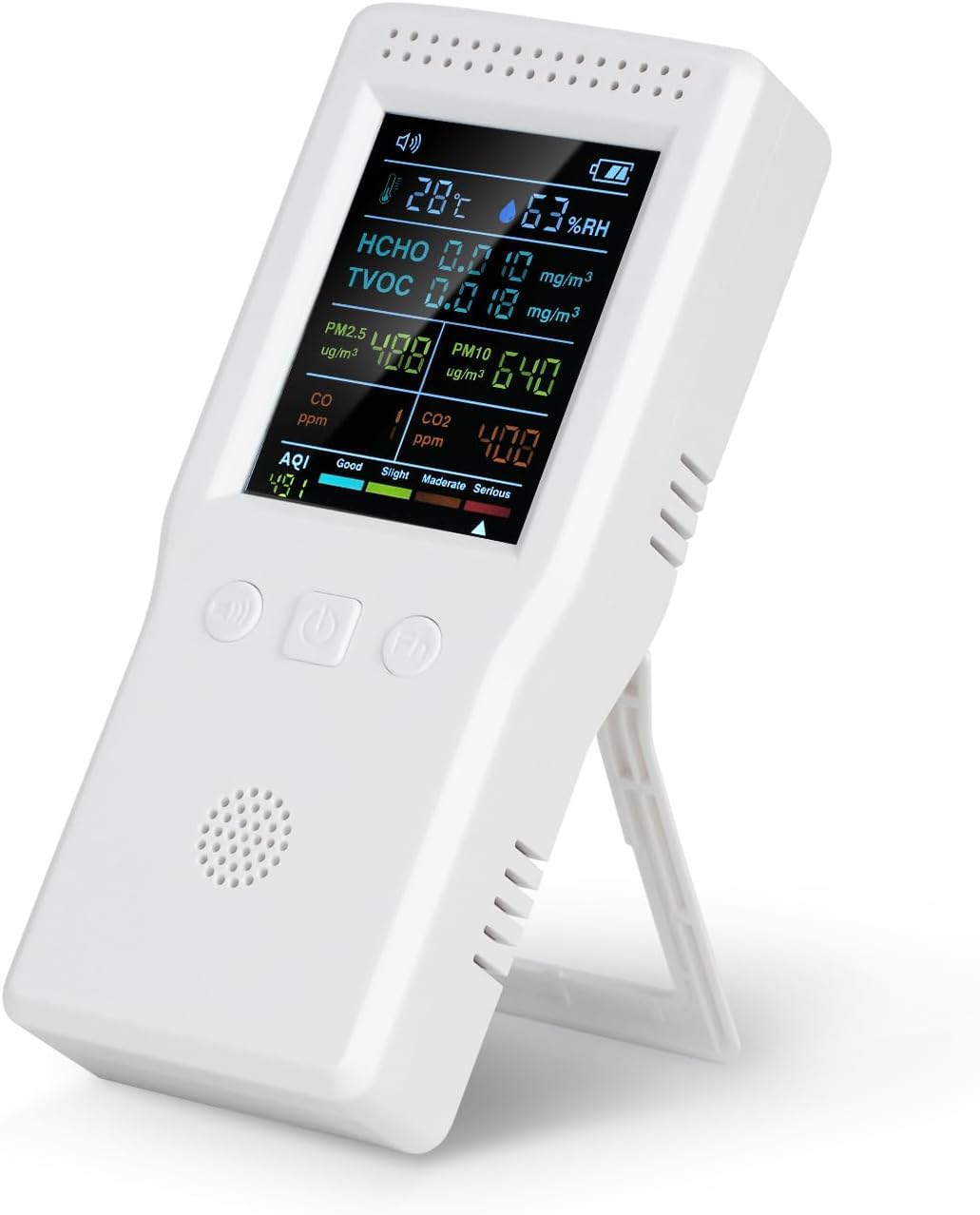
Image: The TROMAR 9-in-1 Air Quality Monitor, showing its digital display with readings for temperature, humidity, HCHO, TVOC, PM2.5, PM10, CO, CO2, and AQI.
주요 특징
- 9-in-1 감지: Monitors CO2, CO, HCHO, TVOC, PM2.5, PM10, Temperature, Humidity, and AQI.
- 실시간 모니터링: Provides instant readings for comprehensive air quality assessment.
- 간편한 조작: Simple interface with no complex app or Wi-Fi required.
- 휴대성 있는 디자인: Compact and lightweight, suitable for various indoor and outdoor environments.
- 충전식 배터리: Built-in 1500mAh battery with Type-C USB charging, offering 4-6 hours of operation.
- Clear Screen Display: Easy-to-read screen for quick air quality assessment.

Image: A detailed diagram of the TROMAR Air Quality Monitor, highlighting and labeling its various components such as Speech State, Temperature, HCHO Concentration, PM2.5 Concentration, CO Concentration, AQI, Buzzer Switch, Mute On/Off, Function Keys, Air Quality Level, CO2 Concentration, PM10 Concentration, TVOC Concentration, Humidity, and Battery Capacity.
설정
짐 풀기
Carefully remove the air quality monitor and all accessories from the packaging. Ensure all items listed in the packing list are present:
- 1 x TROMAR Air Quality Monitor
- 1 x USB 충전 케이블(Type-C)
- 1 x 사용자 설명서
장치 충전하기
Before first use, fully charge the monitor. Connect the provided USB Type-C charging cable to the device's charging port and the other end to a standard USB power adapter (not included) or a computer USB port.
- 디스플레이의 배터리 표시등은 충전 상태를 보여줍니다.
- 일반적으로 완전 충전에는 약 2~3시간이 걸립니다.
- The device can operate for 4-6 hours on a full charge.

Image: The TROMAR Air Quality Monitor with its USB Type-C charging port visible, connected to a charging cable, illustrating the charging process.
작동 지침
전원 켜기/끄기
- 전원을 켜려면 전원 버튼 (usually the middle button) for 3 seconds.
- 전원을 끄려면 전원 버튼 다시 3초간.
디스플레이 이해
The monitor features a clear screen that displays all detected parameters simultaneously. Readings are updated in real-time.
| 매개변수 | 단위 | 설명 |
|---|---|---|
| HCHO | mg/mXNUMX | Formaldehyde concentration |
| TVOC | mg/mXNUMX | Total Volatile Organic Compounds concentration |
| 온도 | ° C (섭씨) | 주변 온도 |
| 휴미 | % RH | 상대 습도 |
| 이산화탄소 | 피피엠 | Carbon Dioxide concentration |
| CO | 피피엠 | Carbon Monoxide concentration |
| 오후 2.5 | ug/mXNUMX | Fine Particulate Matter concentration (2.5 micrometers) |
| 오후 10 | ug/mXNUMX | Coarse Particulate Matter concentration (10 micrometers) |
| AQI | 색인 | Air Quality Index (overall air quality) |
버튼 기능
- Buzzer Switch Button (Left): Press to toggle the audible alarm on or off.
- 전원 버튼(가운데): Press and hold to power on/off. Short press for certain function adjustments (refer to specific model features).
- Function Key (Right): Used for navigating menus or changing display modes if applicable. Refer to on-screen prompts.
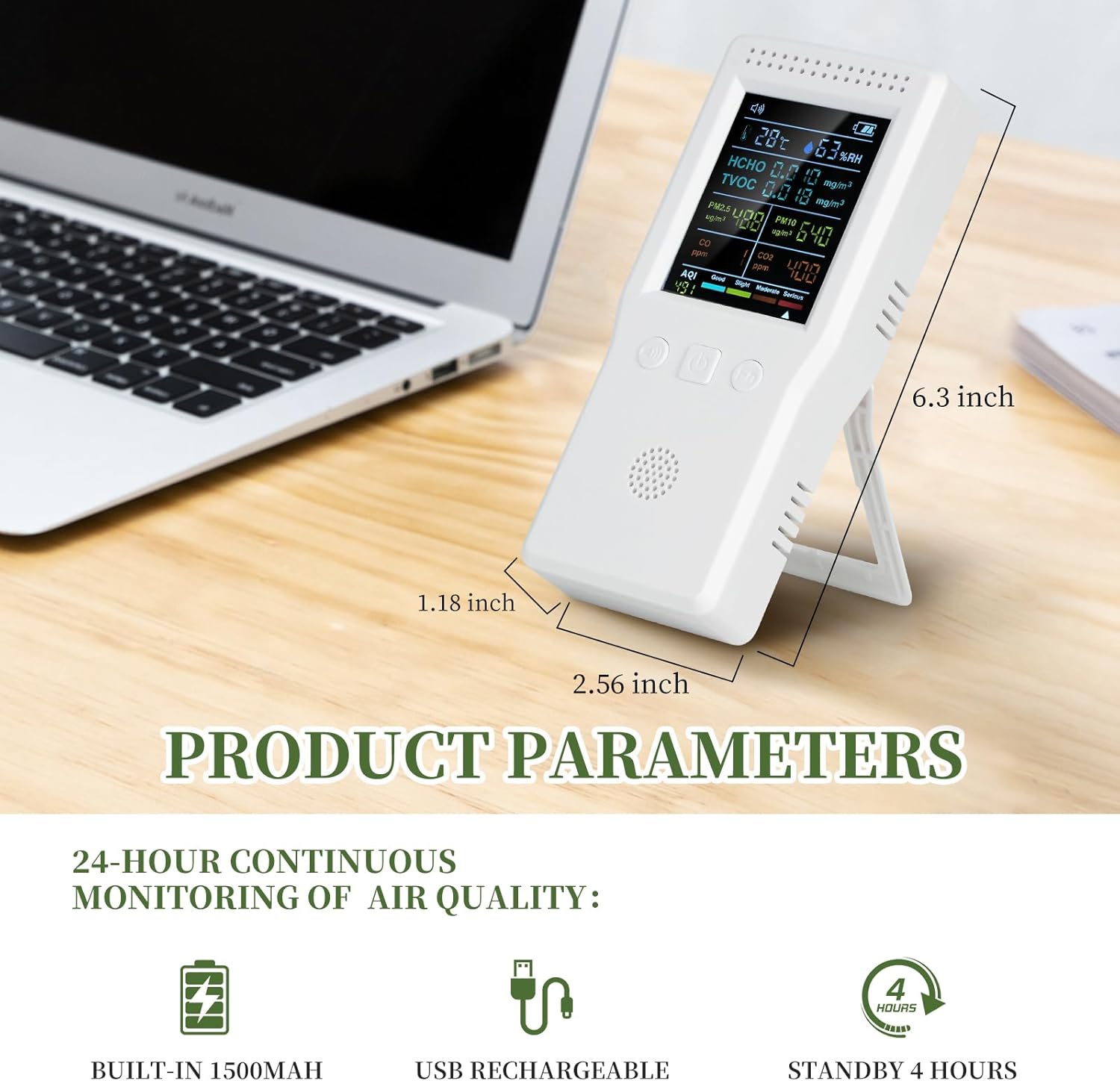
Image: A close-up of the TROMAR Air Quality Monitor's clear digital display, showing various air quality parameters and their readings, emphasizing readability.
유지
청소
- 부드럽고 마른 천으로 기기를 닦으십시오.
- 연마성 세척제, 용제 또는 강한 화학 물질을 사용하지 마십시오. 이러한 제품은 표면을 손상시킬 수 있습니다.asing 또는 내부 구성 요소.
- Ensure the ventilation holes are clear of dust and debris for accurate readings.
저장
- 본 기기는 직사광선과 극한의 온도를 피해 시원하고 건조한 곳에 보관하세요.
- 장기간 보관할 경우, 배터리 수명을 연장하려면 배터리를 부분적으로(약 50%) 충전해 두세요.

Image: The TROMAR Air Quality Monitor being splashed with water, demonstrating its solid shell construction. While durable, direct water exposure should be avoided for optimal performance.
문제 해결
| 문제 | 가능한 원인 | 해결책 |
|---|---|---|
| 장치의 전원이 켜지지 않습니다. | 배터리가 부족합니다. 기기가 충전되지 않았습니다. | USB Type-C 케이블을 사용하여 기기를 전원에 연결하고 최소 30분 동안 충전한 후 다시 전원을 켜십시오. |
| 부정확한 판독값. | Ventilation holes blocked; device not calibrated (if applicable); extreme environmental conditions. | Ensure ventilation holes are clear. Move the device to a stable environment. If issues persist, contact customer support. |
| 배터리 수명이 짧습니다. | 배터리가 완전히 충전되지 않았습니다. 배터리가 노후되었습니다. | Ensure the device is fully charged before use. Battery performance may degrade over time. |
| 화면이 검게 나오거나 멈췄습니다. | 소프트웨어 오류, 배터리 부족. | Try restarting the device by holding the power button. If it doesn't respond, connect to charger. If issue persists, contact support. |
명세서
| 매개변수 | 값 |
|---|---|
| 모델 번호 | VT-9IN1 |
| HCHO 범위 | 0-9.999 mg / m³ |
| TVOC 범위 | 0-9.999 mg / m³ |
| 온도 범위 | 0~70 °C |
| 습도 범위 | 상대습도 0~99% |
| CO2 범위 | 400-5000 PPM |
| CO 범위 | 0-5000 PPM |
| PM2.5/PM10 Range | 0-999ug/m³ |
| AQI 범위 | 0-999 |
| 배터리 용량 | 1500mAh 리튬 폴리머 |
| 전원 | Battery Powered (USB Type-C rechargeable) |
| 작동 습도 | 최대 99% |
| 센서 유형 | 전기 화학 |
| 품목 무게 | 9.6 온스 |
| 패키지 크기 | 6.97 x 3.58 x 1.85 인치 |
| 한국어: | 749671736152 |
보증 정보
TROMAR products are manufactured to high-quality standards. This product comes with a standard manufacturer's warranty. Please refer to the warranty card included in your packaging for specific terms and conditions, or visit the official TROMAR web자세한 보증 정책 정보는 사이트를 참조하세요.
Typically, the warranty covers defects in materials and workmanship under normal use. It does not cover damage caused by misuse, accident, unauthorized modification, or improper maintenance.
고객 지원
If you encounter any issues or have questions regarding your TROMAR 9-in-1 Air Quality Monitor, please do not hesitate to contact our customer support team.
- 이메일: Refer to your product packaging or the official TROMAR web연락처 이메일 사이트입니다.
- Web대지: Visit the official TROMAR webFAQ, 지원 리소스, 문의 양식을 제공하는 사이트입니다.
- 온라인 소매업체 지원: For purchase-related inquiries, you may also contact the retailer from whom you purchased the product.
Ask a question about this manual
Ask about setup, troubleshooting, compatibility, parts, safety, or missing instructions. Manuals+ will review the question and use this page’s manual context to help answer it.