
1. 서론
This manual provides detailed instructions for the assembly, operation, and maintenance of your VIVO DESK-TOP1R 63x32 inch Black Carbon Fiber Universal Table Top. This table top is designed to be compatible with various standard and sit-to-stand height adjustable desk frames, offering a spacious and organized workspace.
2. 안전 정보
Always follow the assembly instructions provided. Ensure all three sections of the tabletop are used for stability. Do not exceed the weight limit of the desk frame. Always keep the desk on a stable surface and avoid placing heavy objects on the edges to prevent tipping.
3. 상자 안에 무엇이 들어있나요?
Your VIVO DESK-TOP1R package includes the following components:
- Black Carbon Fiber 63" x 32" Table Top (3 sections)
- Assembly hardware (screws, wooden dowel pins, support bars)
- Cable management covers
4. 사양
| 특징 | 세부 사항 |
|---|---|
| 상표 | 비보 |
| 모델 번호 | DESK-TOP1R |
| 제품 치수 | 31.5인치 깊이 x 63.1인치 너비 x 0.75인치 높이 |
| 색상 | 블랙 카본 파이버 |
| 상단 재료 유형 | 탄소 섬유(적층형) |
| 특징 | 긁힘 방지 |
| 품목 무게 | 38.2 파운드 |
| 필요한 조립 | 예 |
| 조립을 위한 추천 인원 | 2 |
5. 설치 및 조립
The VIVO DESK-TOP1R table top requires minimal assembly. All necessary hardware and instructions are included. It is recommended that two people assist with the assembly due to the size and weight of the components.
5.1 총회 회의록
- Ensure all three sections of the tabletop are used for proper stability and functionality.
- The pre-drilled holes on this tabletop are designed to fit VIVO desk frame models (e.g., DESK-V101M, DESK-V102E, DESK-V103E).
- If using with most other desk frames, pre-drilling will be required to secure the tabletop.
5.2 조립 단계
- Connect Desktop Panels: Place the three desktop panels upside down on a soft, clean surface. Use the provided wooden dowel pins to align and connect the panels.
- 지지 막대 부착: Lay the metal support bars over the pre-drilled holes in the assembled desktop. Secure them using the provided 5/8" screws and a Phillips screwdriver.
- Secure to Desk Frame: Carefully lift the assembled desktop and place it onto your desk frame. Align the desktop with the frame's mounting points. Secure the desktop to the frame using the provided 5/8" screws and a Phillips screwdriver.
- Insert Cable Management Covers: Place the cable management covers into the designated holes on the desktop.

Figure 1: Dimensions of the 3-panel VIVO DESK-TOP1R table top, measuring 63.1 inches wide by 31.5 inches deep.

Figure 2: The VIVO DESK-TOP1R table top mounted on an adjustable desk frame, demonstrating compatibility with frames ranging from 43 to 62 inches in length.
5.3 조립 영상
Video 1: This video provides a detailed guide on assembling the VIVO 63 x 32 inch Table Top, including connecting the three panels and securing them to a desk frame.
6. 사용 설명서
The VIVO DESK-TOP1R table top is designed to enhance your workstation experience, especially when paired with a compatible adjustable desk frame.
6.1 Adjustable Height Functionality
When combined with a VIVO manual or electric height-adjustable desk frame, this table top allows for seamless transitions between sitting and standing positions. Refer to your specific desk frame's manual for instructions on adjusting height and programming presets.
6.2 Spacious Work Area
The large 63.1" x 31.5" (28" at center) surface provides ample space for multiple monitors, laptops, and essential office supplies, ensuring an organized and efficient work environment.

Figure 3: The VIVO DESK-TOP1R Black Carbon Fiber Table Top configured with dual monitors, keyboard, mouse, and other computer peripherals, demonstrating its spacious work area.
6.3 케이블 관리
Integrated cable management holes are strategically placed to help keep your power and AV cords tidy and organized, reducing clutter on your desktop.
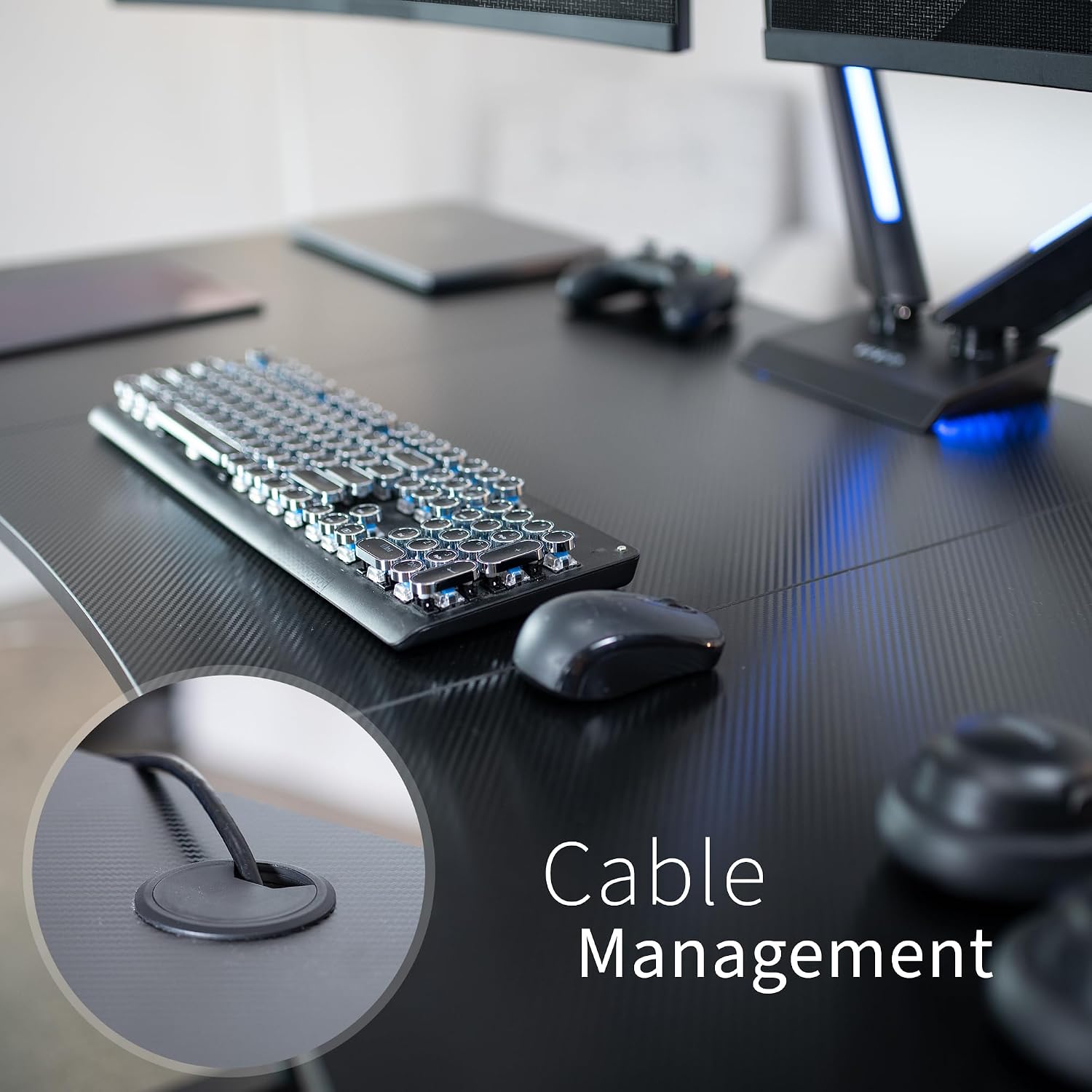
그림 4: 클로즈업 view of the integrated cable management grommet on the VIVO DESK-TOP1R table top, designed to keep cables organized.
6.4 운영 비디오
Video 2: A user demonstration of the VIVO desk frame with a compatible tabletop, showcasing its height adjustment capabilities and ergonomic benefits.
비디오 3: 한 사용자가 다시view highlighting the spaciousness and ease of assembly of the VIVO desktop.
7. 유지관리
To ensure the longevity and appearance of your VIVO DESK-TOP1R table top, follow these simple maintenance guidelines:
- 청소: 부드러운 천으로 표면을 정기적으로 닦아주세요.amp cloth. For stubborn marks, use a mild, non-abrasive cleaner. Avoid harsh chemicals that may damage the carbon fiber laminate finish.
- 유출: 얼룩이나 표면 손상을 방지하려면 유출된 액체를 즉시 닦아내세요.
- 보호: While the surface is scratch-resistant, using coasters for drinks and desk pads for heavy equipment can further protect the tabletop.
- 패스너: 모든 나사와 패스너가 단단히 조여져 있는지 정기적으로 점검하세요. 안정성을 유지하기 위해 필요한 경우 다시 조여주세요.
8. 문제 해결
If you encounter any issues with your VIVO DESK-TOP1R table top, please refer to the following common solutions:
- 흔들림/불안정성: Ensure all assembly screws and fasteners connecting the desktop panels and to the desk frame are securely tightened. Verify that the desk frame itself is stable and properly assembled according to its own instructions.
- Desktop Panels Not Aligning: Double-check that the wooden dowel pins are correctly inserted and that the panels are pressed firmly together during initial assembly.
- Pre-drilled Holes Don't Match Frame: As noted in the specifications, the pre-drilled holes are optimized for VIVO desk frames. If using a non-VIVO frame, custom pre-drilling may be necessary. Exercise caution and ensure proper measurements before drilling.
- 배송 중 파손: Inspect the product upon arrival. If any components are damaged, contact VIVO customer support immediately.
9. 보증 및 지원
The VIVO DESK-TOP1R table top comes with a 1 년 전체 보증, which is a limited warranty covering manufacturing defects. For warranty claims, technical assistance, or any product-related inquiries, please contact VIVO customer support.
VIVO is a US-based company dedicated to providing quality office ergonomics and customer support. For further assistance, please visit the official VIVO web사이트를 방문하거나 지원팀에 직접 문의하세요.