
symcode USA-6709DA-Green
Symcode 무선 블루투스 바코드 스캐너 사용 설명서
Model: USA-6709DA-Green
1. 서론
This user manual provides comprehensive instructions for the Symcode Wireless Bluetooth Barcode Scanner, Model USA-6709DA-Green. This device is designed for accurate and efficient data capture, supporting various 1D and 2D barcode types. It offers versatile connectivity options including Bluetooth, 2.4G wireless, and USB wired connections, making it suitable for a wide range of business applications.

Image 1: Symcode Wireless Bluetooth Barcode Scanner and accessories.
2. 패키지 내용
패키지에 모든 품목이 들어 있는지 확인하세요.
- Symcode Barcode Scanner (Model: USA-6706DA-Green)
- USB 충전 케이블
- 2.4G USB 동글
- 사용자 설명서

Image 2: Components included with the Symcode Barcode Scanner.
3. 제품 특징
- 고급 스캐닝 기술: CMOS optical imaging for quick and precise scanning of 1D and 2D barcodes (QR, DataMatrix, PDF417, Aztec, Hanxin, etc.) even on damaged or poorly printed labels.
- 3중 연결 모드: Supports Bluetooth, 2.4G wireless, and USB wired connections for maximum flexibility.
- 확장된 무선 범위: Up to 200m in open environments and 30m indoors with the 2.4G USB dongle.
- 긴 배터리 수명: 2000mAh battery provides up to 30 hours of continuous scanning, with a full recharge in approximately 2 hours.
- 다양한 구성: Features include hands-free intelligent sensor mode, trigger scan mode, vibration/buzzer settings, data storage/instant upload modes, multiple keyboard languages, and customizable prefix/suffix options.
- 뛰어난 내구성: Constructed with strong ABS material, designed to withstand drops of up to 2.4 meters (8 ft) and features an integrated dustproof housing (IP67 rated).
4. 설정 및 연결
이 스캐너는 세 가지 주요 연결 방식을 제공합니다.
4.1. 2.4G 무선 연결
- 2.4G USB 동글을 컴퓨터의 사용 가능한 USB 포트에 꽂습니다.
- Turn on the scanner. It will automatically pair with the dongle.
- A successful connection is indicated by a specific beep sound and LED indicator.
4.2. 블루투스 연결
- 스마트폰, 태블릿, 컴퓨터 등 기기의 블루투스 기능이 활성화되어 있는지 확인하세요.
- Scan the Bluetooth pairing barcode (usually found in the user manual or on a setup card).
- On your device, search for Bluetooth devices and select "Symcode Scanner" (or similar name).
- 페어링을 확인하세요.
4.3. USB 유선 연결
- 제공된 USB 케이블을 사용하여 스캐너를 컴퓨터에 연결합니다.
- 스캐너는 유선 장치로 작동하며 동시에 충전도 가능합니다.

Image 3: Connectivity options for the Symcode Barcode Scanner.

이미지 4: 운영 체제 호환성.
5. 사용 설명서
5.1. 기본 스캐닝 작업
To scan a barcode, point the scanner's window at the barcode and press the trigger button. A successful scan will be indicated by a beep and/or vibration, and the data will be transmitted to your connected device.
5.2. 데이터 업로드 모드
스캐너는 두 가지 데이터 업로드 모드를 지원합니다.
- 자동 업로드 모드: Data is transmitted to the connected device immediately after each scan. This is the default mode.
- 오프라인 저장 모드: Scanned data is stored in the scanner's internal memory (up to 10,000 codes). To upload stored data, scan the specific setup code for 'Upload Data' found in your detailed user manual.

Image 5: Instant Upload Mode vs. Offline Storage Mode.
5.3. 디코딩 기능
The scanner can decode a wide array of barcode types, including:
- 1D 바코드: UPC/EAN, Code 39, Code 128, Codabar, Interleaved 2 of 5, Code 93, MSI, Code 11, RSS variants, etc.
- 2D 바코드: QR Code, Data Matrix, PDF417, Aztec, Hanxin.
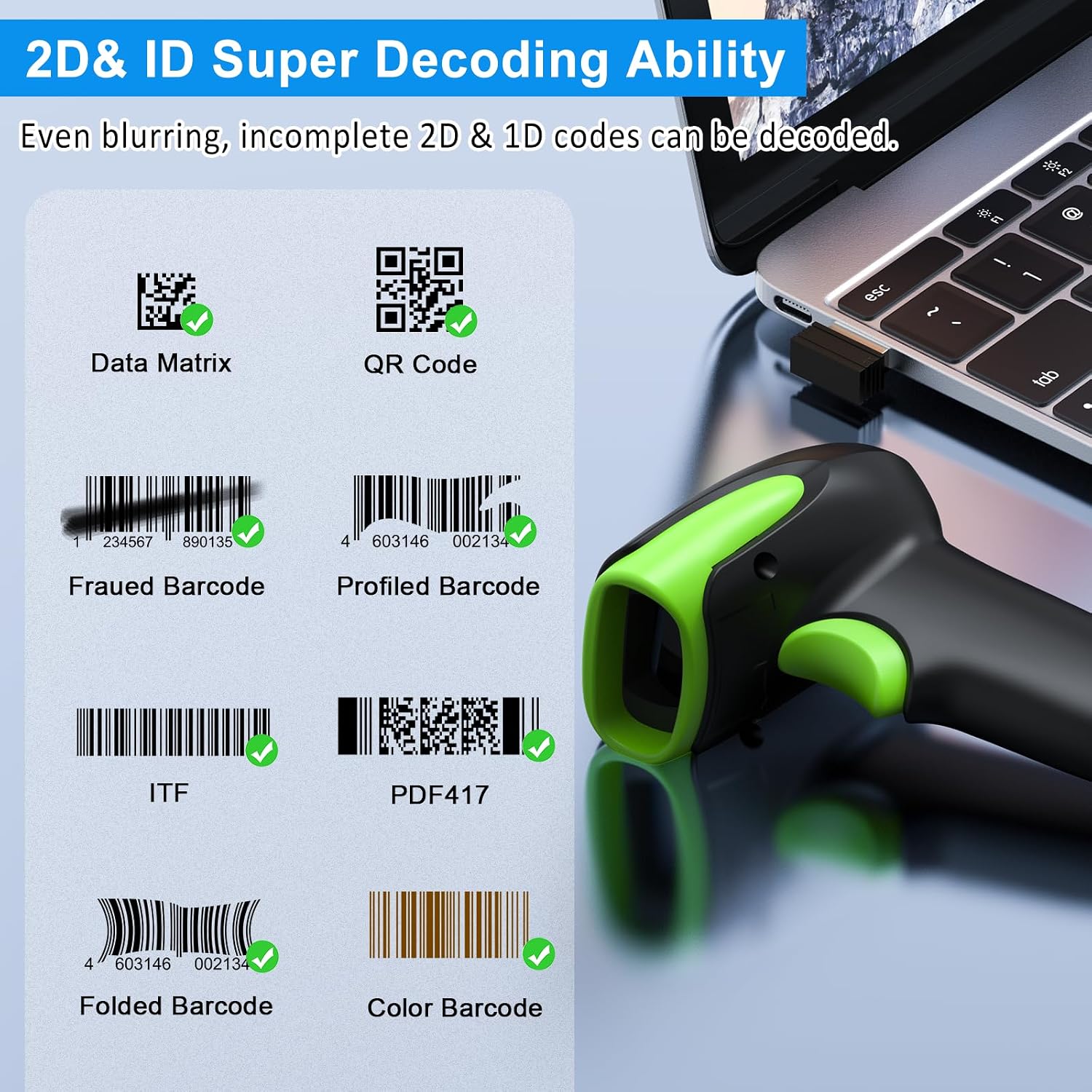
이미지 6: Examples of decodable 1D and 2D barcodes.
6. 유지관리
스캐너의 최적 성능과 수명 보장을 위해 다음 사항을 준수하십시오.
- 청소: 부드럽고 마른 천을 사용하여 스캐너 외부를 청소하세요. 스캔 창에는 긁힘 방지를 위해 렌즈 청소용 천을 사용하세요. 연마성 세척제나 용제는 사용하지 마세요.
- 충전 중: Recharge the battery using the provided USB cable. Avoid overcharging or completely draining the battery for extended periods.
- 저장: 스캐너는 직사광선과 극한의 온도를 피해 시원하고 건조한 곳에 보관하세요.
- 내구성: While rugged, avoid intentional drops or impacts. The scanner is designed to withstand accidental drops up to 2.4 meters.

Image 7: The scanner's rugged design and drop resistance.
7. 문제 해결
스캐너에 문제가 발생하면 다음의 일반적인 문제와 해결 방법을 참조하세요.
- 스캐너가 연결되지 않음:
- 스캐너가 충전되어 있는지 확인하십시오.
- Verify the correct connection mode (Bluetooth, 2.4G, USB) is selected and properly set up.
- For 2.4G, ensure the dongle is securely plugged in. For Bluetooth, ensure your device's Bluetooth is on and the scanner is paired.
- 스캐너와 호스트 장치를 모두 다시 시작해 보세요.
- 스캐너가 바코드를 읽지 못합니다.
- 바코드가 심하게 손상되었거나, 번졌거나, 인쇄 상태가 불량하지 않은지 확인하십시오.
- 스캐너와 바코드 사이의 거리와 각도를 확인하세요.
- 스캐너가 바코드 유형을 지원하는지 확인하십시오.
- 스캔 창이 더러우면 닦아주세요.
- 데이터 전송 중이 아닙니다.
- 스캐너가 기기에 성공적으로 연결되었는지 확인하십시오.
- Check if the scanner is in 'Offline Storage Mode' and needs to be manually uploaded.
- Ensure the application on your device is ready to receive input.
For further assistance, please refer to the comprehensive troubleshooting section in the full user manual or contact Symcode customer support.
8. 사양
| 특징 | 사양 |
|---|---|
| 모델 번호 | USA-6709DA-Green |
| 입력 Voltage | DC5V±0.25V |
| Current (Work/Instantaneous) | 25mA / 95mA |
| 디코딩 속도 | 100 회 / 초 |
| 무선 범위(2.4G) | 최대 200m(야외), 30m(실내) |
| 충전 시간 | 약 2.5시간 |
| 배터리 수명 | Up to 30 Hours (continuous scanning) |
| 배터리 유형 | 1개의 리튬 폴리머 배터리(포함) |
| 연결성 | 블루투스 6.1, 무선 2.4G, USB 케이블 |
| 호환 장치 | Desktop, Laptop, Smartphone, POS systems |
| 운영 체제 | 윈도우 11/10/8/7/XP, 맥 OS, iOS, 안드로이드, 리눅스 |
| 품목 무게 | 10.2 온스 |
| 패키지 크기 | 6.89 x 4.49 x 3.31 인치 |

Image 8: Wireless transmission range.
9. 보증 및 지원
This Symcode product is manufactured by USA Scanner. For any product inquiries, technical support, or warranty claims, please contact USA Scanner directly. Refer to the contact information provided in your product packaging or visit the official Symcode brand store on Amazon for support resources.
방문하세요 심코드 스토어 자세한 내용은.
Ask a question about this manual
Ask about setup, troubleshooting, compatibility, parts, safety, or missing instructions. Manuals+ will review the question and use this page’s manual context to help answer it.