
1. 서론
This instruction manual provides detailed guidance for the safe and effective use of the DLMELHOR Universal Dye Ink Refill Kit. This kit is designed to replenish ink in compatible inkjet printer cartridges, offering a cost-effective solution for your printing needs. Please read this manual thoroughly before attempting to refill any cartridges.
2. 패키지 내용
The DLMELHOR Universal Dye Ink Refill Kit UDI-4PACK(BK+CMY) includes the following items:
- 1 x 100ml Bottle of Black Dye Ink
- 1 x 100ml Bottle of Cyan Dye Ink
- 1 x 100ml Bottle of Magenta Dye Ink
- 1 x 100ml Bottle of Yellow Dye Ink
- 4 x Syringes for ink refilling
- 1 x 사용 설명서(이 문서)

Image: Contents of the DLMELHOR Universal Dye Ink Refill Kit, showing the four ink bottles and accompanying syringes.
3. 호환성
This universal dye ink refill kit is compatible with a wide range of inkjet printer cartridges, refillable ink cartridges, and Continuous Ink Supply Systems (CISS/CIS) from various manufacturers. It is designed for use with:
- HP 잉크젯 프린터
- Epson Inkjet Printers
- Canon 잉크젯 프린터
- Lexmark Inkjet Printers
- Brother Inkjet Printers
- Samsung Inkjet Printers
- Dell Inkjet Printers
- Kodak Inkjet Printers
- And most other inkjet printer cartridges or CISS/CIS systems.

Image: Visual representation of the ink kit's broad compatibility with major printer brands.
4. Setup and Ink Refill Process
Before starting, ensure you have a clean workspace and consider wearing gloves to prevent ink stains. The ink bottles feature a special bottleneck design for easier and cleaner refilling.
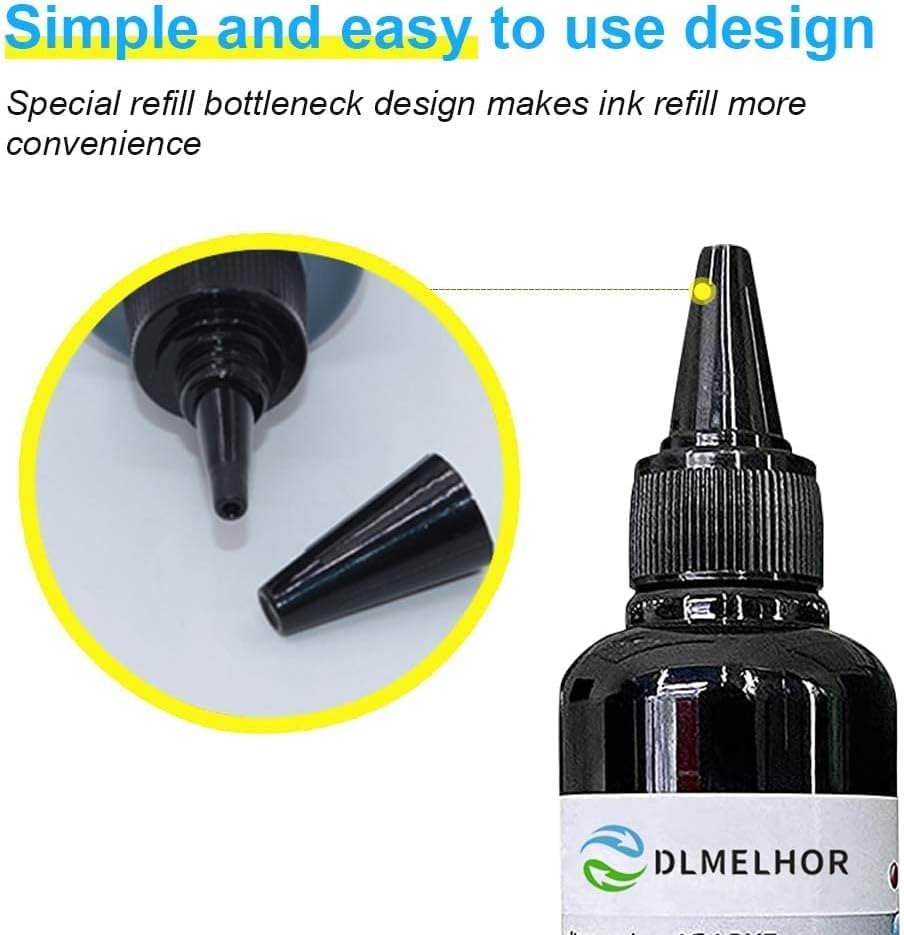
Image: The specialized bottleneck design of the ink bottles, facilitating convenient refilling.
General Cartridge Refill Steps:
- Step 1: Prepare the Cartridge. Carefully remove the label on top of your printer cartridge to expose the refill holes. Some cartridges may require drilling a small hole if no existing refill port is visible.
- Step 2: Identify Ink Colors. If there are multiple holes, use a toothpick or a small probe to gently test the color of the ink remaining in each hole. This helps ensure you refill with the correct color.
- Step 3: Refill the Ink. Attach a syringe to the appropriate ink bottle. Slowly inject the ink into the corresponding cartridge hole. Do not overfill; leave a small air gap at the top. It is recommended to refill before the cartridge is completely empty to prevent air from entering the print head.
- Step 4: Verify Ink Flow. After refilling, gently press the print cartridge onto a clean paper towel to check for proper ink flow and to verify the color. A clear, solid line of ink should appear.
- Step 5: Seal and Install. Carefully seal the refill holes (e.g., with tape or the original label). Allow the cartridge to rest for about an hour before reinstalling it into your printer.

Image: Step-by-step visual guide for refilling an inkjet cartridge.
5. 사용 설명서
Once cartridges are refilled and reinstalled, your printer should be ready for use. The DLMELHOR dye ink is formulated to produce vivid, true-to-life prints with accurate and bright colors, matching or exceeding original specifications for color, pH, surface tension, and viscosity.
- 인쇄 품질: Expect high-quality output for documents and images.
- 페이지 수율: This kit provides a high capacity, allowing for significant page yields (e.g., up to 8000 pages as per product information) and reducing overall printing costs.

Image: Comparison of print quality, highlighting the vibrant and consistent results achieved with DLMELHOR ink.
6. 유지관리
Proper maintenance ensures the longevity of your printer and consistent print quality.
- 막힘 방지: The ink is purified to prevent clogging and corrosion of the print head. However, regular printing helps keep print heads clear. If you don't print frequently, consider running a print head cleaning cycle from your printer's utility software periodically.
- Ink Storage: Store unused ink bottles in a cool, dry place, away from direct sunlight. Ensure caps are tightly sealed to prevent evaporation or contamination.
- Refill Timing: Always ensure there is still some ink in the cartridge before refilling. This prevents air from entering the print head, which can lead to printing issues.

Image: Depiction of the high-quality raw materials used in DLMELHOR ink production.
7. 문제 해결
If you encounter issues after refilling, consider the following common problems and solutions:
| 문제 | 가능한 원인 | 해결책 |
|---|---|---|
| Printer does not recognize cartridge / Cartridge shows as empty. | Many printers are designed to track ink levels electronically. Refilling does not reset this counter. |
|
| Spotty, faded, or streaky prints. |
|
|
| Ink leakage. |
|
|
8. 사양
| 특징 | 세부 사항 |
|---|---|
| 상표 | DLMELHOR |
| 모델명 | Universal Refill Dye Ink |
| 잉크 종류 | Dye-based Ink |
| Ink Colors Included | 검정, 청록색, 자홍색, 노랑색 |
| Ink Volume per Bottle | 100ml |
| Total Ink Volume | 400 ml (100 ml x 4) |
| 호환성 | HP, Epson, Canon, Lexmark, Brother, Samsung, Dell, Kodak, and most inkjet printers/CISS systems |
| 품질인증 | ISO-9001 approved |
| 품목 무게 | 1.15파운드 |
| 제품 치수 | 4.7 x 0.9 x 4.5인치(포장) |
9. 보증 및 지원
DLMELHOR is committed to providing high-quality products and customer satisfaction. This product is ISO-9001 approved, ensuring adherence to quality management standards.
If you encounter any issues with your purchased product, or if you believe you have received the wrong item, please contact our professional service center. Our team is available to assist you and help resolve any concerns you may have.
For support, please refer to the contact information provided with your purchase or visit the official DLMELHOR store on Amazon.