
소개
The Tilta Nucleus Nano II Hand Wheel Controller is an advanced wireless lens control system designed for precise control over focus, iris, and zoom (FIZ) functions. Featuring a responsive touch screen and intuitive controls, it allows for seamless adjustment of camera settings and multiple motors, enhancing your filmmaking workflow.

그림 1: 전면 view of the Nucleus Nano II Hand Wheel Controller, showing its touch screen interface.
상자 안에 무엇이 들어있나요?
모든 품목이 패키지에 포함되어 있는지 확인하세요.
- 1x Nucleus Nano II Hand Wheel Controller (12009.00002.00.00)
- 1x USB-C Power Cable (30cm) (21114.00061.00.00)
- 1x 사용 설명서
설정
1. 컨트롤러 충전
The Nucleus Nano II Hand Wheel Controller includes a built-in Lithium Ion battery. Before first use, fully charge the device using the provided USB-C cable. Connect the USB-C cable to the port on the controller and to a compatible USB power source.
2. 컨트롤러 장착
The controller features a NATO mount and a tie-down mechanism for secure attachment to camera rigs or gimbals.
- Locate the NATO rail or mounting point on your camera rig or gimbal.
- Align the NATO mount on the back of the controller with the rail.
- Secure the controller by tightening the tie-down lever until it is firmly attached.

그림 2: 후면 view of the controller, highlighting the NATO mount and USB-C port.

Figure 3: Controller mounted on a camera setup.
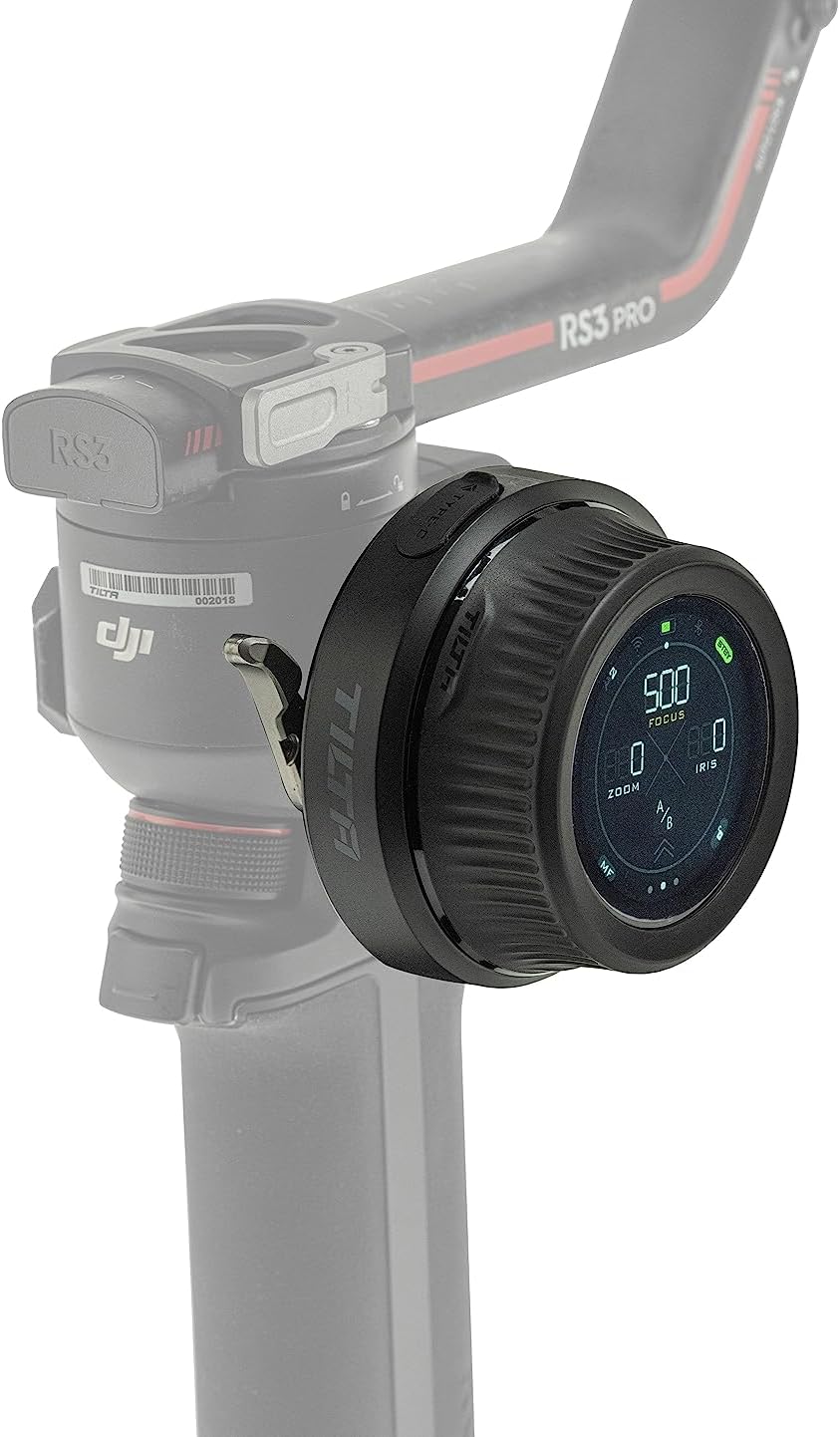
Figure 4: Controller mounted on a gimbal for remote control.
3. Connecting to Motors and Camera
The controller can connect to various motors and cameras via Wifi, Bluetooth, and USB-C for comprehensive control.
- 모터 연결: The controller is compatible with Nucleus M & Nano motors, and DJI Focus Motors. Refer to the specific motor's manual for pairing instructions.
- 카메라 커뮤니케이션: Connect to compatible Canon, Sony, and Black Magic Design cameras (selected models) to adjust settings like ISO, Shutter Speed, and Frame Rate. Consult your camera's manual for wireless control setup.
작동 지침
1. 기본 제어
The controller features a hand wheel, REC button, rocker switch, and FUNC button for intuitive operation.
- 핸드 휠: Primarily used for precise focus pulling.
- REC 버튼 : Initiates and stops recording on compatible cameras.
- 로커 스위치: Controls zoom or iris depending on the selected mode.
- FUNC 버튼: Customizable function button for quick access to frequently used features.

Figure 5: Labeled diagram of the controller's components.
2. 터치스크린 인터페이스
The integrated touch screen provides easy access to advanced features and streamlines on-set workflow. Tap and swipe to navigate menus and adjust settings.

Figure 6: User interacting with the touch screen for intuitive control.

Figure 7: The three main display modes on the touch screen.
3. Multi-Motor Control
The Hand Wheel Controller can control multiple motors simultaneously. With optional expansion, it supports up to 4 motors when used with the Tilta Control Handle.
4. Lens Mapping
The controller displays real-time focal distance information, enabling more accurate and repeatable focus pulling. This feature is particularly useful for precise cinematic work.
5. 호환성
The Nucleus Nano II is compatible with a range of Tilta wireless lens control systems, including Nucleus M and Nucleus Nano, as well as DJI Ronin S series gimbals and DJI Focus Motors. It also supports communication with selected Canon, Sony, and Black Magic Design cameras.

Figure 8: High compatibility with various lens control systems and gimbals.
유지
- 청소: Use a soft, dry cloth to clean the controller. Avoid abrasive materials or harsh chemicals.
- 저장: 컨트롤러는 직사광선과 극한의 온도를 피해 서늘하고 건조한 곳에 보관하세요.
- 배터리 관리 : To prolong battery life, avoid fully discharging the battery frequently. If storing for extended periods, charge the battery to approximately 50% and recharge every few months.
문제 해결
| 문제 | 가능한 원인 | 해결책 |
|---|---|---|
| 컨트롤러의 전원이 켜지지 않습니다. | 배터리가 소진되었습니다. | USB-C 케이블을 사용하여 컨트롤러를 충전하세요. |
| Unable to control motors. | Motors are not paired or out of range. | Ensure motors are powered on and within range. Re-pair the motors if necessary. |
| Camera communication issues. | Incorrect camera settings or compatibility. | Verify camera compatibility and settings. Ensure Wi-Fi/Bluetooth is enabled on both devices. |
| 터치 스크린이 반응하지 않습니다. | 일시적인 소프트웨어 오류입니다. | Restart the controller. If the issue persists, contact customer support. |
명세서
| 특징 | 세부 사항 |
|---|---|
| 모델 번호 | WLC-T05-HWC |
| 치수 | 6 x 5 x 4 인치 |
| 품목 무게 | 10.9 온스(0.68 파운드) |
| 배터리 유형 | 1개의 리튬 이온 배터리(포함) |
| 색상 | 검은색 |
| 연결성 | Wifi, Bluetooth, USB-C |
| 제조업체 | 틸타 |
| 한국어: | 810076276465 |
보증 및 지원
보증 정보 및 기술 지원에 대해서는 Tilta 공식 웹사이트를 참조하십시오. web사이트를 방문하거나 고객 서비스에 직접 문의하세요. 보증 청구에 대비해 구매 증빙 자료로 구매 영수증을 보관하세요.
틸타 공식 Web대지: www.tilta.com


