
1. 서론
The Ankilo Mini Bluetooth 5.3 Receiver/Transmitter is a versatile 2-in-1 audio adapter designed to add Bluetooth functionality to non-Bluetooth devices. Featuring the latest Bluetooth 5.3 technology, it ensures stable connections and a transmission range of up to 33 feet (10 meters). This device is suitable for use with cars, speakers, stereo systems, and headphones, allowing you to enjoy wireless audio streaming and hands-free calling.

Figure 1: Ankilo Mini Bluetooth 5.3 Receiver/Transmitter.

Figure 2: Highlighting Bluetooth 5.3 for stable connections, auto reconnect in RX mode, 33 ft signal range, and fast transmission.
2. 제품 오버view
기기의 구성 요소를 숙지하십시오.
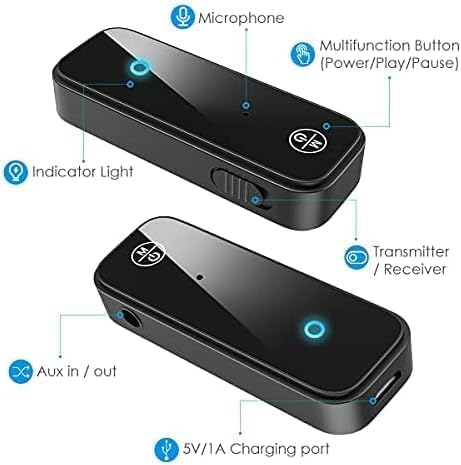
Figure 3: Labeled diagram of the Ankilo Bluetooth adapter. Key components include the Microphone, Multifunction Button (Power/Play/Pause), Indicator Light, Transmitter/Receiver (TX/RX) switch, Aux in/out port, and 5V/1A Charging port.
3. 패키지 내용
패키지에 모든 품목이 들어 있는지 확인하세요.
- 1 x Ankilo Mini Bluetooth 5.3 Receiver/Transmitter
- 1 x 3.5mm Audio Connector (new and old versions may be sent randomly)
- 1 x USB 충전 케이블
- 1 x 사용자 설명서
4. 설정 및 연결
4.1. 수신 모드(RX)
Use Receiver Mode to stream audio from your Bluetooth-enabled device (e.g., smartphone, laptop) to a non-Bluetooth audio system (e.g., car stereo, wired speakers, wired headphones).
- RX 모드로 전환: Locate the TX/RX switch on the side of the adapter and slide it to the "RX" position.
- 오디오 시스템에 연결: Plug the 3.5mm audio connector into the Aux in/out port of the Bluetooth adapter. Then, plug the other end of the 3.5mm audio connector into the auxiliary input port of your non-Bluetooth audio system.
- 전원 켜기 및 페어링: Press and hold the Multifunction Button (power button) for 3 seconds to turn on the device. The indicator light will flash red and blue alternately, indicating it is in pairing mode.
- 장치와 페어링: On your smartphone or other Bluetooth-enabled device, go to Bluetooth settings and search for "Ankilo" or "ZF-360" (or similar device name). Select it to connect. Once connected, the indicator light on the adapter will turn solid blue.

Figure 4: Step-by-step visual guide for connecting in both Receiver (RX) and Transmitter (TX) modes.
4.2. 송신기 모드(TX)
Use Transmitter Mode to stream audio from a non-Bluetooth audio source (e.g., TV, computer, MP3 player) to your Bluetooth headphones or speakers.
- TX 모드로 전환: Locate the TX/RX switch on the side of the adapter and slide it to the "TX" position.
- 오디오 소스에 연결: Plug the 3.5mm audio connector into the Aux in/out port of the Bluetooth adapter. Then, plug the other end of the 3.5mm audio connector into the auxiliary output port of your non-Bluetooth audio source (e.g., TV headphone jack).
- 전원 켜기 및 페어링: Press and hold the Multifunction Button (power button) for 3 seconds to turn on the device. The indicator light will flash red and blue alternately, indicating it is in pairing mode.
- 블루투스 헤드폰/스피커와 페어링하세요: Put your Bluetooth headphones or speakers into pairing mode. The adapter will automatically search and connect to your headphones/speakers. Once connected, the indicator light on the adapter will turn solid red.
Video 1: General guide on how to use an Aux Bluetooth Adapter for Car. (Note: Product shown may vary slightly from Ankilo model.)
Video 2: Demonstration of ensuring the audio plug is firmly inserted for optimal sound quality. (Note: Product shown may vary slightly from Ankilo model.)
5. 작동 모드 및 기능
5.1. 핸즈프리 통화
The adapter features a built-in HD microphone for convenient hands-free calling while driving or performing other tasks.
- 전화 받기/끊기: 다기능 버튼을 한 번 누르세요.
- 전화 거부: 다기능 버튼을 2초간 길게 누르세요.
- 마지막 번호 재다이얼: 다기능 버튼을 두 번 누르세요.
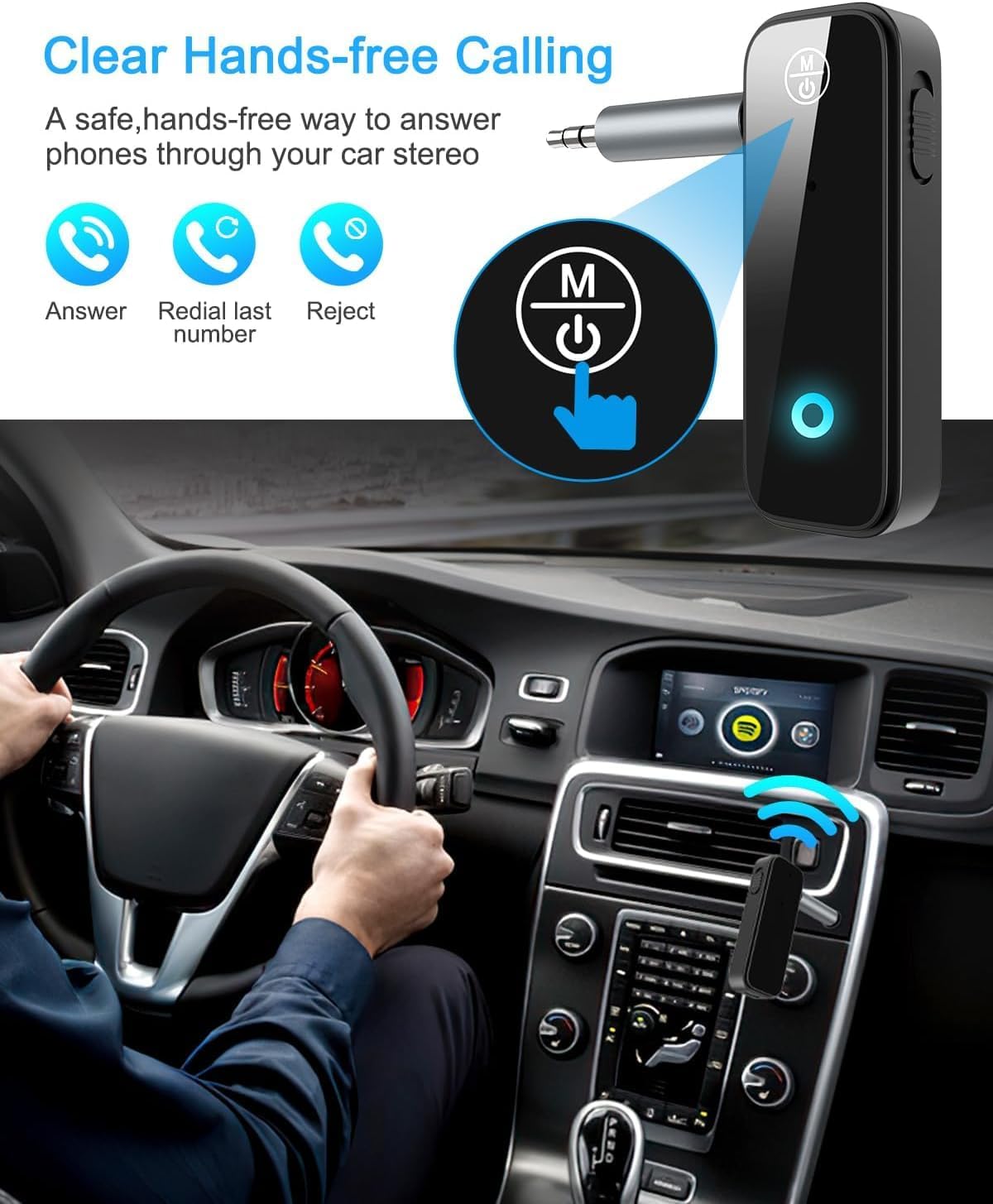
Figure 5: Visual representation of hands-free calling functionality in a vehicle.
5.2. 음악 재생 제어
- 재생/일시 중지: 다기능 버튼을 한 번 누르세요.
- 다음 트랙: "+" 버튼을 한 번 누르세요.
- 이전 트랙 : "-" 버튼을 한 번 누르세요.
- 볼륨 업: "+" 버튼을 길게 누르세요.
- 볼륨 작게 : "-" 버튼을 길게 누르세요.
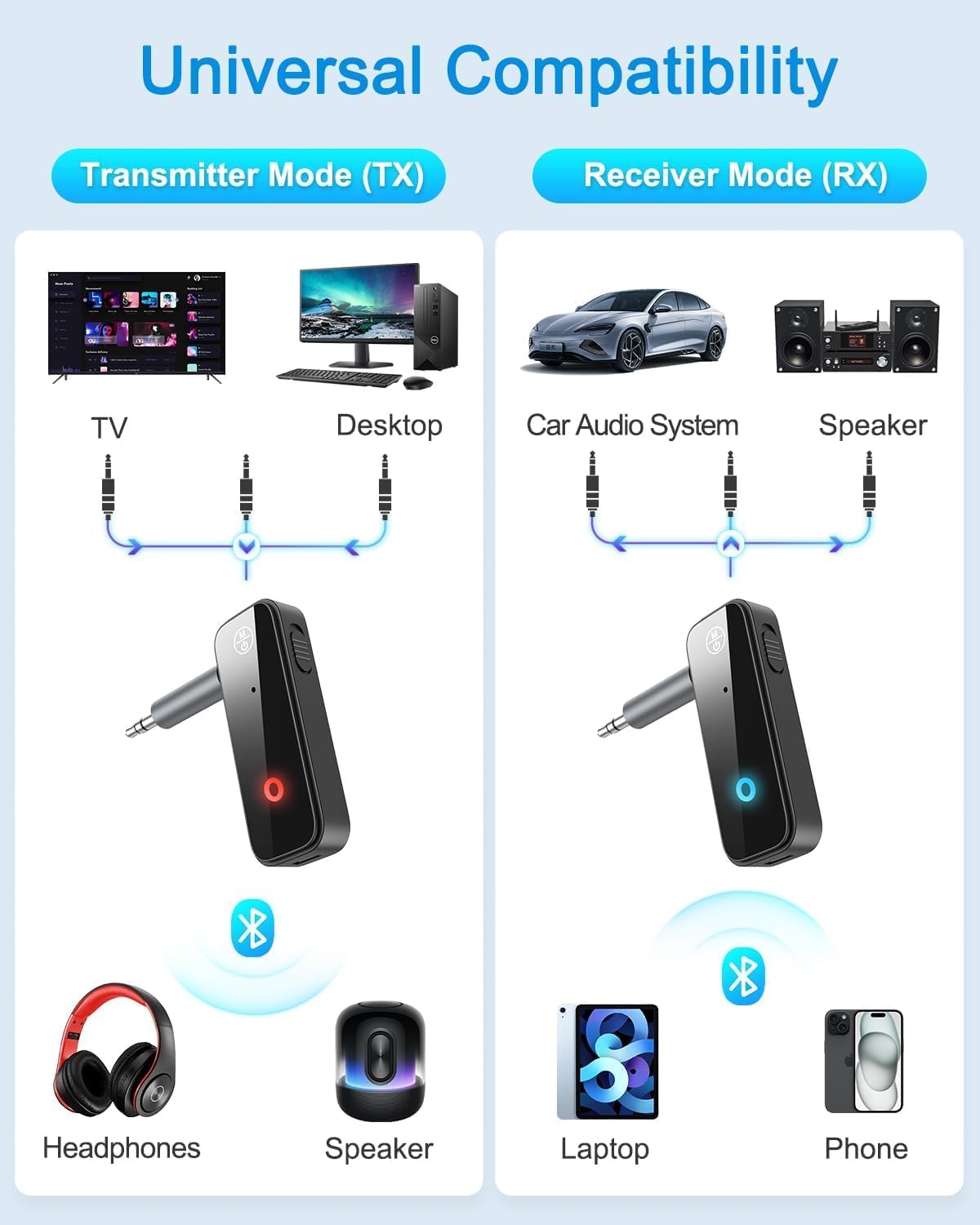
Figure 6: Illustrates the universal compatibility of the device in both Transmitter (TX) and Receiver (RX) modes with various devices like TVs, desktops, car audio systems, speakers, headphones, laptops, and phones.
6. 충전 및 배터리 수명
The Ankilo Mini Bluetooth adapter is equipped with a built-in rechargeable battery. A full charge takes approximately 2 hours and provides up to 8 hours of music playback or call time.
- 충전 중: Connect the provided USB charging cable to the 5V/1A Charging port on the adapter and to a USB power source. The red indicator light will be solid during charging and turn off when fully charged.
- 배터리 부족 표시: When the battery is low, the red indicator light will flash.

Figure 7: Details on the device's 8-hour battery life, 2-hour fast charging, and USB charging port.
7. 사양
| 특징 | 세부 사항 |
|---|---|
| 상표 | 안킬로 |
| 모델 | CP210-MA06CA-KH |
| 블루투스 버전 | 5.3 |
| 작동 모드 | Receiver (RX) & Transmitter (TX) |
| 전송 범위 | 최대 33피트(10미터) |
| 배터리 수명 | Approx. 8 hours (music/call) |
| 충전 시간 | 약 2시간 |
| 충전 포트 | 5V/1A(USB) |
| 오디오 입력/출력 | 3.5mm 보조 |
| 내장 마이크 | Yes (HD) |
| 재료 | 플라스틱 |
| 제품 치수 | 6.7 x 1.8 x 10 cm; 30g |
8. 문제 해결
- 장치가 켜지지 않음: 기기가 완전히 충전되었는지 확인하십시오. USB 케이블을 사용하여 전원에 연결하십시오.
- 장치와 페어링할 수 없습니다:
- 어댑터가 올바른 송신(TX) 또는 수신(RX) 모드로 설정되어 있는지 확인하십시오.
- Make sure the adapter is in pairing mode (red and blue lights flashing alternately).
- Ensure the target device (phone, headphones, speaker) is also in pairing mode.
- Turn off and on the Bluetooth function on your device and try searching again.
- 필요한 경우 두 기기 모두에서 이전 블루투스 연결을 삭제하십시오.
- No audio or low audio:
- Check that the 3.5mm audio connector is fully and firmly inserted into both the adapter and the audio system/source.
- 어댑터와 연결된 오디오 장치의 볼륨이 모두 켜져 있는지 확인하십시오.
- Verify that the adapter is correctly connected to the audio source/system (TX mode for output, RX mode for input).
- 간헐적 연결: Ensure there are no significant obstacles (like walls) between the adapter and the connected Bluetooth device. Keep devices within the 33-foot (10-meter) range.
9. 안전 정보
- 기기를 극한의 온도, 습기 또는 부식성 환경에 노출시키지 마십시오.
- 장치를 직접 분해하거나 수리하려고 하지 마십시오.
- 어린이의 손이 닿지 않는 곳에 보관하세요.
- Note: This adapter is not suitable for SONY devices. Please confirm compatibility before purchase.
10. 보증 및 지원
Ankilo offers a 12-month quality protection warranty and 60 days free replacement for this product. For any questions or concerns, please contact our customer support. We are committed to responding within 24 hours to assist you.