
소개
Thank you for choosing the DELUX GM905 Ergonomic Wireless Keyboard. This manual provides detailed instructions for setting up, operating, and maintaining your keyboard to ensure optimal performance and comfort. Please read this manual thoroughly before using the product.

제품 특징
- Ergonomic Split and Curved Design: Engineered to promote a natural arm and wrist posture, reducing strain and discomfort during extended typing sessions.
- 다중 장치 연결: Supports 2.4G wireless (via USB receiver) and Bluetooth 5.0 (BT1 + BT2 channels), allowing connection to up to three devices simultaneously with easy switching.
- Integrated Padded Wrist Rest: Features a skin-friendly synthetic leather wrist rest to provide comfortable support for your palms and wrists.
- Full-Size Layout with Multimedia Keys: Includes a standard 112-key layout with a number pad, 12 FN function keys, and dedicated multimedia controls for enhanced productivity.
- Adjustable Front and Palm Supports: Equipped with four adjustable kickstands to customize the keyboard angle for both seated and standing postures.
- 광범위한 시스템 호환성: Compatible with Microsoft Windows (7/8/10/11), Mac OS 10.12 or higher, and Android 4.3 or higher.


패키지 내용
상자를 푼 후 패키지 내용물을 확인하세요.
- DELUX GM905 Ergonomic Wireless Keyboard
- 2.4G USB 수신기
- USB 케이블
- 사용 설명서 (본 문서)
설정
1. 배터리 설치
The keyboard requires two AAA batteries (not included). Locate the battery compartment on the underside of the keyboard. Open the cover, insert two AAA batteries according to the polarity indicators, and close the cover.
2. 기기에 연결
The DELUX GM905 keyboard offers three connection modes: 2.4G Wireless and two Bluetooth 5.0 channels (BT1, BT2).
2.1. 2.4G 무선 연결
- Locate the 2.4G USB receiver, usually stored in a compartment on the keyboard or included in the package.
- USB 수신기를 컴퓨터의 사용 가능한 USB 포트에 연결합니다.
- 키보드에서 다음을 누르세요. 2.4G key to switch to 2.4G wireless mode. The indicator light will illuminate.
- Your computer should automatically detect and install the keyboard.
2.2. 블루투스 연결(BT1 / BT2)
- 키보드에서 다음 중 하나를 길게 누릅니다. BT1 or BT2 해당 표시등이 빠르게 깜박일 때까지 키를 3~5초간 누르세요. 이는 페어링 모드임을 나타냅니다.
- 기기(컴퓨터, 태블릿, 스마트폰)에서 Bluetooth 설정으로 이동하여 Bluetooth를 활성화하세요.
- 검색 new devices. You should see "DELUX GM905" or a similar name appear in the list.
- Select the keyboard to pair. The indicator light on the keyboard will stop flashing and remain solid once connected.
- 다른 블루투스 채널(BT2 또는 BT1)에 대해서도 이 단계를 반복하여 두 번째 장치를 연결하십시오.


3. Adjust Keyboard Angle
The keyboard features adjustable kickstands at the front and palm rest area. You can adjust these to find the most comfortable typing angle for your seated or standing posture. Experiment with different angles to reduce wrist and arm strain.

작동 지침
장치 간 전환
Once multiple devices are paired, you can switch between them by simply pressing the corresponding connection key: 2.4G, BT1, 또는 BT2. The keyboard will connect to the selected device almost instantly.
Using Function (FN) Keys
The keyboard features 12 FN function keys (F1-F12) with secondary multimedia functions. To activate the secondary function, hold down the Fn (왼쪽 Ctrl 키 근처에 있는) 키를 누른 다음 원하는 F 키를 누르십시오.
Common FN key combinations include:
- Fn+F1: 자르다
- Fn+F2: 복사
- Fn+F3: 반죽
- Fn+F4: 검색
- Fn+F5: 이전 트랙
- Fn+F6: 재생/일시정지
- Fn+F7: 다음 트랙
- Fn+F8: 무음
- Fn+F9: 볼륨 낮추기
- Fn+F10: 볼륨을 높이다
- Fn+F11: 잠금 화면
- Fn+F12: 계산자

전용 멀티미디어 컨트롤
The central circular dial provides quick access to multimedia functions:
- 중앙 버튼: 재생/일시정지
- 왼쪽/오른쪽 버튼: 이전/다음 트랙
- 위/아래 버튼: 볼륨 높이기/낮추기
- Top/Bottom Buttons (Sun icons): Brightness Up/Down (System dependent)

유지
키보드 청소
- 청소하기 전에 키보드를 장치에서 분리하세요.
- 부드럽고 털이 없는 천을 살짝 사용하세요.amp물이나 순한 세척액을 사용하여 키보드 표면을 닦으세요.
- For stubborn dirt between keys, use compressed air or a soft brush.
- 강한 화학 물질, 연마성 세제 또는 과도한 습기는 키보드를 손상시킬 수 있으므로 사용하지 마십시오.
- Clean the wrist rest with a damp cloth and mild soap if necessary, then wipe dry.
배터리 교체
When the keyboard's performance degrades or the connection becomes unstable, it may be time to replace the batteries. Follow the "Install Batteries" steps in the Setup section to replace the two AAA batteries.
문제 해결
| 문제 | 가능한 원인 | 해결책 |
|---|---|---|
| 키보드가 응답하지 않습니다 | Low batteries; Incorrect connection mode; USB receiver not plugged in (2.4G); Bluetooth not paired. | Replace batteries. Ensure the correct connection mode (2.4G, BT1, BT2) is selected. For 2.4G, ensure the USB receiver is securely plugged in. For Bluetooth, re-pair the keyboard. |
| 지연 또는 간헐적 연결 | Interference; Distance from device; Low batteries. | Move closer to your device. Remove potential sources of interference (other wireless devices). Replace batteries. |
| Keys not typing correctly or double typing | Software issue; Keyboard defect; Low batteries. | Restart your computer. Ensure keyboard drivers are up to date. Replace batteries. If the issue persists, contact customer support. |
| 멀티미디어 키가 작동하지 않음 | System compatibility; Software conflict. | Ensure your operating system supports multimedia key functions. Check for any conflicting software or drivers. |
명세서
- 상표: 디럭스
- 모델: GM905
- 연결성: 2.4G 무선, 블루투스 5.0 (BT1, BT2)
- 호환 장치: PC, Laptop, Smart TV, Smartphone, Tablet
- 키보드 유형: Ergonomic, Split, Wireless, Full-Size
- 키의 개수: 112
- 키 레이아웃: 쿼티
- 스위치 유형: 딸깍 하는 소리
- 손목 받침대: Integrated, Padded (Synthetic Leather)
- 조정 가능한 각도: Yes (Front and Palm Kickstands)
- 전원: AAA 배터리 2개
- 재료: 플라스틱
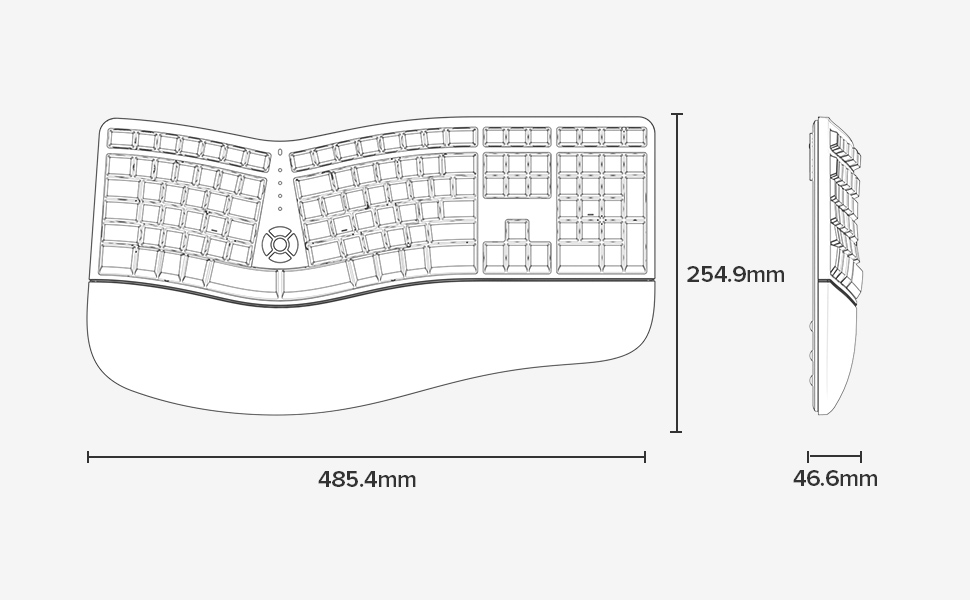
- 치수(길이 x 너비 x 높이): 48.5cm x 25.5cm x 4.7cm(19.1 x 10.0 x 1.85인치)
- 방수 기능: 방수가 안됨
- 상자 내용물: Keyboard, 2.4G USB Receiver, USB Cable


보증 정보
Specific warranty details for the DELUX GM905 Ergonomic Wireless Keyboard are not provided in the available product data. Please refer to the product packaging or the manufacturer's official web보증 약관은 해당 사이트를 참조하십시오.
지원하다
For further assistance, technical support, or inquiries regarding your DELUX GM905 keyboard, please visit the official DELUX website or contact their customer service department. Contact information is typically found on the product packaging or the manufacturer's web대지.
You can also visit the DELUX store on Amazon for more information: DELUX Amazon Store