
1. 서론
This manual provides detailed instructions for the setup, operation, and maintenance of your Graflsoa PG-9078 Bluetooth Wireless Gamepad. Please read this manual thoroughly before using the product to ensure proper functionality and to maximize your gaming experience. This gamepad is compatible with iOS, Android, Tablet, Phone, PC, Smart TV, and Set Top Box devices.
2. 안전 정보
- 게임패드를 극한의 온도, 습도 또는 직사광선에 노출시키지 마십시오.
- 게임패드를 떨어뜨리거나 강한 충격을 가하지 마십시오.
- Do not attempt to disassemble or modify the gamepad. This will void the warranty.
- 게임패드를 물이나 기타 액체로부터 멀리하십시오.
- 제공된 충전 케이블이나 인증된 동등 제품만 사용하세요.
- Store the gamepad in a clean, dry place when not in use.
3. 패키지 내용
상자를 푼 후 패키지 내용물을 확인하세요.
- Graflsoa PG-9078 Wireless Gamepad
- USB 충전 케이블
- 사용 설명서 (본 문서)
4. 제품 오버view
Familiarize yourself with the components and features of your PG-9078 gamepad.
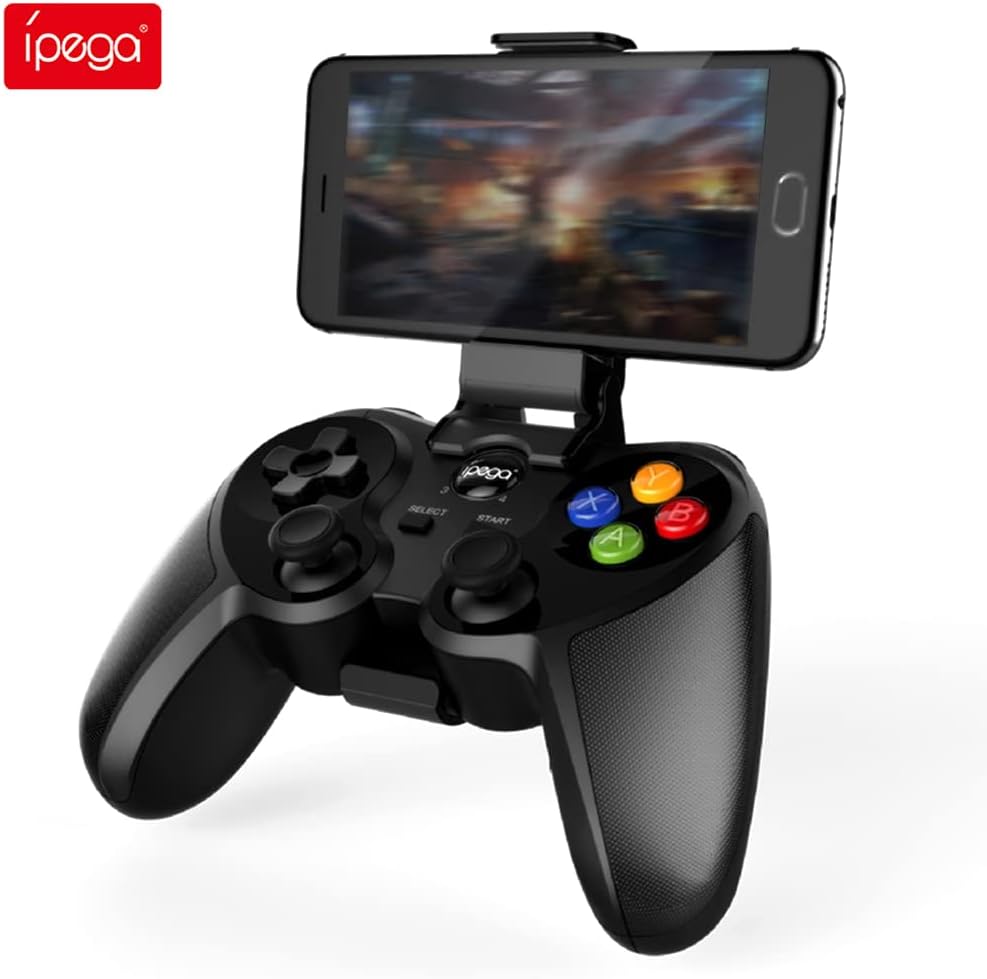
Figure 4.1: Graflsoa PG-9078 Wireless Gamepad with a smartphone mounted in the integrated holder.
The Graflsoa PG-9078 is a versatile Bluetooth gamepad designed for various gaming platforms. It features a comfortable ergonomic design, precise controls, and an integrated phone holder.
4.1 주요 특징
- 통합형 전화 홀더: Supports smartphones from 4 to 5.5 inches, with an adjustable angle for optimal view주고받음.
- Hall Effect Sensor Switches: Provides durable and responsive trigger input.
- High Accuracy Joysticks: 360-degree precision joysticks with anti-slip texture to prevent operational errors.
- 반응형 버튼: Fast response time for all face buttons and shoulder buttons.
- Analog L2/R2 Triggers: Offers precise control for racing and other games requiring nuanced input.
- 블루투스 연결: Stable wireless connection with a transmission distance of up to 8 meters.

Figure 4.2: The adjustable phone holder, designed to securely hold smartphones between 4 and 5.5 inches. The angle can be freely adjusted for user comfort.

Figure 4.3: The high-accuracy joystick, featuring 360-degree movement and an anti-slip texture for enhanced control.

Figure 4.4: The highly sensitive and responsive face buttons and shoulder buttons, designed for quick input.
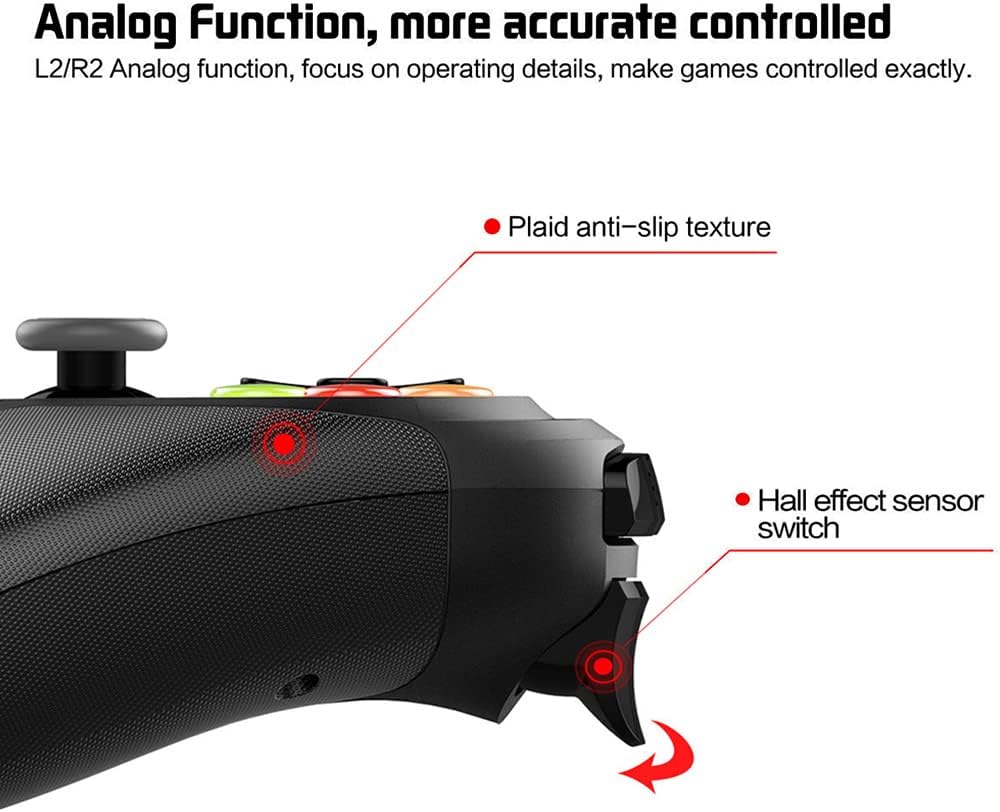
Figure 4.5: The L2/R2 analog triggers, providing accurate and detailed control for various in-game actions.

Figure 4.6: The gamepad utilizes Bluetooth technology for wireless connectivity, offering a stable connection up to 8 meters.
5. 설정 지침
5.1 게임패드 충전
- USB 충전 케이블의 작은 쪽 끝을 게임패드의 충전 포트에 연결하세요.
- USB 충전 케이블의 큰 쪽 끝을 USB 전원(예: 컴퓨터 USB 포트, USB 벽면 어댑터)에 연결합니다.
- The charging indicator light on the gamepad will illuminate during charging and turn off or change color when fully charged.
- 일반적으로 완전 충전에는 약 2~3시간이 걸립니다.
5.2 휴대폰 거치대 부착하기
- Locate the phone holder attachment point on the top of the gamepad.
- Carefully slide the phone holder into the designated slot until it clicks securely into place.
- 홀더의 각도를 원하는 대로 조절하세요. view위치입니다.
- Gently place your smartphone (4-5.5 inches) into the holder, ensuring it is securely gripped.
5.3 블루투스 페어링
The PG-9078 supports multiple connection modes. Select the appropriate mode for your device.
5.3.1 안드로이드 표준 모드
- 게임패드의 전원이 꺼져 있는지 확인하십시오.
- 를 누르고 계세요 "X" button + HOME button 표시등이 빠르게 깜박일 때까지 동시에 누르세요.
- On your Android device, enable Bluetooth and search for available devices.
- Select "PG-9078" from the list to pair. The indicator light will become solid once connected.
5.3.2 iOS Standard Mode
- 게임패드의 전원이 꺼져 있는지 확인하십시오.
- 를 누르고 계세요 "Y" button + HOME button 표시등이 빠르게 깜박일 때까지 동시에 누르세요.
- On your iOS device, enable Bluetooth and search for available devices.
- Select "PG-9078" from the list to pair. The indicator light will become solid once connected.
5.3.3 PC/Smart TV Mode (Direct Play)
- 게임패드의 전원이 꺼져 있는지 확인하십시오.
- 를 누르고 계세요 "A" button + HOME button 표시등이 빠르게 깜박일 때까지 동시에 누르세요.
- On your PC or Smart TV, enable Bluetooth and search for available devices.
- Select "PG-9078" from the list to pair. The indicator light will become solid once connected.
Note: After successful pairing, the gamepad will automatically connect to the last paired device when powered on in the same mode.
6. 사용 설명서
6.1 전원 켜기/끄기
- 전원 켜기: 를 누르세요 홈 버튼 for 1 second. The indicator light will flash, then connect to the last paired device.
- 전원 끄기 : 를 누르고 계세요 홈 버튼 for 5 seconds until the indicator light turns off. The gamepad will also automatically power off after 5 minutes of inactivity.
6.2 Gamepad Modes
The PG-9078 supports different modes for optimal compatibility:
- Android Standard Mode (X + HOME): For most Android games and emulators.
- iOS Standard Mode (Y + HOME): For iOS games that support MFi controllers or specific gamepad protocols.
- PC/Smart TV Mode (A + HOME): For direct play on Windows PCs (requires Bluetooth adapter) and compatible Smart TVs.
Note: Game compatibility varies by platform and game title. Some games may require specific mapping or may not support external controllers.
6.3 컨트롤 사용
이 게임패드는 표준 조작 방식을 지원합니다.
- 방향 패드(D-패드): 정확한 방향 입력을 위해.
- 왼쪽/오른쪽 아날로그 스틱: 360도 움직임과 카메라 제어가 가능합니다.
- 페이스 버튼(A, B, X, Y): 게임 내 액션을 위해.
- 어깨 버튼(L1, R1): 신속한 조치를 위해.
- Analog Triggers (L2, R2): For pressure-sensitive input, ideal for acceleration/braking in racing games.
- 선택/시작 버튼: 메뉴 탐색 및 게임 기능에 사용됩니다.
- 홈 버튼: For power on/off and mode switching.

Figure 6.1: Proper grip and button access on the Graflsoa PG-9078 gamepad, highlighting its ergonomic design and Hall effect sensor switches.
7. 유지관리
- 청소: 부드럽고 마른 천으로 게임패드 표면을 닦으십시오. 독한 화학 약품이나 연마성 세척제를 사용하지 마십시오.
- 저장: 게임패드는 직사광선과 극한의 온도를 피해 서늘하고 건조한 곳에 보관하세요.
- 배터리 관리 : To prolong battery life, avoid fully discharging the gamepad frequently. Charge it regularly, even if not in constant use. If storing for an extended period, charge it to about 50% every few months.
8. 문제 해결
8.1 게임패드 전원이 켜지지 않음
- Ensure the gamepad is charged. Connect it to a power source using the USB cable and allow it to charge for at least 30 minutes before attempting to power on again.
- 홈 버튼을 1초 동안 길게 눌러 전원을 켜세요.
8.2 블루투스를 통한 페어링 불가
- Ensure the gamepad is in the correct pairing mode for your device (Android: X+HOME, iOS: Y+HOME, PC/Smart TV: A+HOME).
- 기기에서 Bluetooth가 활성화되어 있고 검색 가능한지 확인하세요.
- Move the gamepad closer to your device (within 8 meters).
- Forget/remove "PG-9078" from your device's Bluetooth list and attempt to pair again.
- Restart both your device and the gamepad.
8.3 버튼/조이스틱이 응답하지 않음
- Verify that the gamepad is successfully connected to your device.
- Check game settings to ensure controller support is enabled and controls are mapped correctly.
- Some games may not fully support external gamepads.
- Try restarting the gamepad and your device.
9. 사양
| 모델 | PG-9078 |
| 연결성 | 블루투스 무선 |
| 블루투스 범위 | 최대 8미터 |
| 호환성 | iOS, Android, Tablet, Phone, PC, Smart TV, Set Top Box |
| Phone Holder Support | 4 - 5.5 inch smartphones |
| 특별 기능 | Hall Effect Sensor Switches, 360-degree High Accuracy Joysticks, Analog L2/R2 Triggers |
| 전원 | 충전식 배터리(내장형) |
10. 보증 및 지원
보증 정보 및 기술 지원에 대한 자세한 내용은 구매 시 제공된 설명서를 참조하거나 판매점에 문의하십시오. 보증 청구를 위해 구매 증빙 자료를 보관하십시오.