
소개
This manual provides essential information for the safe and effective use of your Thule Courier Bike Trailer. Please read these instructions carefully before assembly and operation to ensure proper functionality and safety for all occupants. The Thule Courier is a versatile solution designed for transporting children and cargo, offering multiple modes of use.
중요한 안전 정보
- Always ensure children are properly secured with the 5-point harness system.
- 최대 권장 중량인 45.4kg(97파운드)을 초과하지 마십시오.
- Regularly inspect the trailer for any signs of wear, damage, or loose components.
- Ensure all wheels are securely attached before each use.
- Use the rain and mesh covers as appropriate for weather conditions to protect occupants.
- When used as a bike trailer, ensure the trailer is correctly hitched to the bicycle and reflective accents are visible.
- Never leave children unattended in the trailer.
설정 및 조립
예고편 펼치기
Carefully unfold the Thule Courier frame until it locks into its open position. Ensure all locking mechanisms are engaged for stability.
바퀴 부착하기
The large rear wheels and smaller front wheels (for stroller mode) attach using a quick-release system. Press the button on the wheel hub and insert it into the axle until it clicks securely. For the front wheels, press the button on the housing and insert the wheel stem.
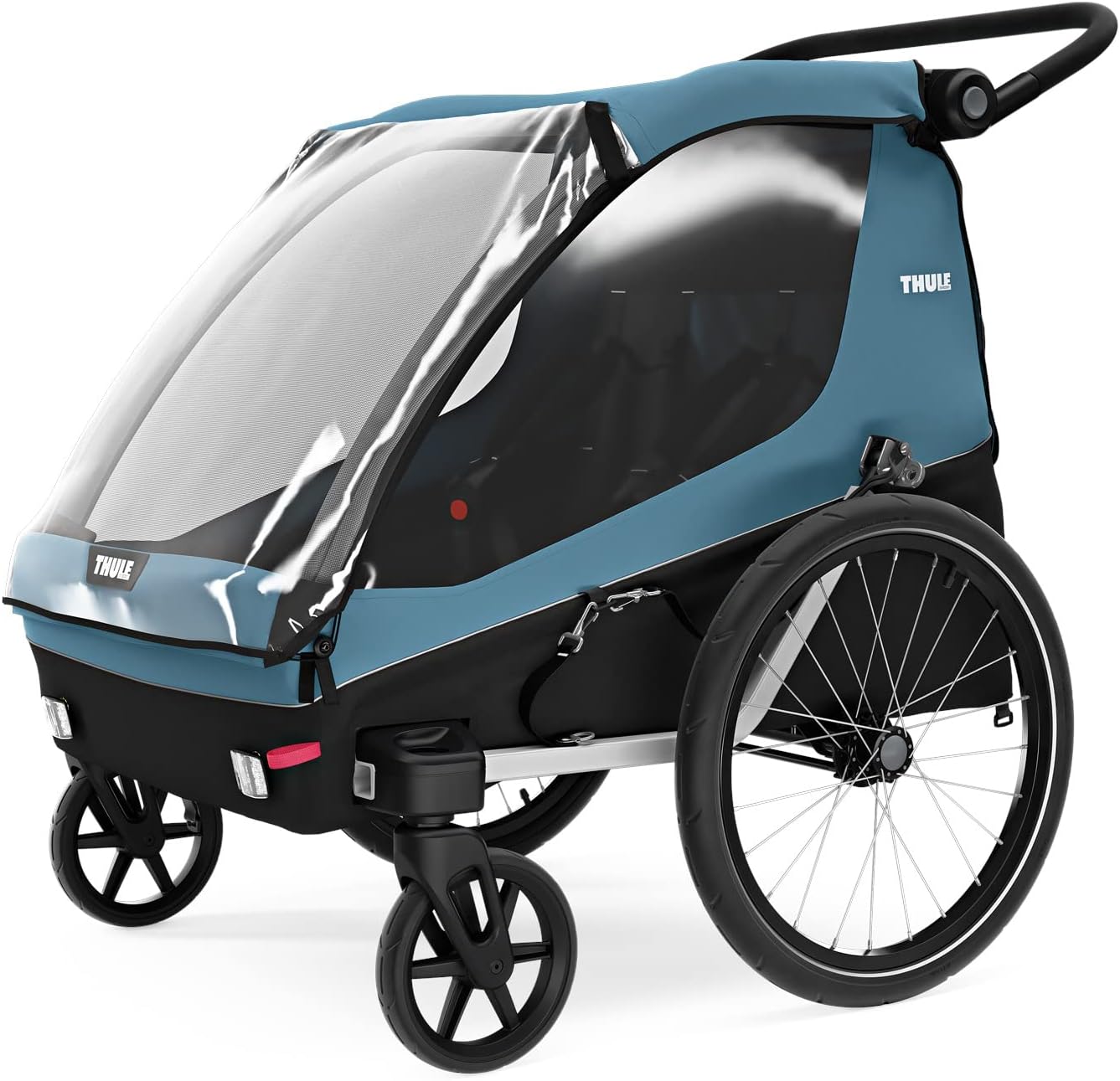
Image: Thule Courier in stroller mode, demonstrating the attachment of the front wheels for strolling. The trailer is blue and black with a clear weather cover.

Image: Thule Courier in bike trailer mode, showing the large rear wheels attached. The trailer is ready for connection to a bicycle.
하네스 시스템 조정
The Thule Courier features a 5-point padded safety harness for each seat. Adjust the straps to ensure a snug and secure fit for your child. The harness buckles are designed for easy fastening and release.

이미지: 정면을 향한 view of the Thule Courier interior, highlighting the two spacious seats, each equipped with a 5-point padded safety harness for secure child transport.
Video: This video demonstrates the adjustment of the 5-point harness system and the quick-release mechanism for the wheels, facilitating easy conversion between stroller and bike trailer modes.
작동 지침
자전거 트레일러 모드
To use as a bike trailer, attach the tow arm to your bicycle's rear axle using the provided hitch. Ensure the safety strap is also secured. The trailer is designed to carry up to two children or cargo. Always check that the trailer is securely connected before riding.

Image: The Thule Courier bike trailer securely attached to the rear wheel of a bicycle, illustrating its use in bike trailer mode. Dimensions are shown for reference.
유모차 모드
For strolling, detach the tow arm and attach the smaller front wheels. The adjustable handlebar can be set to a comfortable height for the user. Engage the parking brake when stationary.

Image: The Thule Courier in strolling mode, featuring the front swivel wheels and adjustable handlebar, ready for pedestrian use.

Image: A close-up of the Thule Courier's adjustable handlebar, demonstrating its ergonomic design for comfortable pushing by users of varying heights.
Cargo Trailer Mode
The Thule Courier can be converted into a dedicated cargo trailer. Remove the seats and utilize the sturdy cargo floor and tie-down points for securing items. This mode is ideal for transporting groceries or other gear.

Image: The interior of the Thule Courier configured for cargo, showing ample space for groceries and other items. The seats are folded or removed to maximize storage.

이미지: A view of the rear storage compartment of the Thule Courier, illustrating the generous space available for carrying essentials during outings.
날씨 보호
The trailer includes integrated rain and mesh covers. Use the rain cover during wet conditions to keep children dry. The mesh cover provides ventilation and protection from insects while allowing airflow.
유지
- 청소: Clean fabric parts with mild soap and water. Wipe down the frame with a damp 옷감. 가혹한 화학 물질을 피하십시오.
- 휠 관리: Periodically check tire pressure and inflate as needed. Ensure wheel axles are clean and free of debris.
- 하네스 점검: Regularly inspect the harness straps and buckles for wear or damage. Replace if necessary.
- 저장: When not in use, fold the trailer for compact storage. Store in a dry, protected area to prolong its lifespan.

Image: The Thule Courier shown in its compact folded configuration, demonstrating how it can be stored efficiently when not in use.
문제 해결
| 문제 | 가능한 원인 | 해결책 |
|---|---|---|
| Wheels not attaching securely | Debris in axle housing, button not fully pressed | Clean axle housing. Ensure button is fully depressed when inserting wheel until a click is heard. |
| Trailer feels unstable | Frame not fully locked, uneven tire pressure | Verify all frame locks are engaged. Check and adjust tire pressure to recommended levels. |
| Harness not securing child | Straps are too loose, buckle not fully engaged | Adjust straps for a snug fit. Ensure buckle clicks when fastened. |
If you encounter issues not listed here or require further assistance, please contact Thule customer support.
명세서
- 상표: 툴레
- 모델 번호: 10102001
- 색상: Aegean Blue
- 품목 무게: 35파운드(15.88kg)
- 프레임 소재: 알류미늄
- 최대 무게 권장 : 45.4킬로그램(97파운드)
- 좌석 수: 2명의 아이들
- 최대 높이 권장 사항: 80 센티미터
- 마구 유형: 5점
- 포함된 구성 요소: 자전거 트레일러
보증 정보
The Thule Courier Bike Trailer comes with a 제한된 평생 보증. For detailed terms and conditions, please refer to the official Thule web사이트를 방문하거나 고객 지원팀에 문의하세요.
고객 지원
For further assistance, spare parts, or warranty claims, please visit the official Thule website or contact their customer service department. Ensure you have your model number (10102001) available when contacting support.
툴레 공식 Web대지: www.thule.com