
1. 서론
This manual provides essential information for setting up, operating, and maintaining your Beelink EQ14 Mini PC. The Beelink EQ14 is a compact desktop computer designed for daily tasks, office work, online education, home entertainment, and industrial use. It features an Intel Twin Lake N150 processor, 16GB DDR4 RAM, and a 500GB PCIe 3.0 SSD, offering efficient and smooth performance.
2. 상자 안에 무엇이 들어있나요?
Upon unpacking your Beelink EQ14 Mini PC, please verify that all the following items are included:
- 1x Beelink EQ14 Mini PC
- 1x 사용자 설명서
- 1x AC Cable (Optional: US/EU/UK/JP/AU)
- 1x 100cm HDMI Cable

3. 제품 오버view
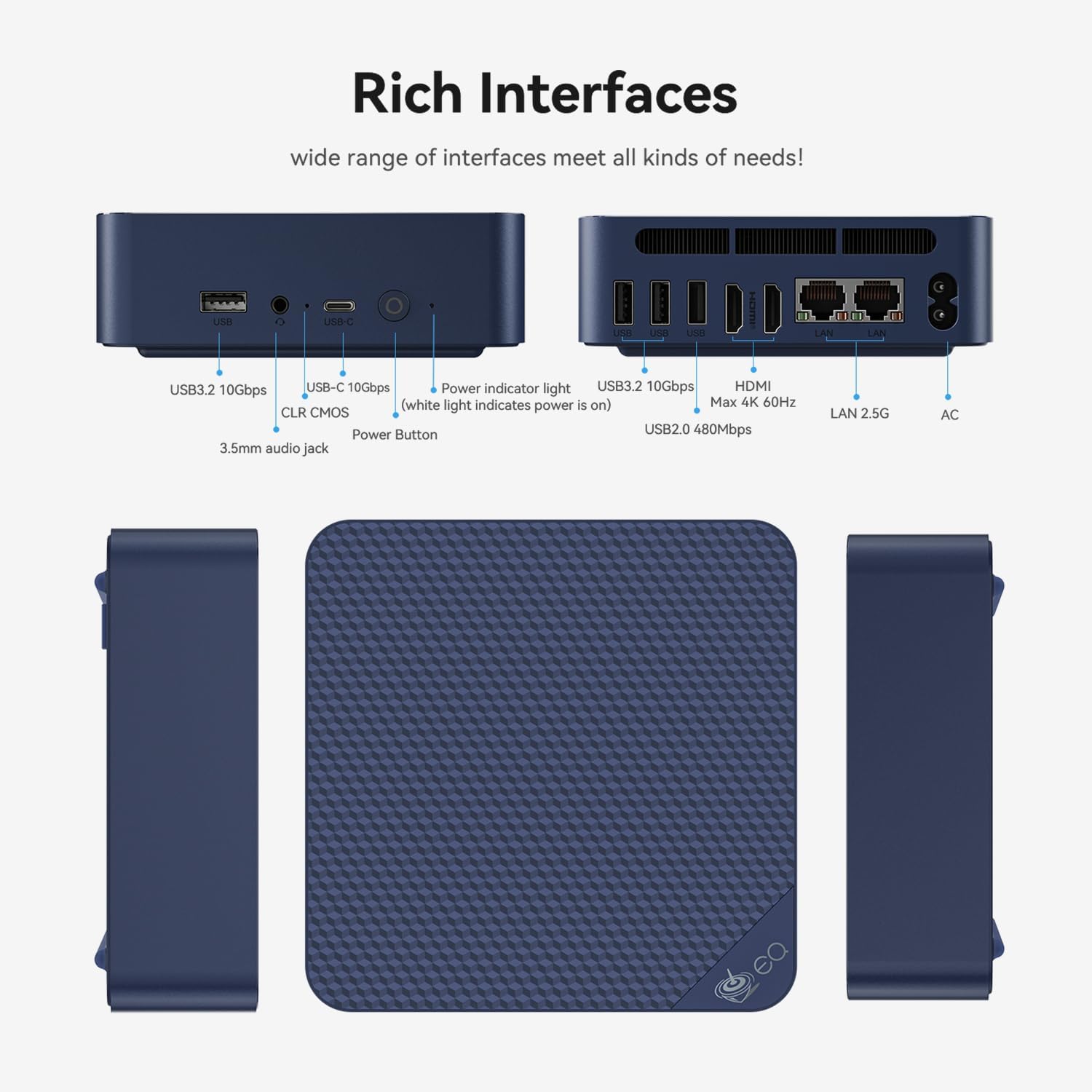
3.1 전면 패널
- 1x USB 2.0 포트
- 3x USB 3.2 포트
- 1x Type-C Port (Data)
- 1x 3.5mm 오디오 잭
- 전원 버튼
- Power Indicator Light (white light indicates power is on)
- CLR CMOS (BIOS Reset)
3.2 후면 패널
- 2x HDMI Ports (supports dual 4K displays at 60Hz)
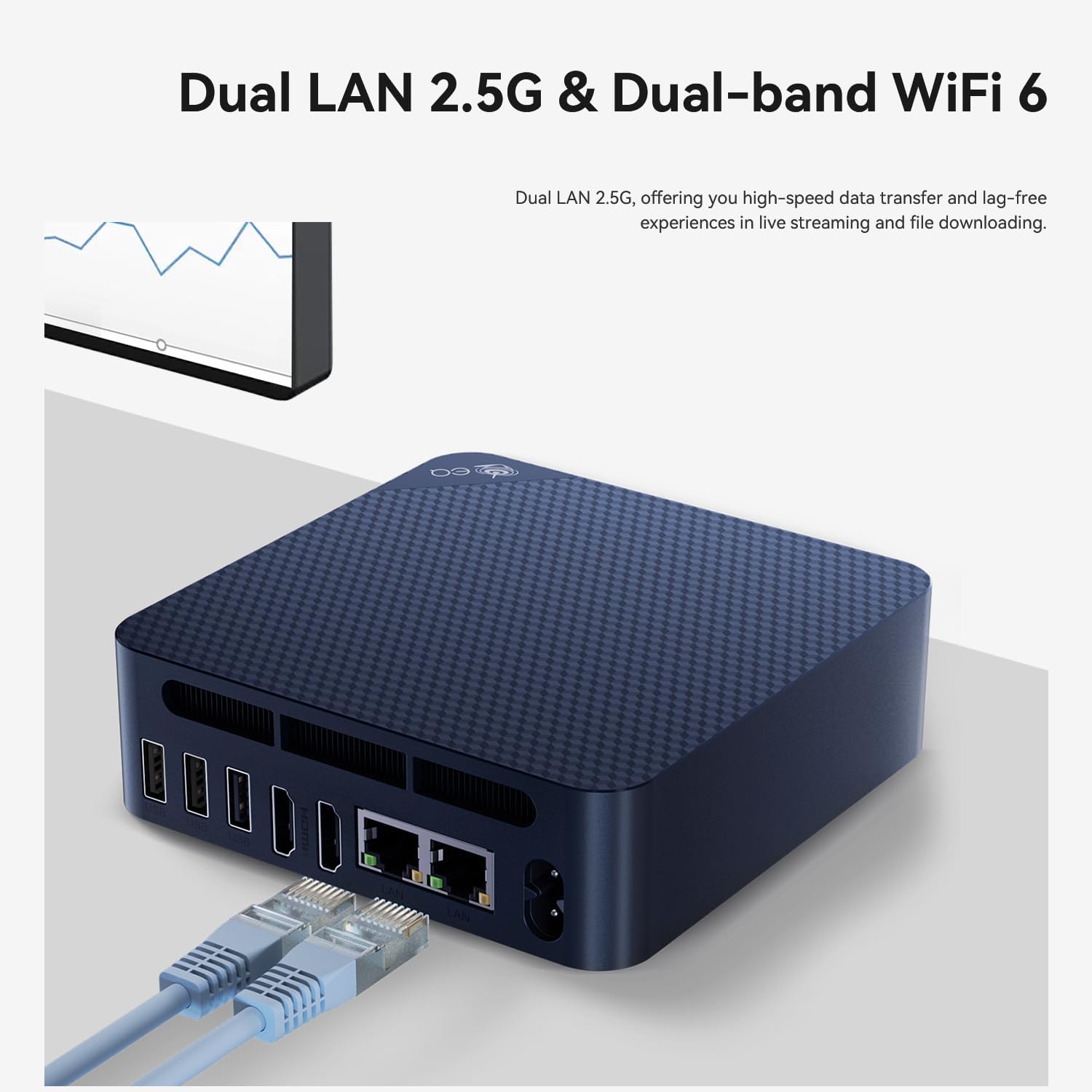
- 2x 2.5G LAN Ports
- DC 전원 입력

4. 설정 가이드
- 디스플레이에 연결: Use the provided HDMI cable to connect your Beelink EQ14 Mini PC to a monitor or TV. The device supports dual 4K displays.
- 주변기기 연결: 키보드와 마우스를 사용 가능한 USB 포트에 연결하세요.
- 네트워크에 연결: For wired internet, connect an Ethernet cable to one of the 2.5G LAN ports. For wireless internet, the device supports WiFi6.
- 전원 켜기: Connect the AC power cable to the DC input port on the rear of the mini PC, then plug it into a power outlet. Press the power button on the front panel.
- 초기 설정 : 화면의 지시에 따라 Windows 11 Home 설치를 완료하십시오.

5. 사용 설명서
The Beelink EQ14 Mini PC comes pre-installed with Windows 11 Home, providing a familiar and user-friendly operating environment. It is designed for efficient multitasking and can handle various applications simultaneously, including office suites, photo editing software, web browsing, and video streaming.
5.1 기본 작업
- 전원 켜기/끄기: Press the power button once to turn on the device. To shut down, use the Windows Start menu or press and hold the power button for a few seconds.
- 다시 시작: 윈도우 시작 메뉴를 사용하여 시스템을 다시 시작하십시오.
- 수면 모드 : The system will enter sleep mode after a period of inactivity or can be manually put to sleep via the Start menu.

6. 스토리지 확장
The Beelink EQ14 Mini PC offers flexible storage expansion options:
- Pre-installed Storage: Comes with a 500GB PCIe 3.0 SSD.
- 듀얼 M.2 슬롯: Features one M.2 SATA3 2280 slot and one M.2 PCIe 3.0 x1 (NVMe) slot.
- Maximum Internal Storage: Supports up to 8TB total internal storage.
To install additional storage, carefully open the chassis and insert your M.2 SSD into the appropriate slot. Refer to the detailed instructions in the user manual for safe installation.

7. 연결성
The EQ14 Mini PC provides robust connectivity options for various needs:
- 무선 전화: Built-in WiFi6 (802.11ax, AX101, dual-band 2.4/5GHz) and Bluetooth 5.2 for stable and fast wireless connections.
- 열광한: Dual 2.5G LAN ports for high-speed wired network connections.
- 표시하다: Dual HDMI ports supporting 4K 60Hz output for connecting multiple displays.

8. Performance Notes
The Beelink EQ14 Mini PC is equipped with an Intel Twin Lake N150 processor (4C/4T, up to 3.6GHz) and Intel Graphics (24EUs, 1000MHz). It includes 16GB DDR4 3200MHz RAM, ensuring smooth performance for everyday computing tasks.
- CPU: Intel Twin Lake N150 (4 Cores, 4 Threads, Max 3.6GHz)
- 그래픽 카드: Intel Graphics (24EUs, 1000MHz) for 4K video playback and web 브라우징.
- 숫양: 16GB DDR4 3200MHz (single-channel, expandable up to 16GB).
- 냉각: Features an MSC2.0 Cooling System with lower fan speed for near-silent operation (approx. 32dB).


9. 유지관리
To ensure the longevity and optimal performance of your Beelink EQ14 Mini PC, regular maintenance is recommended:
- 깨끗하게 유지하십시오: 기기 외부를 부드럽고 마른 천으로 정기적으로 닦아주세요. 과열을 방지하기 위해 통풍구에 먼지나 이물질이 끼지 않도록 하십시오.
- 소프트웨어 업데이트: Keep your Windows 11 Home operating system and drivers updated to the latest versions for security and performance improvements.
- 데이터 백업: 데이터 손실을 방지하려면 중요한 데이터를 주기적으로 외장 드라이브나 클라우드 스토리지에 백업하세요.
- 적절한 종료: Always shut down the PC properly through the operating system rather than simply unplugging it.
10. 문제 해결
If you encounter issues with your Beelink EQ14 Mini PC, refer to the following common troubleshooting steps:
- 전원 없음: Ensure the power adapter is securely connected to both the PC and a working power outlet. Check the power indicator light.
- 디스플레이 없음: Verify that the HDMI cable is correctly connected to both the PC and the monitor. Try a different HDMI port or cable if available. Ensure the monitor is set to the correct input source.
- 네트워크 문제: For wired connections, check the Ethernet cable and router. For Wi-Fi, ensure the Wi-Fi adapter is enabled and you are connected to the correct network with the right password.
- 느린 성능: 불필요한 애플리케이션을 종료하세요. 백그라운드 업데이트를 확인하세요. 적절한 환기를 확보하세요.
- BIOS 재설정: If you experience boot issues due to BIOS settings, use the CLR CMOS button on the front panel to reset BIOS to default settings.
11. 사양
| 특징 | 세부 사항 |
|---|---|
| 상표 | 비링크 |
| 모델 번호 | EQ14 |
| CPU 모델 | Intel Twin Lake N150 (4C/4T) |
| CPU 속도 | 최대 3.6GHz |
| 그래픽 코프로세서 | Intel UHD Graphics (24EUs, 1000MHz) |
| RAM 메모리 설치됨 | 16GB DDR4 3200MHz |
| RAM 메모리 최대 크기 | 16GB (XNUMX기가바이트) |
| 메모리 저장 용량 | 500 GB PCIe 3.0 SSD (expandable up to 8TB) |
| 운영 체제 | 윈도우 11 홈 |
| 비디오 출력 | 2x HDMI(4K@60Hz) |
| LAN 포트 | 2x 2.5G 랜 |
| 무선 연결 | WiFi6 (802.11ax, AX101, dual-band 2.4/5GHz), Bluetooth 5.2 |
| USB 포트 | 3x USB 3.2, 1x USB 2.0, 1x Type-C (Data) |
| 오디오 출력 | 3.5mm 오디오 잭 |
| 냉각 방식 | MSC2.0 Cooling System (Ultra Quiet) |
| 전원 플러그 유형 | A형 - 2핀 (북미식) |
12. 보증 및 지원
비링크는 신뢰할 수 있는 제품과 탁월한 고객 서비스를 제공하기 위해 최선을 다하고 있습니다.
- 보증: Your Beelink EQ14 Mini PC comes with a 3-year worry-free warranty.
- 기술 지원: 평생 기술 지원이 제공됩니다.
- 고객 서비스: 24-hour customer service is provided to assist with any questions or issues.
For further assistance, please visit the official Beelink store or contact customer support: