
1. 서론
This manual provides essential information for setting up, operating, and maintaining your Samsung Galaxy S21 Ultra 5G. Please read this guide thoroughly to ensure proper use and to maximize the device's features.

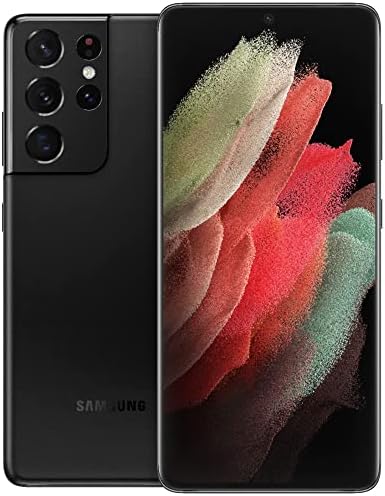
이미지 1.1: 앞면 view of the Samsung Galaxy S21 Ultra 5G.
2. 상자 안에 무엇이 들어있나요?
Upon unboxing your Samsung Galaxy S21 Ultra 5G, verify that the following items are included:
- Samsung Galaxy S21 Ultra 5G Device
- 데이터 케이블(USB-C)
- 표준 배터리(사전 설치됨)
- 보호 필름 (클링)
참고: 추가 액세서리는 별도로 판매될 수 있습니다.
3. 설정
3.1. 전원 켜기 / 끄기
- 전원을 켜려면: Samsung 로고가 나타날 때까지 전원/측면 키를 길게 누릅니다.
- To power off: Press and hold the Power/Side key and Volume Down button simultaneously, then tap "Power off" on the screen. Alternatively, swipe down from the top of the screen to open the Quick Panel, then tap the Power icon and select "Power off".
3.2. SIM 카드 삽입
Locate the SIM card tray on the bottom edge of the device. Use the provided ejection tool to open the tray. Insert your Nano-SIM card with the gold contacts facing down. Close the tray securely.
3.3. 초기 설정
화면 안내에 따라 초기 설정을 완료하세요. 초기 설정에는 다음 사항이 포함됩니다.
- 언어 선택
- Wi-Fi 네트워크 연결
- Google 계정 로그인
- Data transfer from a previous device (optional)
- Setting up security features (fingerprint, face recognition, PIN/pattern)
4. 장치 작동
4.1. 인터페이스 탐색
- 홈 화면: Your main screen for accessing apps and widgets.
- 앱 서랍: 홈 화면에서 위로 스와이프하여 view 설치된 모든 응용 프로그램.
- 알림 패널: 화면 상단에서 아래로 살짝 밀어 알림과 빠른 설정에 접근하세요.
- 엣지 패널: Swipe from the curved edge of the screen to access frequently used apps and contacts.
4.2. 카메라 기능
The Samsung Galaxy S21 Ultra 5G features a versatile camera system. To open the camera, tap the Camera icon on the Home screen or App Drawer.
이미지 4.1: 상세 view of the multi-lens rear camera system.
- 사진 모드 : 정지 이미지를 촬영하기 위한 표준 모드입니다.
- 비디오 모드: 고해상도 영상을 녹화하세요.
- 전문 모드: Manual control over camera settings like ISO, shutter speed, and white balance.
- 싱글 테이크: Capture multiple types of photos and videos with one tap.
- 우주 확대: Utilize the advanced zoom capabilities, including 100x Space Zoom.
4.3. 배터리 관리
이 기기에는 5000mAh 배터리가 장착되어 있습니다. 배터리 수명을 최적화하려면 다음을 수행하십시오.
- 화면 밝기를 조정합니다.
- 절전 모드를 활성화하세요.
- 백그라운드에서 실행 중인 사용하지 않는 앱을 닫습니다.
- Utilize fast wireless charging or wired fast charging for quick power-ups.
5. 유지관리
5.1. 기기 청소
부드럽고 보풀이 없는 천을 사용하여 휴대폰 화면과 본체를 닦으세요. 강한 화학 물질이나 연마재는 사용하지 마세요.
5.2. 소프트웨어 업데이트
최적의 성능과 보안을 보장하려면 소프트웨어 업데이트를 정기적으로 확인하고 설치하세요. 설정 > 소프트웨어 업데이트 > 다운로드 및 설치.
6. 문제 해결
6.1. 장치 전원이 켜지지 않음
배터리가 충전되어 있는지 확인하세요. 기기를 충전기에 연결하고 몇 분 정도 기다린 후 다시 전원을 켜보세요.
6.2. 연결 문제
- 와이파이: Restart your router and device. Forget and reconnect to the Wi-Fi network.
- 모바일 데이터: Check if mobile data is enabled in Quick Settings. Verify your SIM card is properly inserted and your plan is active.
6.3. 화면 응답 없음
전원/측면 버튼과 볼륨 다운 버튼을 7초 이상 길게 눌러 강제로 재시작하십시오.
7. 사양
Key technical specifications for the Samsung Galaxy S21 Ultra 5G:
| 특징 | 사양 |
|---|---|
| 모델명 | 갤럭시 S21 울트라 5G |
| 제품 치수 | 6.5 x 2.98 x 0.35 인치 |
| 품목 무게 | 12.3 온스 |
| 운영 체제 | 기계적 인조 인간 |
| 화면 크기 | 6.8 인치 |
| 해결 | 3200 x 1440 |
| 새로 고침 빈도 | 120Hz |
| CPU 모델 | Snapdragon / Exynos 2100 |
| CPU 속도 | 2.42GHz |
| 설치된 RAM 메모리 크기 | 12GB (XNUMX기가바이트) |
| 메모리 저장 용량 | 128GB (XNUMX기가바이트) |
| 배터리 용량 | 5000밀리amp 시간 |
| 전화 통화 시간 | 18시간 |
| 연결 기술 | 와이파이, GPS |
| 특별 기능 | Wireless Charging Support, High Performance Processor, High Battery Capacity |
| 오디오 잭 | 헤드폰 잭이 없습니다 |
| 색상 | 팬텀 블랙 |
8. 보증 및 지원
This product is an Amazon Renewed device. Amazon Renewed products are professionally inspected, tested, and cleaned by Amazon-qualified suppliers. They come with a 90-day return policy for refund or replacement.
추가 지원이 필요하면 다음을 참조하세요. 아마존 리뉴얼 스토어 또는 아마존 고객 지원팀에 문의하세요.

Image 8.1: General information regarding Amazon Renewed products.