
1. 서론
The Levoit Core 300S is an advanced smart air purifier designed to enhance your indoor air quality. It features a high-precision dust sensor, real-time air quality display, and multiple operating modes including automatic, pollen, and sleep modes. With its compact design and powerful 4-layer filtration system, it effectively removes 99.97% of airborne particles as small as 0.1 microns, including pollen, dust, pet dander, and odors. The device can be controlled via the VeSync app and is compatible with voice assistants like Amazon Alexa and Google Assistant.

Figure 1: Levoit Core 300S Smart Air Purifier.
2. 설정
2.1 풀기 및 초기 배치
Carefully remove the air purifier from its packaging. Ensure all packing materials are removed. Place the unit on a flat, stable surface. The 4-layer 360° genuine filter comes pre-installed. The compact body allows placement on floors or tabletops.
2.2 전원 연결
Connect the power cord to the air purifier and then plug it into a standard electrical outlet. The power cord length is 1.83m.

Figure 2: Plug the air purifier into a power outlet.
2.3 VeSync 앱 다운로드 및 페어링
To utilize smart features, download the VeSync app from your smartphone's app store. Follow the in-app instructions to pair your air purifier. Ensure your smartphone's Bluetooth is enabled and keep your phone close to the router during connection.
Video 1: Guide to connecting the Levoit Core 300S to the VeSync app via Wi-Fi.
3. 사용 설명서
3.1 전원 켜기/끄기
상단 패널의 전원 버튼을 눌러 공기청정기를 켜거나 끄세요.

Figure 3: Top control panel with power button and mode indicators.
3.2 작동 모드
- 자동 모드: The air purifier's high-precision dust sensor detects air quality in real-time and automatically adjusts the fan speed to maintain clean air. This mode is ideal for continuous, hands-free operation.
- 꽃가루 모드: Designed for allergy sufferers, this mode automatically switches between low and high fan speeds every 20 minutes to effectively capture airborne pollen and other allergens for rapid purification.
- 수면 모드 : For quiet operation, sleep mode utilizes patented silent technology, operating at a mere 22dB. The display lights can also be turned off to ensure an undisturbed sleep environment.

Figure 4: Pollen mode helps alleviate allergy symptoms.

Figure 5: Automatic mode adjusts fan speed based on detected air quality.

Figure 6: The air purifier operates quietly in sleep mode, ideal for bedrooms.
3.3 Smart Control with VeSync App
The VeSync app provides comprehensive control over your air purifier, including:
- Remote control of power and modes.
- Setting schedules and timers for automatic operation.
- Monitoring PM2.5 concentration and air quality history.
- Activating child lock.
- Turning the display lights on/off.

Figure 7: Control your air purifier from anywhere using the VeSync app.
3.4 음성 제어
Integrate your Levoit Core 300S with Amazon Alexa or Google Assistant for convenient voice control. Simply use voice commands to manage your air purifier.

Figure 8: Use Amazon Alexa or Google Assistant for hands-free control.
4. 유지관리
4.1 필터 시스템
The Levoit Core 300S uses a 4-layer filtration system:
- 사전 필터: Captures large particles like dust, hair, and pet fur.
- H13 Electrostatic HEPA Filter: Traps pollen, house dust, PM2.5, dust mites, and bacteria.
- Sterilization Coating: Provides double sterilization.
- 활성탄 필터: Effectively removes odors from tobacco smoke, pets, cooking, and mold.

Figure 9: The 4-layer filtration system for comprehensive air purification.
4.2 필터 교체
The filter has a lifespan of approximately 2 years, but it is recommended to replace it every 6 to 12 months, depending on usage and air quality. The VeSync app will notify you when a filter replacement is due.
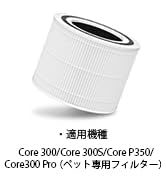
Figure 10: Original replacement filter for Core 300/300S/P350/300 Pro.
4.3 프리필터 청소
The pre-filter should be cleaned lightly about once a month to maintain optimal performance. Refer to the detailed instructions in the full user manual for proper cleaning procedures.
5. 문제 해결
If you encounter any issues with your Levoit Core 300S, please refer to the following common troubleshooting tips:
- 장치가 켜지지 않음: Ensure the power cord is securely plugged into both the air purifier and the wall outlet. Check if the outlet is functioning correctly.
- 앱 연결 문제: Verify that your smartphone's Bluetooth is on and that you are connected to a 2.4GHz Wi-Fi network. Keep your smartphone close to the router during the pairing process. If connection is lost, try re-pairing the device.
- Air quality sensor not responding: Ensure the sensor intake is not blocked by dust or debris. Clean the sensor area if necessary. If the issue persists, contact customer support.
- 이상한 소음: 필터가 제대로 설치되었는지 확인하세요. 팬에 이물질이 끼어 있지 않은지 확인하세요.
- Odor not being removed: Confirm that the filter is not expired and is correctly installed. Consider replacing the filter if it's old or heavily used.
For more detailed troubleshooting steps, please consult the comprehensive user manual or contact customer support.
6. 사양
| 특징 | 사양 |
|---|---|
| 상표 | 레보이트 |
| 모델 번호 | LAP-C301S-WJP |
| 색상 | 하얀색 |
| 제품 크기(D x W x H) | 22 x 22 x 36cm |
| 품목 무게 | 3kg |
| 전원 | 코드식 전기 |
| 제어 방법 | 음성, 앱 |
| 필터 유형 | 헤파 |
| Covered Floor Area | Up to 33 square meters (20 tatami mats) |
| 소음 수준 | 22dB(수면 모드) |
| 입자 보유 크기 | 0.1마이크론 |
| 컨트롤러 유형 | Amazon Alexa, Google Assistant |
| 전력 소비 | 3.3와트 |
| 호환 표준 | Energy Star 인증 |
| 포함된 구성 요소 | 4-layer 360° Genuine Filter (pre-installed), Quick Start Guide, Quality Guarantee Card, Japanese Instruction Manual |
| 원산지 | 중국 |
| 한국어: | 810043374774 |
Note: Product specifications may be updated due to performance improvements. Refer to the Amazon product page for the latest information.

그림 11: 제품 치수 및 무게.
7. 보증 및 지원
Levoit provides a 2-year quality guarantee for this product. Our customer support team is available 24 hours a day to assist you.
7.1 지원 문의
If you have any questions or encounter problems, please feel free to contact us. You can typically find a chat button for questions by selecting the 'Seller' on the product page and navigating to the seller information page.