
소개
The SMSL PL150 is a high-performance CD player designed to deliver exceptional audio quality from your CD collection. Featuring a CS43198 decoding chip, versatile output options, and a robust anti-shock design, it supports both standard and mini CDs. This manual provides detailed instructions for the setup, operation, and maintenance of your PL150 CD player.
안전 정보
- 기기를 작동하기 전에 모든 지침을 주의 깊게 읽으세요.
- 제품을 물, 습기 또는 과도한 습도에 노출시키지 마십시오.
- 제품을 분해, 수리 또는 개조하지 마십시오. 모든 서비스는 자격을 갖춘 전문가에게 맡기십시오.
- Use only a 5V/2A power supply with the provided USB to DC power cable. Incorrect power supplies may damage the unit.
- This product contains a Class 1 laser. Do not open the enclosure or attempt to defeat safety interlocks.
- 과열을 방지하려면 장치 주변에 적절한 환기가 이루어지도록 하십시오.
패키지 내용
패키지에 모든 품목이 들어 있는지 확인하세요.
- SMSL PL150 CD 플레이어
- 사용 설명서
- USB to DC Power Cable
- Remote Control (2x AA batteries not included)

Image: The SMSL PL150 CD Player, its manual, a USB to DC power cable, and the remote control, laid out as they would appear in the product box.
제품 끝view
전면 패널

Image: A detailed diagram illustrating the front panel of the SMSL PL150 CD Player, highlighting the CD slot, IPS display, control buttons (Eject/Stop, Play/Pause, Track Navigation, Volume), and dual headphone outputs (3.5mm and 4.4mm).
- CD 슬롯: 표준(12cm) 및 미니(8cm) CD 삽입용입니다.
- 표시하다: Full-Lamination IPS display showing track information, time, and volume level.
- 제어 버튼:
- Eject/Stop: Tap to stop playback, hold to eject the CD.
- 재생/일시 중지: Tap to play or pause, hold to power on/off.
- Previous Track/Rewind: Tap for previous track, hold to rewind.
- Next Track/Fast-Forward: Tap for next track, hold to fast-forward.
- 볼륨-/볼+: Adjust headphone output volume.
- 헤드폰 출력: 3.5mm 언밸런스드 헤드폰 잭과 4.4mm 밸런스드 헤드폰 잭이 있습니다.
후면 패널
Image: A detailed diagram illustrating the rear panel of the SMSL PL150 CD Player, highlighting the RCA analog outputs, Optical digital output, Coaxial digital output, and the 5V/2A power input port.
- RCA 출력(좌/우): 아날로그 오디오 출력(연결용) amp수신자 또는 수신자.
- 광 출력: 외부 DAC에 연결하기 위한 디지털 오디오 출력 amp리퍼.
- 동축 출력: 외부 DAC에 연결하기 위한 디지털 오디오 출력 amp리퍼.
- Power Input (5V/2A): Connect the provided USB to DC power cable to a compatible 5V/2A power source.
설정
1. 전원 연결
- Connect the provided USB to DC power cable to the Power Input (5V/2A) port on the rear of the PL150.
- USB 케이블의 다른 쪽 끝을 호환되는 5V/2A USB 전원 어댑터(별도 구매)에 연결하십시오.
2. 오디오 연결
Choose one of the following methods to connect the PL150 to your audio system:
- RCA 아날로그 출력: Use RCA cables to connect the RCA Output (L/R) ports on the PL150 to the analog input ports of your amp수신자 또는 수신자.
- 광학 디지털 출력: Use an optical cable to connect the 광 출력 port on the PL150 to the optical input of an external DAC or integrated amp리퍼.
- 동축 디지털 출력: Use a coaxial cable to connect the 동축 출력 port on the PL150 to the coaxial input of an external DAC or integrated amp리퍼.
- 헤드폰 출력: Plug your headphones into either the 3.5mm or 4.4mm headphone jacks on the front panel.

Image: A visual representation of the SMSL PL150's rear panel connections, illustrating how to connect analog RCA outputs to a pure amp리퍼 또는 헤드폰 amplifier, and digital optical/coaxial outputs to an audio DAC or integrated amp리퍼.
3. 배치
Place the PL150 on a stable, flat surface. Ensure there is adequate space around the unit for ventilation. Avoid placing it near heat sources, direct sunlight, or in areas with high humidity.
작동 지침
1. 전원 켜기/끄기
- 기기를 켜려면 버튼을 길게 누르십시오. 재생/일시정지 전면 패널의 버튼 또는 힘 리모컨의 버튼을 누르세요.
- 기기의 전원을 끄려면 버튼을 길게 누르십시오. 재생/일시정지 전면 패널의 버튼 또는 힘 리모컨의 버튼을 누르세요.
2. CD 로딩
- Gently insert a standard (12cm) or mini (8cm) CD into the CD slot on the front panel. The player will automatically draw the CD in.
- Ensure the CD is clean and free of scratches or debris.
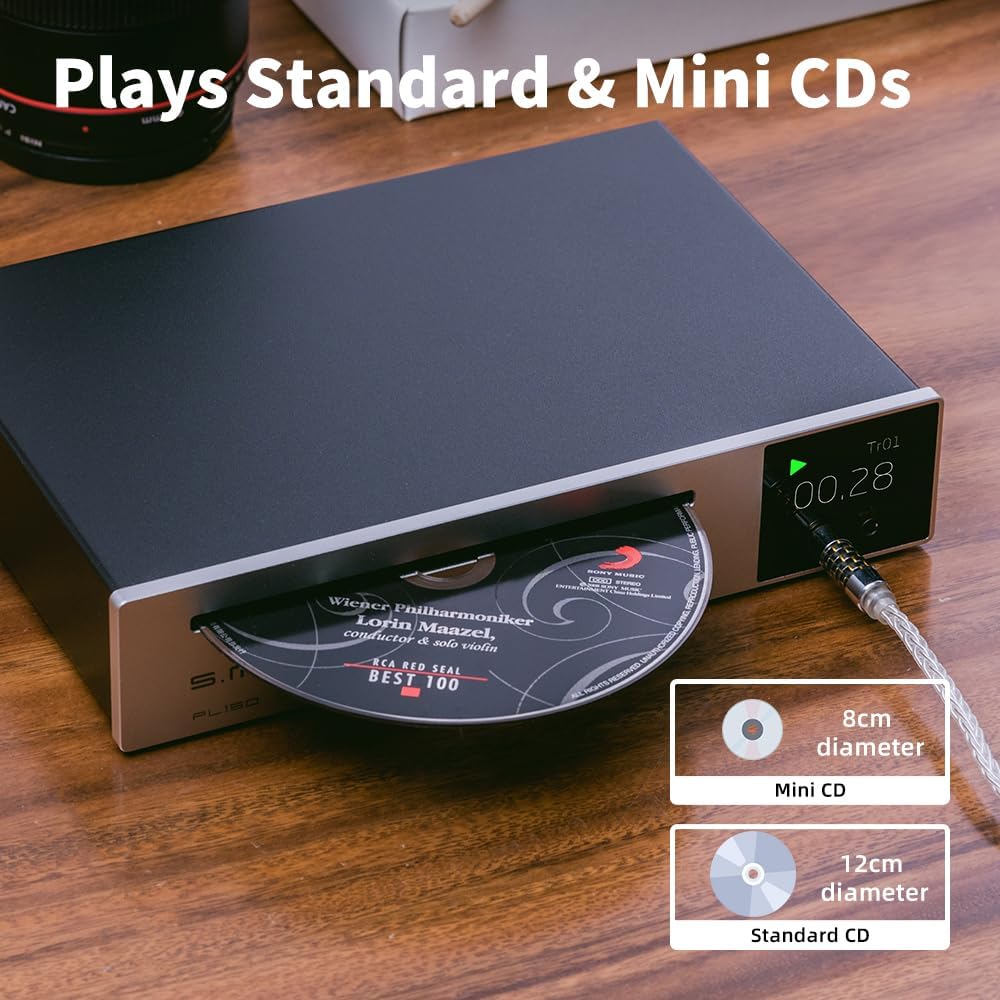
Image: The SMSL PL150 CD Player with a CD being inserted into its slot, demonstrating compatibility with both standard 12cm and mini 8cm CDs.
3. 재생 제어
- 재생/일시 중지: 탭하세요 재생/일시정지 button on the front panel or remote to start or pause playback.
- 정지/추출: 탭하세요 Eject/Stop button on the front panel or remote to stop playback. Hold the button to eject the CD.
- 다음 / 이전 트랙 : 탭하세요 다음 or 이전의 buttons on the front panel or remote to skip tracks.
- 빨리 감기/되감기: 잡아라 다음 or 이전의 buttons on the front panel or remote to fast forward or rewind within a track.
- 볼륨 조절: 사용하세요 권 or 볼륨+ buttons on the front panel or remote to adjust the headphone output volume.
4. 원격 제어 기능
The included remote control provides comprehensive control over the PL150. Ensure 2x AA batteries are installed (not included).

Image: The SMSL PL150 CD Player alongside its remote control, with detailed labels for each button's function, covering power, volume adjustment, track navigation, play/pause, stop/eject, and additional settings like sequence and shuffle.
- 힘: 장치를 켜거나 끕니다.
- HP Vol+/-: 헤드폰 볼륨을 조정합니다.
- 재생/일시 중지: 재생을 시작하거나 일시 중지합니다.
- Prev/RW: Skips to previous track or rewinds when held.
- 다음/FF: Skips to next track or fast-forwards when held.
- 중지: 재생을 중지합니다.
- 적재/배출: CD를 꺼냅니다.
- 메뉴: Accesses menu options (if available).
- 디스플레이: 화면 표시 모드를 변경합니다.
- 숫자 패드(0-9): 트랙 직접 선택.
- 순서: Toggles playback sequence mode.
- 혼합: 셔플 재생 모드를 전환합니다.
유지
1. 장치 청소
- Wipe the exterior of the PL150 with a soft, dry cloth.
- 액체 세척제, 에어로졸 또는 연마제를 사용하지 마십시오. 표면이 손상될 수 있습니다.
2. CD 관리
- CD를 다룰 때는 지문이나 흠집이 생기지 않도록 가장자리를 잡으세요.
- CD는 부드럽고 보풀 없는 천으로 중앙에서 바깥쪽으로 닦아주세요.
- Store CDs in their cases to protect them from dust and damage.
문제 해결
| 문제 | 가능한 원인 | 해결책 |
|---|---|---|
| 전원이 없습니다 | Power cable not connected; incorrect power supply. | Ensure the USB to DC power cable is securely connected. Verify the power adapter is 5V/2A. |
| 사운드 출력이 없습니다 | Incorrect audio connection; wrong input selected on amp앰프/DAC; 볼륨이 너무 낮습니다. | Check all audio cable connections. Select the correct input source on your connected amplifier or DAC. Increase volume on the PL150 and your audio system. |
| CD read errors or "BLOCK" message | Dirty or damaged CD; unstable power supply; internal error. | Clean the CD or try a different CD. Ensure the power supply is stable and meets 5V/2A specifications. Power cycle the unit (unplug and replug). |
| 리모컨이 작동하지 않습니다 | Dead batteries; obstructed line of sight. | Replace batteries (2x AA). Ensure there is a clear line of sight between the remote and the PL150's IR receiver. |
| Skipping or stuttering during playback | Dirty or scratched CD; unit not on a stable surface. | Clean the CD. Place the PL150 on a stable, vibration-free surface. |
명세서

Image: A table detailing the technical specifications of the SMSL PL150 CD Player, including its input/output types, supported CD formats, headphone output power, distortion levels, signal-to-noise ratio, power consumption, dimensions, and weight.
| 특징 | 사양 |
|---|---|
| 입력 | CD |
| 산출 | RCA / 3.5mm or 4.4mm headphone / Optical / Coaxial |
| CD 유형 | CD / CD-R / CD-RW / MP3 CD |
| CD 크기 | 8cm / 12cm |
| 헤드폰 출력 전력 | 60mW x 2 @ 32Ω |
| 총 고조파 왜곡률 + N | 0.001% |
| 신호대잡음비 | 110데시벨 |
| 전력 소비 | 4W |
| 대기 전력 | <0.1W |
| 크기 (WxHxD) | 205 x 42.8 x 144.7mm |
| 무게 | 1.145kg / 2.52파운드 |
보증 및 지원
The SMSL PL150 CD Player comes with a standard manufacturer's warranty. Please refer to the warranty card included in your package for specific terms and conditions, including warranty period and coverage details.
For technical support, troubleshooting assistance, or warranty claims, please contact S.M.S.L customer service through their official web대지:
When contacting support, please have your product model (PL150) and purchase information readily available.