
1. 서론
This manual provides essential information for the installation, operation, maintenance, and troubleshooting of your MAXSUN GeForce RTX 2060 iCraft 6GB graphics card. Please read this manual thoroughly before installing and using the product to ensure proper functionality and safety.
2. 안전 정보
- 구성 요소를 설치하거나 제거하기 전에 항상 컴퓨터의 전원을 분리하세요.
- 정전기 방지 손목 스트랩을 착용하거나 접지된 금속 물체를 자주 만져 부품의 정전기 방전(ESD) 손상을 방지하십시오.
- 민감한 구성 요소를 만지지 않도록 그래픽 카드의 가장자리를 잡으세요.
- 컴퓨터 케이스 내부의 과열을 방지하기 위해 적절한 통풍이 이루어지도록 하십시오.
- 그래픽 카드를 직접 수리하려고 하지 마십시오. 자격을 갖춘 서비스 담당자에게 문의하십시오.
3. 패키지 내용
패키지에 다음 품목이 포함되어 있는지 확인하십시오.
- 1 x MAXSUN GeForce RTX 2060 iCraft 6GB Graphics Card
품목이 누락되었거나 손상된 경우 판매점에 문의하세요.
4. 제품 오버view
The MAXSUN GeForce RTX 2060 iCraft 6GB graphics card is designed for gaming PCs, featuring NVIDIA's Turing GPU architecture, 6GB GDDR6 memory, and a 192-bit memory interface. It includes a triple-fan cooling system and RGB lighting.

그림 4.1: 전면 view of the MAXSUN GeForce RTX 2060 iCraft 6GB graphics card, showing the three cooling fans and RGB lighting elements.

그림 4.2: 각도 view of the graphics card, highlighting its robust design and cooling solution.

그림 4.3: 후면 view 그래픽 카드의 경우, 표시됨asing the alloy backplate designed for structural integrity and heat dissipation.

Figure 4.4: Display output ports on the graphics card, including DisplayPort (DP), HDMI, and DVI connectors.
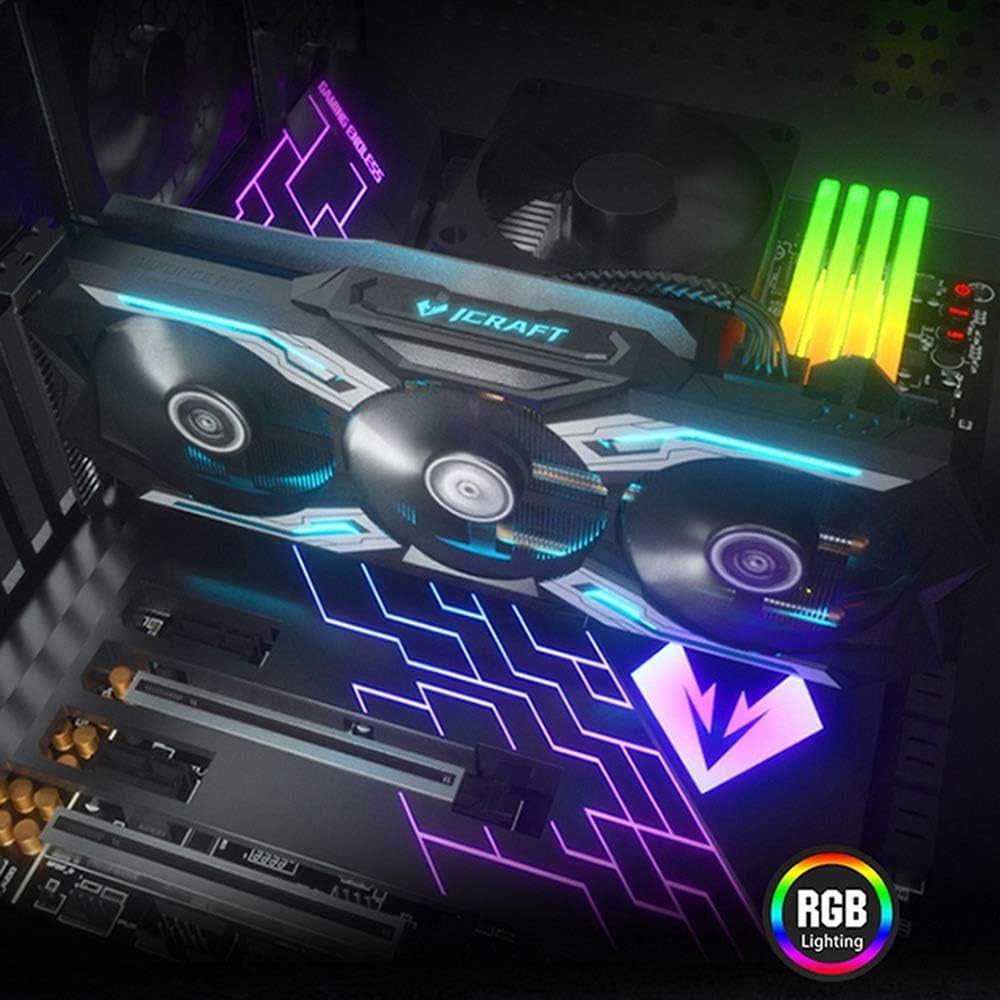
Figure 4.5: The graphics card installed in a PC case, demonstrating its integrated RGB lighting.
주요 특징:
- Turing GPU Architecture: Provides enhanced performance for real-time ray tracing and AI capabilities.
- iCraft Series RGB Lighting: Features auto RGB lighting for aesthetic customization within your PC build.
- Triple Fan Cooling: Equipped with 3 MAXSUN Blade II hydro-mechanics low noise fans for efficient heat dissipation.
- Alloy Backplate & Radiator: Includes an alloy backplate and a high-end fin technology radiator with 5 heat pipes for improved thermal performance.
- 성능: Boost Clock up to 1680 MHz, 6GB GDDR6 memory, 192-bit memory interface.
5. 설정 및 설치
5.1 사전 설치
- 전원 끄기 : 컴퓨터를 끄고 벽면 콘센트에서 전원 케이블을 뽑으세요.
- 열린 사건: Open your computer case to access the motherboard and PCIe slots.
- 정전기 방지: Ground yourself by touching a metal part of the computer chassis or wearing an anti-static wrist strap to prevent ESD.
- 기존 카드를 제거하십시오(해당되는 경우): If replacing an existing graphics card, carefully remove it by unscrewing its bracket and releasing the PCIe retention clip.
5.2 물리적 설치
- PCIe 슬롯 찾기: Identify an available PCIe x16 slot on your motherboard. This is typically the topmost long slot.
- 그래픽 카드를 장착하세요: Align the graphics card with the PCIe slot and press down firmly until it is securely seated. The PCIe retention clip should click into place.
- 보안 카드: Secure the graphics card to the computer case with screws.
- 전원 연결: Connect the required PCIe power cables from your power supply to the graphics card. This model typically requires one 8-pin PCIe power connector. Ensure all connections are firm.
- 사건 종결: 컴퓨터 케이스를 닫고 전원 케이블을 다시 연결하세요.
5.3 드라이버 설치
- 전원 켜기: Connect your monitor to one of the graphics card's output ports (HDMI, DisplayPort, or DVI) and power on your computer.
- 드라이버 다운로드: NVIDIA 공식 웹사이트로 이동하세요. web사이트 (www.nvidia.com/driversGeForce RTX 2060용 최신 드라이버를 다운로드하려면 다음 링크를 클릭하세요.
- 드라이버 설치: 다운로드한 드라이버 설치 프로그램을 실행하고 화면의 지시를 따르세요. 설치 후 컴퓨터를 다시 시작해야 할 수 있습니다.
Video 5.1: An official video demonstrating the MAXSUN Nvidia Geforce RTX 2060 iCraft 6GB graphics card, showcasing its design and features. This video provides a visual overview 제품의.
6. 사용 설명서
6.1 디스플레이 연결
Connect your monitor(s) to the available display output ports on the graphics card (HDMI, DisplayPort, DVI). The card supports multiple displays simultaneously. Ensure your display cables are securely connected.
6.2 RGB 조명
The MAXSUN iCraft series graphics card features automatic RGB lighting. The lighting effects are pre-programmed and activate upon system power-on. Please note that dedicated software for controlling the RGB lighting is not typically provided for this model, and it may not be compatible with third-party motherboard RGB software.
7. 유지관리
7.1 청소
- 빈도: Clean your graphics card periodically, especially if you notice dust accumulation on the fans or heatsink.
- 절차: Disconnect power from your PC. Use compressed air to gently blow dust out of the heatsink fins and fan blades. Hold the fan blades in place while blowing to prevent over-spinning and potential damage.
- 피하다: Do not use liquid cleaners or abrasive materials on the graphics card.
7.2 팬 유지 관리
The Blade II hydro-mechanics fans are designed for durability. If you notice unusual fan noise or reduced cooling performance, ensure there are no obstructions to the fan blades. Do not attempt to lubricate or disassemble the fans.
8. 문제 해결
8.1 디스플레이 출력 없음
- 모니터 케이블이 그래픽 카드와 모니터에 제대로 연결되어 있는지 확인하십시오.
- Verify that the graphics card is fully seated in the PCIe slot and that all power connectors are properly attached.
- 모니터의 입력 소스가 올바르게 설정되어 있는지 확인하십시오.
- 가능하다면 다른 디스플레이 케이블이나 모니터를 사용해 보세요.
8.2 성능 문제 또는 충돌
- 최신 NVIDIA 드라이버가 설치되어 있는지 확인하십시오.
- Monitor your GPU temperatures using third-party software. High temperatures can lead to throttling or instability. Ensure proper case airflow.
- 전원 공급 장치(PSU)가 최소 와트 요구 사항을 충족하는지 확인하십시오.tag시스템에 필요한 사양(그래픽 카드 포함)을 확인하십시오.
- Check for any conflicting software or background applications that might be consuming system resources.
8.3 팬 소음
- 팬 날개에 케이블이나 장애물이 걸리지 않도록 하십시오.
- Clean any dust accumulation from the fans and heatsink.
- Fan speed will increase under load to maintain optimal temperatures. This is normal operation.
9. 사양
| 특징 | 사양 |
|---|---|
| 그래픽 코프로세서 | 엔비디아 지포스 RTX 2060 |
| 상표 | 맥스선 |
| 그래픽 RAM 크기 | 6GB GDDR6 |
| 비디오 출력 인터페이스 | DVI, DisplayPort, HDMI |
| 그래픽 프로세서 제조업체 | 엔비디아 |
| 제품 치수 | 12.05 x 4.92 x 1.61 인치 |
| 품목 무게 | 3.19파운드 |
| 모델 번호 | NVIDIA Geforce RTX 2060 iCraft 6G |
10. 보증 및 지원
For warranty information and technical support, please refer to the documentation provided with your purchase or visit the official MAXSUN web사이트. 보증 청구를 위해 구매 증빙 자료를 보관하세요.