
1. 서론
This manual provides detailed instructions for the setup, operation, maintenance, and troubleshooting of your FILCO Majestouch Minila R Convertible mechanical keyboard. Please read this manual thoroughly before using the product to ensure proper functionality and longevity.
The FILCO Majestouch Minila R Convertible is a compact 60% mechanical keyboard featuring Cherry MX Red switches and durable double-shot PBT keycaps. It offers versatile connectivity options, supporting both wired USB and wireless Bluetooth 5.1 connections.
2. 패키지 내용
설치를 진행하기 전에 패키지에 모든 구성품이 들어 있는지 확인하십시오.
- FILCO Majestouch Minila R Convertible Keyboard
- USB 케이블
- 키캡 풀러
- Replacement Keycaps (e.g., Esc, Del, Ctrl, Win)
- AA 배터리 2개 (사전 장착 또는 별도 구매)
- 사용 설명서 (본 문서)

Image: The retail packaging box for the FILCO Majestouch Minila R Convertible keyboard, displaying the product name and key features like Bluetooth and MX switches.
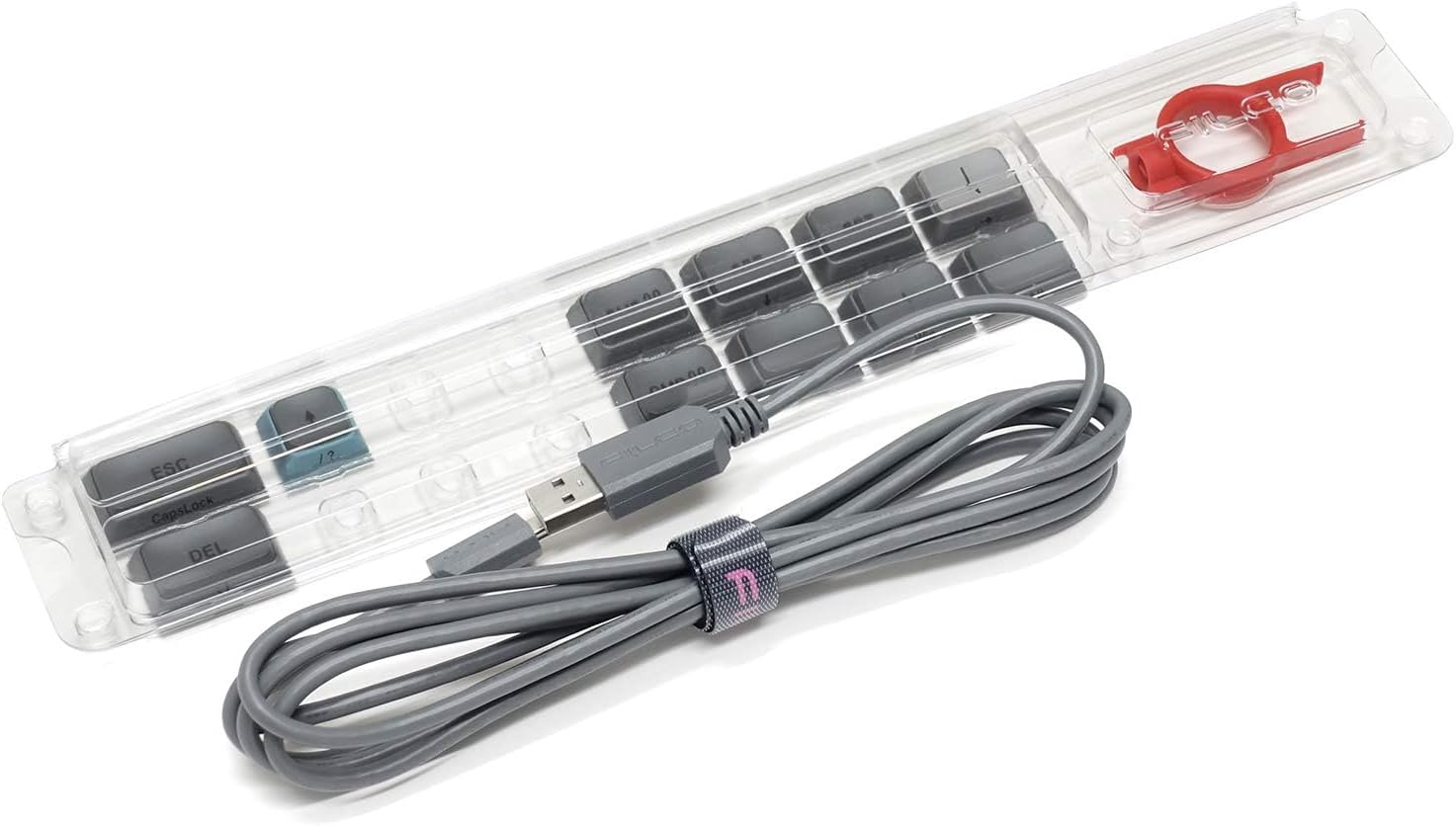
Image: A clear plastic tray containing the gray USB cable, a red keycap puller, and several gray replacement keycaps (e.g., Esc, Del, Ctrl, Win).
3. 설정
3.1 배터리 설치
The keyboard operates wirelessly using two AA batteries. These are typically included with your purchase. To install or replace batteries:
- 키보드 아랫부분에서 배터리 칸을 찾으세요.
- 배터리 덮개를 엽니다.
- AA 배터리 2개를 올바른 극성(+/-)에 맞춰 넣으세요.
- 배터리 덮개를 단단히 닫으세요.
3.2 유선 연결
For a wired connection, use the provided USB cable:
- Connect the smaller end of the USB cable to the USB port on the back of the keyboard.
- USB 케이블의 더 큰 쪽을 컴퓨터의 사용 가능한 USB 포트에 연결합니다.
- 키보드는 운영 체제에서 자동으로 인식됩니다.
3.3 블루투스 연결
The keyboard supports Bluetooth 5.1 for wireless connectivity. It can pair with up to four devices.
- Ensure the keyboard is powered on and in wireless mode (refer to Section 4.1).
- 를 누르고 계세요 Fn key and one of the Bluetooth device keys (1, 2, 3, or 4) for approximately 3 seconds until the corresponding LED indicator above the number key flashes rapidly. This indicates pairing mode.
- 기기(컴퓨터, 스마트폰, 태블릿)에서 Bluetooth 설정을 열고 새로운 기기를 검색하세요.
- Select "FILCO Minila R Convertible" from the list of available devices.
- 화면에 페어링 코드가 표시되면 키보드를 사용하여 코드를 입력하고 버튼을 누르십시오. 입력하다.
- Once paired, the LED indicator will stop flashing and remain solid for a few seconds, then turn off. The keyboard is now connected.
- Repeat these steps for up to four different devices, assigning each to a different Bluetooth device key (1-4).
4. 사용 설명서
4.1 유선 모드와 무선 모드 간 전환
To switch between wired and wireless (Bluetooth) modes, use the switch located on the underside or back of the keyboard. Ensure the keyboard is in the correct mode for your desired connection type.
4.2 Switching Between Paired Bluetooth Devices
To switch between previously paired Bluetooth devices, simply press the Fn key along with the corresponding Bluetooth device key (1, 2, 3, or 4) that the device is assigned to. The keyboard will attempt to connect to that device.
4.3 Using Function Keys and Special Commands
Due to its 60% compact layout, many standard keys (like F1-F12, navigation keys, etc.) are accessed via the Fn (Function) key combinations. Refer to the keycap legends for specific functions. Typically, these are printed on the front or side of the keycaps.

이미지: 위에서 내려다본 전체 모습 view of the FILCO Majestouch Minila R Convertible keyboard, showcasing its compact 60% layout with Sky Grey and light blue keycaps.
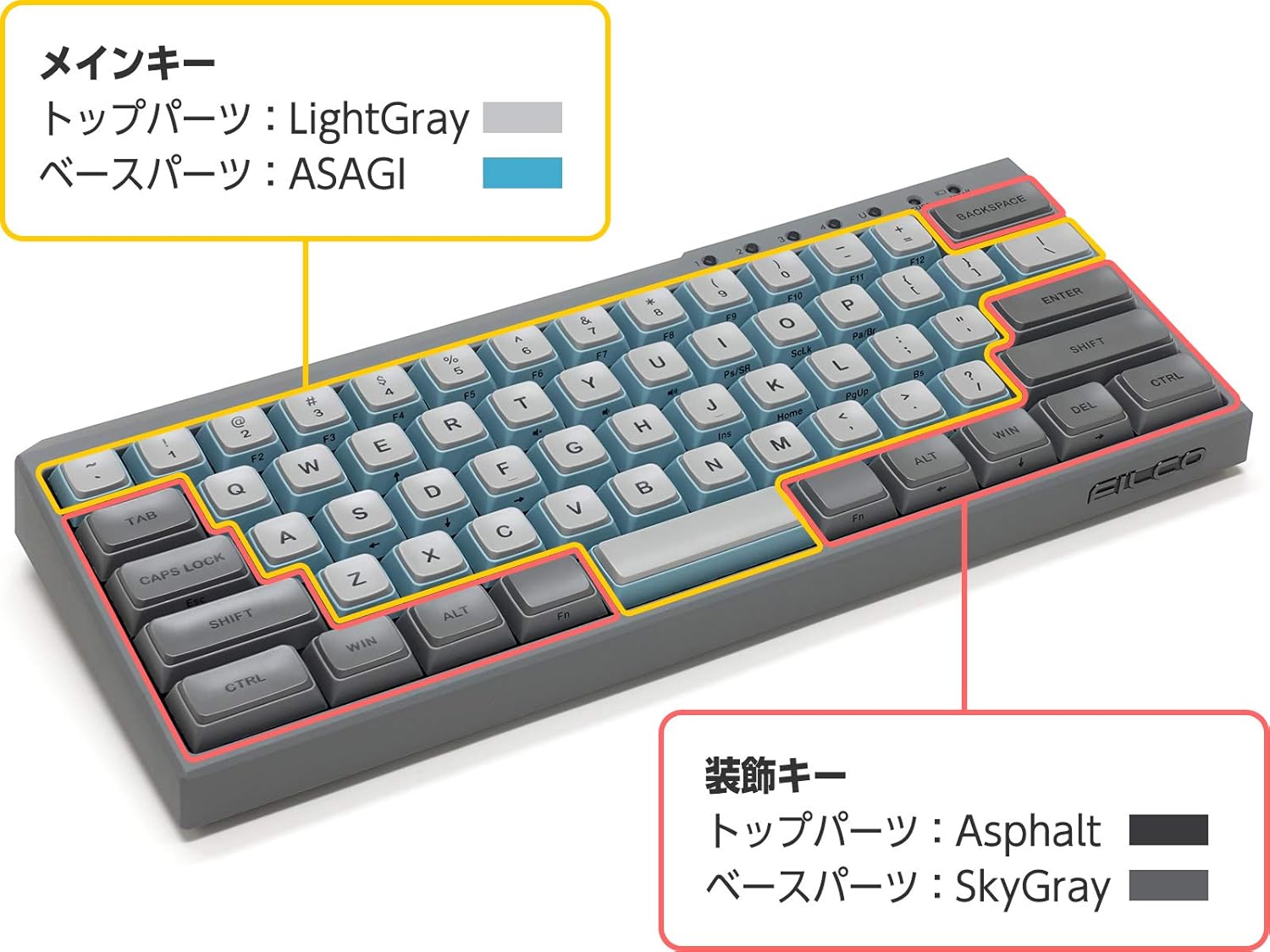
Image: A diagram of the keyboard layout, highlighting the main keys in light gray and light blue, and accent keys (like Ctrl, Win, Alt) in a darker gray. This illustrates the keycap color scheme.

이미지: 클로즈업 view of the top-right section of the keyboard, showing the 'scroll' and 'caps' lock indicator lights, and the number keys 1, 2, 3, 4, which also serve as Bluetooth device indicators.

이미지: 측면 view of the keyboard, prominently featuring the metallic FILCO logo embedded on the gray casing.
5. 유지관리
5.1 키보드 청소
최적의 성능과 외관을 유지하려면:
- Disconnect the keyboard from your computer (wired) or turn off (wireless).
- 부드럽고 털이 없는 천을 살짝 사용하세요.amp물이나 순한 세척액으로 키캡과 c를 닦으세요.asing.
- 키캡 사이의 먼지와 이물질을 제거하려면 압축 공기를 사용하세요.
- 강한 화학 물질, 용매 또는 연마재의 사용을 피하세요.
5.2 키캡 제거 및 교체
The keyboard features durable PBT double-shot keycaps. You can remove and replace keycaps using the included keycap puller:
- 제거하려는 키캡 위에 키캡 풀러를 살짝 올려놓으세요.
- 균일한 압력을 가하고 키캡이 스위치 스템에서 분리될 때까지 위쪽으로 당깁니다.
- 교체하려면 키캡을 스위치 스템에 맞춰서 딸깍 소리가 날 때까지 단단히 누릅니다.

이미지: 클로즈업 view of individual keycaps, showcasing their double-shot PBT construction. One keycap is shown from the top (letter 'A'), another from the bottom (showing the stem mount), and a larger keycap (Ctrl) is also visible.

이미지: 자세한 view of a Cherry MX Red mechanical switch, characterized by its red stem, indicating a linear, non-tactile, and non-clicky switch type.
6. 문제 해결
키보드에 문제가 발생하면 다음의 일반적인 해결 방법을 참조하십시오.
- 키보드가 응답하지 않음(유선):
Ensure the USB cable is securely connected to both the keyboard and the computer. Try a different USB port or cable. Restart your computer. - 무선 키보드가 응답하지 않습니다.
Check if the keyboard is powered on and has sufficient battery charge. Ensure the keyboard is in wireless mode. Re-pair the keyboard with your device (refer to Section 3.3). Ensure Bluetooth is enabled on your device. - Bluetooth Connection Drops Frequently:
Ensure the keyboard is within range of your device. Minimize interference from other wireless devices. Check and replace batteries if low. - 작동하지 않는 특정 키:
Remove the keycap and check for any debris obstructing the switch. Re-seat the keycap firmly. If the issue persists, contact support. - 잘못된 키 출력:
Ensure the correct keyboard layout is selected in your operating system settings.
7. 사양
| 모델명 | FFBTR63MRL/ESG |
| 제품 치수 | 4.92 x 11.81 x 1.38 인치 |
| 품목 무게 | 1.63파운드 |
| 제조업체 | 필코 |
| 배터리 | AA 배터리 2개 (포함) |
| 호환 장치 | 스마트폰, 노트북, 태블릿 |
| 연결 기술 | 블루투스 |
| 키보드 설명 | 기계적 |
| 추천 용도 | 비즈니스, 교육, 일상생활 |
| 특징 | Bluetooth, USB-A passthrough port (for wired connection) |
| 색상 | Cherry MX Red (switch type) |
| 스타일 | 현대의 |
| 재료 | 폴리부틸렌 테레프탈레이트(PBT) |
8. 보증 및 지원
8.1 보증 정보
FILCO products are manufactured to high-quality standards. For specific warranty terms and conditions, please refer to the warranty card included with your product or visit the official FILCO web사이트. 보증 청구를 위해 구매 증빙 자료를 보관하세요.
8.2 고객 지원
If you require further assistance, have questions, or encounter issues not covered in this manual, please contact FILCO customer support through their official web제품을 구매한 사이트 또는 소매업체.