
소개
This manual provides detailed instructions for the proper setup, operation, and maintenance of your Supvan TP76E Black & White Label Printer. Please read this manual thoroughly before using the device to ensure optimal performance and longevity. The Supvan TP76E is designed for efficient label printing, offering monochrome output at speeds up to 25 labels per minute.
패키지 내용
시작하기 전에 패키지에 모든 구성품이 들어 있는지 확인하십시오.
- Supvan TP76E Label Printer
- 전원 어댑터
- USB 케이블
- Samp르 라벨 롤
- 사용 설명서 (본 문서)
설정
1. 풀기 및 배치
Carefully remove the printer from its packaging. Place the printer on a stable, flat surface with adequate ventilation. Ensure there is enough space around the printer for easy access to ports and for label output.

Figure 1: Supvan TP76E Label Printer (Side View)
This image displays the Supvan TP76E label printer from a side angle, highlighting its integrated keyboard, the transparent cover over the label compartment, and the overall compact design. The handle on the right side is also visible.
2. 전원 연결
- Connect the power adapter to the power input port on the printer.
- 전원 어댑터의 다른 쪽 끝을 표준 전기 콘센트에 꽂습니다.
- Press the power button to turn on the printer. The display should illuminate.
3. 라벨 롤 장착
The TP76E uses thermal label rolls. Follow these steps to load a new roll:
- Open the transparent cover of the label compartment located at the top of the printer.
- Place the label roll onto the spindle, ensuring the labels feed from the bottom of the roll towards the print head.
- Feed the leading edge of the label through the guide until it is positioned under the print head.
- 투명 커버를 확실하게 닫아주세요.
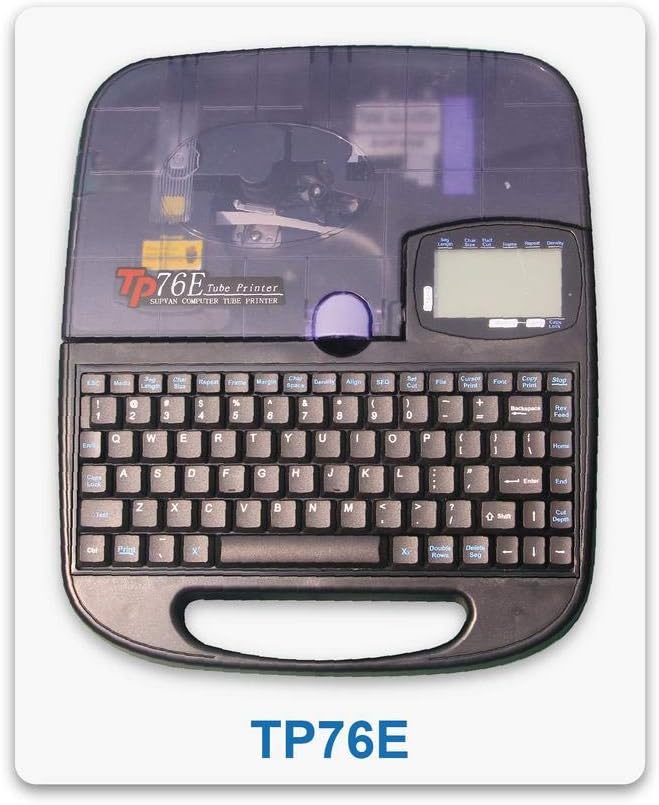
Figure 2: Supvan TP76E Label Printer (Top View)
이 이미지는 위에서 아래로의 이미지를 제공합니다. view of the Supvan TP76E, clearly showing the full QWERTY keyboard layout, the LCD display, and the transparent cover of the label roll compartment. This perspective is useful for understanding the user interface.
4. 컴퓨터 연결 (선택 사항)
The TP76E supports USB connectivity for printing from a computer.
- Connect one end of the provided USB cable to the USB port on the printer.
- USB 케이블의 다른 쪽 끝을 컴퓨터의 사용 가능한 USB 포트에 연결합니다.
- Install the necessary drivers and software from the official Supvan website or the included installation media (if applicable).
작동 지침
1. 기본 라벨 생성
- 프린터를 켭니다.
- Use the integrated QWERTY keyboard to type your desired text. The text will appear on the LCD display.
- Utilize the navigation keys to move the cursor and edit text.
- 를 누르세요 인쇄 라벨을 인쇄하는 버튼입니다.
2. 서식 옵션
The TP76E offers various formatting options accessible via dedicated keys or menu functions:
- 글자 크기 : Adjust the size of the text to fit your label requirements.
- Bold/Italic: Apply bold or italic styling to your text for emphasis.
- 밑줄: Add an underline to text.
- 액자: Add decorative frames around your text.
- 조정: Choose left, center, or right alignment for your text.
3. 라벨 저장 및 불러오기
The printer allows you to save frequently used label designs for quick recall:
- 레이블을 생성한 후, 다음으로 이동하세요. 구하다 function (refer to the display menu).
- Select an empty memory slot to store the label.
- To recall a saved label, navigate to the 상기하다 or 열려 있는 function and select the desired label from the list.
유지
1. 프린트 헤드 청소
Regular cleaning of the print head ensures clear and consistent print quality. Clean the print head if you notice faded or incomplete prints.
- 프린터 전원을 끄고 전원 어댑터를 분리하세요.
- 라벨 칸 덮개를 여세요.
- 면봉으로 프린트 헤드 표면을 부드럽게 닦아주세요.amp이소프로필 알코올로 세척하십시오. 물이나 연마성 세척제를 사용하지 마십시오.
- 프린트 헤드가 완전히 마를 때까지 기다린 후 덮개를 닫고 전원을 다시 연결하십시오.
2. Replacing Label Rolls
When the label roll is depleted, replace it as follows:
- 라벨 칸 덮개를 여세요.
- 빈 라벨 롤 코어를 제거하세요.
- Insert a new label roll as described in the 설정 부분.
- 덮개를 닫으세요.
문제 해결
This section addresses common issues you might encounter with your Supvan TP76E printer.
| 문제 | 가능한 원인 | 해결책 |
|---|---|---|
| 프린터가 켜지지 않음 | No power supply; Power adapter faulty | Ensure power adapter is securely connected to printer and outlet. Try a different outlet. |
| No labels are printing | Label roll empty; Labels incorrectly loaded; Print head dirty | Replace label roll. Re-load labels correctly. Clean the print head as per maintenance instructions. |
| Print quality is poor/faded | Print head dirty; Low quality labels | Clean the print head. Ensure you are using high-quality thermal labels. |
| 컴퓨터에서 프린터를 인식하지 못합니다. | USB cable faulty; Drivers not installed or outdated | Try a different USB cable or port. Install or update printer drivers from the Supvan web대지. |
명세서
Key technical specifications for the Supvan TP76E Label Printer:
- 모델 번호: Supvan TP76E
- 프린터 출력: 흑백 (모노크롬)
- 인쇄 기술: 열의
- 연결성: USB
- 인쇄 매체: 라벨
- 최대 입력 시트 용량: 25 (labels per minute)
- 양면 인쇄: 아니요
- 필요한 배터리: 아니요
보증 및 지원
For warranty information, technical support, or to purchase accessories and replacement parts, please contact Supvan customer service or visit their official web대지.
자세한 정보와 지원 리소스는 공식에서 찾을 수 있습니다. 아마존에서 SUPVAN 스토어를 만나보세요.
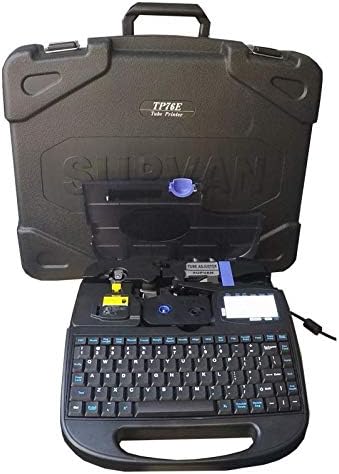
Figure 3: Supvan TP76E Label Printer in Carrying Case
This image shows the Supvan TP76E label printer neatly stored within its custom-fitted protective carrying case, emphasizing its portability and secure storage solution.