
1. 서론
The Zealot S11 is a portable, wireless Bluetooth speaker designed for versatile use, including outdoor activities. It features IP67 waterproofing, a multi-mode flashlight, a power bank function, and supports various audio input methods. This manual provides detailed instructions for its setup, operation, and maintenance.

Image 1: Zealot S11 Waterproof Bluetooth Speaker
2. 패키지 내용
사용하시기 전에 패키지에 모든 구성품이 들어 있는지 확인하십시오.
- Zealot S11 Bluetooth Speaker
- Bike/Cycle Mount
- 3.5mm 오디오 케이블
- USB 충전 케이블
- 사용자 설명서
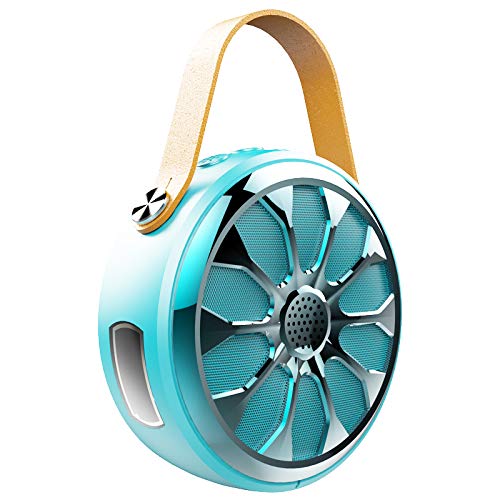
Image 2: Zealot S11 Speaker with included accessories
3. 제품 레이아웃
3.1 포트 및 커넥터

이미지 3: 측면 view of the Zealot S11 showing the AUX-in port, USB-out port (for power bank), USB-in port (for charging), Power ON/OFF switch, and TF card slot.
- IN (USB-in): 스피커 충전용 마이크로 USB 포트.
- 끄기 / 켜기 : Power switch to turn the speaker on or off.
- TF : Slot for a TF (MicroSD) card for local music playback.
- OUT (USB-out): Standard USB port for using the speaker as a power bank.
- 보조: 3.5mm audio input jack for wired connection.
3.2 제어 버튼

이미지 4: 상단 view of the Zealot S11 showing the control buttons for Flashlight, Mode Switch, Volume Down/Previous Track, and Volume Up/Next Track.
- 손전등 버튼: 손전등 모드를 활성화하고 순환합니다.
- M (모드 전환): Switches between Bluetooth, TF card, and AUX modes.
- Vol-/Pre Track: 짧게 누르면 볼륨이 낮아지고, 길게 누르면 이전 트랙으로 돌아갑니다.
- Vol+/다음 트랙: 짧게 누르면 볼륨이 커지고, 길게 누르면 다음 트랙이 됩니다.
4. 설정
4.1 스피커 충전
- 제공된 USB 충전 케이블을 연결하세요. IN 스피커의 포트.
- USB 케이블의 다른 쪽 끝을 5V/1A USB 전원 어댑터(별도 구매) 또는 컴퓨터의 USB 포트에 연결하십시오.
- 충전 표시등이 켜집니다. 완전히 충전되면 표시등의 색상이 바뀌거나 꺼집니다(자세한 LED 작동 방식은 빠른 시작 가이드를 참조하십시오).
- 완충 시 약 20시간 동안 음악을 재생할 수 있습니다.
4.2 Mounting on a Bike/Cycle
The Zealot S11 includes a mount for attachment to a bike or cycle handlebar.
- Locate the screw hole on the bottom of the speaker.
- Attach the provided bike mount to the speaker using the screw.
- Securely fasten the mount to your bike's handlebar. Ensure the speaker is stable before riding.
5. 사용 설명서
5.1 전원 켜기/끄기
- 전원을 켜려면 슬라이드하세요 켜기/끄기 '켜짐' 위치로 전환하십시오.
- 전원을 끄려면 슬라이드하세요. 켜기/끄기 'OFF' 위치로 전환하십시오.
5.2 블루투스 페어링
- Ensure the speaker is powered on and in Bluetooth mode (indicated by a flashing LED, if applicable). If not, press the M Bluetooth 모드로 전환하려면 버튼을 누르세요.
- 스마트폰이나 태블릿에서 블루투스를 활성화하고 사용 가능한 장치를 검색하세요.
- Select "Zealot S11" from the list of devices.
- 페어링이 완료되면 스피커에서 소리로 확인 메시지가 나오고 LED 표시등이 깜빡임을 멈춥니다.
5.3 음악 재생

Image 5: The Zealot S11 supports three major player modes: Bluetooth, TF card, and AUX input.
- Bluetooth Play: 페어링이 성공적으로 완료되면 연결된 기기에서 음악을 재생하세요.
- TF 카드 놀이 : 음악이 담긴 TF(MicroSD) 카드를 삽입하세요 file에 s TF slot. The speaker will automatically switch to TF card mode or you can press the M 버튼을 눌러 선택합니다.
- AUX 재생: Connect an audio device using the 3.5mm audio cable to the 보조 포트. 누르세요 M 버튼을 누르면 AUX 모드로 전환됩니다.
5.4 핸즈프리 통화

Image 6: The Zealot S11 allows for hands-free phone calls when connected via Bluetooth.
스마트폰과 블루투스로 연결하면 스피커를 사용하여 핸즈프리 통화를 할 수 있습니다.
- 전화 받기: 를 누르세요 M 걸려오는 전화에 응답하려면 버튼을 한 번 누르세요.
- 통화 종료: 를 누르세요 M button once during a call to end it.
- 전화 거부: 를 누르고 계세요 M 버튼을 눌러 수신 전화를 거부합니다.
5.5 손전등 작동
The speaker features a 3-mode flashlight.
- 를 누르세요 손전등 버튼 손전등을 켜려면 한 번만 하면 됩니다.
- Press again to cycle through the different modes (e.g., high, low, SOS).
- 손전등을 끄려면 세 번 누르세요.
5.6 파워뱅크 기능
The Zealot S11 can act as a power bank to charge other devices.
- Connect your mobile phone or other USB-powered device to the 밖으로 (USB-out) port on the speaker using a compatible USB cable.
- The speaker will begin providing 5V/1A current to charge your device.
6. 유지관리
- 방수 등급: The Zealot S11 is IP67 waterproof and dustproof. This means it can withstand immersion in water up to 1 meter for 30 minutes and is protected against dust ingress. Ensure all port covers are securely closed before exposure to water or dust.
- 청소: 부드러운 천으로 스피커를 닦고 damp 옷감. 강한 화학 물질이나 연마성 세제를 사용하지 마십시오.
- 저장: 스피커는 직사광선과 극한의 온도를 피해 시원하고 건조한 곳에 보관하세요.
- 배터리 관리 : To prolong battery life, fully charge the speaker before first use and at least once every three months if not used regularly. Avoid completely draining the battery frequently.
7. 문제 해결
- 스피커가 켜지지 않음: 배터리가 충전되어 있는지 확인하십시오. USB 충전 케이블을 사용하여 스피커를 전원에 연결하십시오.
- Bluetooth를 통해 페어링할 수 없습니다.
- 스피커가 Bluetooth 페어링 모드(깜박이는 LED)에 있는지 확인하세요.
- 기기의 블루투스가 켜져 있고 통신 가능 범위(일반적으로 10미터) 내에 있는지 확인하세요.
- Forget "Zealot S11" from your device's Bluetooth list and try pairing again.
- 스피커와 Bluetooth 장치를 모두 다시 시작하세요.
- 소리가 나지 않습니다:
- 스피커와 연결된 기기의 볼륨 레벨을 확인하세요.
- Ensure the correct playback mode (Bluetooth, TF, AUX) is selected.
- AUX 케이블을 사용하는 경우 케이블이 완전히 삽입되어 정상적으로 작동하는지 확인하십시오.
- 손전등이 작동하지 않습니다. Ensure the speaker is powered on and press the flashlight button.
- 보조 배터리가 기기를 충전하지 못합니다. Ensure the speaker has sufficient charge. Verify the USB cable and the connected device are functional.
8. 사양
| 특징 | 사양 |
|---|---|
| 모델 | S11 |
| 상표 | 열광자 |
| 연결 기술 | Bluetooth, Auxiliary, Wireless |
| 방수 레벨 | IP67 방수 |
| 전원 | 배터리 구동 |
| 배터리 용량 | 4000mAh 리튬 배터리 |
| 배터리 평균 수명 | 20 Hours (Music Time) |
| 제어 방법 | 터치(버튼) |
| 특별 기능 | Bluetooth, Portable, Wireless, Flashlight (3 Modes), Power Bank, TF Card Support, Hands-Free Calling |
| 호환 장치 | 스마트폰, 태블릿 |
| 오디오 출력 모드 | 스테레오 재생 |
| 품목 무게 | 360그램 |
| 제품 크기(LxWxH) | 11.5 x 11.5 x 4.5cm |
9. 제품 비디오 끝view
이 영상은 시각적으로 다음을 제공합니다.view of the Zealot S11 speaker's features, including its flashlight, design, and various playback options. Please note that the video source URL is a placeholder as a direct m3u8 link was not provided in the product data.
10. 보증 및 지원
For warranty information and customer support, please refer to the documentation included with your purchase or visit the official Zealot web사이트. 보증 청구를 위해 구매 증빙 자료를 보관하세요.