
1. 제품 오버view
The STMicroelectronics NUCLEO-64 boards offer an accessible and adaptable platform for developing and prototyping with STM32 microcontrollers. The NUCLEO-F446RE board features the STM32F446RET6 microcontroller, providing a balance of performance, power efficiency, and diverse functionalities. It supports Arduino Uno V3 connectivity and includes ST morpho headers for expanding its capabilities with various specialized shields.
This board integrates an ST-LINK/V2-1 debugger and programmer, eliminating the need for separate debugging tools. It comes with the comprehensive STM32 software HAL library, numerous software examples, and access to Arm Mbed online resources.
주요 특징:
- STM32F446RET6 microcontroller in LQFP64 package.
- High-performance ARM Cortex-M4 core with DSP and FPU, 512 Kbytes Flash, 180 MHz CPU.
- On-board ST-LINK/V2-1 debugger/programmer with SWD connector and USB re-enumeration (mass storage, Virtual COM port, debug port).
- Arduino Uno V3 connectivity support and ST morpho extension pin headers.
- Flexible power-supply options: ST-LINK USB VBUS or external sources.
- One user LED shared with Arduino, two additional LEDs, and two push-buttons (user and reset).
- 32.768 kHz LSE crystal oscillator.
- 포괄적인 무료 소프트웨어 라이브러리 및 examples via STM32Cube MCU Package.
- Support for various Integrated Development Environments (IDEs) including IAR, Keil, GCC-based IDEs, and Arm Mbed.

그림 1: 전면 view of the NUCLEO-F446RE Development Board, showing the microcontroller, connectors, and buttons.
2. 설정 및 초기 구성
Follow these steps to set up your NUCLEO-F446RE development board for the first time.
2.1. 시작하기
- Check Jumper Positions: Ensure jumpers JP1 (off), JP5 (PWR) on U5V side, and JP6 (IDD) are correctly set on the board.
- PC에 연결: Connect the STM32 Nucleo board to a PC using a USB Type-A to Mini-B cable through connector CN1.
- Power-Up Indication: Upon successful connection, the red LEDs LD3 (PWR) and LD1 (COM) should light up, and the green LED LD2 will blink.
- User Button Test: Press the user button B1 (left button) and observe the blinking pattern of the green LED LD2. It should change according to the button press.
- 데모 소프트웨어: The board comes with pre-loaded demo software. Explore its features to understand basic functionalities.
- Develop Applications: Begin developing your own applications using available examples and libraries.

Figure 2: Packaging detail showing initial setup instructions and system requirements.
2.2. 시스템 요구 사항
- 운영 체제: Windows® OS (7, 8 and 10), Linux® 64-bit, or macOS®.
- USB 케이블 : USB Type-A to Mini-B cable for connection to PC.
2.3. Development Toolchains
The NUCLEO-F446RE board supports a wide range of development environments:
- IAR 임베디드 워크 벤치
- 케일 MDK-ARM
- GCC-based IDEs (e.g., STM32CubeIDE)
- Arm Mbed online compiler (for compatible Nucleo part numbers)
3. 운영
The NUCLEO-F446RE board is designed for flexible operation, supporting various programming and debugging methods.
3.1. 프로그래밍 및 디버깅
The integrated ST-LINK/V2-1 debugger/programmer allows for easy code upload and debugging. When connected via USB, the ST-LINK/V2-1 enumerates as three different interfaces:
- 대용량 저장 장치: For drag-and-drop programming of binary files.
- 가상 COM 포트: For serial communication with the host PC.
- 디버그 포트: For debugging applications using compatible IDEs.
3.2. Expanding Functionality
The board's functionality can be extended using its expansion connectors:
- Arduino Uno V3 Connectivity: Allows attachment of Arduino-compatible shields.
- ST Morpho Extension Headers: Provides full access to all STM32 I/Os for custom connections and shield development.
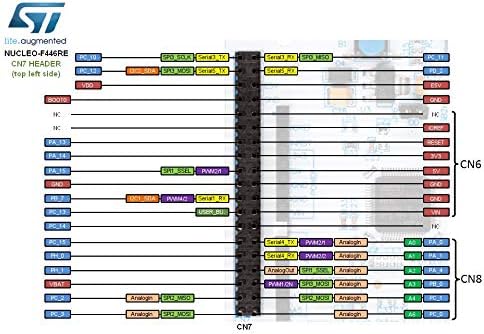
Figure 3: Pinout diagram illustrating the CN7 header connections for the NUCLEO-F446RE board.
4. 유지관리
To ensure the longevity and reliable operation of your NUCLEO-F446RE board, follow these general maintenance guidelines:
- 조심스럽게 다루십시오: 보드를 떨어뜨리거나 물리적인 충격을 가하지 마십시오.
- 정전기 방전: Always handle the board in an environment free of static electricity. Use an anti-static mat and wrist strap if possible.
- 깨끗한 환경: Operate and store the board in a clean, dry, and dust-free environment.
- 청소: 청소가 필요한 경우, 부드럽고 마른 브러시나 압축 공기를 사용하여 먼지를 제거하십시오. 액체 세척제 사용은 피하십시오.
- 연결/분리 전에 전원을 끄십시오: Always disconnect power before connecting or disconnecting any shields, cables, or components to prevent damage.
5. 문제 해결
If you encounter issues with your NUCLEO-F446RE board, consider the following troubleshooting steps:
- No Power Indication (LEDs Off):
- Ensure the USB cable is securely connected to both the board (CN1) and the PC.
- 다른 USB 포트나 케이블을 사용해 보세요.
- Verify that the PC's USB port is providing power.
- Check jumper settings, especially JP5 (PWR).
- ST-LINK/V2-1 Not Recognized by PC:
- Install the necessary ST-LINK drivers. These are usually part of the STM32CubeIDE or available on the STMicroelectronics web대지.
- PC를 다시 시작해 보세요.
- Ensure the USB cable is functioning correctly.
- Application Not Running/Debugging Issues:
- Verify your development environment (IDE) is correctly configured for the STM32F446RET6 microcontroller.
- Check your code for errors and ensure it's compiled correctly.
- Ensure the debugger is connected and configured properly in your IDE.
- Reset the board using the reset button.
- 주변 문제:
- Double-check all wiring and connections to external components or shields.
- Verify that the correct pins are being used and initialized in your software.
- Consult the STM32F446RET6 datasheet and reference manual for peripheral configuration details.
6. 기술 사양
| 특징 | 세부 사항 |
|---|---|
| 마이크로 컨트롤러 | STM32F446RET6 (DSP 및 FPU를 탑재한 ARM Cortex-M4) |
| CPU 속도 | 180MHz |
| 플래시 메모리 | 512킬로바이트 |
| 디버거/프로그래머 | 온보드 ST-LINK/V2-1 |
| 연결성 | USB (ST-LINK), Arduino Uno V3, ST Morpho headers |
| 사용자 인터페이스 | 1 user LED (shared with Arduino), 2 additional LEDs, 1 user button, 1 reset button |
| 발진기 | 32.768kHz LSE 크리스털 |
| 전원 공급 장치 | ST-LINK USB VBUS or external sources |
| 품목 무게 | 0.01 온스(대략) |
| 패키지 크기 | 4.61 x 3.78 x 1.57인치(대략) |
7. 보증 및 지원
Specific warranty information for the STMicroelectronics NUCLEO-F446RE development board is typically provided at the point of purchase or on the official STMicroelectronics website. Please refer to the documentation included with your product or visit the manufacturer's web자세한 보증 약관은 해당 사이트에서 확인하세요.
For technical support, documentation, software downloads, and community forums, please visit the official STMicroelectronics support pages. These resources offer extensive information, FAQs, and assistance for developing with STM32 microcontrollers and Nucleo boards.
Official STMicroelectronics Web대지: www.st.com/stm32nucleo


