
중요 안전 지침
To ensure safe operation and prolong the life of your monitor, please read and follow these instructions carefully:
- 모니터를 청소하기 전에 항상 전원 코드를 콘센트에서 뽑으십시오.
- 감전 사고를 방지하기 위해 모니터를 비나 습기에 노출시키지 마십시오.
- 모니터 과열을 방지하기 위해 모니터 주변에 적절한 통풍이 이루어지도록 하십시오. 통풍구를 막지 마십시오.
- 제조업체에서 제공한 전원 어댑터와 케이블만 사용하세요.
- 전원 코드나 모니터 위에 무거운 물건을 올려놓지 마세요.
- If the monitor is damaged or malfunctions, do not attempt to repair it yourself. Contact qualified service personnel.
패키지 내용
Before proceeding with the setup, please check the contents of your package to ensure all items are present:
- Acer CB272U smiiprx LED Monitor
- 모니터 스탠드 (받침대 및 암)
- 전원 코드
- HDMI 케이블
- 빠른 시작 가이드/보증 카드
설정
1. 모니터 스탠드 조립
- Carefully remove the monitor from its packaging. Place the monitor face down on a soft, clean cloth or surface to prevent scratches to the screen.
- Attach the stand arm to the back of the monitor panel. Ensure it is securely fastened, typically by sliding it into place until it clicks or by tightening screws.
- Connect the stand base to the bottom of the stand arm. Secure the base by tightening the captive screw located underneath the base.

그림 1: 후면 view of the Acer CB272U smiiprx monitor with the stand attached, illustrating the assembly points.
2. Connecting the Monitor to Your Computer
- 제공된 HDMI 케이블의 한쪽 끝을 모니터의 HDMI 포트에 연결하십시오.
- Connect the other end of the HDMI cable to the HDMI output port on your computer or graphics card.
- 전원 코드를 모니터의 전원 입력 단자에 꽂은 다음, 다른 한쪽 끝을 접지된 콘센트에 꽂으십시오.

그림 2: 각진 후면 view showing the input ports of the monitor, including HDMI and power connections.
모니터 작동
전원 켜기 및 끄기
Locate the power button on the monitor's bezel. Press it once to turn the monitor on. The power indicator light will illuminate. Press it again to turn the monitor off.
Adjusting Display Settings (OSD Menu)
The On-Screen Display (OSD) menu allows you to customize various monitor settings. Use the control buttons (usually located on the back or bottom right of the monitor) to navigate the OSD menu. Common adjustments include:
- 밝기/대비: 전반적인 밝기와 밝은 부분과 어두운 부분의 차이를 조정합니다.
- 색상 설정: 색온도, 감마, 개별 RGB 레벨을 수정합니다.
- 입력 소스: Manually select the video input (e.g., HDMI).
- 오디오: Control volume for the built-in speakers.
인체공학적 조정
The Acer CB272U smiiprx monitor stand offers multiple ergonomic adjustments to optimize your view편안함:
- 높이 조정: 모니터를 눈높이로 높이거나 낮추세요.
- 경사: Adjust the screen angle forward or backward to reduce glare.
- 받침: Rotate the monitor horizontally to share your screen or adjust view잉 각도.
- 피벗: Rotate the screen to a portrait orientation for document view코딩 또는 코딩.
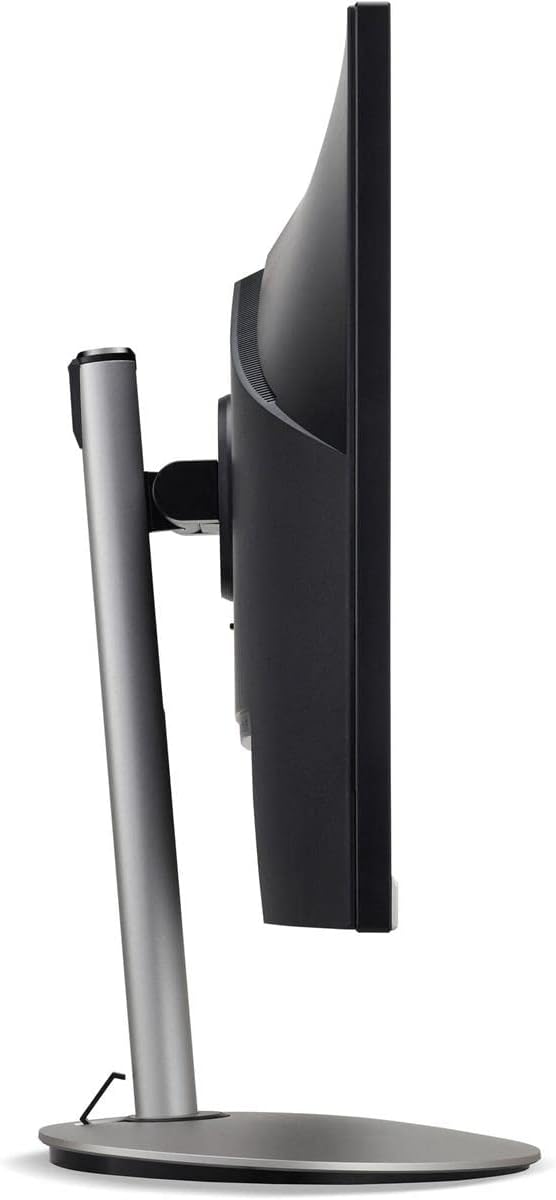
그림 3: 사이드 프로file of the monitor, illustrating its adjustable stand for ergonomic positioning.
유지
Cleaning the Monitor Screen and Casing
To clean your monitor, first ensure it is turned off and unplugged from the power outlet. Use a soft, lint-free cloth. For stubborn marks, lightly dampen the cloth with water or a specialized non-abrasive screen cleaner. 액체를 화면이나 c에 직접 분사하지 마십시오.asing. 강한 화학 물질, 연마 세척제 또는 용제의 사용을 피하세요.
보관 지침
If you need to store the monitor for an extended period, it is recommended to use its original packaging to protect it from dust, moisture, and physical damage. Store in a cool, dry environment away from direct sunlight and extreme temperatures.
문제 해결
일반적인 문제와 해결 방법은 아래 표를 참조하세요.
| 문제 | 가능한 원인 | 해결책 |
|---|---|---|
| 화면에 이미지가 없습니다. | 전원 케이블이 분리되었습니다. 비디오 케이블이 분리되었습니다. 잘못된 입력 소스가 선택되었습니다. | 전원 및 비디오 케이블 연결을 확인하십시오. 모니터 전원이 켜져 있는지 확인하십시오. OSD 메뉴를 통해 올바른 입력 소스를 선택하십시오. |
| 이미지가 흐릿하거나 왜곡됩니다. | 해상도 설정이 잘못되었거나 비디오 케이블에 문제가 있을 수 있습니다. | Set the display resolution to 2560 x 1440 at 75 Hz; Try a different HDMI cable. |
| 스피커에서 소리가 나지 않음 | Monitor volume too low or muted; Incorrect audio output selected on computer. | Adjust monitor volume via OSD; Unmute audio; Select the monitor as the audio output device in your computer's sound settings. |
| 모니터 깜빡임 | 새로 고침 빈도 불일치; 간섭; 케이블 불량. | Ensure refresh rate is set to 75 Hz; Check for nearby electronic devices causing interference; Replace video cable. |
명세서
Key technical specifications for the Acer CB272U smiiprx LED Monitor:
| 특징 | 세부 사항 |
|---|---|
| 모델명 | CB272U smiiprx |
| 화면 크기 | 24.1 인치 |
| 네이티브 해상도 | 2560x1440(WQHD) |
| 새로 고침 빈도 | 75Hz |
| 응답 시간 | 1 Millisecond (VRB) |
| 종횡비 | 16시 9분 |
| 디스플레이 유형 | LED-backlit LCD / TFT active matrix (IPS) |
| 명도 | 350칸델라/제곱미터 |
| 대비율 | 1000:1 (정적) |
| 연결성 | HDMI |
| 적응형 동기화 | 프리싱크 |
| 내장 스피커 | 예 |
| Dimensions (WxDxH with stand) | 24.1인치 x 9.2인치 x 20.5인치 |
| 무게(스탠드 포함) | 18.1 파운드 |

Figure 4: Monitor dimensions with stand, indicating width, depth, and height.
보증 정보
The Acer CB272U smiiprx LED Monitor comes with a 3년 제조사 제한 보증. This warranty covers defects in materials and workmanship under normal use. For complete details regarding warranty coverage, limitations, and how to make a claim, please refer to the warranty documentation included with your product or visit the official Acer support web대지.
보증 서비스를 받으시려면 구매 증빙 자료(영수증 또는 송장)가 필요하므로 잘 보관해 주십시오.
고객 지원
Should you require further assistance, technical support, or wish to download the latest drivers and firmware updates for your monitor, please visit the official Acer support web대지:
You can also find contact information for Acer customer service in your region on the support web개인화된 지원을 위한 사이트입니다.