
1. 서론
The AUTOOL LM120 Digital Manifold Gauge is an intelligent electronic instrument designed to assist in the installation, testing, and maintenance of refrigeration equipment. This includes systems such as air conditioners, refrigerators, and cold storage units. It provides precise measurements for pressure, temperature, and vacuum, along with advanced diagnostic capabilities.

Image 1.1: AUTOOL LM120 Digital Manifold Gauge in use, connected to an automotive air conditioning system.
2. 안전 정보
기기를 작동하기 전에 모든 안전 지침을 읽고 숙지하십시오. 이 지침을 따르지 않을 경우 부상이나 장비 손상이 발생할 수 있습니다.
- Always wear appropriate personal protective equipment (PPE), including safety glasses and gloves, when working with refrigeration systems and refrigerants.
- Ensure adequate ventilation in the work area to prevent the accumulation of refrigerant gases.
- 기기를 극한 온도, 직사광선 또는 부식성 환경에 노출시키지 마십시오.
- Handle refrigerant hoses and connections with care to prevent leaks and accidental discharge.
- Refer to local regulations and industry standards for the safe handling, recovery, and disposal of refrigerants.
- 기기를 수리하거나 개조하려고 시도하지 마십시오. 자격을 갖춘 전문가에게 서비스를 요청하십시오.
3. 제품 오버view 및 구성 요소
The LM120 Digital Manifold Gauge features a robust design with an intuitive interface. Familiarize yourself with the components shown below.

Image 3.1: Detailed diagram of the LM120 Digital Manifold Gauge components.
- 훅
- Clamp-on Temperature Probe Socket
- LCD 디스플레이
- 기능 버튼
- 실행/정지 버튼
- 제로 버튼
- R+/R- Refrigerant Type Selection Buttons
- 디밍 버튼
- 단위 버튼
- ° C / ° F 버튼
- 전원 버튼
- 저압밸브
- Refrigerant Observation Window
- 고압 밸브
- 1/4 inch Low Pressure Inlet
- 릴리프 밸브
- 1/4 inch High Pressure Inlet
- Refrigerant Inlet / Vacuum Pump Inlet
4. 설정
처음 사용하기 전에 기기가 작동 준비가 되었는지 확인하십시오.
4.1 초기 전원 켜기
- 를 누르고 계세요 전원 버튼 (11) 장치를 켜기 위해.
- The LCD Display (3) will illuminate and show the initial readings.
4.2 호스 연결
Connect the appropriate refrigeration hoses to the inlets on the manifold gauge.
- Connect the low-pressure hose to the 1/4 inch Low Pressure Inlet (15).
- 고압호스를 연결하세요. 1/4 inch High Pressure Inlet (17).
- Connect the service hose (for vacuum pump or refrigerant tank) to the Refrigerant Inlet / Vacuum Pump Inlet (18).
- 모든 연결 부분이 단단히 조여져 누수가 발생하지 않도록 하세요.
4.3 Connecting Temperature Probes (Optional)
For dual temperature measurement, connect compatible clamp-on temperature probes (not included) to the Clamp-on Temperature Probe Socket (2).
5. 사용 설명서
This section details the various functions and how to operate the AUTOOL LM120.
5.1 디스플레이 오버view
The large LCD provides clear, real-time data for pressure, temperature, and other parameters.

Image 5.1: The smart digital display provides clear readings for various parameters.
5.2 단위 선택
To change pressure or temperature units:
- 를 누르세요 단위 버튼 (9) to cycle through available pressure units (e.g., Kpa, Psi, Bar).
- 를 누르세요 ° C / ° F 버튼 (10) to switch between Celsius and Fahrenheit temperature displays.
5.3 Refrigerant Type Setting
The device has a built-in database of 89 refrigerants. Select the correct refrigerant type for accurate calculations.

Image 5.2: Setting the refrigerant type on the LM120 display.
- 사용하세요 R+/R- Refrigerant Type Selection Buttons (7) to scroll through the available refrigerant types.
- 선택 사항을 확인하세요.
5.4 압력 측정
The LM120 measures both high and low pressures simultaneously.
- Ensure hoses are correctly connected to the high and low-pressure ports of the system.
- The display will show the current high and low pressure readings.
5.5 온도 측정
선택 사양 cl 포함amp-on temperature probes, the device can measure dual temperatures.

Image 5.3: High/Low pressure temperature test display.
- Attach the temperature probes to the desired measurement points (e.g., suction line, liquid line).
- The display will show T1 and T2 temperature readings.
5.6 Evaporation Pressure & Temperature Test
This function measures the maximum pressure when the refrigerant changes from liquid to gas and the lowest temperature when the liquid becomes gaseous.
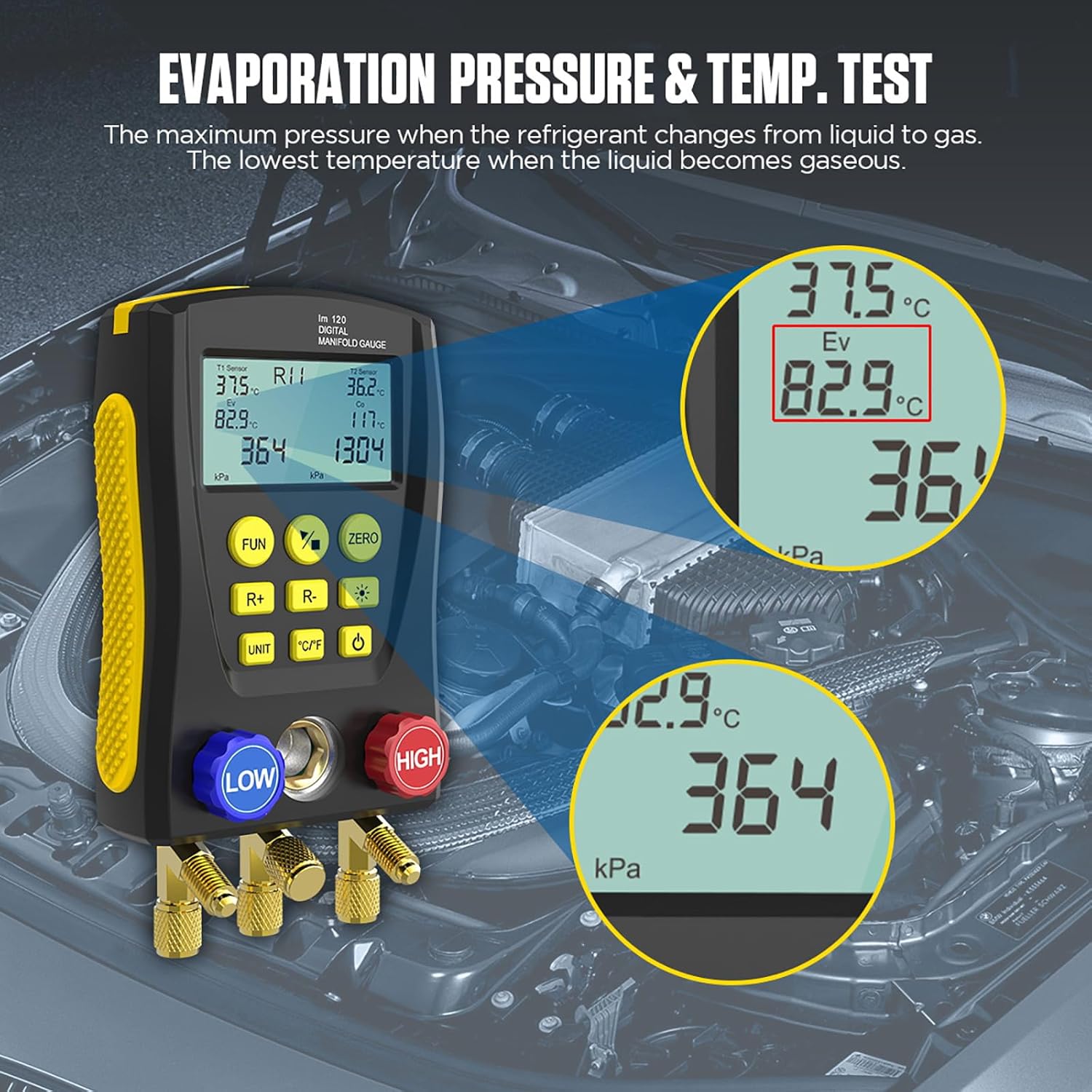
Image 5.4: Evaporation pressure and temperature test results on the display.
5.7 Condensing Pressure & Temperature Test
This function measures the minimum pressure when the refrigerant changes from gas to liquid and the maximum temperature when the gas changes to liquid.

Image 5.5: Condensing pressure and temperature test results on the display.
5.8 Pressure Leakage Test
The device can perform a pressure leakage test, recording leak time and speed.
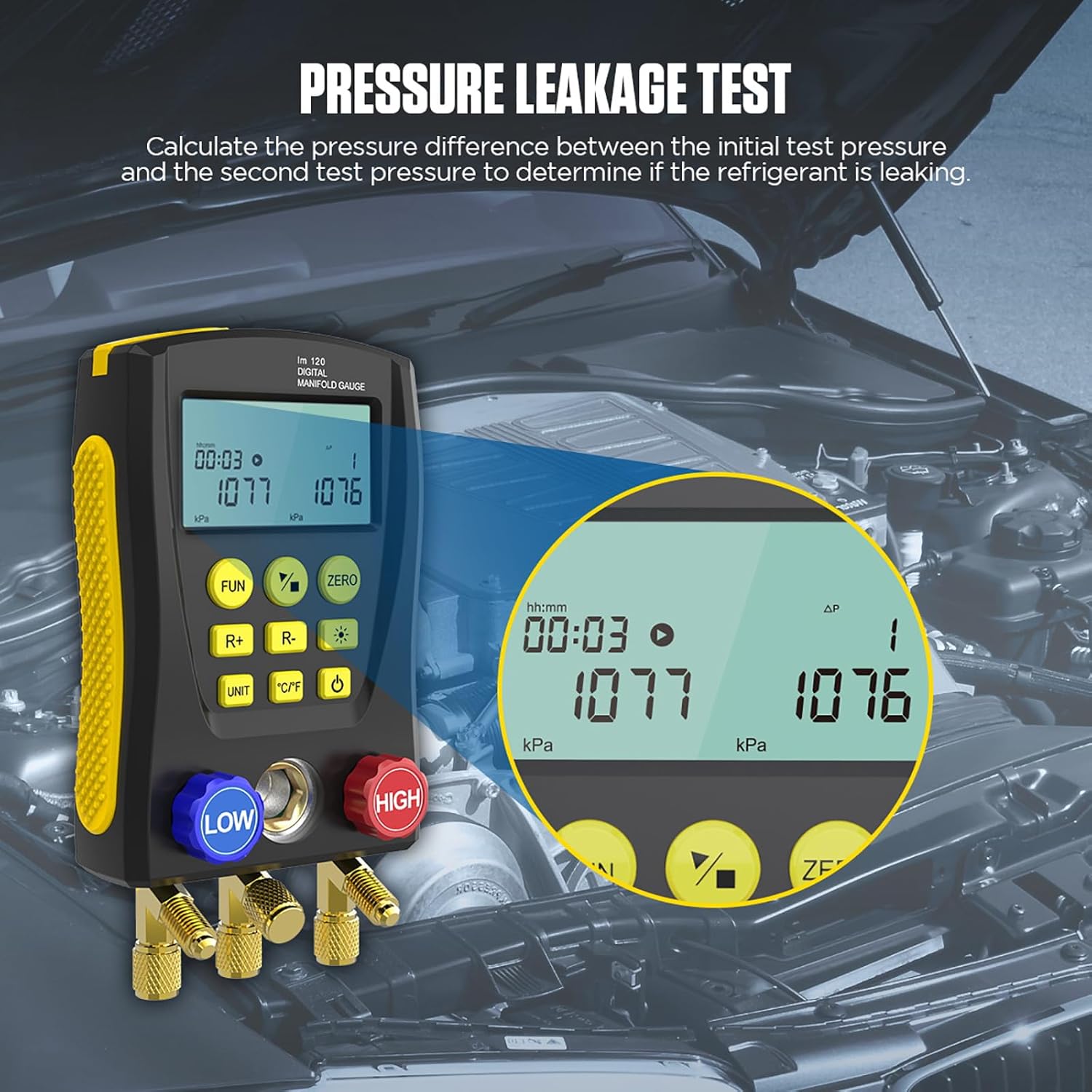
Image 5.6: Pressure leakage test in progress, showing initial and current pressure values over time.
- Connect the gauge to the system to be tested.
- 를 누르세요 기능 버튼 (4) to navigate to the leakage test mode.
- Follow the on-screen prompts to start and monitor the test. The device calculates the pressure difference between the initial and second test pressures to determine if refrigerant is leaking.
5.9 진공 측정
The LM120 can measure the percentage of vacuum achieved in a system.
- Connect the vacuum pump to the Refrigerant Inlet / Vacuum Pump Inlet (18).
- Activate the vacuum pump and monitor the vacuum percentag디스플레이에 e.
5.10 Superheat and Subcooling Calculation
Leveraging its integrated 89-type refrigerant database, the LM120 can automatically calculate superheat and subcooling temperatures.

Image 5.7: Built-in database of 89 refrigerant types for accurate calculations.
- Ensure the correct refrigerant type is selected (refer to Section 5.3).
- With pressure and temperature probes connected, the device will display calculated superheat and subcooling values.
6. 유지관리
Proper maintenance ensures the longevity and accuracy of your LM120 Digital Manifold Gauge.
- 청소: 부드럽고 마른 천으로 기기를 닦으세요. 연마성 세제나 용제를 사용하지 마세요.
- 저장: Store the gauge in its original case or a protective container in a cool, dry place away from direct sunlight and extreme temperatures.
- 호스 검사: Regularly inspect refrigerant hoses for cracks, wear, or damage. Replace damaged hoses immediately.
- 연결 확인: Ensure all connections and valves are clean and free of debris.
7. 문제 해결
If you encounter issues with your LM120, refer to the following common problems and solutions.
| 문제 | 가능한 원인 | 해결책 |
|---|---|---|
| 장치 전원이 켜지지 않음 | Low or depleted internal battery; power button not pressed correctly. | Ensure the device is charged or has sufficient power. Press and hold the Power Button firmly. |
| Inaccurate pressure/temperature readings | Incorrect refrigerant selected; loose hose connections; faulty probes; sensor calibration needed. | Verify the correct refrigerant type. Check all hose connections for tightness. Ensure temperature probes are clean and properly connected. Perform a zero calibration if available (using Zero Button). |
| 디스플레이가 어둡거나 읽을 수 없습니다 | 백라이트가 꺼져 있습니다. 배터리가 부족합니다. | Press the Dimming Button (8) to adjust backlight. Ensure the device is charged. |
| Leakage test shows false positive/negative | Improper connection; external temperature fluctuations; insufficient test duration. | Ensure all connections are absolutely leak-free. Conduct the test in a stable environment. Allow sufficient time for the test to complete. |
8. 사양
Detailed technical specifications for the AUTOOL LM120 Digital Manifold Gauge.
| 특징 | 사양 |
|---|---|
| 제조업체 | 오토올 |
| 모델 번호 | LM120 |
| 재료 | High-strength Engineering Plastic |
| 압력 테스트 범위 | 0Kpa – 6000Kpa |
| 압력 테스트 해상도 | 1kpa |
| 압력 테스트 정확도 | +/- 0.5 %(FS) + 5dgt |
| 압력 과부하 한계 | 10000 Kpa (10 Mpa; 100 bar) |
| Number of Refrigerants in Database | 89가지 유형 |
| 인터페이스 표준 | 1/4 인치 |
| 치수(길이 x 너비 x 높이) | 20.32 x 7.62 x 12.7cm(8 x 3 x 5인치) |
| 무게 | 59.53g (2.1온스) |
| 포함된 구성 요소 | 1 set of LM120 Digital Refrigeration Manifold Gauge |
| 필요한 배터리 | No (implies internal rechargeable or power source) |
| 한국어: | 733810026709, 733810026198 |
9. 보증 및 지원
AUTOOL is committed to providing high-quality products and customer satisfaction.
- XNUMX 년 보증 : For damage caused by non-human factors, AUTOOL promises to resend parts free of charge within 3 years from the date of purchase.
- Permanent Maintenance: The product is covered by permanent maintenance support.
- 고객 지원: For any inquiries, technical assistance, or warranty claims, please contact AUTOOL customer support. You can expect a response within 24 hours.