
1. 서론
Thank you for choosing the NEDIS Automatic Lead Acid Battery Charger, model BACCH02. This charger is designed for safe and efficient charging and maintenance of 2V, 6V, and 12V lead-acid batteries. Please read this manual thoroughly before use to ensure proper operation and to prevent damage to the charger or battery.
2. 안전 지침
배터리 충전기를 사용할 때는 항상 다음 안전 수칙을 준수하십시오.
- This charger is for indoor use only. Do not expose to rain or moisture.
- 어린이의 손이 닿지 않는 곳에 보관하세요.
- 충전 중에는 가스 축적을 방지하기 위해 적절한 환기가 이루어지도록 하십시오.
- Avoid sparks, flames, or smoking near the battery during charging. Batteries can produce explosive gases.
- 배터리로 작업할 때는 보안경과 보호복을 착용하십시오.
- 배터리 단자를 연결하거나 분리하기 전에 항상 AC 전원 공급 장치를 차단하십시오.amps.
- 빨간색(+) cl을 연결합니다.amp 배터리의 양극 단자와 검은색 (-) 단자에 연결하십시오.amp 배터리 음극 단자에 연결하세요.
- 얼어붙은 배터리, 손상된 배터리 또는 충전이 불가능한 배터리는 충전하지 마세요.
- 충전기를 열지 마십시오.asing. 모든 서비스는 자격을 갖춘 담당자에게 의뢰하세요.
- 전원 코드가 손상된 경우 위험을 방지하기 위해 제조업체, 해당 서비스 담당자 또는 이와 동등한 자격을 갖춘 사람을 통해 코드를 교체해야 합니다.
3. 제품 오버view
The NEDIS BACCH02 is a compact and automatic battery charger. It features a main unit with LED indicators and a voltage selection switch, connected to an AC power cable and DC output cables with battery clamps.

Image: The main unit of the NEDIS BACCH02 charger, showing the LED indicators for polarity and charge status, and the voltage 선택 스위치.
구성 요소:
- 충전기: Main body containing the electronics.
- 권tage 선택 스위치: Allows selection between 2V, 6V, and 12V charging modes.
- Polarity LED (Red): Indicates incorrect battery connection.
- Charge LED (Green): Indicates charging status (blinking for charging, solid for fully charged).
- 배터리 Clamps: Red (+) and Black (-) for connecting to the battery terminals.
- AC 전원 케이블: 벽면 콘센트에 연결합니다.
4. 설정
배터리 충전기를 설정하려면 다음 단계를 따르십시오.
- Ensure Charger is Unplugged: Before making any connections, ensure the charger's AC power cable is disconnected from the wall outlet.
- 배터리 전압을 확인하세요tage: 볼륨을 결정tage of the battery you intend to charge (2V, 6V, or 12V).
- Select Correct Voltage: 볼륨을 사용하세요tage selection switch on the charger unit to set the appropriate voltag배터리 전압은 2V, 6V 또는 12V 중 하나를 선택하세요.
- 배터리 Cl 연결amps:
- 연결하다 빨간색(+) 배터리 CLamp 배터리의 양극(+) 단자에 연결하세요.
- 연결하다 검은색 (-) 배터리 CLamp 배터리의 음극(-) 단자에 연결합니다.
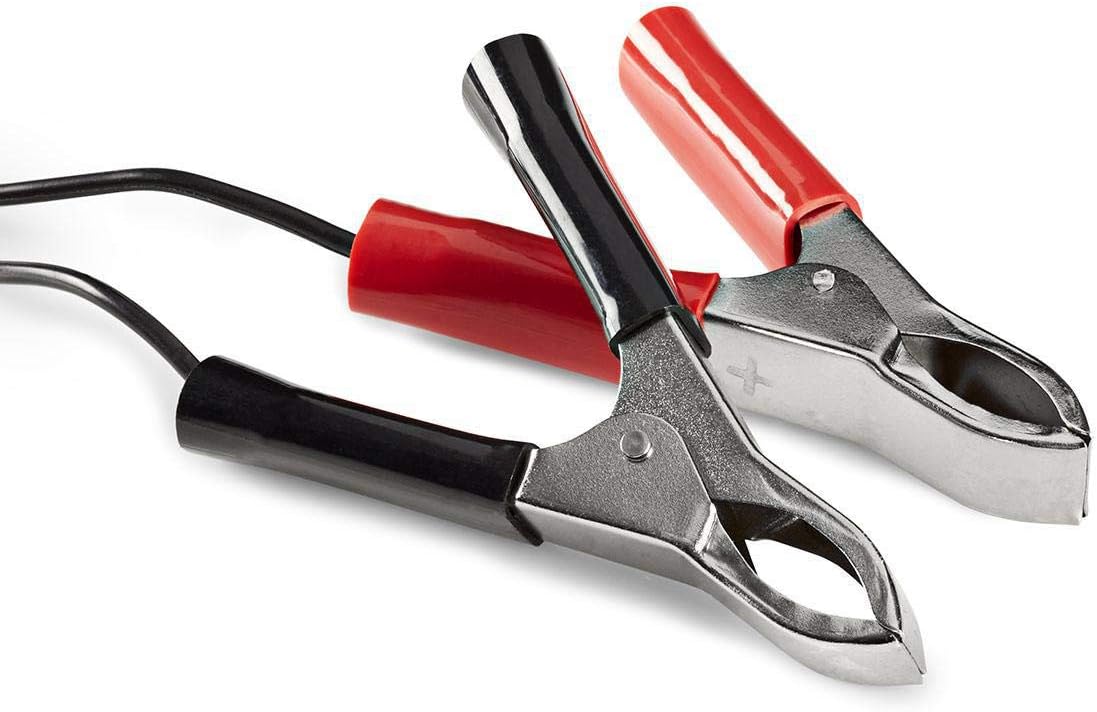
Image: Close-up of the red (positive) and black (negative) battery clamps.
- 전원에 연결: 일단 배터리 clamps are securely connected, plug the charger's AC power cable into a standard 220V wall outlet.
5. 사용 설명서
The NEDIS BACCH02 is a fully automatic charger. Once connected to the battery and power, it will automatically begin the charging process.
충전 프로세스:
- 극성 확인: If the red 'Polarity' LED illuminates, it indicates that the battery clamps are connected incorrectly. Immediately unplug the charger from the AC outlet and correct the connections before plugging it back in.
- 충전 표시: The green 'Charge' LED will blink when the battery is actively charging.
- 완전 충전 표시: When the battery is fully charged, the green 'Charge' LED will stop blinking and remain solid. The charger will then automatically switch to a maintenance (float) charge mode to keep the battery at optimal capacity without overcharging.
충전기 분리하기:
To disconnect the charger after use:
- Unplug the charger's AC power cable from the wall outlet first.
- Disconnect the black (-) battery clamp from the negative terminal of the battery.
- Disconnect the red (+) battery clamp 배터리의 양극 단자에서.
6. 유지관리
적절한 유지관리는 충전기의 수명을 보장합니다.
- Keep the charger clean and dry. Wipe with a soft, dry cloth. Do not use abrasive cleaners or solvents.
- 사용하지 않을 때에는 충전기를 서늘하고 건조한 곳에 보관하십시오.
- Regularly inspect the AC power cable, DC output cables, and battery clamp손상, 마모 또는 부식의 징후가 있는지 확인하십시오. 필요한 경우 교체하십시오.
7. 문제 해결
충전기에 문제가 발생하면 다음 표를 참조하십시오.
| 문제 | 가능한 원인 | 해결책 |
|---|---|---|
| 충전기가 켜지지 않음 / LED가 켜지지 않음 | No power supply; Faulty outlet; Damaged cable. | Check AC power connection; Try a different outlet; Inspect cable for damage. |
| Red 'Polarity' LED is lit | 역 극성 연결. | Unplug charger, correct battery clamp connections (red to +, black to -), then plug back in. |
| Green 'Charge' LED not blinking / Battery not charging | Battery too deeply discharged; Incorrect voltage selected; Damaged battery. | 올바른 볼륨 확인tage is selected; Battery may be beyond recovery; Have battery tested by a professional. |
| Charger unit feels excessively hot | Normal operation (some warmth is expected); Overload; Internal fault. | Ensure adequate ventilation; Disconnect immediately if excessively hot and contact support. |
8. 사양
| 특징 | 사양 |
|---|---|
| 모델 | 바크02 |
| 품목 모델 번호 | 5412810284245 |
| 입력 Voltage | 220V 교류 |
| 출력 볼륨tage | 2V / 6V / 12V DC (selectable) |
| Suitable Battery Capacity | 2.2아 ~ 10아 |
| 보호 기능 | Reverse Polarity, Short Circuit |
| 제품 크기(L x W x H) | 7 x 10 x 6cm |
| 품목 무게 | 680그램 |
| 규정 준수 | CE |
| 색상 | 검은색 |
9. 보증 및 지원
This product is covered by the standard warranty terms provided by the retailer at the time of purchase. For specific warranty details, please refer to your purchase documentation or contact the retailer directly.
For technical support, troubleshooting assistance beyond what is provided in this manual, or inquiries regarding parts and service, please contact your point of purchase or the manufacturer's customer service department.