
1. 서론
구매해주셔서 감사합니다asing the Nobsound NS-01G Pro Bluetooth 5.0 Power Amplifier. This compact yet powerful amplifier is designed to deliver high-fidelity audio for your speakers, offering versatile input options including Bluetooth 5.0, AUX, and USB. This manual provides detailed instructions for setup, operation, maintenance, and troubleshooting to ensure you get the best performance from your device.
2. 제품 오버view
2.1 주요 특징
- 2-in-1 디자인: Functions as both a Bluetooth receiver and a power amp리퍼.
- 무선 연결 : Seamlessly connect to smartphones and other devices via Bluetooth 5.0.
- 높은 출력 전력: Despite its mini size, it delivers up to 100W output power.
- 다중 입력 : Supports AUX, USB, and Bluetooth audio inputs.
- 톤 컨트롤: Features Bass, Middle, and Treble tone controls for sound customization.
2.2 패키지 내용
- 1 × Nobsound NS-01G Pro Amp리퍼
- 1 × DC 19V 전원 어댑터
- 1 × USB 케이블
- 1 × RCA 케이블
- 1 × 3.5mm 오디오 케이블
- 1 × 사용자 설명서

2.3 전면 패널 레이아웃

2.4 후면 패널 레이아웃
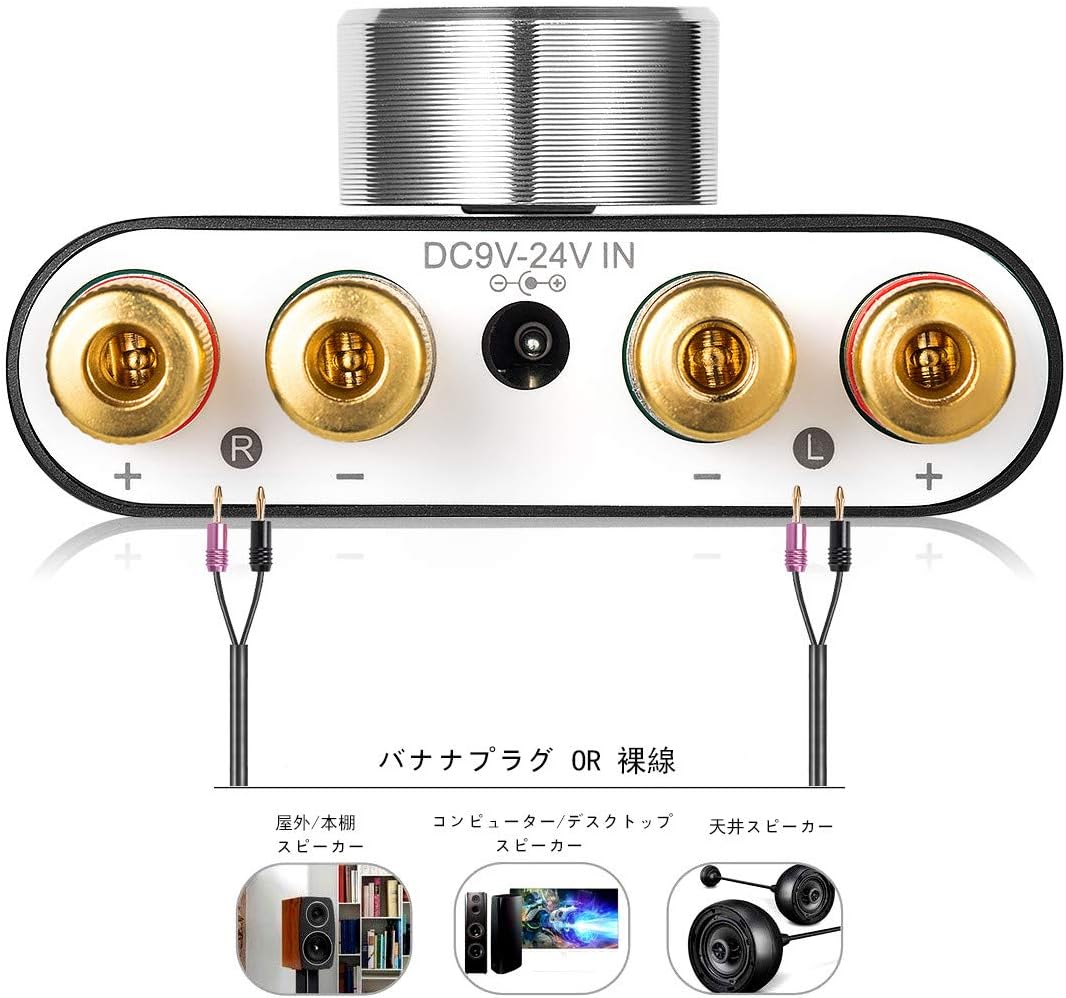
3. 설정 지침
3.1 스피커 연결
- 확인하십시오 amp전원이 꺼집니다.
- Connect your passive speakers to the speaker output terminals on the rear panel. Pay attention to polarity: connect the red (+) terminal on the amplifier to the red (+) terminal on the speaker, and the black (-) terminal on the amplifier to the black (-) terminal on the speaker.
3.2 입력 소스 연결
The NS-01G Pro supports three input methods: AUX, USB, and Bluetooth.

3.2.1 AUX 입력
- Connect your audio source (e.g., smartphone, CD player, TV) to the AUX input jack on the front panel using a 3.5mm audio cable.
3.2.2 USB 입력
- Connect your computer to the USB sound input port on the front panel using a USB cable. No drivers are typically required for this plug-and-play connection.

3.2.3 블루투스 입력
- Attach the Bluetooth antenna to the RF connector on the rear panel.
- Switch the input selector on the front panel to 'BT' mode.
- 모바일 기기에서 블루투스를 활성화하고 검색하세요.
Ask a question about this manual
Ask about setup, troubleshooting, compatibility, parts, safety, or missing instructions. Manuals+ will review the question and use this page’s manual context to help answer it.