
1. 서론
구매해주셔서 감사합니다asing the Homtime D2qi Bluetooth Speaker with Wireless Charging and Alarm Clock. This device is designed to provide a versatile audio experience with convenient features for your daily life. Please read this manual carefully before use to ensure proper operation and to maximize the product's lifespan.
2. 안전 정보
- 장치를 극한의 온도, 습도 또는 직사광선에 노출시키지 마십시오.
- 물 및 기타 액체에서 멀리 보관하십시오.
- 기기를 직접 분해하거나 수리하려고 하지 마십시오. 모든 정비는 자격을 갖춘 기술자에게 맡기십시오.
- 제공되거나 권장되는 전원 어댑터만 사용하십시오.
- 장치를 떨어뜨리거나 강한 충격을 가하지 마십시오.
3. 패키지 내용
다음 품목이 패키지에 포함되어 있는지 확인하세요.
- Homtime D2qi Bluetooth Speaker
- 전원 어댑터
- 사용자 설명서
4. 제품 오버view
The Homtime D2qi combines a high-quality Bluetooth speaker with a digital alarm clock and a convenient wireless charging pad. It features intuitive controls for easy operation.

그림 4.1: 전면 view of the Homtime D2qi speaker with a smartphone placed on its top surface for wireless charging.

Figure 4.2: The Homtime D2qi speaker positioned on a book, showcasing its compact design and the digital clock display.

Figure 4.3: The Homtime D2qi speaker in a home setting, demonstrating wireless charging functionality.
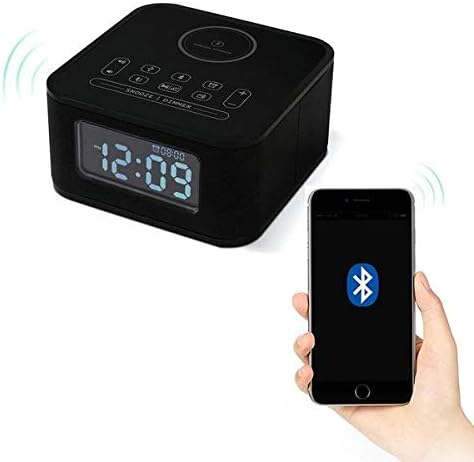
Figure 4.4: The Homtime D2qi speaker connected via Bluetooth to a smartphone.
5. 설정
5.1 전원 연결
- Connect the provided power adapter to the DC input port on the back of the Homtime D2qi.
- 전원 어댑터를 표준 벽면 콘센트에 꽂습니다.
- 디스플레이에 불이 들어오면 기기가 켜진 것입니다.
5.2 초기 시간 설정
처음 전원을 켤 때 또는 전원을 끈 후에tage, you may need to set the time. Refer to the 'Operating Instructions' section for detailed steps on setting the clock.
6. 사용 설명서
6.1 블루투스 연결
- 를 누르세요 블루투스 버튼 on the top panel to enter Bluetooth pairing mode. The Bluetooth indicator will flash.
- 스마트폰이나 오디오 기기에서 블루투스를 활성화하고 사용 가능한 기기를 검색하세요.
- Select "Homtime D2qi" from the list.
- Once connected, the Bluetooth indicator will stop flashing and remain solid. You can now play audio through the speaker.
6.2 무선 충전
- Place your Qi-compatible smartphone centrally on the wireless charging pad located on the top surface of the speaker.
- Ensure the phone is properly aligned with the charging coil.
- The charging indicator on your phone will show that charging has begun.
6.3 알람 시계 기능
- 를 누르세요 알람 버튼 알람 설정 모드로 들어갑니다.
- 사용하세요 +/- 버튼 시간과 분을 조정합니다.
- 를 누르세요 알람 버튼 각 설정을 다시 한번 확인하십시오.
- 알람을 활성화/비활성화하려면 다음을 누르세요. 알람 버튼 briefly when not in setting mode.
- 다시 알림을 받으려면 버튼을 누르세요. 스누즈/디머 버튼 알람이 울릴 때.
6.4 라디오 기능
- 를 누르세요 모드 버튼 FM 라디오 모드로 전환합니다.
- 를 누르고 계세요 재생/일시정지 버튼 to auto-scan and save available stations.
- 사용하세요 이전/다음 버튼 to navigate through saved stations.
6.5 전화 응답
Bluetooth로 연결하면 스피커를 핸즈프리 통화로 사용할 수 있습니다.
- 수신 전화를 받으려면 재생/일시정지 버튼.
- 통화를 종료하려면 재생/일시정지 버튼 다시.
7. 유지관리
- 부드럽고 마른 천으로 기기를 닦으세요. 연마성 세제나 용제는 사용하지 마세요.
- Keep the charging pad free of dust and debris to ensure efficient wireless charging.
- 장기간 사용하지 않을 때는 기기를 서늘하고 건조한 곳에 보관하세요.
8. 문제 해결
| 문제 | 가능한 원인 | 해결책 |
|---|---|---|
| 전원이 없습니다 | 전원 어댑터가 연결되지 않았거나 콘센트에 결함이 있습니다. | Ensure power adapter is securely plugged into the device and a working wall outlet. |
| 스피커에서 소리가 나지 않음 | Bluetooth not connected; volume too low; incorrect mode. | Ensure Bluetooth is paired. Increase volume on both the speaker and your device. Check if the speaker is in the correct mode (Bluetooth/Radio). |
| 무선 충전이 작동하지 않음 | Phone not Qi-compatible; phone not aligned; phone case too thick. | Verify phone supports Qi wireless charging. Realign phone on the charging pad. Remove thick phone cases. |
| Buttons difficult to locate in the dark | Buttons are flush with the surface. | Familiarize yourself with button layout during daylight. Use the dimmer function to adjust display brightness. |
| Bluetooth disconnects automatically | Power saving feature; device out of range. | Reconnect Bluetooth manually. Keep devices within Bluetooth range (approx. 10 meters). |
9. 사양
| 특징 | 세부 사항 |
|---|---|
| 상표 | 홈타임 |
| 모델 번호 | D2qi |
| 색상 | 검은색 |
| 스피커 유형 | 블루투스 스피커 |
| 연결성 | 무선 전화 |
| 호환 장치 | 스마트폰 |
| 출력 전력 | 5~10와트 |
| 제품 무게 | 0.5kg |
| 패키지 크기 | 19.6 x 18.8 x 14.8cm |
| 하드웨어 인터페이스 | Audio/Video Port |
10. 보증 및 지원
Homtime products are manufactured to the highest quality standards. For warranty information and customer support, please refer to the warranty card included in your package or visit the official Homtime web사이트. 구매 증빙 자료로 구매 영수증을 보관하세요.