
1. 서론
This manual provides essential instructions for setting up, operating, and maintaining your Fujifilm X-A5 Mirrorless Digital Camera. Please read this manual thoroughly to ensure proper use and to maximize the camera's capabilities.
The Fujifilm X-A5 is a compact and versatile mirrorless digital camera featuring a 24.2MP APS-C sensor, a 180-degree tilting LCD touchscreen, and 4K video recording capabilities. It comes equipped with the XC15-45mmF3.5-5.6 OIS PZ lens, offering optical image stabilization and a power zoom function.
2. 설정
2.1 언박싱 및 포함 구성품
패키지에 모든 구성 요소가 들어 있는지 확인하세요.
- Fujifilm X-A5 Camera Body
- XC15-45mmF3.5-5.6 OIS PZ Lens
- Li-Ion Battery (NP-W126)
- Wall Plug Adapter
- USB 케이블
- 어깨끈
- 사용 설명서
- USA Warranty Card
2.2 배터리 설치 및 충전
- 카메라 하단에 있는 배터리 덮개를 엽니다.
- Insert the provided Li-Ion battery (NP-W126) with the correct orientation, ensuring it clicks into place.
- 배터리 덮개를 닫습니다.
- Connect the camera to the wall plug adapter using the USB cable to charge the battery. The charging indicator light will illuminate. Charging is complete when the light turns off.
2.3 메모리 카드 삽입
The camera uses SD, SDHC, or SDXC memory cards (UHS-I compatible, Class 10 recommended). The maximum supported capacity is 2048 GB.
- 일반적으로 카메라의 측면이나 바닥에 있는 메모리 카드 슬롯 덮개를 엽니다.
- 메모리 카드의 라벨이 카메라 앞면을 향하도록 하여 딸깍 소리가 날 때까지 삽입합니다.
- 메모리 카드 슬롯 커버를 닫습니다.
2.4 렌즈 부착
- 카메라의 바디 캡을 제거하고 렌즈의 후면 렌즈 캡을 제거합니다.
- 렌즈의 흰색 점과 카메라 본체의 흰색 점을 일치시키세요.
- Mount the lens by rotating it clockwise until it clicks securely into place.
- 전면 렌즈 캡을 제거합니다.

그림 2.4.1: 전면 view of the Fujifilm X-A5 camera with the XC15-45mm lens attached.
2.5 초기 전원 켜기 및 기본 설정
배터리와 메모리 카드를 장착한 후 전원 스위치를 눌러 카메라를 켜십시오. 화면의 안내에 따라 날짜, 시간 및 언어를 설정하십시오.
3. 카메라 작동
3.1 카메라 제어view
Familiarize yourself with the camera's buttons and dials for efficient operation.
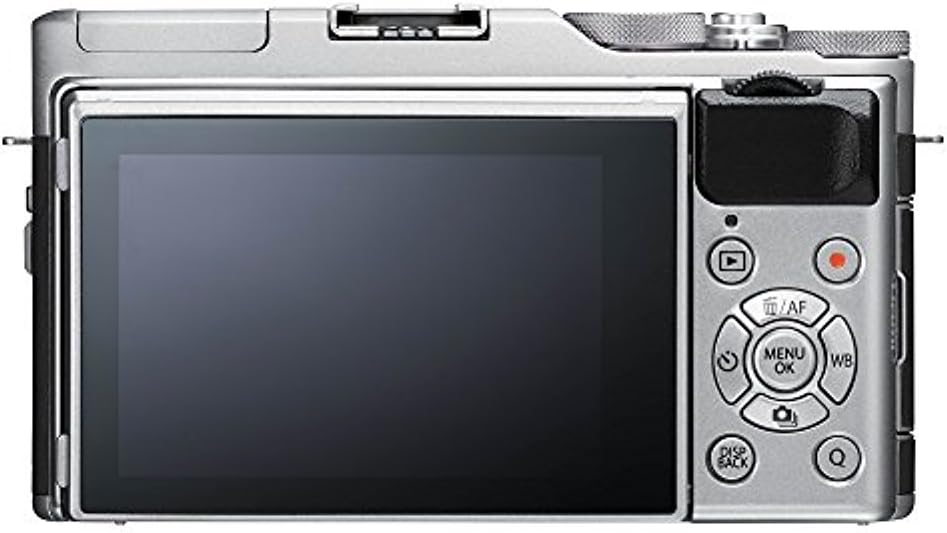
그림 3.1.1: 후면 view of the Fujifilm X-A5, highlighting the LCD and control layout.

그림 3.1.2: 상단 view of the Fujifilm X-A5, showing the mode dial and other top-plate controls.
3.2 기본 사진 모드
카메라 상단의 모드 다이얼을 사용하면 다양한 촬영 모드를 선택할 수 있습니다.
- SR+ (Scene Recognition Auto): 카메라가 자동으로 장면에 맞는 설정을 최적화합니다.
- P(프로그램 AE): 카메라는 최적의 노출을 위해 조리개와 셔터 속도를 설정합니다.
- S (셔터 우선 AE): 셔터 속도는 사용자가 설정하고, 조리개는 카메라가 설정합니다.
- A (조리개 우선 자동 노출): 조리개는 사용자가 설정하고, 카메라는 셔터 속도를 설정합니다.
- M (수동): 조리개와 셔터 속도를 모두 조절할 수 있습니다.
- SP(장면 위치): Choose from various scene modes (e.g., Portrait, Landscape).
- Adv (Advanced Filter): 사진에 다양한 필터를 적용해 보세요.
3.3 포커싱
The X-A5 features a phase detection autofocus system. You can select different focus modes:
- AF-S (싱글 AF): Focuses when the shutter button is pressed halfway. Ideal for stationary subjects.
- AF-C(연속 AF): Continuously adjusts focus while the shutter button is pressed halfway. Suitable for moving subjects.
- MF(수동 초점): Allows you to manually adjust focus using the lens ring.
The camera's 3-inch tilting LCD is also a touchscreen, allowing for touch-to-focus and touch-to-shoot functionality.
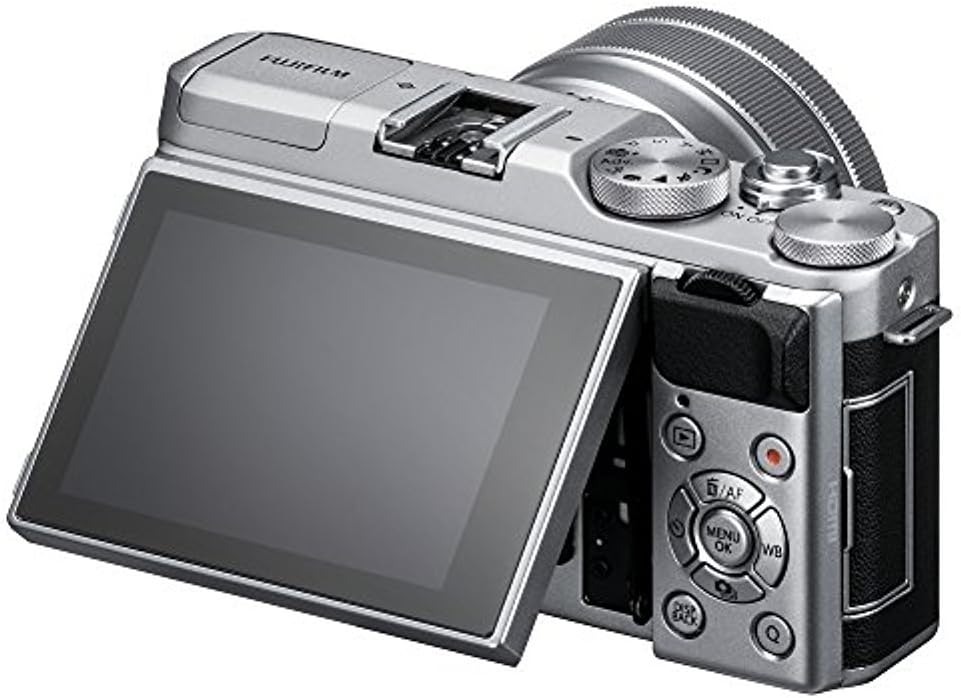
Figure 3.3.1: The tilting LCD screen of the Fujifilm X-A5, useful for various shooting angles.
3.4 이미지 품질 설정
Adjust image quality and size according to your needs:
- 이미지 크기: Select from various resolutions, with a maximum effective still resolution of 24.2 megapixels (5184 pixels maximum image size).
- 화질 : Choose between JPEG (Basic, Normal, Fine) or RAW format for maximum post-processing flexibility.
3.5 비디오 녹화
The X-A5 supports 4K UHD video recording at 24, 25, or 30 frames per second. To start recording, press the dedicated movie record button. The camera features a stereo microphone for audio capture.
3.6 플래시 사용법
The camera includes a built-in pop-up flash. To activate, press the flash release button. Available flash modes include Auto, Forced On, Suppressed Flash, Red-Eye Reduction, and Slow Sync.

Figure 3.6.1: The Fujifilm X-A5 with its built-in flash deployed.
3.7 연결성
The X-A5 offers various connectivity options:
- 블루투스 4.1 LE: For wireless connection to smart devices for image transfer and remote control.
- Wi-Fi (802.11b/g/n): For faster wireless image transfer.
- USB 2.0: For connecting to a computer for data transfer or charging.
- HDMI : 외부 디스플레이 연결용입니다.

그림 3.7.1: 측면 view of the Fujifilm X-A5, showing the HDMI port.
4. 유지관리
4.1 카메라 및 렌즈 청소
- 부드럽고 보풀 없는 천으로 카메라 본체를 닦으세요. 잘 지워지지 않는 얼룩은 살짝 두드려 닦아내세요.amp천에 물을 적셔요.
- For the lens, use a lens blower to remove dust, then a soft lens brush. For smudges, use a specialized lens cleaning solution and a microfiber lens cloth.
- Avoid touching the sensor directly. If sensor cleaning is required, consult a professional service.
4.2 배터리 관리
- 처음 사용하기 전에 배터리를 완전히 충전하십시오.
- 사용하지 않을 때는 배터리를 서늘하고 건조한 곳에 보관하십시오.
- 배터리를 극한 온도에 노출시키지 마세요.
4.3 보관 권장 사항
When storing the camera for extended periods, remove the battery and memory card. Store the camera in a dry, dust-free environment, ideally with a desiccant to prevent mold growth.
5. 문제 해결
This section addresses common issues you might encounter with your Fujifilm X-A5 camera.
5.1 카메라 전원이 켜지지 않습니다
- 배터리가 완전히 충전되었고 올바르게 삽입되었는지 확인하세요.
- 배터리 접점이 깨끗한지 확인하세요.
- 가능하다면 완전히 충전된 다른 배터리를 사용해 보세요.
5.2 이미지가 흐릿합니다
- 렌즈가 깨끗하고 얼룩이 없는지 확인하세요.
- Ensure the camera is properly focused on your subject. Check your focus mode (AF-S, AF-C, MF).
- In low light, use a higher ISO or slower shutter speed with image stabilization, or a tripod.
5.3 배터리가 빨리 소모됩니다
- Frequent use of Wi-Fi/Bluetooth, flash, or continuous shooting can deplete the battery faster.
- Reduce LCD brightness or set a shorter auto power-off time.
- 배터리가 오래되었거나 손상되지 않았는지 확인하십시오.
5.4 Camera Freezes or Becomes Unresponsive
- 배터리를 분리했다가 다시 장착하여 하드 리셋을 수행하십시오.
- Ensure your memory card is not corrupted or full. Try a different memory card.
- Update the camera's firmware to the latest version if available.
6. 사양
| 특징 | 사양 |
|---|---|
| 모델명 | X-A5 w/XC15-45mm Lens Kit |
| 센서 유형 | APS-C CMOS |
| 효과적인 스틸 해상도 | 24.2 MP |
| 렌즈 마운트 | 후지필름 X 마운트 |
| 포함된 렌즈 | XC15-45mmF3.5-5.6 OIS PZ |
| 이미지 안정화 | Digital, Optical (with OIS lens) |
| 자동 초점 시스템 | 위상 검출 |
| 최소 셔터 속도 | 32000 Seconds (Electronic Shutter) |
| 표시하다 | 3-inch Tilting Touch Screen LCD (1,040,000 dots) |
| 비디오 해상도 | 4K UHD 2160p (24, 25, 30 fps) |
| 연결성 | Bluetooth 4.1 LE, Wi-Fi (802.11b/g/n), USB 2.0, HDMI |
| 지원됨 File 체재 | JPEG, RAW |
| 메모리 카드 유형 | SD, SDHC, SDXC (UHS-I) |
| 배터리 유형 | Fuji NP-W126 Li-Ion |
| 치수(D x W x H) | 1.6인치 깊이 x 4.6인치 너비 x 2.7인치 높이 |
| 품목 무게 | 0.5 Kilograms (Body only, approx.) |
7. 보증 정보
Your Fujifilm X-A5 camera includes a USA Warranty. For detailed information regarding the terms, conditions, and duration of your warranty, please refer to the warranty card included in your product packaging or visit the official Fujifilm support web대지.
8. 지원
For further assistance, technical support, or to download the latest firmware updates, please visit the official Fujifilm support web해당 웹사이트를 방문하거나 고객 서비스 센터에 문의하세요. 더 많은 정보와 자료는 다음에서 찾아보실 수 있습니다. 아마존의 후지필름 스토어.