
1. 서론
The Fosi Audio M04 is a high-performance mono amplifier designed to power passive subwoofers or speakers. Utilizing the Texas Instruments TPA3116 chip and NE5532 op-amp, it delivers 100 watts of output power for 2-ohm loads. This compact amplifier enhances bass response and offers versatile connectivity for various audio setups, including home theater systems.
2. 안전 지침
- 적절한 환기를 확보하세요 amp과열을 방지하는 lifier.
- 기기를 물, 습기 또는 극한 온도에 노출시키지 마세요.
- 손상을 방지하려면 제공된 전원 어댑터만 사용하세요.
- 연결이나 조정을 하기 전에 전원을 차단하십시오.
- 어린이의 손이 닿지 않는 곳에 보관하세요.
3. 패키지 내용
패키지에 모든 품목이 들어 있는지 확인하세요.
- Fosi Audio M04 서브우퍼 Amp리파이어 x1
- 19V/4.74A 전원 공급 장치 1개
- 사용 설명서 x1

Image: The Fosi Audio M04 amplifier, 19V/4.74A power adapter, and user manual are shown as included package contents.
4. 제품 오버view
전면 및 후면 패널

Image: A diagram illustrating the front and rear panels of the Fosi Audio M04 amplifier, highlighting the controls and connection ports.
- 전원 표시기: 장치의 전원이 켜지면 켜집니다.
- PBTL 및 SUB 선택기: Switch between full-frequency mono amplifier (PBTL) and subwoofer bass amp증폭기(SUB) 모드.
- Sub Frequency Knob: Adjusts the low-pass filter frequency when in SUB mode.
- Power Switch & Volume Knob: 기기를 켜고 끄며 출력 볼륨을 조절합니다.
- 라인 입력(RCA): Connects to audio sources such as phones, laptops, TVs, or computers.
- Output (Speaker Terminals): Connects to passive subwoofers or speakers.
- DC 12-24V Power Interface: 제공된 전원 어댑터에 연결합니다.
5. 설정
5.1 Connecting to Passive Subwoofer/Speakers
The Fosi Audio M04 can be used to power either a passive subwoofer or a full-range passive speaker. Ensure all connections are secure before powering on the device.
- Connect your audio source (e.g., phone, laptop, TV, computer) to the Line In (RCA) ports on the rear panel of the M04.
- Connect your passive subwoofer or passive speaker to the Output (Speaker Terminals) on the rear panel. Ensure correct polarity (+ to + and - to -).
- 설정하다 PBTL & SUB Selector switch on the front panel to the appropriate mode:
- 보결: For connecting a passive subwoofer. This mode activates the low-pass filter.
- PBTL: For connecting a full-range passive speaker. This mode bypasses the low-pass filter.
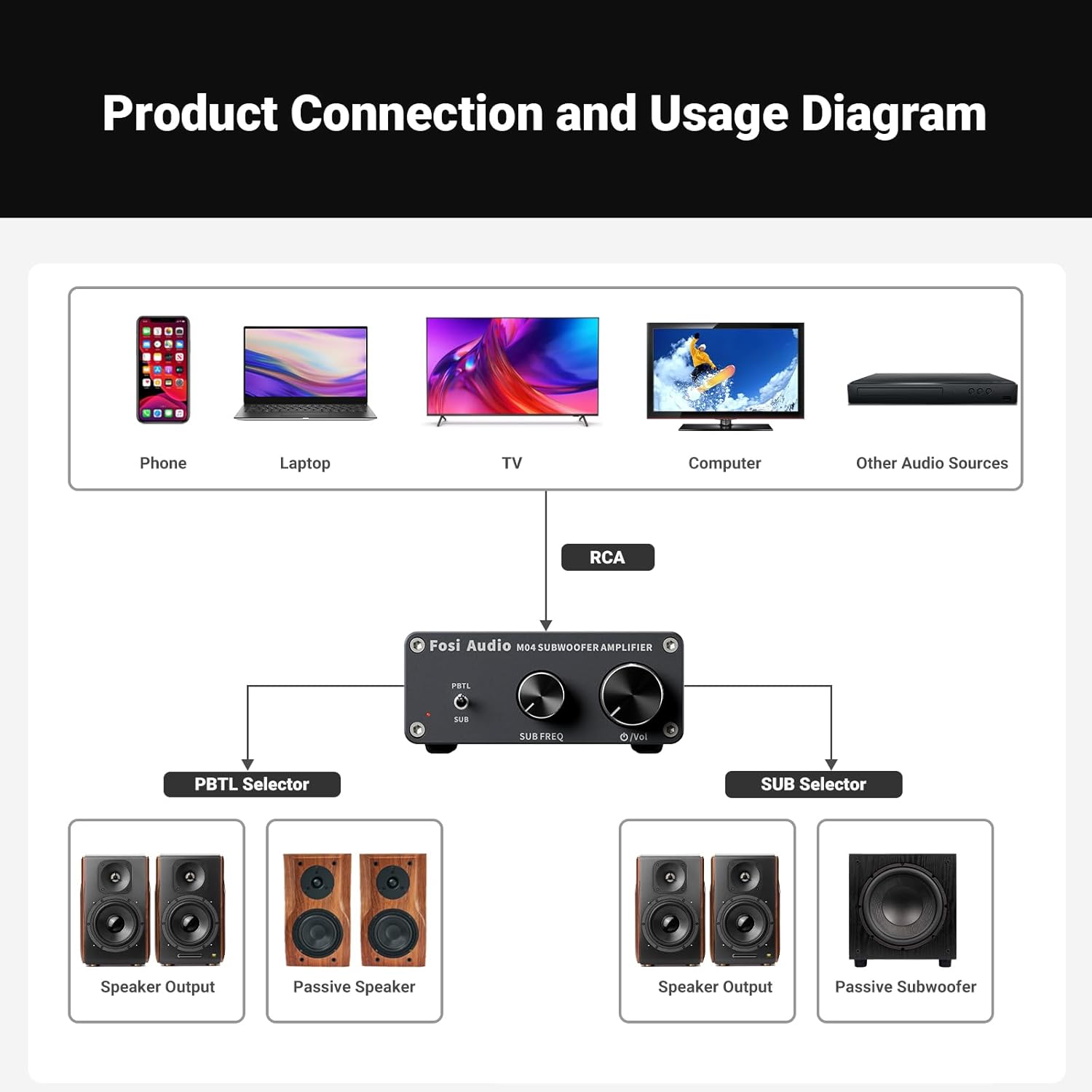
Image: A diagram illustrating various audio sources (phone, laptop, TV, computer) connecting via RCA to the Fosi Audio M04, which then connects to either passive speakers or a passive subwoofer, demonstrating the PBTL and SUB selector functions.
5.2 전원 연결
Connect the provided 19V/4.74A power supply to the DC 12-24V Power Interface on the rear panel of the M04, then plug the power supply into a wall outlet.
Video: This video demonstrates the Fosi Audio M04 Subwoofer Amplifier in a home theater setup, showcasing its compact size and integration with other audio components.
6. 사용 설명서
6.1 전원 켜기/끄기 및 볼륨 제어
켜다 전원 스위치 및 볼륨 노브 시계 방향으로 돌리면 전원이 켜집니다. amplifier. The power indicator LED will illuminate. Continue turning clockwise to increase the volume. Turn counter-clockwise to decrease volume and eventually power off the unit.

이미지: 클로즈업 view of the Fosi Audio M04 amplifier's front panel, showing the PBTL/SUB selector, Sub Frequency knob, and Power Switch/Volume knob.
6.2 SUB/PBTL Selector
사용하세요 PBTL & SUB Selector switch to choose between modes:
- 서브 모드: Activates the built-in low-pass filter, ideal for driving passive subwoofers to produce deep bass.
- PBTL Mode: Provides full-frequency mono amplification, suitable for powering a single passive full-range speaker.
6.3 Sub Frequency Control
When in SUB mode, the Sub Frequency Knob allows you to adjust the cutoff frequency of the low-pass filter. This helps integrate your subwoofer seamlessly with your main speakers by controlling the range of bass frequencies it reproduces.
6.4 오디오 재생
Once all connections are made and the unit is powered on, begin playing audio from your connected source. Adjust the volume on the M04 and your source device as needed for optimal sound.
Video: This video illustrates how to stream Hi-Fi music to your stereo system using Fosi Audio components, demonstrating various connection possibilities and product integration.
7. 사양
| 특징 | 사양 |
|---|---|
| 출력 전력 | 100 와트 |
| 채널 수 | 1 |
| 권tage | 12볼트(DC) |
| 최대 공급량tage | 19볼트(DC) |
| 최소 공급량tage | 19볼트(DC) |
| 사양 충족 | THD <= 0.04% and Frequency Range 20Hz - 120Hz |
| 품목 치수(L x W x H) | 5.2 x 3.5 x 1.4 인치 |
| 품목 무게 | 15.9 온스 |
| 장착 유형 | 독립형 |
8. 문제 해결
If you encounter issues with your Fosi Audio M04, refer to the following common problems and solutions:
- 소리 없음:
- Check if the power indicator is on. If not, ensure the power adapter is securely connected and the power switch is turned on.
- Verify all audio cables (RCA, speaker wires) are correctly and securely connected.
- Ensure the volume knob on the M04 and your audio source is turned up.
- Confirm the PBTL/SUB selector is in the correct position for your setup.
- Test with a different audio source or speaker to isolate the problem.
- 왜곡된 소리:
- Reduce the volume on both the M04 and your audio source. Overdriving the amplifier or speakers can cause distortion.
- 스피커 배선 연결부에 느슨한 가닥이나 단락이 있는지 확인하십시오.
- Ensure the impedance of your speaker/subwoofer matches the amplifier's requirements (2-ohm minimum).
- Weak Bass (in SUB mode):
- Adjust the Sub Frequency knob to a higher setting to allow more bass frequencies through.
- Ensure your subwoofer is properly connected and functioning.
- Check the audio source for any bass reduction settings.
9. 유지관리
Fosi Audio M04의 수명과 최적의 성능을 보장하려면 amp정수기:
- 청소: 부드럽고 마른 천을 사용하여 제품 외부를 닦으십시오. amp증폭기. 독한 화학 약품이나 연마성 세척제 사용을 피하십시오.
- 통풍: 유지하다 amplifier in a well-ventilated area. Do not block the ventilation holes.
- 저장: 장기간 사용하지 않을 경우 보관하세요 amp직사광선과 극한의 온도를 피해 시원하고 건조한 곳에 보관하세요.
10. 보증 및 지원
Fosi Audio 제품은 뛰어난 신뢰성과 성능을 위해 설계되었습니다. 보증 정보, 기술 지원 또는 서비스 문의는 Fosi Audio 공식 고객 지원 센터를 통해 문의해 주십시오. web제품을 구매한 사이트 또는 소매업체.