
1. 서론
This manual provides detailed instructions for the installation, operation, and maintenance of your THINKWARE F100 Dash Cam. The F100 is designed to record high-quality video footage of your journeys, offering features such as Full HD 1080p recording, night vision, and a secure parking mode to enhance your driving safety and provide evidence in case of incidents.
제품의 올바른 작동과 손상 방지를 위해 사용하기 전에 이 설명서를 자세히 읽어주세요.
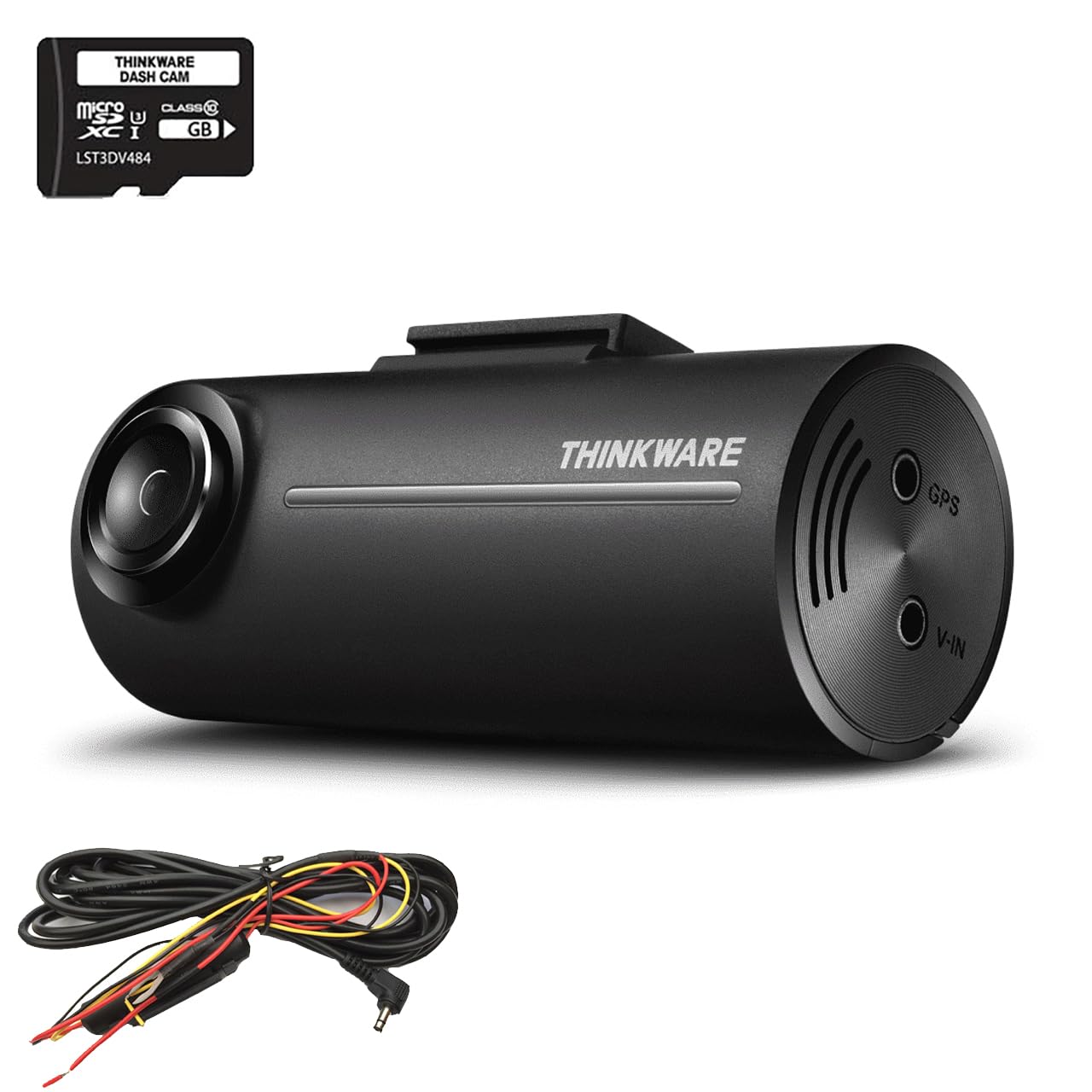
Image 1.1: The THINKWARE F100 Dash Cam recording in Full HD 1080p.
2. 패키지 내용
Verify that all components are present in the box before proceeding with installation.
- THINKWARE F100 Dash Cam Unit
- 하드와이어 케이블
- 16GB 마이크로 SD 카드
- 빠른 시작 가이드 및 보증 정보
- 3M Sticky Mounting Pad (2 included)

Image 2.1: All items included in the THINKWARE F100 Dash Cam package.
3. 제품 오버view
The THINKWARE F100 Dash Cam features a compact design for discreet installation and a wide-angle lens to capture a broad view 도로의.

Image 3.1: The F100 Dash Cam mounted on a windshield.
주요 특징:
- 풀 HD 1080p 녹화: Captures clear video at 30 frames per second with a 135-degree wide-angle view.
- Night Enhancement Technology: Sony CMOS image sensors provide clearer images in low-light conditions.
- 주차 감시 모드: Monitors your vehicle when parked, preventing battery drain with its G-sensor system.
- 형식에 구애받지 않는 기술: Extends the life of your Micro SD card by eliminating the need for manual formatting.
- 운전자 안전 기능: Includes emergency recording via G-sensor accident detection and optional speed camera alerts (requires optional GPS antenna).

Image 3.2: Visual representation of F100 key features.
4. 설치
Proper installation is crucial for optimal performance. It is recommended to have the dash cam professionally installed, especially for hardwiring.
4.1 대시캠 장착
- 대시캠을 설치할 앞유리 부분을 깨끗하게 닦으세요. 시야를 가리지 않도록 주의하세요. view.
- Attach one of the 3M sticky mounting pads to the dash cam mount.
- Firmly press the mount onto the cleaned windshield area. Hold for at least 30 seconds to ensure a secure bond.
- 카메라 각도를 조정하여 앞쪽 도로가 선명하게 보이도록 하고, 수평선이 화면 중앙에 오도록 하십시오.
4.2 Power Connection (Hardwire)
The F100 includes a hardwire cable for secure parking mode installation, which connects directly to your vehicle's fuse box. This connection prevents battery drain while providing continuous power for parking surveillance.
- Connect the hardwire cable to the power input port on the dash cam.
- Route the cable along the windshield trim and down to your vehicle's fuse box. Use cable clips to secure the cable and keep it tidy.
- Connect the hardwire cable's ACC (Accessory) and BATT (Battery) wires to appropriate fuse slots in your vehicle's fuse box. Consult your vehicle's manual or a professional installer for correct fuse selection.
- Connect the GND (Ground) wire to a metal bolt or chassis point in your vehicle.
- Once connected, start your vehicle to ensure the dash cam powers on correctly.
5. 기본 동작
5.1 전원 켜기/끄기
- When connected to your vehicle's power supply (either via cigarette lighter adapter or hardwire kit), the F100 will automatically power on and begin continuous recording when the vehicle starts.
- The dash cam will automatically power off when the vehicle's ignition is turned off, unless parking mode is enabled via hardwire installation.
5.2 녹음 모드
- 연속 녹화 : The dash cam records continuously in 1-minute segments while driving. Older files are overwritten automatically when the SD card is full.
- 이벤트 녹화: In the event of an impact or sudden braking detected by the G-sensor, the dash cam will automatically save a 20-second video clip (10 seconds before and 10 seconds after the event) to a protected folder, preventing it from being overwritten.
- 수동 녹음: Press the emergency recording button on the dash cam to manually save a 20-second video clip to the protected folder.
6. 고급 기능
6.1 주차 감시 모드
With the hardwire installation, the F100 can monitor your vehicle even when parked. This mode uses the G-sensor to detect impacts and motion, recording events to provide security when you are away from your vehicle.
- The F100's parking mode system continuously monitors your car battery's health. If the battery voltage drops below a safe level, the dash cam will automatically shut down to prevent complete battery drain.
- Motion detection and impact detection are active in parking mode.

Image 6.1: Battery Saving Parking Mode functionality.
6.2 Driver Safety Features
- G-Sensor Accident Detection: 충격을 자동으로 감지하고 음식을 저장합니다.tag보호된 폴더로 이동합니다.
- 과속 단속 카메라 알림: The F100 supports a UK speed camera database (Cyclops) with free updates. This feature requires an optional GPS antenna to function.
6.3 형식 자유 기술
The F100 utilizes an advanced file allocation table system that manages the Micro SD card efficiently, reducing the need for manual formatting and extending the lifespan of the memory card.
7. PC/Mac View어 소프트웨어
The THINKWARE PC/Mac Viewer software allows you to manage your dash cam settings, view 기록된 footage, and download or delete file컴퓨터에서 s.
7.1 Downloading and Installing the Viewer
그만큼 viewer software can be downloaded for free from the official THINKWARE website. Follow the on-screen instructions to install it on your computer.
7.2 사용 Viewer
- Remove the Micro SD card from the dash cam.
- Insert the Micro SD card into your computer's card reader.
- THINKWARE PC/Mac을 실행하세요 View어 소프트웨어.
- You can now browse recorded videos, adjust dash cam settings, and update firmware if available.

Image 7.1: The THINKWARE PC/Mac Viewer software in use.
8. 유지관리
8.1 마이크로 SD 카드 관리
- 중요한 음식을 정기적으로 백업하세요tage from your Micro SD card to a computer or external storage.
- Although the F100 features Format Free technology, it is still recommended to manually format the SD card every few months using the PC/Mac Viewer software to maintain optimal performance and prevent data corruption.
- Use only high-quality, genuine Micro SD cards from reputable brands.
8.2 대시캠 청소
- Wipe the camera lens gently with a soft, lint-free cloth to ensure clear recordings.
- 대시캠 외부를 마른 천이나 약간 마른 천으로 닦아주세요.amp 옷감. 강한 화학 물질이나 연마성 세제를 사용하지 마십시오.
9. 문제 해결
If you encounter issues with your F100 Dash Cam, refer to the following common problems and solutions:
| 문제 | 가능한 원인 | 해결책 |
|---|---|---|
| 대시캠 전원이 켜지지 않습니다. | No power supply; faulty cable; incorrect hardwire connection. | Check power cable connection. Ensure vehicle ignition is on (if not hardwired). Verify hardwire connections to fuse box. |
| 녹음이 중지되거나 정지됩니다. | SD 카드 오류; SD 카드 용량 부족; SD 카드 호환 불가. | Format the SD card using the PC/Mac Viewer. Replace with a new, high-quality SD card if issues persist. |
| 비디오 품질이 좋지 않습니다. | Dirty lens; incorrect camera angle; low-light conditions. | Clean the camera lens. Adjust camera angle. Ensure sufficient lighting for optimal recording. |
| 주차 모드가 작동하지 않습니다. | Not hardwired; incorrect hardwire connection; battery voltag너무 낮음. | Ensure the dash cam is hardwired correctly. Check vehicle battery health. |
If the problem persists after trying these solutions, please contact THINKWARE customer support.
10. 사양
Technical specifications for the THINKWARE F100 Dash Cam:
| 특징 | 세부 사항 |
|---|---|
| 제조업체 | 팅크웨어 |
| 모델 번호 | F100 |
| 제품 치수 | 7.8 x 3.4 x 3.15cm |
| 무게 | 421.84그램 |
| 비디오 캡처 해상도 | 1080p 풀 HD |
| 광센서 기술 | CMOS (Sony) |
| 특별 기능 | Night Vision, G-Sensor, Parking Mode, Format Free Technology |
| 장착 유형 | 윈드 실드 마운트 |
| 포함된 구성 요소 | Dash Camera, Hardwire Cable, 16GB SD Card |
| 색상 | 검은색 |
11. 보증 및 지원
THINKWARE provides comprehensive support for its products. As a global dash cam brand, we offer a free technical helpline and professional national installation services.
For warranty information, please refer to the 'Quick Start Guide & Warranty Information' included in your product package. For technical assistance or further inquiries, please visit the official THINKWARE web사이트를 방문하거나 고객 지원팀에 직접 문의하세요.