
Alarm.com ADC-V723x
Alarm.com ADC-V723 Outdoor Wi-Fi Camera User Manual
Model: ADC-V723x
1. 제품 오버view
The Alarm.com ADC-V723 is a high-definition 1080p outdoor Wi-Fi camera designed to provide reliable surveillance for your property. Featuring High Dynamic Range (HDR) and powerful Video Analytics, it can detect and alert you to people, vehicles, and animals. Its robust design ensures performance in various lighting conditions and environments. This manual provides comprehensive instructions for installation, operation, and maintenance.
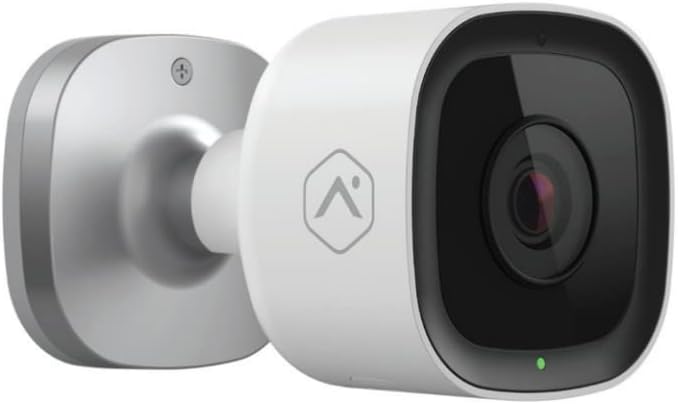
이미지: 앞면 view of the Alarm.com ADC-V723 Outdoor Wi-Fi Camera, showing its compact, bullet-style design and lens.
2. 안전 정보
- Ensure the camera is installed in a location that complies with local building codes and regulations.
- 카메라와 함께 제공된 전원 어댑터만 사용하십시오.
- 카메라를 작동 범위를 벗어난 극한 온도에 노출시키지 마십시오.
- 카메라를 강한 전자기 간섭 발생원 근처에 두지 마십시오.
- 청소나 유지관리 작업을 하기 전에 전원을 차단하세요.
3. 패키지 내용
패키지에 모든 품목이 들어 있는지 확인하세요.
- Alarm.com ADC-V723 Outdoor Wi-Fi Camera
- 장착 플레이트
- 장착 나사 및 벽 앵커
- 전원 어댑터
- 설치 가이드(본 문서)
4. 설정 및 설치
4.1 위치 선택
원하는 것을 제공하는 야외 위치를 선택하십시오. viewing angle and is within range of your Wi-Fi network. The camera is designed for outdoor use and is IP67 rated for weather resistance. Consider areas with good lighting or where the camera's night vision capabilities can be maximized.
4.2 카메라 장착
- Secure the mounting plate to the desired surface using the provided screws and wall anchors. Ensure the plate is level.
- Attach the camera to the mounting plate by aligning the camera with the plate and twisting until it locks securely.
- Adjust the camera's angle to achieve the optimal field of view.
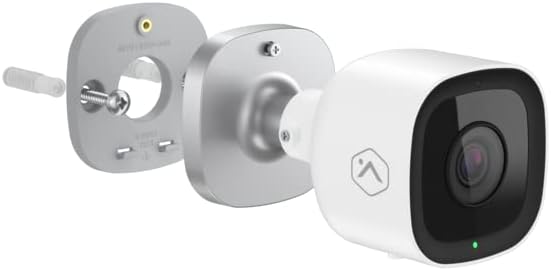
이미지: 폭발 view showing the Alarm.com ADC-V723 camera, its mounting plate, and a screw with wall anchor, illustrating the assembly process.
4.3 Powering On and Connecting to Wi-Fi
- Connect the power adapter to the camera and plug it into a suitable outdoor power outlet.
- Wait for the camera's LED indicator to show a specific status (refer to the LED status guide in Section 5.2).
- Download the Alarm.com mobile application from your device's app store.
- Follow the in-app instructions to add the ADC-V723 camera to your Alarm.com system and connect it to your Wi-Fi network. This typically involves scanning a QR code on the camera or entering its MAC address.
5. 카메라 작동
5.1 라이브 View 그리고 녹음
Access live video feeds and recorded clips through the Alarm.com mobile app or web portal. You can view 실시간 푸tage, 수동 녹음을 시작하고 다시view event-triggered clips.
5.2 개의 LED 상태 표시기
The camera features an LED indicator that communicates its current status:
- 솔리드 그린: Connected to Wi-Fi and operating normally.
- 녹색 깜박임: Attempting to connect to Wi-Fi.
- 단색 빨간색: Not connected to Wi-Fi or an error has occurred.
- 빨간색으로 깜박임: Firmware update in progress or factory reset.
5.3 Video Analytics and Alerts
The ADC-V723 supports advanced Video Analytics. Configure detection zones and rules within the Alarm.com app to receive specific alerts for people, vehicles, or animals entering designated areas. Alerts can be customized to send notifications to your mobile device.
5.4 Night Vision and HDR
The camera is equipped with infrared night vision, allowing clear video capture up to 40 feet in low-light conditions. High Dynamic Range (HDR) technology enhances video quality by balancing bright and dark areas, providing clearer images in challenging lighting environments.
6. 유지관리
- 부드러운 천으로 카메라 렌즈를 정기적으로 청소하세요.amp 선명한 화질을 위해 천을 사용하십시오. 강한 화학 약품은 사용하지 마십시오.
- Periodically check the mounting hardware to ensure the camera remains securely fastened.
- Ensure the power cable is free from damage and properly secured.
- Keep the camera's firmware updated through the Alarm.com app to ensure optimal performance and access to new features.
7. 문제 해결
| 문제 | 가능한 원인 | 해결책 |
|---|---|---|
| 카메라 전원이 켜지지 않음 | 전원이 안 들어옴, 어댑터 불량, 연결 불량. | Check power outlet, ensure connections are secure, try a different outlet. |
| Wi-Fi에 연결할 수 없습니다 | Incorrect Wi-Fi password, camera too far from router, network interference. | Verify Wi-Fi password, move camera closer to router, reduce interference, restart router. |
| 비디오 품질이 좋지 않음 | 렌즈가 더럽고, 대역폭이 낮고, 조명이 좋지 않습니다. | Clean lens, check internet speed, ensure adequate lighting or rely on night vision. |
| 움직임 알림 없음 | Incorrect Video Analytics settings, notifications disabled. | Review and adjust Video Analytics rules in the app, enable notifications for the camera. |
8. 사양
| 특징 | 세부 사항 |
|---|---|
| 모델 번호 | ADC-V723x |
| 비디오 캡처 해상도 | 1080p (1920x1080) |
| 연결성 | 와이파이 |
| 전원 | 코드식 전기 |
| 실내/실외 사용 | 집 밖의 |
| View잉 각도 | 167도 |
| 나이트 비전 범위 | 40 피트 |
| 재료 | 금속 |
| 치수(길이 x 너비 x 높이) | 2.5 x 2.5 x 4.5 인치 |
| 품목 무게 | 1.32파운드 |
| 국제 보호 등급 | IP67 |
| 특징 | Motion Sensor, HDR |
9. 보증 및 지원
For warranty information and technical support, please contact your Alarm.com service provider or visit the official Alarm.com web사이트. 직접 기기를 수리하려고 시도하지 마십시오. 보증이 무효화될 수 있습니다.
For additional resources and FAQs, please refer to the Alarm.com support portal.
Ask a question about this manual
Ask about setup, troubleshooting, compatibility, parts, safety, or missing instructions. Manuals+ will review the question and use this page’s manual context to help answer it.