
ORICO FBA_ORICO 2189U3-BK-US
ORICO USB 3.0-SATA III 2.5인치 외장 하드 드라이브 케이스 사용 설명서
Brand: ORICO | Model: FBA_ORICO 2189U3-BK-US
1. 서론
This user manual provides detailed instructions for the ORICO USB 3.0 to SATA III 2.5" External Hard Drive Enclosure. This device allows you to easily connect 2.5-inch 7mm/9.5mm SATA SSDs and HDDs up to 6TB to your computer, laptop, router, or game console, transforming them into portable external storage. It features ultra-fast USB 3.0 with UASP support for efficient data transfer and a tool-free design for simple installation.

Image: The ORICO 2.5-inch external hard drive enclosure shown with its accompanying USB 3.0 cable.
2. 주요 특징
- Portable Data Storage: Supports most 2.5-inch 7mm/9.5mm SATA SSD and HDD up to 6TB (Max). Easily connect old drives to transfer files or use as a USB external hard drive.
- Ultra-fast USB 3.0 & UASP: Features a USB 3.0 interface for data transmission rates up to 5Gbps, 20% faster than USB 2.0. UASP support further increases transfer speeds by 20% compared to ordinary USB 3.0 when both drive and output device support it.
- 사용하기 쉽습니다: Tool-free installation allows for quick insertion and removal of internal SSDs/HDDs. Hot-swappable with an LED indicator for working status.
- 폭넓은 호환성: Compatible with Windows 2000/98/XP/Vista/7/8/10, Linux, Mac OS 9.1/10.8.4 and above. Plug & play, no driver installation required. Ideal for booting old drives and recovering files.
- Friendly Design: Made of high-quality ABS plastic, compact size (4.9x3x0.5in) for portability. Brushed surface prevents fingerprints. Built-in shockproof sponge pad protects the hard drive.

Image: The enclosure supports both 7mm and 9.5mm 2.5-inch SATA HDDs and SSDs.

Image: The enclosure supports up to 6TB of storage, capable of holding millions of photos, hundreds of thousands of songs, or thousands of movies.

Image: Demonstrates the 5Gbps ultra-fast transfer speed of USB 3.0, which is 10 times faster than USB 2.0.
3. 포함 사항
The package for your ORICO 2.5" External Hard Drive Enclosure includes the following components:
- 1 x ORICO 2.5 Inch Hard Drive Enclosure
- 1 x EVA Foam Pad (for drive stability)
- 1 x Micro B to USB A Cable (USB 3.0)
- 1 x 사용자 설명서

Image: Visual representation of the package contents, including the enclosure, EVA foam pad, USB cable, and user manual.
4. 설정 가이드
4.1. Hardware Installation (Tool-Free)
- 덮개를 밀어서 여세요: 케이스 윗덮개를 살살 밀어서 여세요.
- 2.5인치 디스크를 삽입하세요: Carefully insert your 2.5-inch SATA HDD or SSD into the enclosure, ensuring it connects firmly to the SATA port.
- 덮개를 밀어서 닫으세요: 덮개를 다시 제자리에 밀어 넣어 딸각 소리가 나면서 단단히 고정시킵니다.
- 장치에 연결: Use the provided USB 3.0 cable to connect the enclosure to your computer, laptop, router, or other compatible device.
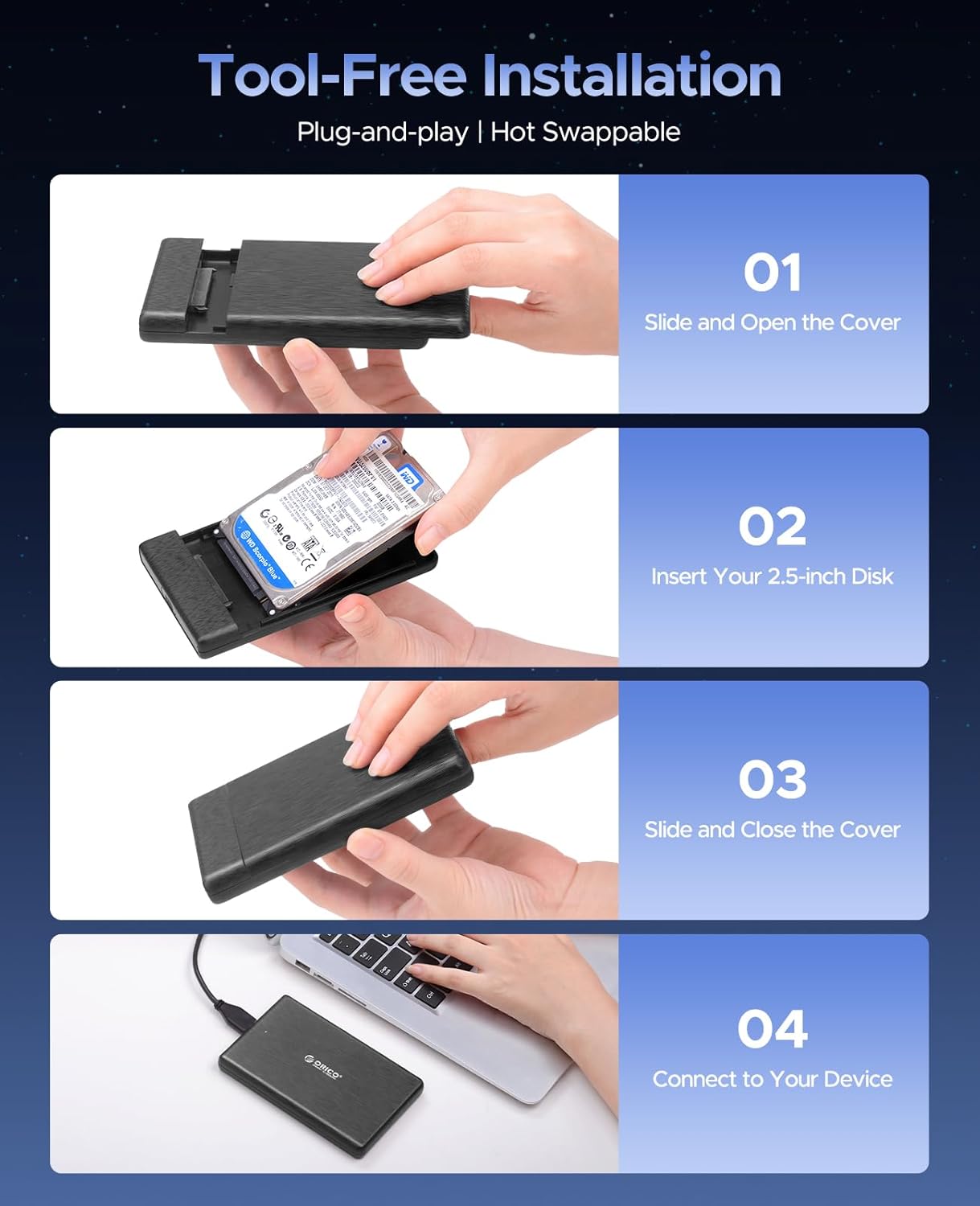
Image: Visual steps for installing a 2.5-inch hard drive into the enclosure: slide open, insert disk, slide close, and connect.
4.2. 디스크 초기화 및 포맷
For new hard drives or drives that are not recognized, you may need to initialize and format them. This process creates a partition that your operating system can read and write to.
Watch the official ORICO video guide below for detailed steps on formatting and partitioning your hard drive in both Windows and Mac OS systems.
Video: Official ORICO guide on how to format and partition a hard drive for use with the enclosure on Windows and Mac OS systems. This video demonstrates accessing Disk Management (Windows) or Disk Utility (Mac OS), initializing the disk, creating new volumes, and selecting appropriate file systems like ExFAT for cross-platform compatibility.
5. 사용 설명서
Once the hard drive is installed and formatted (if necessary), the ORICO enclosure operates as a standard external storage device. Simply connect it to a USB 3.0 port on your computer or compatible device. The blue LED indicator on the enclosure will illuminate when connected and blink during data transfer activity.
- 데이터 전송: 드래그 앤 드롭 files to and from the drive, or use your operating system's copy/paste functions.
- UASP Acceleration: For optimal performance, ensure your computer's USB port and operating system support UASP (USB Attached SCSI Protocol). This will significantly boost data transfer speeds.
- 안전한 제거: Always safely eject the drive from your operating system before disconnecting the cable to prevent data corruption.

Image: The enclosure is compatible with a wide range of devices including PCs, laptops, TVs, game consoles, routers, and streaming devices, and supports Windows, Mac OS, and Linux operating systems.

이미지: 전amples of how the enclosure can be used for office computers, travel backups, home backups, and game entertainment.
6. 유지관리
- 청소: 케이스 외부를 닦을 때는 부드럽고 마른 천을 사용하세요. 액체 세제나 연마재는 사용하지 마세요.
- 저장: 보관함은 직사광선과 극한의 온도를 피해 시원하고 건조한 곳에 보관하세요.
- 손질: Handle the enclosure with care to prevent drops or impacts, which could damage the internal drive.
- 펌웨어 업데이트: ORICO 공식 웹사이트를 주기적으로 확인하세요. web최적의 성능과 호환성을 보장하기 위해 해당 모델에 사용 가능한 펌웨어 업데이트가 있는지 사이트를 방문하세요.
7. 문제 해결
| 문제 | 가능한 원인 | 해결책 |
|---|---|---|
| 컴퓨터에서 드라이브를 인식하지 못합니다. |
|
|
| 데이터 전송 속도가 느립니다. |
|
|
| 외함이 무작위로 연결이 끊어집니다. |
|
|
8. 사양
| 특징 | 세부 사항 |
|---|---|
| 상표 | 오리코 |
| 모델 번호 | FBA_ORICO 2189U3-BK-US |
| 재료 | 아크릴로니트릴 부타디엔 스티렌(ABS) |
| 호환 장치 | Desktop PC, Laptop, Smartphone, Tablet |
| 하드 디스크 폼 팩터 | 2.5 Inches (7mm/9.5mm SATA HDD/SSD) |
| 최대 저장 용량 | 6테라바이트 |
| 데이터 전송 속도 | 초당 5기가비트(USB 3.0) |
| 하드웨어 인터페이스 | Micro USB 3.0 Type B, USB 3.0, USB 3.2 Gen 1 |
| 제품 치수 | 4.92 x 3.15 x 0.55 인치 |
| 품목 무게 | 3.17온스(90그램) |
| 색상 | 검은색 |
| 특징 | Tool-Free, UASP Supported, Hot-Swappable, LED Indicator, Auto-Sleep Mode, Fingerprint-Free Design, EVA Foam Pad |
9. 보증 및 지원
ORICO products typically come with a standard manufacturer's warranty. For specific warranty terms and conditions, please refer to the warranty card included in your product packaging or visit the official ORICO website. If you encounter any issues or require technical assistance, please contact ORICO customer support through their official channels. You can often find support contact information on the ORICO web웹사이트 또는 제품 설명서에서 확인할 수 있습니다.
추가 리소스 및 제품 정보는 다음을 방문하세요. 아마존에서 ORICO 스토어를 만나보세요.
Ask a question about this manual
Ask about setup, troubleshooting, compatibility, parts, safety, or missing instructions. Manuals+ will review the question and use this page’s manual context to help answer it.