
1. 서론
The Zelotes T80 Ergonomic Wired Gaming Mouse is designed for comfortable use, particularly for individuals with larger hands. It features adjustable DPI settings, multiple buttons for enhanced control, and dynamic LED lighting to complement your gaming and computing environment. This manual provides instructions for setup, operation, maintenance, and troubleshooting.

이미지: 측면 view of the Zelotes T80 mouse, highlighting its ergonomic design and blue LED accents.
2. 패키지 내용
Please ensure that your package contains the following items:
- Zelotes T80 Ergonomic Wired Gaming Mouse
- 사용 설명서 (본 문서)
3. 설정 지침
3.1. 마우스 연결
The Zelotes T80 mouse is a plug-and-play device, meaning no additional software or drivers are typically required for basic functionality on most operating systems.
- 컴퓨터에서 사용 가능한 USB 포트를 찾습니다.
- Connect the USB cable of the Zelotes T80 mouse firmly into the USB port.
- Your operating system will automatically detect the mouse and install the necessary generic drivers. This process may take a few moments.
- Once successfully connected, the mouse's LED lights will illuminate, indicating it is powered on and ready for use.
4. 사용 설명서
4.1. 버튼 기능
The Zelotes T80 mouse is equipped with 7 buttons, each serving a specific purpose to enhance your control. Refer to the image below for button identification.
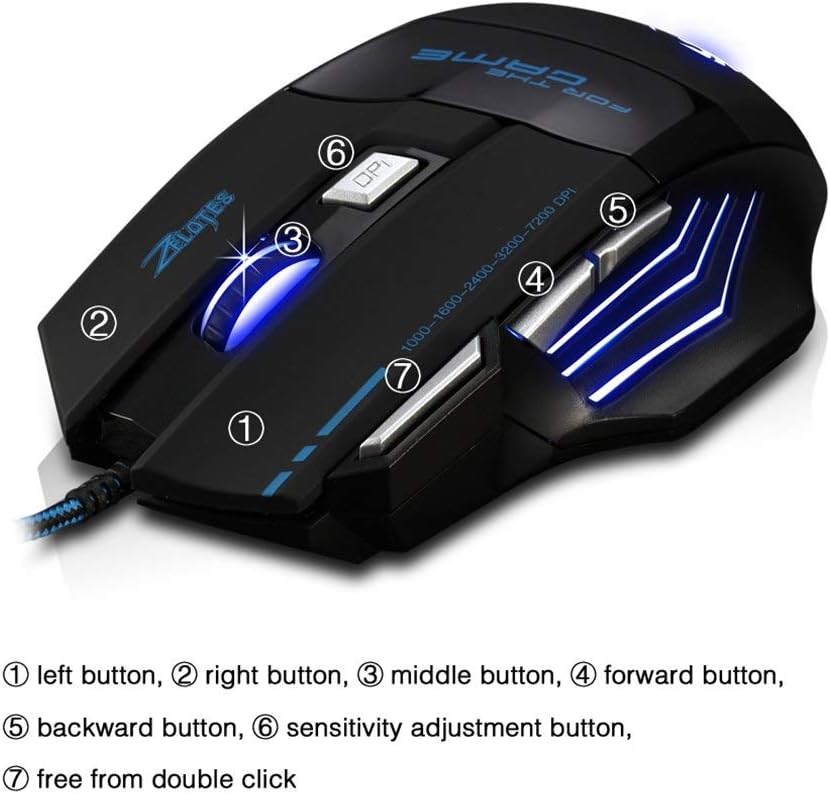
Image: Labeled diagram of the Zelotes T80 mouse buttons.
- 1. 왼쪽 버튼: Performs the standard left-click action.
- 2. 오른쪽 버튼: Performs the standard right-click action.
- 3. 가운데 버튼(스크롤 휠): Allows for scrolling up and down. Pressing the scroll wheel performs a middle-click action.
- 4. 앞으로 가기 버튼: 앞으로 이동합니다 web 브라우저 또는 file 탐험가.
- 5. 뒤로 가기 버튼: 뒤로 탐색합니다 web 브라우저 또는 file 탐험가.
- 6. Sensitivity Adjustment Button (DPI Button): 사용 가능한 DPI 설정값을 순환하며 보여줍니다.
- 7. Double Click Button: Executes a double-click action with a single press.
4.2. DPI 조정
The Zelotes T80 mouse allows for on-the-fly adjustment of its DPI (Dots Per Inch) sensitivity. This feature enables you to quickly change cursor speed to suit different tasks, such as precise aiming in games or fast navigation across multiple monitors.
- 를 누르세요 Sensitivity Adjustment Button (6), located behind the scroll wheel, to cycle through the preset DPI levels.
- The available DPI settings are typically 1000, 1600, 2400, 3200, and 7200 DPI.
- Each DPI level may be indicated by a change in the mouse's LED lighting color or pattern, providing visual feedback for the current setting.
4.3. LED 조명
The Zelotes T80 mouse features dynamic LED lighting that enhances its aesthetic appeal. The lighting typically cycles through a spectrum of colors or changes color to reflect the current DPI setting.
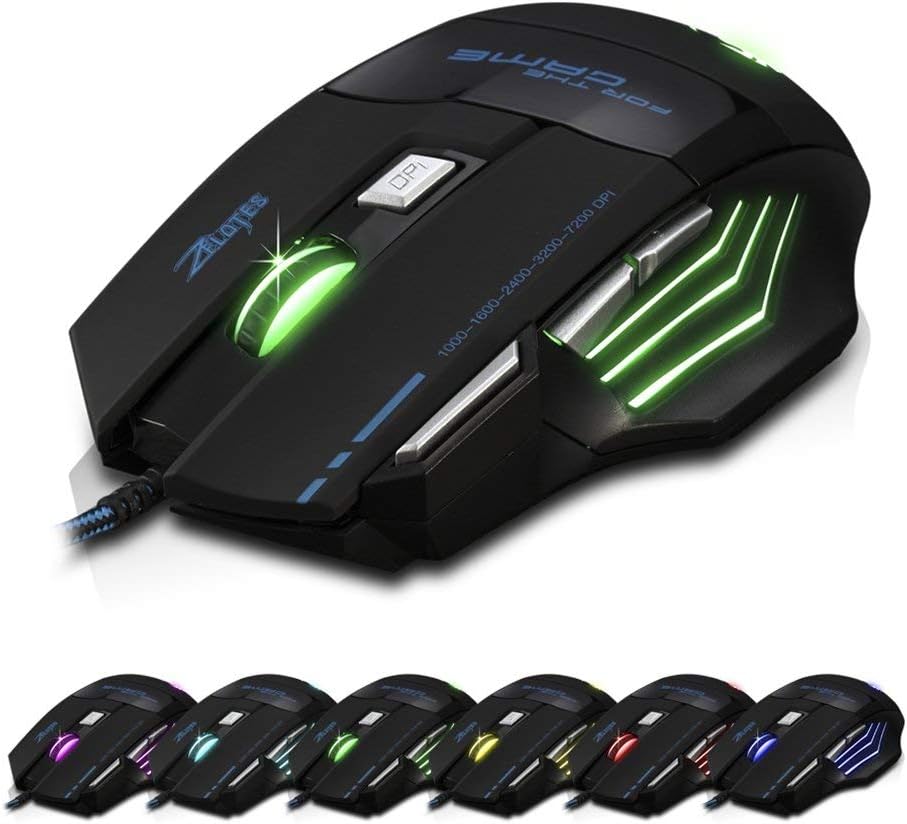
Image: Zelotes T80 mouse showcasing its multi-color LED lighting options.
Please note that specific controls for customizing or turning off the LED lighting (e.g., holding the DPI button for 2 seconds or holding the Forward button for 2 seconds) may not be universally functional or available without dedicated software. The default behavior is generally a continuous cycling color pattern.
5. 유지관리
Proper maintenance ensures the longevity and optimal performance of your Zelotes T80 mouse.
- 표면 청소: Use a soft, dry, lint-free cloth to gently wipe the exterior of the mouse. Avoid using harsh chemicals, abrasive cleaners, or solvents, as these can damage the finish.
- 광학 센서 청소: Periodically clean the optical sensor located on the underside of the mouse. Use a cotton swab lightly dampened with rubbing alcohol to remove any dust or debris that may interfere with tracking accuracy. Ensure the sensor is dry before use.
- 환경 조건: Do not expose the mouse to extreme temperatures, direct sunlight, or high humidity. Keep it away from liquids.
- 손질: Avoid dropping the mouse or subjecting it to strong impacts, which can damage internal components.
6. 문제 해결
젤로테스 T80 마우스 사용 중 문제가 발생하면 다음의 일반적인 문제 및 해결 방법을 참조하십시오.
6.1. 마우스가 응답하지 않음
- USB 연결 확인: USB 케이블이 컴퓨터의 작동하는 USB 포트에 제대로 꽂혀 있는지 확인하십시오.
- 다른 USB 포트를 사용해 보십시오: 마우스를 컴퓨터의 다른 USB 포트에 연결하세요.
- 컴퓨터를 다시 시작합니다. 시스템을 재시작하면 연결 문제가 해결되는 경우가 많습니다.
- 다른 컴퓨터에서 테스트: If possible, test the mouse on a different computer to determine if the issue lies with the mouse or your computer's setup.
6.2. 커서 이동이 불규칙하거나 정확하지 않음
- 깨끗한 광학 센서: Dust or debris on the optical sensor can cause tracking problems. Clean the sensor as described in the Maintenance section.
- 마우스 표면: Ensure you are using the mouse on a suitable, non-reflective, and non-transparent surface, such as a mouse pad.
- DPI 조정: Experiment with different DPI settings using the Sensitivity Adjustment Button (6) to find the optimal sensitivity for your usage.
6.3. LED Lights Are Not Working
- 전원 확인: Ensure the mouse is properly connected and receiving power. If the mouse functions but the lights do not, it may indicate a specific LED component issue.
- No Software Control: As mentioned, direct control over LED patterns or on/off functionality may not be available without specific software.
6.4. 버튼이 응답하지 않음
- 장애물 확인: Ensure there are no physical obstructions preventing the buttons from being pressed fully.
- Re-connect Mouse: Disconnect and reconnect the mouse to refresh its connection.
- 응용 프로그램 호환성: Some side buttons (e.g., Forward/Backward) may require specific applications or browser focus to function as intended.
7. 사양
| 특징 | 사양 |
|---|---|
| 모델 | T80 |
| 상표 | Zelotes (Manufactured by Granvela) |
| 연결성 | 유선 USB |
| 센서 유형 | 광학 |
| DPI 레벨 | 1000, 1600, 2400, 3200, 7200 (조절 가능) |
| 버튼 | 7 (Left, Right, Middle, Forward, Backward, DPI, Double Click) |
| 운영 체제 호환성 | Windows 10 (및 일반적으로 다른 Windows 버전, macOS, Linux와 호환) |
| 치수(길이x너비x높이) | 5.12 x 5.12 x 3.15인치(130 x 130 x 80mm) |
| 무게 | 4.6온스(약 130g) |
| 케이블 유형 | 꼬임형 USB 케이블 |
| 특별 기능 | Ergonomic design for large hands, LED backlighting |
8. 보증 및 지원
For detailed warranty information, technical support, or service inquiries regarding your Zelotes T80 mouse, please refer to the official website of the retailer or manufacturer where the product was purchased. It is recommended to retain your purchase receipt as proof of purchase for any warranty claims.