
1. 서론
This manual provides essential instructions for the installation, operation, maintenance, and troubleshooting of the APC Smart-UPS SRT3000RMXLT 3kVA 208V Rackmount Uninterruptible Power Supply (UPS). Please read this manual thoroughly before installing or operating the equipment to ensure proper usage and safety.
2. 안전 정보
본 설명서의 모든 경고 및 작동 지침을 준수하십시오. 그렇지 않을 경우 부상이나 장비 손상이 발생할 수 있습니다.
- 전기 안전: 이 장치에는 위험한 볼륨이 포함되어 있습니다.tages. Do not attempt to disassemble the UPS. Servicing should only be performed by qualified personnel.
- 배터리 안전: 배터리는 감전 및 높은 단락 전류의 위험을 초래할 수 있습니다. 배터리를 다루기 전에 시계, 반지 또는 기타 금속 물체를 제거하십시오. 절연 손잡이가 있는 도구를 사용하십시오.
- 무게: The UPS is heavy. Use proper lifting techniques and ensure adequate support during installation.
- 환경: Install the UPS indoors in a controlled environment, free from excessive dust, moisture, and extreme temperatures.
3. 패키지 내용
Carefully unpack the UPS and inspect for shipping damage. The package should contain the following items:
- APC Smart-UPS SRT3000RMXLT Unit
- Power Supply (Built-In)
- 랙 장착 하드웨어
- 문서 CD
- USB 케이블
- 직렬 케이블
4. 설정
4.1 물리적 설치
The SRT3000RMXLT is designed for rack installation. Ensure the rack is stable and capable of supporting the UPS weight (approximately 69 pounds).
- Mount the UPS into a standard 19-inch rack using the provided rack-mounting hardware.
- 기기 주변에 충분한 공기 흐름이 확보되도록 하십시오. 통풍구를 막지 마십시오.

그림 4.1: 전면 view of the APC Smart-UPS SRT3000RMXLT. This image shows the front panel with the display and ventilation grille.
4.2 무정전 전원 공급 장치(UPS) 연결하기
Connect the UPS to the utility power and your equipment.
- Connect the UPS input power cord to a dedicated 208V AC outlet. The UPS uses a Type B - 3 pin (North American) power plug.
- Connect your equipment to the output receptacles on the rear of the UPS. The unit provides 12 IEC 320 C13/C14 outlets.
- For communication, connect the USB cable or serial cable from the UPS to your computer or network management card.
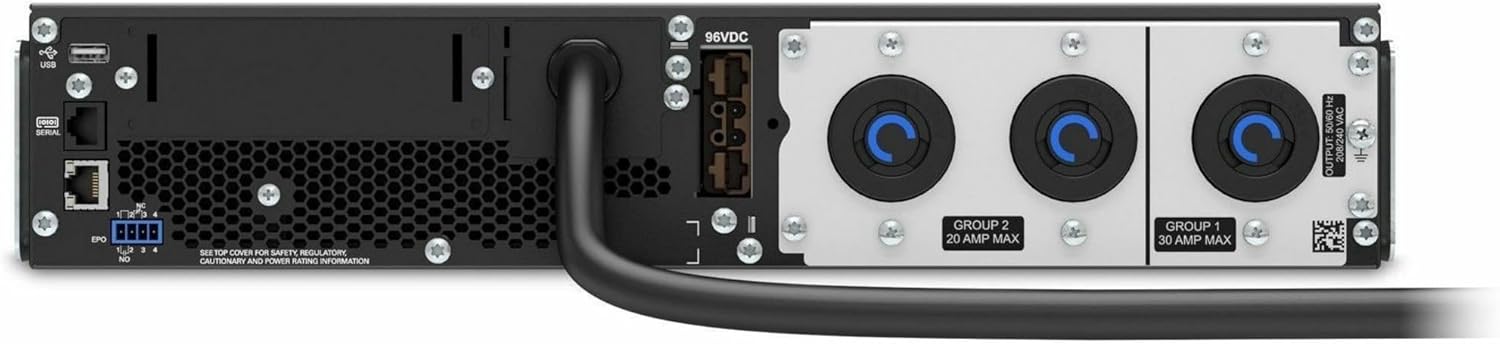
그림 4.2: 후면 view of the APC Smart-UPS SRT3000RMXLT. This image displays the various input and output ports, including USB, serial, EPO, and the 12 output receptacles, along with the main power input.
4.3 초기 전원 켜기
모든 연결이 안전해지면:
- Press the power button on the front panel to turn on the UPS.
- The UPS will perform a self-test and the display will show the current status.
- Allow the batteries to charge for at least 6 hours before relying on them for extended backup time.
5. UPS 작동 방법
5.1 전면 패널 디스플레이 및 제어 장치
The front panel features an LCD display and control buttons for monitoring and configuring the UPS.
- LCD 디스플레이: Shows real-time status, load, battery charge, input/output voltage, and event logs.
- ESC 버튼: 현재 메뉴를 종료하거나 작업을 취소합니다.
- 확인 버튼: 선택을 확인하거나 메뉴로 들어갑니다.
- 위/아래 화살표: 메뉴 옵션을 탐색하거나 설정을 조정하세요.
5.2 기본 작업
- 켜기: 전원 버튼이 화면에 불이 들어올 때까지 길게 누르세요.
- 끄기: Press and hold the power button until the UPS powers down. Ensure all connected equipment is safely shut down first.
- 배터리 모드: 정전이 발생한 경우tage, the UPS will automatically switch to battery power. The display will indicate 'On Battery'.
- 자가 진단: Initiate a manual self-test through the front panel menu to verify battery and UPS functionality.
6. 유지관리
6.1 배터리 교체
The UPS uses sealed lead-acid batteries. Battery life is typically 3-5 years, depending on environmental conditions and usage. Replace batteries when the UPS indicates a 'Battery Fault' or 'Replace Battery' warning.
- Contact APC support or a certified service technician for battery replacement.
- Always use genuine APC replacement battery cartridges (RBCs) to ensure compatibility and optimal performance.
- 오래된 배터리는 책임감 있게 재활용하세요.
6.2 청소
Keep the UPS free from dust and debris to ensure proper ventilation.
- Use a soft, dry cloth to clean the exterior of the UPS.
- 액체 세척제나 용제를 사용하지 마세요.
- 환기구에 장애물이 없는지 확인하십시오.
7. 문제 해결
이 섹션에서는 일반적인 문제에 대한 해결 방법을 제공합니다. 더 복잡한 문제의 경우 기술 지원팀에 문의하십시오.
| 문제 | 가능한 원인 | 해결책 |
|---|---|---|
| UPS가 켜지지 않습니다. | No input power; Battery disconnected or discharged | Check power cord connection; Ensure utility power is present; Allow batteries to charge. |
| UPS에서 계속해서 경고음이 울립니다. | On battery power; Overload condition | Check utility power; Reduce connected load. |
| 'Replace Battery' indicator | 배터리 수명이 거의 다됨 | Order and replace the battery cartridge. |
| UPS not providing power to outlets | Output circuit breaker tripped; UPS in fault mode | Reset circuit breaker; Check display for fault codes and consult manual. |
8. 사양
Key technical specifications for the APC Smart-UPS SRT3000RMXLT.
| 특징 | 사양 |
|---|---|
| 모델 번호 | SRT3000RMXLT |
| 상표 | 항공우주국(APC) |
| 출력 전력 용량 | 3000VA / 2700와트 |
| 공칭 출력 볼륨tage | 208V 교류 |
| 공칭 입력 Voltage | 208V 교류 / 230V 교류 |
| 입력 주파수 | 60Hz |
| 출력 연결 | 12 x IEC 320 C13/C14 |
| 배터리 유형 | 납산 |
| 일반적인 재충전 시간 | 6시간 |
| 일반적인 백업 시간(최대 부하 시) | 4 분 |
| 폼 팩터 | 고문 |
| 치수(높이 x 너비 x 깊이) | 9 x 23 x 34 인치 |
| 무게 | 69 파운드 |
| 작동 온도 | 0 - 40 °C (32 - 104 °F) |
9. 보증 및 지원
9.1 보증 정보
APC provides a standard warranty for this product. Please refer to the warranty card included with your product or visit the official APC web해당 지역의 자세한 보증 약관 및 조건은 해당 사이트에서 확인하세요.
9.2 기술 지원
For technical assistance, product information, or troubleshooting beyond the scope of this manual, please contact APC customer support. Have your model number (SRT3000RMXLT) and serial number ready when contacting support.
- APC 공식 웹사이트를 방문하세요. web지원 리소스, FAQ 및 연락처 정보를 제공하는 사이트입니다.
- Online resources often include updated manuals, firmware, and diagnostic tools.