
소개
This manual provides detailed instructions for the setup, operation, and maintenance of your Homtime C12PRO Docking Station Speaker. The C12PRO integrates a Bluetooth speaker, FM radio, alarm clock, and dual USB charging capabilities, designed for convenient everyday use.
패키지 내용
아래 나열된 모든 품목이 패키지에 포함되어 있는지 확인하세요.
- 1 x Homtime C12PRO Speaker Unit
- 1 x 전원 어댑터
- 1 x 사용자 설명서
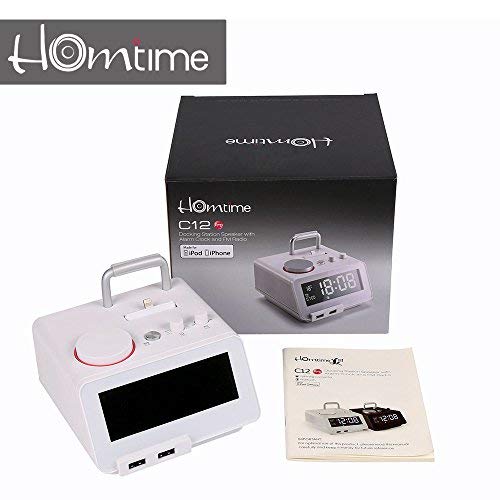
영상: Contents of the Homtime C12PRO package, showing the main speaker unit, power adapter, and the user manual.
제품 끝view
Familiarize yourself with the various components and controls of your C12PRO unit.

영상: 앞쪽 view of the Homtime C12PRO with an iPhone docked. The large digital display shows time and temperature, and the front features dual USB charging ports.

영상: 앞쪽 view of the Homtime C12PRO without a phone docked. This image clearly shows the digital display, the docking connector, and the control buttons on the top surface.
전면 패널 및 디스플레이
- 4.2인치 대형 LCD 디스플레이: Shows time, alarm status, and room temperature (Celsius or Fahrenheit). Brightness is adjustable.
- 듀얼 USB 충전 포트: Located at the front base for convenient charging of external devices.
상단 패널 컨트롤
- 도킹 커넥터: Apple Certified Lightning connector for iPod/iPhone.
- Control Buttons/Knobs: For setting time, alarm, volume, mode selection, and FM radio tuning.
후면 패널 연결
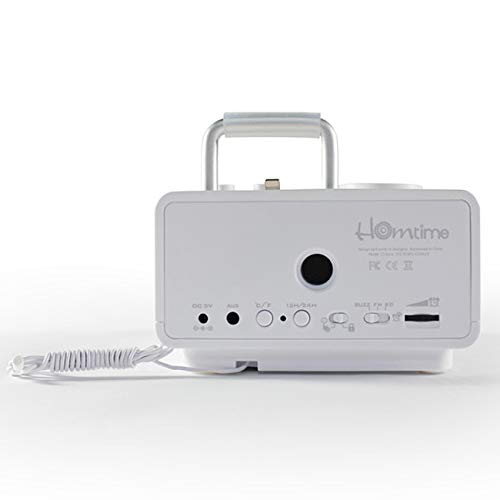
영상: 뒤쪽 view of the Homtime C12PRO. This image displays the DC 9V power input, AUX-in port, 12H/24H time format button, and other rear controls.
- DC 9V 전원 입력: 제공된 전원 어댑터를 여기에 연결하세요.
- AUX-in 포트: 외부 오디오 소스를 연결하기 위한 3.5mm 잭.
- 12H/24H Button: Toggles between 12-hour and 24-hour time display formats.
- 기타 컨트롤: May include snooze/dimmer, alarm on/off, and FM antenna connection.
설정
- 단위 풀기: Carefully remove the C12PRO speaker and all accessories from the packaging.
- 전원 연결: Insert the DC plug of the power adapter into the DC 9V input port on the rear of the unit. Plug the power adapter into a standard wall outlet. The display will illuminate.
- 초기 시간 설정:
- 를 누르고 계세요 시간 설정 button (location may vary, typically on top or rear).
- 사용하세요 +/- buttons or rotary knob to adjust the hour. Press 시간 설정 다시 확인합니다.
- 분을 조정하려면 다음을 사용하세요. +/- buttons or rotary knob. Press 시간 설정 시간 설정 모드를 확인하고 종료하려면 클릭하세요.
- 12시간 형식과 24시간 형식을 전환하려면 다음을 누릅니다. 12시/24시 후면 패널의 버튼.
- 디스플레이 밝기 조정: 를 누르세요 스누즈/디머 button (often combined) repeatedly to cycle through brightness levels.
- 온도 단위 설정: 해당하는 경우 ° C / ° F button to switch between Celsius and Fahrenheit display for room temperature.
작동 지침
전원 켜기/끄기
를 누르세요 힘 button to turn the unit on or off. When off, the clock display remains active.
알람 설정
- 를 누르고 계세요 알람 설정 버튼을 누르세요. 알람 시간이 깜빡입니다.
- 사용하세요 +/- buttons or rotary knob to adjust the alarm hour. Press 알람 설정 확인합니다.
- 알람 시간을 분 단위로 조정하세요. 누르세요. 알람 설정 확인합니다.
- Select the alarm source (Buzzer, FM Radio, or Docked Device). Use +/- or rotary knob and press 알람 설정 확인합니다.
- 알람을 활성화/비활성화하려면 다음을 누르세요. 알람 ON / OFF 버튼을 누르면 활성화 시 디스플레이에 알람 아이콘이 나타납니다.
- 알람이 울리면 버튼을 누르세요. 선잠 button to temporarily silence it for a few minutes. Press 힘 오늘의 알람을 끄세요.
FM 라디오 작동
- 를 누르세요 방법 "FM"이 디스플레이에 나타날 때까지 버튼을 누르세요.
- For automatic station scanning, press and hold the 재생/일시정지 버튼(또는 전용 버튼) 주사 button). The radio will scan and save available stations.
- 수동으로 조정하려면 다음을 사용하십시오. 이전/다음 buttons or rotary knob to adjust the frequency.
- To select a saved station, press the 사전 설정 버튼을 누른 다음 사용 이전/다음 탐색하다.
- 다음을 사용하여 볼륨 조절 용량 knob or buttons.
블루투스 페어링
- 를 누르세요 방법 button until "BT" or "Bluetooth" appears on the display. The Bluetooth indicator will flash, indicating pairing mode.
- 모바일 기기에서 Bluetooth를 활성화하고 새 기기를 검색하세요.
- Select "Homtime C12PRO" from the list of available devices.
- Once paired, the Bluetooth indicator on the C12PRO will stop flashing and remain solid. You can now play audio wirelessly from your device.
- Adjust volume on both the C12PRO and your connected device.
도킹 스테이션 사용
The C12PRO features an Apple Certified Lightning connector for compatible iPod/iPhone devices.
- Carefully align your iPhone/iPod with the Lightning connector on the top of the unit.
- Gently push down until the device is securely seated.
- The C12PRO will automatically charge your device and can play audio from it.
- 를 누르세요 방법 button to select the docking station as the audio source.
USB 충전
The unit includes dual USB ports for charging other devices.
- Connect your USB charging cable to one of the USB ports on the front of the C12PRO.
- Connect the other end of the cable to your device (e.g., Android phone, tablet).
- The C12PRO will provide power to charge your device.
AUX-in 연결
Connect external audio players via the 3.5mm AUX-in port.
- Connect a 3.5mm audio cable (not included) from your external audio device's headphone jack to the AUX-in port on the rear of the C12PRO.
- 를 누르세요 방법 "AUX"가 디스플레이에 나타날 때까지 버튼을 누릅니다.
- Play audio from your external device. Adjust volume on both the C12PRO and the external device.
유지
- 청소: Disconnect the power adapter before cleaning. Use a soft, dry cloth to wipe the exterior surfaces. Do not use abrasive cleaners, waxes, or solvents.
- 저장: 장기간 보관할 경우 전원을 끄고 직사광선과 극한의 온도를 피해 서늘하고 건조한 곳에 보관하세요.
- 배터리: The unit contains a CR2 battery (included) for clock memory backup. This battery is not user-replaceable for general operation and should only be replaced by qualified service personnel if necessary.
문제 해결
| 문제 | 가능한 원인 | 해결책 |
|---|---|---|
| 전원이 꺼져요/디스플레이가 꺼져요 | 전원 어댑터가 연결되지 않았거나 콘센트에 결함이 있습니다. | 전원 어댑터가 장치에 단단히 꽂혀 있고 벽면 콘센트에 잘 연결되어 있는지 확인하세요. |
| 스피커에서 소리가 나지 않음 | Volume too low; incorrect source selected; device not connected properly. | 볼륨을 높이려면 누르세요. 방법 to select the correct audio source (BT, FM, Dock, AUX). Reconnect Bluetooth device or docked phone. |
| 블루투스 페어링 실패 | C12PRO not in pairing mode; device too far; interference. | Ensure C12PRO is in BT mode and flashing. Move device closer. Turn off other Bluetooth devices. |
| FM 라디오 잡음/수신 불량 | 신호가 약합니다. 안테나가 확장되지 않았습니다. | Extend the FM antenna fully. Reposition the unit for better reception. Perform auto-scan again. |
| 알람이 울리지 않습니다 | Alarm not activated; alarm volume too low. | Ensure the alarm icon is visible on the display. Check alarm volume settings. |
| Device not charging via USB/Dock | Cable issue; device not compatible; unit not powered. | Try a different USB cable. Ensure the C12PRO is powered on. Verify device compatibility with the Lightning dock. |
명세서

영상: A table detailing the specifications of the Homtime C12PRO, including driver units, S/N ratio, Bluetooth version, range, radio frequency, power, and dimensions.
| 모델 | C12 프로 |
| 드라이버 유닛 | 2x40mm |
| 신호대잡음비 | >70dB |
| 블루투스 버전 | 2.1 + 업데이트 |
| 블루투스 범위 | 10M |
| 무선 주파수 범위 | 87.5MHz - 108MHz |
| 호환 장치 | iPad, iPhone, Android, Windows Phone, Computer |
| 전원 어댑터 | AC100-240V, 50/60Hz, DC 5V 3A |
| 출력 전력 | 3W + 3W (6 Watts total) |
| 치수(길이x너비x높이) | 12.8 x 12.9 x 10.7cm |
| 품목 무게 | 800g |
| 오디오 소스 | Apple Lightning, USB, Bluetooth, Aux-in |
| 디스플레이 유형 | Digital LCD (4.2 inches) |
| 배터리 | 1 CR2 battery required (included for clock memory) |
보증 및 지원
보증 정보
The Homtime C12PRO comes with a 1년 한정 보증 from the date of purchase. This warranty covers manufacturing defects in materials and workmanship under normal use. It does not cover damage caused by misuse, accidents, unauthorized modifications, or external causes.
보증 청구를 위해 구매 증명서를 보관하십시오.
고객 지원
For technical assistance, troubleshooting not covered in this manual, or warranty inquiries, please contact Homtime customer support. Refer to the contact information provided with your product packaging or visit the official Homtime web최신 지원 세부 정보는 사이트에서 확인하세요.