
1. 서론
구매해주셔서 감사합니다asing the Marvo G904 6D Optical Wired Gaming Mouse. This manual provides essential information for the proper setup, operation, and maintenance of your new gaming mouse. Please read this manual thoroughly before use to ensure optimal performance and longevity of the product.
2. 제품 오버view
The Marvo G904 is a high-performance 6D optical wired gaming mouse designed for precision and comfort. It features an AVago3050 sensor, adjustable DPI settings, and programmable buttons to enhance your gaming experience.

Figure 1: Marvo G904 Gaming Mouse with blue LED lighting, showcasin인체공학적 디자인과 조명 장식이 특징입니다.

Figure 2: Marvo G904 Gaming Mouse displaying green LED lighting, indicating different lighting modes or DPI settings.
3. 설정
Follow these steps to set up your Marvo G904 gaming mouse:
- 마우스 풀기: 마우스와 모든 액세서리를 포장에서 조심스럽게 꺼내십시오.
- 컴퓨터에 연결: Plug the USB connector of the mouse into an available USB port on your computer. The mouse is plug-and-play for basic functionality.
- Install Driver (Optional for Advanced Features): For full functionality, including macro programming and advanced DPI settings, insert the provided CD driver into your computer's optical drive and follow the on-screen instructions to install the software. If your computer does not have an optical drive, please visit the official Marvo web드라이버 다운로드 사이트.

Figure 3: Marvo G904 Gaming Mouse packaging, which includes the driver CD.
4. 사용 설명서
The Marvo G904 mouse features 6 buttons and adjustable DPI settings for versatile control.
4.1 버튼 기능
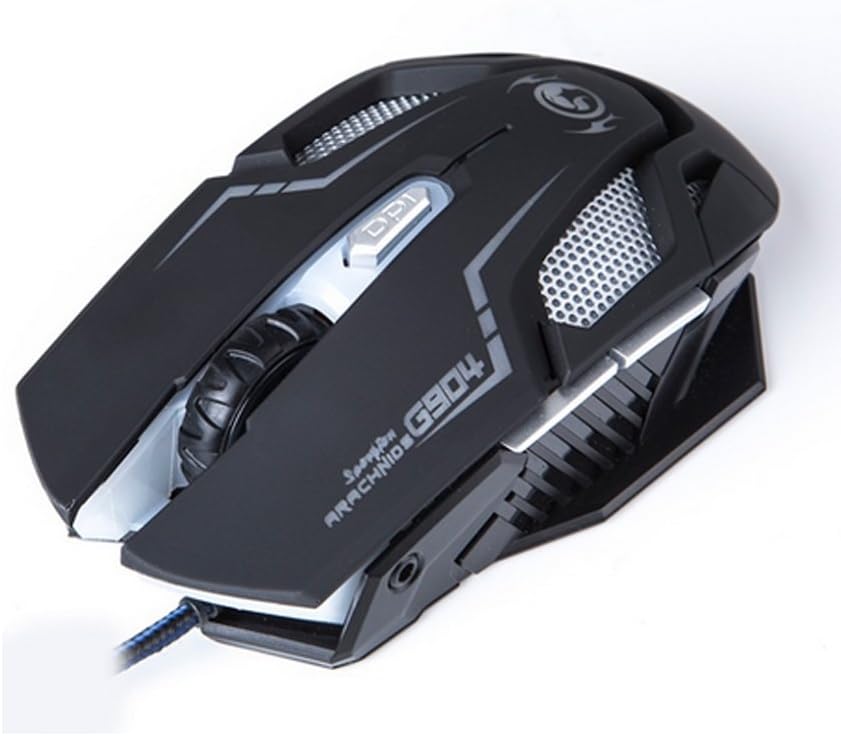
그림 4: 상단 view of the Marvo G904 Gaming Mouse, highlighting the placement of its 6 buttons.
- 왼쪽 클릭 버튼: 표준 기본 클릭 기능.
- 오른쪽 클릭 버튼: 표준 보조 클릭 기능.
- 스크롤 휠: Scrolls up/down. Can also be pressed for a middle click function.
- DPI 전환 버튼: Cycles through DPI settings (1000, 2000, 3000, 4000).
- 측면 버튼(2개): 일반적으로 '앞으로'와 '뒤로' 기능을 합니다. web 브라우저 및 file explorers. These can be programmed using the driver software.
4.2 DPI 조정
를 누르세요 DPI 시프트 버튼 (located behind the scroll wheel) to cycle through the available DPI settings: 1000, 2000, 3000, and 4000 DPI. Each DPI level may be indicated by a change in the mouse's LED lighting color or pattern, depending on the current light mode.
4.3 Macro Programming (with Light Mode)
Utilize the included CD driver software to customize button functions and create macros. The software also allows you to configure the mouse's LED lighting modes. Refer to the software's help section for detailed instructions on macro creation and light mode customization.
5. 유지관리
적절한 관리는 게이밍 마우스의 수명과 최적의 성능을 보장합니다.
- 청소: 부드럽고 마른 천을 사용하여 마우스 표면을 닦으세요. 잘 지워지지 않는 오염의 경우, 살짝 damp천에 물이나 순한 세척액을 묻혀 닦아주세요. 강한 화학 물질이나 연마재는 사용하지 마세요.
- 센서 관리: 마우스 바닥의 광학 센서를 깨끗하고 먼지나 이물질이 없도록 유지하세요. 필요한 경우 면봉이나 압축 공기를 사용하세요.
- 케이블 관리 : 손상을 방지하려면 USB 케이블을 급격하게 구부리거나 과도하게 당기지 마세요.
- 저장: 사용하지 않을 때는 마우스를 극한의 온도를 피해 깨끗하고 건조한 곳에 보관하세요.
6. 문제 해결
If you encounter issues with your Marvo G904 mouse, refer to the following common problems and solutions:
| 문제 | 해결책 |
|---|---|
| 마우스가 응답하지 않습니다. |
|
| DPI 설정이 변경되지 않습니다. |
|
| 버튼이 제대로 작동하지 않습니다. |
|
| Mouse cursor movement is erratic or jumpy. |
|
7. 사양
Detailed technical specifications for the Marvo G904 Gaming Mouse:

그림 5: 하단 view of the Marvo G904 Gaming Mouse, displaying model number, DPI range, and certification marks.
| 특징 | 세부 사항 |
|---|---|
| 모델 | G904 |
| 센서 유형 | Optical (AVago3050) |
| DPI 설정 | 1000 / 2000 / 3000 / 4000 DPI |
| 버튼 | 6D (버튼 6개) |
| 보고율 | 1000Hz |
| 키 내구성 | 10만 클릭 |
| 케이블 길이 | 1.5 미터 |
| 치수(길이*너비*높이) | 143 * 76 * 42mm |
| 정격 볼륨tage | 5V |
| 정격 전류 | 10mA |
| 호환성 | PC |
| 색상 | 검은색 |
8. 보증 및 지원
For warranty information and technical support, please refer to the documentation provided with your purchase or contact your retailer. You may also visit the official MARVO website for further assistance and updated driver software.