
1. 서론
구매해주셔서 감사합니다asing the Gemini PS3-USB 3 Channel 10-Inch Mixer. This manual provides essential information for the proper setup, operation, and maintenance of your mixer. Please read this manual thoroughly before use to ensure optimal performance and to prevent damage.
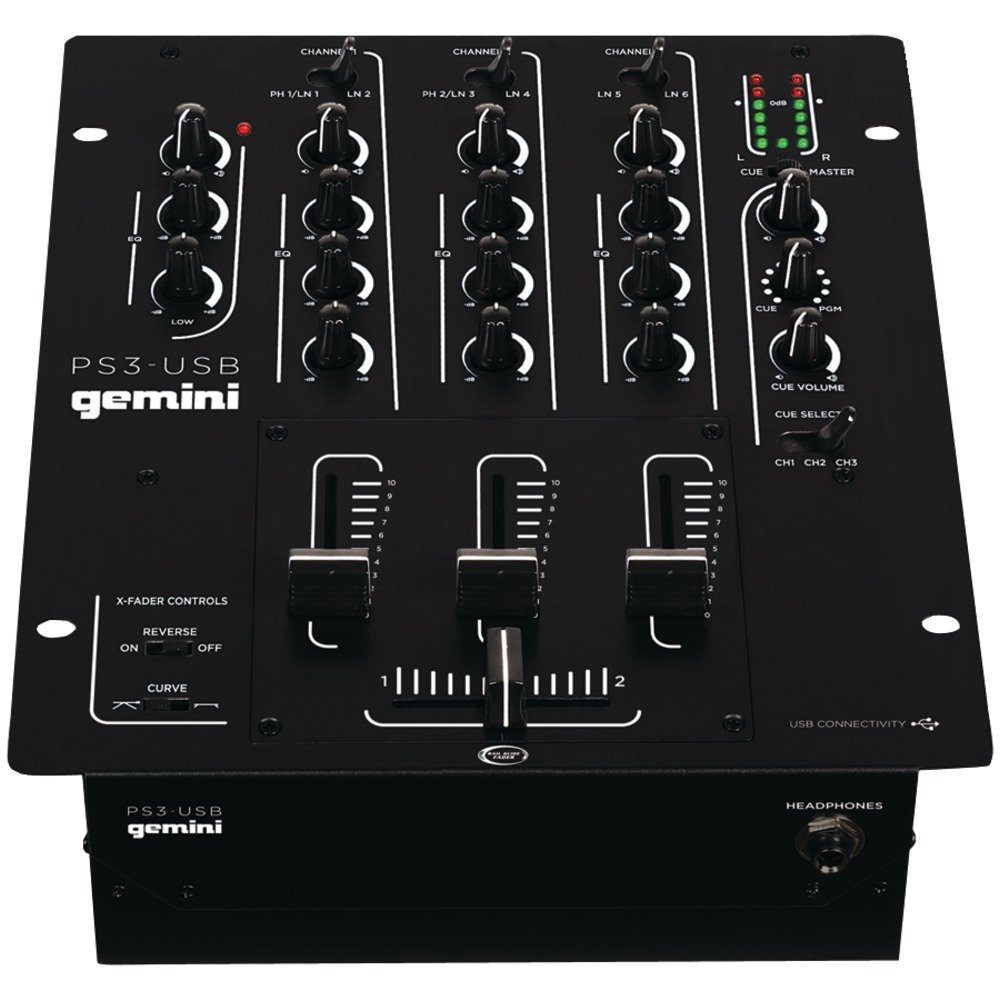
그림 1: 전면 view of the Gemini PS3-USB Mixer, showing controls and inputs.
2. 안전 지침
- 전원: 본 제품은 지정된 전원 공급 장치에만 연결하세요.
- 통풍: 적절한 환기를 유지하세요. 환기구를 막지 마세요.
- 물과 습기: 기기를 비나 습기에 노출시키지 마십시오. 기기 위에 액체가 담긴 물건을 올려놓지 마십시오.
- 열: 라디에이터, 난방 장치, 스토브 또는 기타 장치(예: 열원)에서 장치를 멀리 두십시오. amp열을 생성하는 발전기.
- 청소: 마른 천으로만 닦으십시오.
- 서비스: 모든 정비는 자격을 갖춘 서비스 담당자에게 맡기십시오. 이 제품을 직접 정비하려고 하지 마십시오.
3. 설정
3.1 풀기
Carefully unpack the mixer and check for any signs of damage. Retain the packaging materials for future transport or storage.
3.2 전원 연결
제공된 전원 어댑터를 믹서의 전원 입력 단자에 연결한 다음 적절한 콘센트에 연결하십시오.
3.3 오디오 연결
The PS3-USB features 5-line, 3-channel inputs with 2 convertible Phono/Line RCA inputs.
- 포노/라인 입력: Connect turntables or line-level devices (CD players, media players) to the RCA inputs. Use the Phono/Line switch to select the appropriate input type for each channel.
- 마스터 출력: Connect the Master RCA outputs to your amp전원 공급기 또는 전원 스피커.
- 레코드 출력: Connect the Record RCA outputs to a recording device if you wish to record your mix.
- 헤드폰: Plug your 1/4" (6.3mm) headphones into the front panel headphone connector.
3.4 USB 연결
Connect the mixer to your Mac or PC using a standard USB cable. This allows for simultaneous playback and recording through your computer's media player software.
4. 사용 설명서
4.1 제어 및 기능view
Familiarize yourself with the mixer's layout:
- Channel Gain Control: 각 채널의 입력 레벨을 조정합니다.
- 3-Band Rotary EQ: Provides control over High, Mid, and Low frequencies for each channel.
- 채널 페이더 : 각 채널의 볼륨을 개별적으로 조절할 수 있습니다.
- 크로스 페이더 : A user-replaceable Rail Glide crossfader with curve and reverse controls for blending between channels.
- 마스터 볼륨: 믹서의 전반적인 출력 레벨을 제어합니다.
- VU 미터: Visual indicators for master or cue levels.
- Cue Section: Includes rotary cue volume, CUE/PGM controls, and a split cue switch for headphone monitoring.
- 마이크 섹션: Features a rotary microphone volume control and a 2-band EQ for microphone input.
4.2 기본 혼합
- Connect your audio sources to the appropriate Phono/Line inputs.
- Set the Phono/Line switch for each channel to match your source.
- Adjust the Gain control for each active channel to achieve a healthy input level without clipping (distortion).
- Use the channel faders to bring up the volume of your desired audio sources.
- Utilize the 3-band EQ to shape the sound of each channel.
- Use the crossfader to smoothly transition between channels.
- Monitor your mix using headphones via the Cue section and adjust the Master Volume for the main output.
4.3 USB 재생 및 녹음
Once connected via USB, your computer should recognize the PS3-USB as an audio device.
- 재생: Select the PS3-USB as the output device in your computer's sound settings or media player software to route audio through the mixer.
- 녹음: Select the PS3-USB as the input device in your recording software. The mixer's master output will be sent to your computer for recording.
5. 유지관리
- 청소: 믹서 외부를 닦을 때는 부드럽고 마른 천을 사용하십시오. 액체 세제나 용제를 사용하지 마십시오.
- Crossfader Replacement: The Rail Glide crossfader is user-replaceable. Refer to the Gemini website or authorized service centers for replacement parts and instructions if needed.
- 저장: When not in use for extended periods, store the mixer in a cool, dry place, preferably in its original packaging.
6. 문제 해결
| 문제 | 가능한 원인 | 해결책 |
|---|---|---|
| No sound output from master. | Master volume too low; incorrect input selection; amplifier/speaker issues. | Increase Master Volume. Check Phono/Line switches. Verify amplifier/speaker connections and power. |
| 특정 채널에서 소리가 나지 않습니다. | Channel fader down; Gain too low; incorrect Phono/Line selection; source device off/muted. | Raise channel fader. Adjust Gain. Correct Phono/Line switch. Check source device. |
| 왜곡된 오디오. | Input Gain too high; Master Volume too high; faulty cable. | Reduce channel Gain. Reduce Master Volume. Replace cables. |
| USB recording/playback not working. | Incorrect USB connection; computer audio settings incorrect; driver issues. | Ensure USB cable is securely connected. Select PS3-USB as audio device in computer settings. Restart computer. |
7. 사양
- 모델: PS3USB
- 채널: 3
- 입력: 5-Line, 2 Convertible Phono/Line RCA, USB
- 출력: Master RCA, Record RCA, 1/4" (6.3mm) Headphone
- EQ : 3-Band Rotary EQ per channel, 2-Band EQ for Microphone
- 크로스 페이더 : User-replaceable Rail Glide with Curve and Reverse controls
- 연결성: USB for Mac/PC Playback & Recording
- Dimensions (Approximate Shipping): 12.00인치 x 10.00인치 x 3.25인치
- Weight (Approximate Shipping): 6.2파운드(2.8kg)
- 한국어: 747705208149
8. 보증 및 지원
This Gemini product is covered by a 90일 보증 from the date of purchase. This warranty covers manufacturing defects and workmanship under normal use. It does not cover damage caused by misuse, accident, modification, or unauthorized repair.
For technical support, service inquiries, or warranty claims, please contact your authorized Gemini dealer or visit the official Gemini web연락처 정보 사이트.
보증 확인을 위해 구매 증빙서류를 보관하세요.