Thank you for choosing the AMS Pendule 211/1 wall clock. This manual provides comprehensive instructions for the safe and efficient setup, operation, and maintenance of your new clock. Please read this manual thoroughly before use and retain it for future reference.
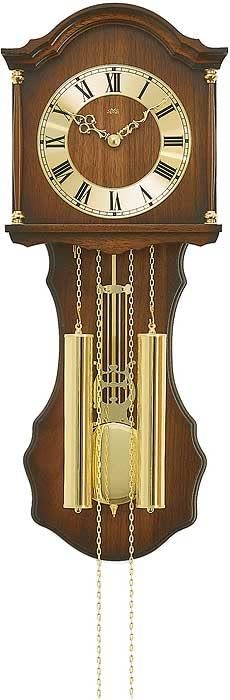
Figure 1: AMS Pendule 211/1 Wall Clock
2. 설정
2.1 풀기
시계를 포장에서 조심스럽게 꺼내세요.
Inspect the clock for any signs of damage. If damaged, do not proceed with setup and contact customer support.
Remove all protective films or packaging materials from the clock face, hands, and pendulum.
미래의 운송이나 보관을 위해 포장재를 보관하세요.
2.2 배터리 설치
The AMS Pendule 211/1 requires batteries (not included) for operation. Please use the specified battery type.
시계 뒷면에서 배터리 덮개를 찾으세요.
Remove the cover by sliding or unlatching it.
Insert the required batteries (e.g., 1x AA or 1x C, refer to the compartment label for exact type) according to the polarity indicators (+ and -).
배터리함 덮개를 단단히 다시 닫으십시오.
2.3 시계 장착
Ensure the clock is mounted securely on a stable wall surface.
Choose a suitable location on a wall, away from direct sunlight, extreme temperatures, or vibrations.
Use an appropriate wall anchor and screw for your wall type (e.g., drywall, concrete). The mounting point should be strong enough to support the clock's weight.
Hang the clock securely using the keyhole slot on the back. Ensure it is level.
2.4 시간 설정
Your AMS Pendule 211/1 clock features an analog display. Some models may include a radio-controlled mechanism for automatic time synchronization.
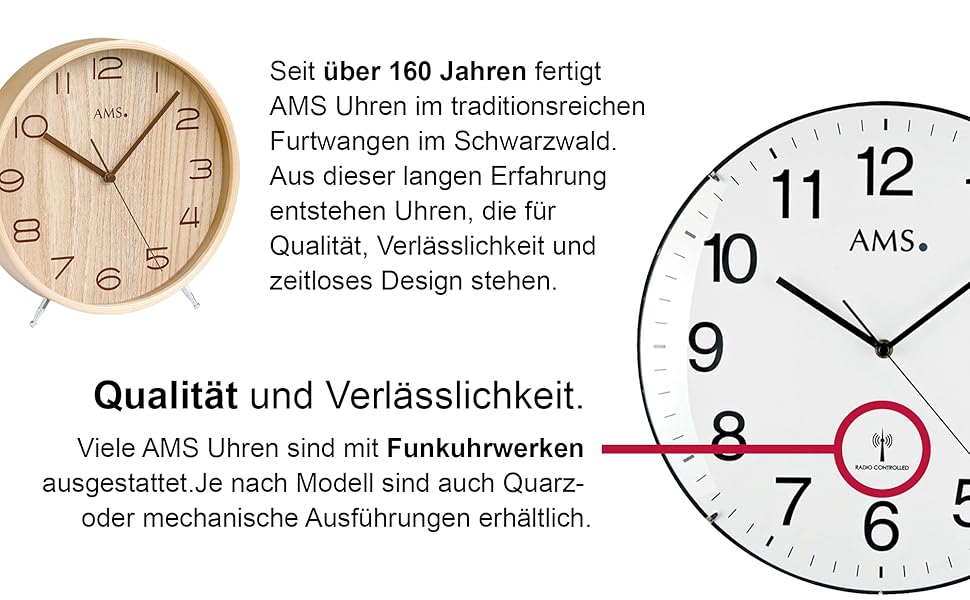
그림 2: 예ample Clock Face with Radio Controlled Symbol
수동 설정: Locate the time-setting knob or wheel on the back of the clock. Gently turn this knob to move the minute and hour hands clockwise until the correct time is displayed. Avoid turning the hands counter-clockwise.
Radio-Controlled (if applicable): If your clock is radio-controlled, it will attempt to synchronize with a time signal after battery installation. Place the clock near a window for better signal reception. This process may take several minutes or hours. Once synchronized, the clock will automatically display the correct time.
2.5 Pendulum Setup
The pendulum is a decorative and functional element of your clock.
Carefully unpack the pendulum if it was separate from the main clock body.
Attach the pendulum to its hook or hanging mechanism inside the clock case. Ensure it hangs freely and does not touch the sides of the case.
Gently push the pendulum to one side to start its swing. It should swing evenly.
3. 사용 설명서
3.1 시간 읽기
The AMS Pendule 211/1 features a clear analog display with hour, minute, and second hands for precise timekeeping.
그만큼 간략한 시간을 나타냅니다.
그만큼 긴 손 분을 나타냅니다.
그만큼 가늘고 쓸어내리는 손 두 번째를 나타냅니다.
3.2 알람 기능
Your clock is equipped with an alarm function. Refer to the specific controls on the back or side of your clock for alarm setting.
알람 시간 설정: Locate the alarm setting knob/dial (often separate from the main time setting). Turn it to set the desired alarm time.
알람 활성화: Find the alarm ON/OFF switch or button. Move it to the "ON" position to activate the alarm.
알람 비활성화: To turn off the alarm sound, move the alarm switch to the "OFF" position.
3.3 Pendulum Operation
Once the pendulum is installed and started, it should swing continuously. If it stops, gently restart it.
Ensure the clock is level on the wall to allow for an even pendulum swing.
Avoid obstructing the pendulum's movement.
4. 유지관리
4.1 청소
Regular cleaning will help maintain the appearance of your clock. The frame is made of Acrylonitrile Butadiene Styrene (ABS).
Wipe the clock's exterior with a soft, dry, lint-free cloth.
완고한 자국의 경우 약간 damp물에 적신 천으로 닦으십시오. 독한 화학 약품, 연마성 세척제 또는 용제는 마감재를 손상시킬 수 있으므로 사용하지 마십시오.
Do not spray cleaning solutions directly onto the clock.
Keep the clock away from excessive dust and moisture.
4.2 배터리 교체
Replace batteries when the clock starts losing time or stops functioning.
Follow the steps in Section 2.2 "Battery Installation" to replace old batteries with new ones of the correct type.
사용한 배터리는 현지 규정에 따라 책임감 있게 폐기하십시오.
5. 문제 해결
If you encounter issues with your AMS Pendule 211/1, refer to the table below for common problems and solutions.
Replace batteries. For radio-controlled, move to a location with better signal. If problem persists, contact support.
추가 흔들리지 않음
Not properly installed; obstruction; clock not level.
Ensure pendulum is correctly hooked and swings freely. Check if the clock is level. Gently restart the pendulum.
알람이 울리지 않음
Alarm not activated; incorrect alarm time set; low battery.
Ensure alarm switch is ON. Verify alarm time setting. Replace batteries.
6. 사양
특징
세부 사항
상표
아메스
모델
211/1
ASIN
B005DRWNZ0
디스플레이 유형
비슷한 물건
모양
직사각형
프레임 소재
아크릴로니트릴 부타디엔 스티렌(ABS)
경보
예
배터리 포함
아니요
7. 보증 및 지원
보증 정보 또는 기술 지원에 대한 문의는 구매 시 제공된 설명서를 참조하시거나 판매점에 문의해 주세요. 보증 청구를 위해 구매 증빙 자료를 보관해 주세요.
For further assistance, you may visit the official AMS web사이트 또는 고객 서비스 부서에 문의하십시오.
Ask a question about this manual
Ask about setup, troubleshooting, compatibility, parts, safety, or missing instructions. Manuals+ will review the question and use this page’s manual context to help answer it.