
1. ಪರಿಚಯ
Thank you for choosing the Mirac Automatic Azan Clock. This device is designed to provide accurate prayer times and Azan calls for over 1500 cities worldwide. It features a clear digital display, multiple Azan voices, and Qibla direction indication. This manual will guide you through the setup, operation, and maintenance of your new Azan clock.
2. ಸುರಕ್ಷತೆ ಮಾಹಿತಿ
- ಬಳಸುವ ಮೊದಲು ಎಲ್ಲಾ ಸೂಚನೆಗಳನ್ನು ಎಚ್ಚರಿಕೆಯಿಂದ ಓದಿ.
- ಸಾಧನವನ್ನು ನೀರು ಮತ್ತು ತೇವಾಂಶದಿಂದ ದೂರವಿಡಿ.
- Do not expose the clock to extreme temperatures or direct sunlight for extended periods.
- Use only the specified power source (AC adapter or AA batteries).
- ಸಾಧನವನ್ನು ನೀವೇ ತೆರೆಯಲು ಅಥವಾ ದುರಸ್ತಿ ಮಾಡಲು ಪ್ರಯತ್ನಿಸಬೇಡಿ. ಎಲ್ಲಾ ಸೇವೆಗಳನ್ನು ಅರ್ಹ ಸಿಬ್ಬಂದಿಗೆ ಉಲ್ಲೇಖಿಸಿ.
- Keep batteries out of reach of children. Dispose of used batteries responsibly.
3. ಉತ್ಪನ್ನ ಮುಗಿದಿದೆview
Familiarize yourself with the components and controls of your Mirac Automatic Azan Clock.

ಚಿತ್ರ 3.1: ಮುಂಭಾಗ View of the Mirac Automatic Azan Clock
This image shows the clock's front panel with its digital display, indicating the current time (13:50), date (2011/1/29), city (FRANKFURT), temperature (20°C), and various prayer times (Imsak, Fajr, Shrooq, Oogle, Ikindi, Asr, Magrib, Yatsi, Isha). Below the screen are several control buttons.

ಚಿತ್ರ 3.2: ಬಹು-ಕೋನ View of the Clock
This composite image provides a comprehensive look at the clock, including its front display and control buttons, a side profile showing its slim design, and the rear panel with its speaker and power input.
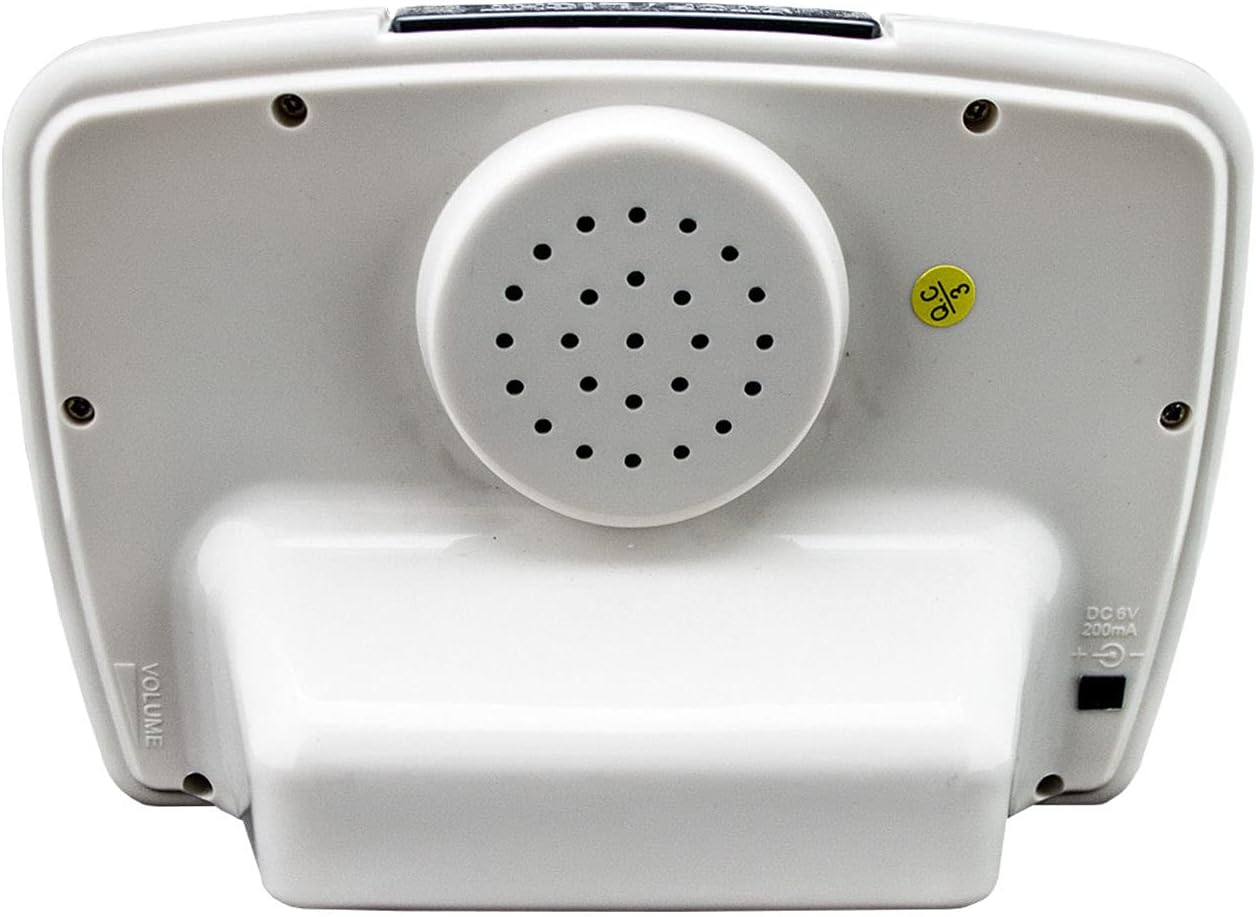
ಚಿತ್ರ 3.3: ಹಿಂಭಾಗ View of the Clock
The back of the clock features a circular speaker grille, a volume control slider on the left side, and a DC 5V 200mA power input jack on the right side.
3.1. ಮುಂಭಾಗದ ಫಲಕ ನಿಯಂತ್ರಣಗಳು
- ನಿರ್ಗಮಿಸಿ: Exits current menu or setting.
- ದೇಶ: Selects country for prayer time calculation.
- ನಗರ: Selects city within the chosen country.
- ಸೆಟ್: Enters setting mode or confirms selection.
- TEMP: Displays temperature.
- DST: Daylight Saving Time adjustment.
- DAILY ALM: Sets daily alarm.
- AUTO ALM: Sets automatic alarm.
- AZAN: Toggles Azan on/off or selects Azan voice.
- ಆನ್/ಆಫ್: ಪವರ್ ಆನ್/ಆಫ್ ಬಟನ್.
- ಧ್ವನಿ: Adjusts voice settings.
- ಮಾತನಾಡುವ: Activates talking function (if available).
- ಮೇಲೆ/ಕೆಳಗೆ ಬಾಣಗಳು (▲ / ▼): ಮೆನುಗಳಲ್ಲಿ ನ್ಯಾವಿಗೇಟ್ ಮಾಡುತ್ತದೆ ಮತ್ತು ಮೌಲ್ಯಗಳನ್ನು ಹೊಂದಿಸುತ್ತದೆ.
3.2. Top Panel Control
- STOP/LIGHT: Stops alarm or activates backlight.
3.3. Rear Panel Controls
- ಸಂಪುಟ: Slider to adjust audio volume.
- DC 5V 200mA: Power input jack.
4. ಆರಂಭಿಕ ಸೆಟಪ್
4.1. ಸಾಧನವನ್ನು ಪವರ್ ಮಾಡುವುದು
The Mirac Automatic Azan Clock can be powered by either an AC adapter or batteries.
- ಬ್ಯಾಟರಿಗಳನ್ನು ಬಳಸುವುದು: Insert 4 AAA batteries (not included) into the battery compartment located on the back of the clock. Ensure correct polarity.
- AC ಅಡಾಪ್ಟರ್ ಬಳಸುವುದು: Connect a compatible DC 5V 200mA AC adapter (not included) to the power input jack on the back of the clock.
4.2. ಸಮಯ ಮತ್ತು ದಿನಾಂಕವನ್ನು ಹೊಂದಿಸುವುದು
- ಒತ್ತಿರಿ ಹೊಂದಿಸಿ ಸೆಟ್ಟಿಂಗ್ ಮೋಡ್ ಅನ್ನು ನಮೂದಿಸಲು ಬಟನ್.
- ಬಳಸಿ ಮೇಲಿನ/ಕೆಳಗಿನ ಬಾಣಗಳು to adjust the year, month, day, hour, and minute.
- ಒತ್ತಿರಿ ಹೊಂದಿಸಿ after each adjustment to confirm and move to the next setting.
- ಒತ್ತಿರಿ ನಿರ್ಗಮಿಸಿ to save settings and return to the main display.
4.3. Selecting Country and City
Accurate prayer times depend on correct location settings.
- ಒತ್ತಿರಿ ದೇಶ ಬಟನ್. ಬಳಸಿ ಮೇಲಿನ/ಕೆಳಗಿನ ಬಾಣಗಳು to select your country. Press ಹೊಂದಿಸಿ ಖಚಿತಪಡಿಸಲು.
- ಒತ್ತಿರಿ ನಗರ ಬಟನ್. ಬಳಸಿ ಮೇಲಿನ/ಕೆಳಗಿನ ಬಾಣಗಳು to select your city from the available list. Press ಹೊಂದಿಸಿ ಖಚಿತಪಡಿಸಲು.
- The clock will automatically calculate and display the prayer times for your selected location.
4.4. ಡೇಲೈಟ್ ಸೇವಿಂಗ್ ಟೈಮ್ (DST)
If your region observes Daylight Saving Time, you may need to adjust this setting.
- ಒತ್ತಿರಿ DST button to toggle Daylight Saving Time on or off.
5. ಕಾರ್ಯಾಚರಣೆ
5.1. Azan Function
The clock provides full Azan calls with 11 different voices, including Makkah, Madinah, Egyptian, Al Aqsa, Turkish, Indonesian, and Moroccan. Each prayer time may feature a different Turkish voice.
- ಒತ್ತಿರಿ AZAN button to toggle the Azan sound on or off for all prayer times.
- To select a specific Azan voice, press and hold the AZAN ಬಟನ್, ನಂತರ ಬಳಸಿ ಮೇಲಿನ/ಕೆಳಗಿನ ಬಾಣಗಳು to cycle through the available voices. Release the button to confirm.
- ಬಳಸಿ ಪರಿಮಾಣವನ್ನು ಹೊಂದಿಸಿ ಸಂಪುಟ slider on the back of the clock.
5.2. Daily and Automatic Alarms
- ದೈನಂದಿನ ಎಚ್ಚರಿಕೆ: ಒತ್ತಿರಿ DAILY ALM button to set a specific daily alarm time. Use the ಮೇಲಿನ/ಕೆಳಗಿನ ಬಾಣಗಳು to adjust the time and ಹೊಂದಿಸಿ ಖಚಿತಪಡಿಸಲು.
- ಸ್ವಯಂಚಾಲಿತ ಎಚ್ಚರಿಕೆ: ಒತ್ತಿರಿ AUTO ALM button to activate or deactivate the automatic alarm function. Consult the full manual for detailed settings of this feature.
5.3. Qibla Direction
The clock can indicate Qibla direction in 5 different ways.
- Refer to the display for the Qibla direction indicator, which will be shown based on your set location.
5.4. ಹಿಂಬದಿ ಬೆಳಕನ್ನು ಪ್ರದರ್ಶಿಸಿ
- ಒತ್ತಿರಿ STOP/LIGHT button on the top of the clock to activate the display backlight for better visibility in low light conditions.
6. ನಿರ್ವಹಣೆ
6.1. ಸ್ವಚ್ಛಗೊಳಿಸುವಿಕೆ
- Wipe the clock with a soft, dry cloth.
- ಅಪಘರ್ಷಕ ಕ್ಲೀನರ್ಗಳು ಅಥವಾ ದ್ರಾವಕಗಳನ್ನು ಬಳಸಬೇಡಿ, ಏಕೆಂದರೆ ಅವು ಮೇಲ್ಮೈಯನ್ನು ಹಾನಿಗೊಳಿಸಬಹುದು.
6.2. ಬ್ಯಾಟರಿ ಬದಲಿ
- When the display dims or the clock functions erratically, it may be time to replace the batteries.
- Open the battery compartment on the back of the clock and replace the 4 AAA batteries, ensuring correct polarity.
- ಸ್ಥಳೀಯ ನಿಯಮಗಳ ಪ್ರಕಾರ ಹಳೆಯ ಬ್ಯಾಟರಿಗಳನ್ನು ವಿಲೇವಾರಿ ಮಾಡಿ.
7. ನಿವಾರಣೆ
| ಸಮಸ್ಯೆ | ಸಂಭವನೀಯ ಕಾರಣ | ಪರಿಹಾರ |
|---|---|---|
| ಗಡಿಯಾರ ಆನ್ ಆಗುತ್ತಿಲ್ಲ. | No power, dead batteries, or incorrect battery insertion. | Check AC adapter connection or replace batteries, ensuring correct polarity. |
| Azan does not play. | Azan function is off, volume is too low, or a defect. | ಒತ್ತಿರಿ AZAN button to turn it on. Adjust the ಸಂಪುಟ slider. If the issue persists, contact support. |
| Incorrect prayer times. | Incorrect country/city settings or DST setting. | ಪರಿಶೀಲಿಸಿ ಮತ್ತು ಸರಿಪಡಿಸಿ ದೇಶ, ನಗರ, ಮತ್ತು DST settings as per Section 4.3 and 4.4. |
| ಪ್ರದರ್ಶನವು ಮಂದವಾಗಿದೆ ಅಥವಾ ಮಿನುಗುತ್ತಿದೆ. | ಕಡಿಮೆ ಬ್ಯಾಟರಿ ಶಕ್ತಿ. | ಬ್ಯಾಟರಿಗಳನ್ನು ಬದಲಾಯಿಸಿ. |
8. ವಿಶೇಷಣಗಳು
- ಬ್ರ್ಯಾಂಡ್: MIRAC
- ಮಾದರಿ ಸಂಖ್ಯೆ: WY-DNK1-KJIT
- ಬಣ್ಣ: ಬಿಳಿ ಚೌಕಟ್ಟು
- ಆಯಾಮಗಳು (L x W x H): 28 x 0.03 x 18 ಸೆಂ
- ತೂಕ: 290 ಗ್ರಾಂ
- ವಸ್ತು: ಪ್ಲಾಸ್ಟಿಕ್
- ವೈಶಿಷ್ಟ್ಯಗಳು: Alarm, Azan, Qibla Direction
- ಶಕ್ತಿ ಮೂಲ: 4 x AAA batteries (not included) or DC 5V 200mA AC adapter (not included)
- ಪ್ರದರ್ಶನ ಪ್ರಕಾರ: ಡಿಜಿಟಲ್
- ಶೈಲಿ: ಆಧುನಿಕ
- ಆಕಾರ: ಚೌಕ
- ಬಳಕೆ: ಒಳಾಂಗಣ
9. ಖಾತರಿ ಮತ್ತು ಬೆಂಬಲ
Information regarding specific warranty terms and customer support contacts is not available in the provided product details. Please refer to the product packaging or contact your retailer for warranty information and technical assistance.