

WZ1 ZigBee & RF 2CH LED Controller
Model No.: WZ1
Tuya APP cloud control / 2 Channels / Push-Dim / DC power socket input / Wireless remote control.
Features
- Used for control single color or color temperature LED strip.
- DC power socket input and 2 channel constant voltage output.
- Tuya APP cloud control, support on/off, color temperature and brightness adjust, delay turn on/off light, timer run, scene edit and music play function.
- Voice control, support Amazon ECHO and TmallGenie smart speaker.
- Match with RF 2.4G remote control optional.
- User need set light type by press key before Tuya APP network connection and match RF remote of the same light type.
- Each WZ1 controller can also work as ZigBee-RF converter, then use Tuya APP to control one or more RF LED controller or RF LED dimming driver synchronously.
- Connect with external push switch to achieve on/off and 0-100% dimming function.
- Light on/off fade time 3s selectable.
Technical Parameters
| Category | Details | ||||||||||||
|---|---|---|---|---|---|---|---|---|---|---|---|---|---|
| Input and Output |
| ||||||||||||
| Safety and EMC |
| ||||||||||||
| Environment |
| ||||||||||||
| Warranty and Protection |
|
Mechanical Structures and Installations
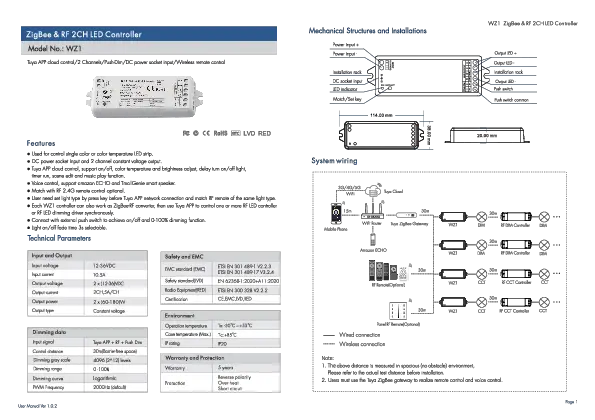
Diagram showing the physical layout of the WZ1 controller. It illustrates power input terminals (Power input +, Power input -), DC socket input, installation rack points, LED indicator, and a Match/Set key. Output terminals are labeled Output LED (+, -) and Push switch terminals (Push switch, Push switch common). Dimensions are provided: 114.00 mm length, 38.00 mm width, 20.00 mm height.
System Wiring
Diagram illustrating the system connectivity. It shows mobile devices connecting via WiFi to a WiFi Router, which then connects to a Tuya ZigBee Gateway. The gateway communicates with WZ1 controllers. WZ1 controllers can be connected to RF DIM Controllers or RF CCT Controllers wirelessly. Amazon ECHO can also interact with the system via the Tuya Cloud. The diagram depicts wired connections (e.g., WZ1 to DIM/CCT controller) and wireless connections. It also shows optional Panel RF Remotes. Distances are indicated (e.g., 15m, 30m) for wireless communication.
Note:
- 1. The above distance is measured in spacious (no obstacle) environment. Please refer to the actual test distance before installation.
- 2. Users must use the Tuya ZigBee gateway to realize remote control and voice control.
Wiring Diagrams
For single color
Diagram for single color LED strips. Shows a 12-24VDC Power Adapter connecting to the WZ1 controller's input. The controller's output connects to a single color LED strip. A Push Switch can also be connected for on/off and dimming control.
For dual color (CCT)
Diagram for dual color (CCT) LED strips. Shows an AC100-240V power supply converting to 12-24VDC Constant Voltage, which connects to the WZ1 controller's input. The controller's output connects to a dual color LED strip. A Push Switch can also be connected.
Note:
- 1. User can connect constant voltage power supply or power adapter as power input.
- 2. Switch off the power, then switch on power, repeat again. Immediately short press match key 3 times, the light on/off time will change between 3s and 0.5s.
- 3. For CCT light, continuous power on and off will change 3 levels color temperature (WW, NW and CW) in sequence.
Push Dim Control
| Light Type | Action | Function |
|---|---|---|
| DIM (Single color) | Click | ON/OFF |
| Double Click | Turn on at 100% or 10% (night light) and vice-versa | |
| Long press(>1s) from OFF | Dimming UP/DOWN | |
| Long press(>1s) from ON | Dimming UP/DOWN | |
| CCT (Dual Color) | Click | ON/OFF |
| Double Click | Turn on at 100% or 10% (night light) and vice-versa | |
| Long press(>1s) from OFF | Color temperature UP/DOWN (turn off and turn on to return dimming) | |
| Long press(>1s) from ON | Dimming UP/DOWN |
Tuya APP Network Connection
Press and hold Match/Set key for 2s, reset ZigBee network, the LED indicator turn cyan.
Press and hold Match/Set key for 5s, or push twice Match/Set key fastly, or when press and hold Match/Set key for 8 or 10s to set 2 kinds light type: Clear previous network connection, enter config mode, the purple LED indicator fast flash, the output LED will flash 10 times.
Repeat power on and off for 5 consecutive times, also clear previous network connection, enter config mode, the output LED will flash 10 times.
If Tuya APP network connection succeed, the RUN LED indicator will stop flash purple, and turn corresponding light type color (White: DIM, Yellow: CCT). In Tuya APP, you can find ZB-DIM or ZB-CCT device.
Tuya App Interface
Screenshots of the Tuya Smart App interface for the WZ1 controller. Two modes are shown: ZB-DIM for brightness control and ZB-CCT for color temperature control. Controls include Timer, Scene, Music, Schedule, White Colour, DIM (brightness slider), and CCT (color wheel for temperature adjustment).
DIM: Touch brightness slide to adjust brightness.
CCT: Touch color wheel to adjust color temperature. Touch brightness slide to adjust brightness.
WZ1 Match Remote Control (Optional)
End user can choose the suitable match/delete ways. Two options are offered for selection:
Use the WZ1's Match key
- Match: Short press match key of WZ1, immediately press on/off key (single zone remote) or zone key (multiple zone remote) on the remote. The LED indicator fast flash a few times means match is successful.
- Delete: Press and hold match key of WZ1 for 15s to delete all match. The LED indicator fast flash a few times means all matched remotes were deleted.
Use Power Restart
- Match: Switch off the power of WZ1, then switch on power, repeat again. Immediately short press on/off key (single zone remote) or zone key (multiple zone remote) 3 times on the remote. The light blinks 3 times means match is successful.
- Delete: Switch off the power of WZ1, then switch on power, repeat again. Immediately short press on/off key (single zone remote) or zone key (multiple zone remote) 5 times on the remote. The light blinks 5 times means all matched remotes were deleted.
WZ1 Work as ZigBee-RF Converter to Match RF LED Controller or Dimming Driver
End user can choose the suitable match/delete ways. Two options are offered for selection:
Use the controller's Match key
- Match: Short press match key of the controller, immediately press on/off key on the Tuya APP. The LED indicator fast flash a few times means match is successful.
- Delete: Press and hold match key of the controller for 5s. The LED indicator fast flash a few times means match was deleted.
Use Power Restart
- Match: Switch off the power of the controller, then switch on power, repeat again. Immediately short press on/off key 3 times on the Tuya APP. The light blinks 3 times means match is successful.
- Delete: Switch off the power of the controller, then switch on power, repeat again. Immediately short press on/off key 5 times on the Tuya APP. The light blinks 5 times means match was deleted.